
The closest hardware alternative to the 6-key Elgato Stream Deck Mini for developers is the Logitech MX Keypad, which runs prompt macros, code refactoring and IDE commands through Logi Options+. If you want to skip extra desk hardware, Elgato's Stream Deck Mobile gives you six virtual keys on a phone, while Microsoft PowerToys Keyboard Manager and Claude Code's keybindings.json replace macro keys in software. For live coding-agent status instead of shortcut buttons, Orbtile turns a Logitech MX Creative Keypad, an iPhone or an Android phone into a session status pad.
Stream Deck Mini and developer alternatives side by side
Each option replaces a different part of what a compact macro pad does: physical keys, an on-screen or phone layout, system-level shortcuts or live session tracking.
| Option | Format and controls | Software and OS | What it does for developers |
|---|---|---|---|
| Elgato Stream Deck Mini | 6 classic membrane keys with an integrated stand | Stream Deck app on Windows and macOS | Hotkeys, plugins, Smart Profiles, Multi Actions, Key Logic and Stream Deck SDK |
| Logitech MX Keypad | Programmable physical keypad in Graphite or Pale Grey | Logi Options+ on Windows 10+, macOS 14+ or Googlebook | Prompt macros, code refactoring and commands for GitHub Copilot, Claude Code, VS Code and IntelliJ IDEA |
| Logitech MX Creative Console | LCD display keypad plus a wireless dialpad | Logi Options+ on Windows 10+, macOS 14+ or Googlebook | Up to 15 keypad pages per app, custom icons, Marketplace plugins and an analogue dial |
| Stream Deck Mobile and Virtual Stream Deck | 6-key phone deck, or unlimited on-screen virtual keys | Stream Deck app and Stream Deck Mobile | Phone or cursor-summoned keys with full plugin and hotkey support |
| PowerToys Keyboard Manager | Software key and shortcut remapping | Microsoft PowerToys on Windows | Remaps keys, chords, Unicode text, app launches and per-app shortcuts |
| Claude Code keybindings | Built-in JSON shortcut config | Claude Code (~/.claude/keybindings.json) | Context-specific actions, slash command shortcuts and chords without restarting |
| Orbtile | Logitech MX Creative Keypad, iPhone, Android phone or computer panel | Orbtile on macOS 14+ on Apple silicon or Windows 11 x64 | Live coding-agent session status, waiting sessions first, and supported approvals from the pad |
What the 6-key Stream Deck Mini gives you first
Before picking an alternative, it helps to check what the Stream Deck Mini includes in Elgato's comparison table:
- Keys and feel: Six classic membrane keys deliver a soft, cushioned press.
- Footprint: The 84 x 60 x 58 mm body weighs 160 g and uses an integrated stand.
- Connection and OS: It connects via a 1.5 m USB 2.0 Type-C cable on Windows and macOS, and supports the Network Dock.
- Automation features: The Stream Deck app provides hotkeys, plugins, Smart Profiles, Pages, Folders, Multi Actions and Key Logic.
- Key Logic: One key can hold three actions for a single press, double press or press-and-hold.
- Custom plugins: Elgato supplies an SDK, documentation and tools for building custom Stream Deck actions.
Elgato positions the Stream Deck Mini for focused workflows. Developers who like the Stream Deck ecosystem but outgrow six keys can step up to the 15-key Stream Deck, which offers classic membrane or scissor keys and a removable magnetic stand. CORSAIR keyboards with G-Keys also work natively with the Stream Deck app.
Hardware alternatives: Logitech MX Keypad and MX Creative Console
Logitech MX Keypad
Logitech unveiled the MX Keypad as a customisable multi-app AI control centre for developers, priced at $99.99 USD or €99.99 in Graphite and Pale Grey.
- Coding tools and IDEs: Keys run prompt macros, refactor code and launch commands across GitHub Copilot, Claude Code, VS Code and IntelliJ IDEA.
- Flexible key routing: Any key can be configured to control one or multiple apps and agents.
- GitHub integration: It launches with native integration for GitHub, including VS Code and the GitHub Copilot app.
- Copilot offer: Every MX Keypad includes 3 free months of GitHub Copilot Pro+, redeemable in Logi Options+ for new and existing users.
- Logi Actions SDK: AI-friendly SDK documentation lets coding agents generate custom integrations directly.
- Agent status plugins: Community Logi Marketplace plugins for Claude Code and OpenAI Codex add real-time status tracking and CLI control on the keys.
- Materials: Certified post-consumer recycled plastic makes up 64% of the Graphite model and 49% of the Pale Grey model.
Logitech MX Creative Console and Logi Options+
If you want rotary controls alongside LCD keys, the Logitech MX Creative Console pairs the LCD display keypad with a wireless Creative Dialpad. The dialpad adds a low-friction aluminium dial, a smooth roller and customisable keys.
Both Logitech devices run through Logi Options+, which downloads for Windows 10 or later, macOS 14 or later and Googlebook:
- Keypad pages and icons: Assign profiles, shortcuts, actions and custom icons across up to 15 keypad pages per app.
- Smart Actions: Supported Logitech mice and keyboards automate multi-step tasks with a single click or keystroke.
- Actions Ring: An on-screen customisable overlay brings tools and shortcuts directly to your cursor.
- Haptics limit: Haptic feedback in Logi Options+ is currently available only with the MX Master 4 mouse.
- Enterprise deployment: IT teams can deploy Logi Options+ via SCCM, Intune and Jamf, and disable features with command-line parameters.
Phone and on-screen alternatives from Elgato
If you want Stream Deck plugins and hotkeys without buying a physical 6-key controller, Elgato offers two software formats.
Stream Deck Mobile
Stream Deck Mobile turns a phone into a free 6-key virtual deck with no hardware purchase required. It keeps full plugin, macro and hotkey support, matching the Stream Deck Mini's six-key layout on a screen you already carry.
Virtual Stream Deck
Virtual Stream Deck puts unlimited customisable virtual keys directly on your computer screen for mouse or touchscreen control. You can customise key shapes and actions in the Stream Deck software, browse Marketplace plugins and profiles, and either pin keys in place or summon them to your cursor.
Virtual Stream Deck comes bundled with hardware rather than standing alone. You unlock it with any physical Stream Deck, the CORSAIR SCIMITAR ELITE WIRELESS SE gaming mouse, or the CORSAIR XENEON EDGE multi-touch display.
Software shortcut alternatives without extra hardware
Many developers buy a 6-key pad only to trigger build scripts, window shortcuts or agent slash commands. On Windows and inside Claude Code, you can map those triggers directly on your existing keyboard.
Microsoft PowerToys Keyboard Manager on Windows
Microsoft PowerToys Keyboard Manager remaps individual keys and shortcut combinations globally across Windows or for specific applications. Starting in PowerToys 0.100, new installations open the redesigned WinUI 3 editor by default, with a toggle to switch back to the legacy editor.
- Function keys and text: Remap F1 through F24, or map any key or shortcut to an arbitrary Unicode text sequence.
- Shortcut rules: Shortcuts must start with
Ctrl,Shift,AltorWin, end with an action key and use at most four keys. - Chords: Enabling
Allow chordsbinds modifiers with two non-modifier keys, up to five keys in total. - App launching: The
Start Appaction launches executables with configurable arguments, working directory, elevation, running behaviour and visibility. - URIs: Shortcuts can also open almost any URI you can issue on the command line.
- Per-app targeting: Target apps by process name rather than application name, such as
msedge, found viaGet-Processortasklist.
PowerToys Keyboard Manager has clear platform limits:
- Background requirement: PowerToys must remain running in the background with Keyboard Manager enabled, or all remappings stop.
- Reserved keys:
Win+L,Ctrl+Alt+Deland mostFnkeys cannot be remapped. - Game Bar:
Win+Goften opens the Xbox Game Bar unless you disable Game Bar in Windows Settings. - Elevation and lock screens: Remappings never work on password screens, and elevated windows require running PowerToys as administrator.
- Hardware and OS limits: Keyboard Manager cannot set different mappings per physical keyboard and excludes Mac and Linux profiles.
Claude Code custom keybindings
If you mainly want one-key access to Claude Code actions and slash commands, run /keybindings inside Claude Code to create or open ~/.claude/keybindings.json. Claude Code detects edits and applies them automatically without restarting.
Each block in the bindings array names a context, such as Global, Chat, Confirmation, Task, Agents, DiffPanel or Scroll. It maps keystrokes to namespace:action strings, or to null to unbind a default. In the Chat context, command:<name> runs /<name>:
{
  "$schema": "https://www.schemastore.org/claude-code-keybindings.json",
  "$docs": "https://code.claude.com/docs/en/keybindings",
  "bindings": [
    {
      "context": "Chat",
      "bindings": {
        "ctrl+e": "chat:externalEditor",
        "meta+g": "command:compact",
        "ctrl+s": null
      }
    }
  ]
}
Keep these Claude Code keybinding rules in mind:
- Portable modifiers: Most terminals do not send
cmd, so usectrlormetaunless your terminal supports Kitty protocol ormodifyOtherKeys. - Chords: Separate multi-key sequences with spaces, such as
ctrl+k ctrl+s, and press each step within 3 seconds. - Reserved shortcuts:
Ctrl+C,Ctrl+D,Ctrl+M,Ctrl+[,Ctrl+I,Ctrl+HandCaps Lockcannot be rebound. - Terminal conflicts:
Ctrl+Bconflicts with the tmux prefix,Ctrl+Awith GNU screen andCtrl+Zwith Unix process suspend. - Validation: Run
claude --debugto inspect warnings for invalid JSON, misspelled modifiers, unknown actions or duplicate bindings.
Watch coding-agent sessions on a keypad or phone with Orbtile
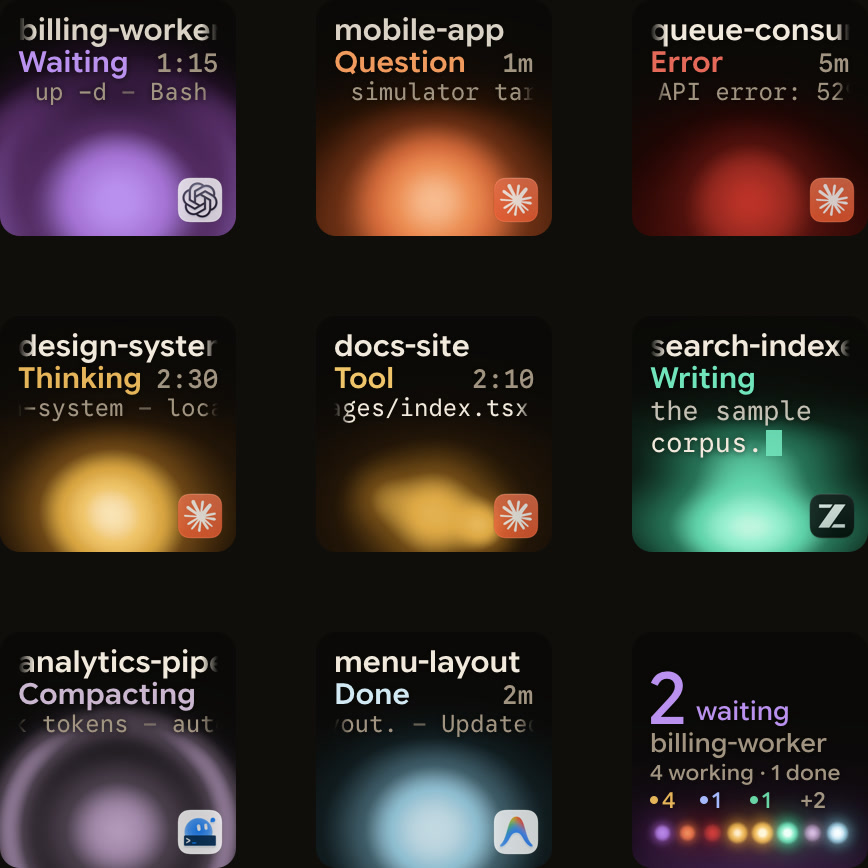
Macro pads and keyboard remappers send shortcuts to whichever window is active. If you run several AI coding agents across terminals and desktop apps, the harder problem is seeing which session stopped to ask for approval or an answer.
Orbtile turns a Logitech MX Creative Keypad, the same keypad as the standalone MX Keypad, or a phone into a live status pad. It runs on a computer with macOS 14.0 Sonoma or later on Apple silicon, or Windows 11 (x64). Orbtile does not support Elgato Stream Deck hardware.
- Direct USB control: Orbtile drives the keypad's nine LCD keys and two page buttons over USB without Logi Options+ or an account.
- Phone pad: Orbtile Mobile turns an iPhone on iOS 17+ or an Android 8.0+ phone into the same pad over your local network.
- On-screen popover: You can also check sessions from the Mac menu bar popover or the Windows system tray panel.
- Supported agents: Keys 1 to 8 show Claude Code, Codex, ZCode, Antigravity desktop app and Kimi Code sessions, plus SSH hosts and Adapter API scripts.
- Urgency order: Waiting sessions move to the front automatically, and tapping key 9 focuses the first waiting session.
- Approvals on keys: Hold a waiting key for 0.6 seconds to open Focus mode, then tap Deny on key 7 or hold Allow on key 9.
- Multiple-choice questions: Supported questions put choices on keys 1, 2, 3 and 7, with a 0.6-second hold on Send on key 9.
- Scope limits: Typed answers, unsupported requests and Antigravity permissions stay on your computer, and Antigravity CLI and IDE sessions do not appear automatically.
- Options+ coexistence: Your Logi Options+ keypad profile pauses while Orbtile is in control and returns when you release the keypad or hold both page buttons for 1.5 seconds.
For a broader look at 15-key controllers, see Stream Deck alternatives for developers and coding agents and Use the Logitech MX Creative Keypad without Logi Options+.
FAQ
What is the closest hardware alternative to the Stream Deck Mini for developers?
Logitech's MX Keypad is a programmable developer keypad priced at 99.99 USD or 99.99 EUR in Graphite and Pale Grey. Through Logi Options+ it runs prompt macros, code refactoring and commands across GitHub Copilot, Claude Code, VS Code and IntelliJ IDEA, and supports custom tools through the Logi Actions SDK.
Can I get a 6-key Stream Deck layout without buying hardware?
Yes. Elgato's Stream Deck Mobile app turns a phone into a free 6-key virtual deck with full plugin, macro and hotkey support and requires no physical Stream Deck purchase. Elgato also offers Virtual Stream Deck for unlimited on-screen keys, bundled with any physical Stream Deck, the CORSAIR SCIMITAR ELITE WIRELESS SE gaming mouse or the CORSAIR XENEON EDGE multi-touch display.
Can software replace a macro pad on Windows or in Claude Code?
For many shortcut workflows, yes. Microsoft PowerToys Keyboard Manager remaps keys, chords, Unicode text sequences and app launches globally or per Windows app while PowerToys runs in the background. Inside Claude Code, running the keybindings command opens ~/.claude/keybindings.json, where you can bind actions and slash commands by context without restarting.
Does Orbtile work with the Elgato Stream Deck Mini?
No. Orbtile does not support Elgato Stream Deck hardware. It drives the Logitech MX Creative Keypad over USB without Logi Options+, or shows your coding-agent sessions on an iPhone, an Android phone or your computer screen, on macOS 14 or later on Apple silicon and Windows 11 x64.