

Every permission prompt pulls you back to the agent's window. There are two fixes, and they work together: let the agent ask less often, with allow rules for the commands you always approve, and answer the prompts that remain from somewhere you can reach without switching windows. With Orbtile, that's a key on the Logitech MX Creative Keypad or a tile on an Android phone.
Ask less often
Claude Code.
- From version 2.1.283, sessions start in auto mode where your model supports it: a separate classifier reviews actions before they run, so routine ones don't ask you at all. Shift+Tab cycles through the modes; accept-edits mode accepts file edits and common file commands without asking.
- When a prompt does come up, "Yes, and don't ask again" remembers a Bash command for that repository.
- Or write allow rules yourself, in
.claude/settings.jsonfor one project or~/.claude/settings.jsonfor all of them./permissionsadds and shows them too:{ "permissions": { "allow": ["Bash(npm run *)", "Bash(git status)"] } }Bash(npm run *)matchesnpm run buildandnpm run test --watch, but notnpm install.
Codex. In ~/.codex/config.toml, approval_policy controls when Codex stops to ask: "on-request" for interactive work, "never" for unattended runs, or a granular table that chooses which kinds of prompts still reach you. sandbox_mode sets what commands can reach: "read-only", "workspace-write" or "danger-full-access".
Keep the rules narrow. A rule for Bash(npm run *) covers your build and test scripts; a rule for every command removes the check you wanted.
Answer the rest from the keypad
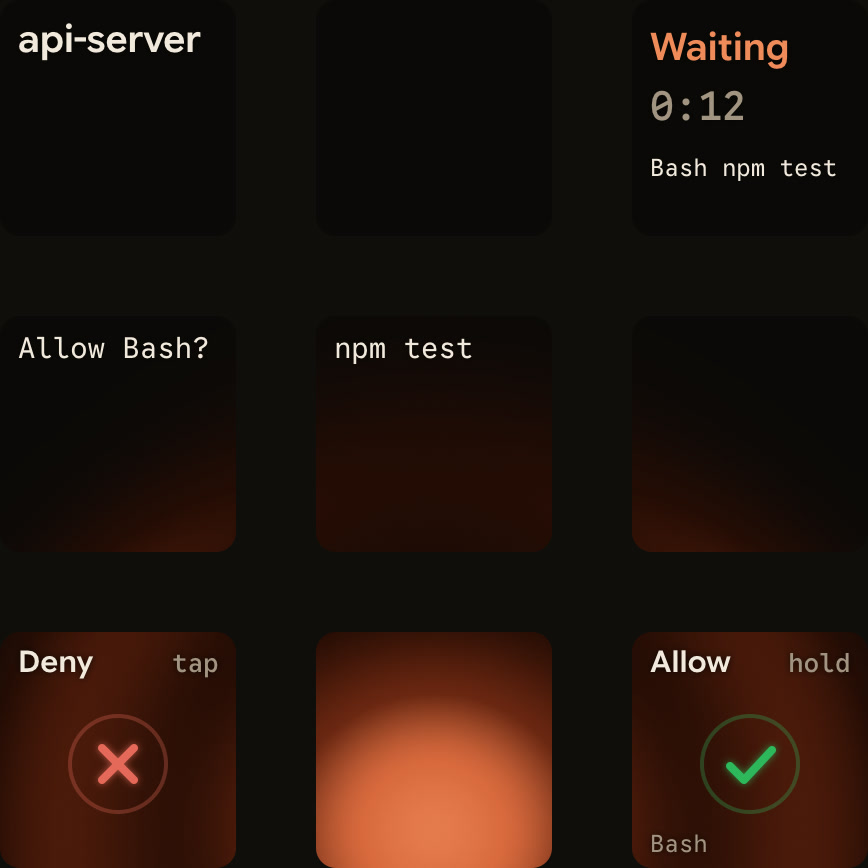
When a session asks for permission, its key on the MX Creative Keypad glows and moves to the front.
- Hold the key to open Focus mode across all nine keys. The request is on the middle keys.
- Press Deny on key 7 once to deny.
- Or hold Allow on key 9 for 0.6 seconds while its ring fills. Letting go early does nothing.
The prompt on screen keeps working, and whichever answers first wins. For Claude Code and ZCode, the keys can answer a permission request for about 25 seconds; after that, answer on screen. A timeout never decides anything, and the keypad refuses decisions while your computer is locked or its displays are asleep.
Questions with options work the same way: the options appear on the keys, you pick them, and you hold Send.
Or from a phone
Orbtile Mobile shows the same request on an Android phone. Permission requests get their own decision area, and Allow needs a hold, so a brushed screen never approves anything.
Which requests can be answered
| Agent | From the keypad or phone |
|---|---|
| Claude Code | Permission requests, and questions with up to four options |
| Codex desktop app | Command approvals and single-choice questions |
| Codex in a terminal | Command approvals, Allow only; say no and answer questions on the computer |
| ZCode | Permission requests |
| Antigravity (desktop app) | Questions with numbered options |
Written answers always go on the computer. Claude Code and ZCode CLI sessions on a remote server over SSH show their state, and you answer on the server.
FAQ
Can a key approve something by accident?
No. Allow needs a 0.6-second hold while its ring fills, and a short press does nothing.
Do I still see the prompt on screen?
Yes. Orbtile doesn't replace it. Answer wherever is closer.
Does this work without the keypad?
Yes, with Orbtile Mobile on an Android phone.