

The Logitech MX Keypad is nine LCD keys and two page buttons, sold on its own or with the dialpad as the MX Creative Console; it's the same keypad either way. With Logi Options+, its keys run actions: shortcuts, macros and plugins for the app in front. Without Options+, Orbtile turns the same keys into a live status pad for your coding agents. You can use both, and switch between them in a second.
What you get
| MX Keypad | MX Creative Console | |
|---|---|---|
| In the box | The keypad | The keypad and the dialpad |
| Keys | 9 LCD keys, 2 page buttons | The same, plus the wireless dialpad |
| Connects by | USB-C | USB-C for the keypad; the dialpad is wireless |
With Logi Options+: actions for the app in front
Options+ gives each key an action, and can change the whole page when you switch apps. For development that means shortcuts and macros: build, run tests, switch branches, open the terminal. Logitech sells the MX Keypad as "AI control keys for developers", with integrations for VS Code, IntelliJ, GitHub Copilot, Claude Code and OpenAI Codex. Logitech's own Claude Desktop (Beta) plugin shows up to 16 Claude Code sessions from the Claude desktop app as live tiles, with Allow and Deny actions.
Each plugin covers its own tool, and they all run inside Options+.
With Orbtile: live state from your coding agents
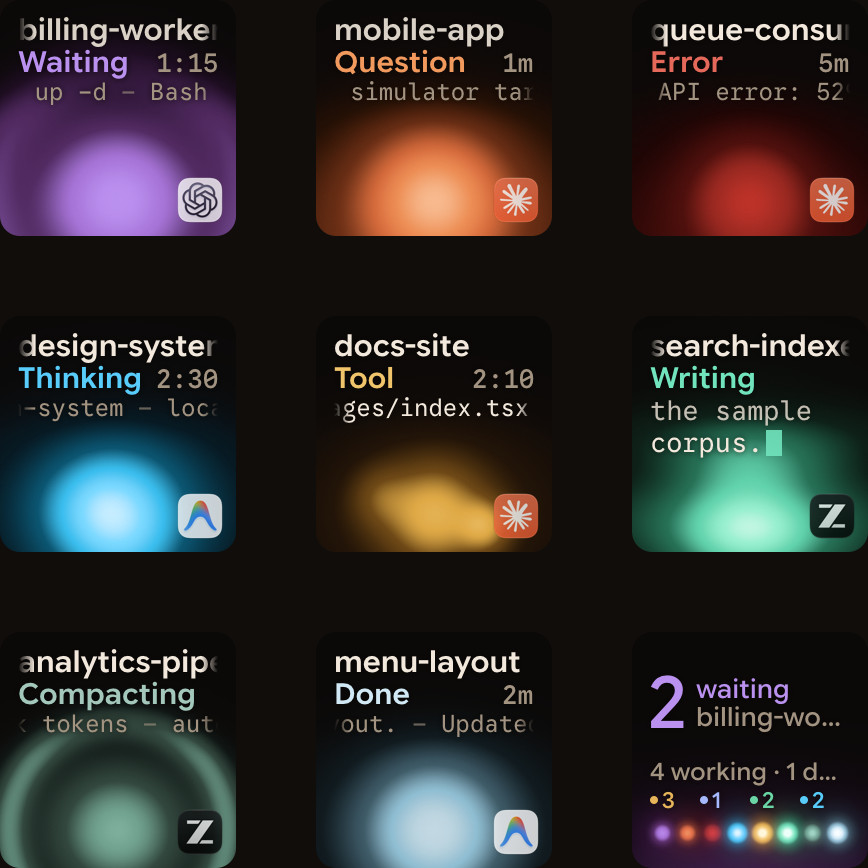
Orbtile takes the keypad over directly over USB, without a plugin inside Options+, and shows your coding agents instead:
- one key per Claude Code, Codex, ZCode or Antigravity session, with its state and its latest words;
- the session that needs you moves to the front, and key 9 jumps straight to it;
- Deny with a press and Allow with a hold, for supported permission requests, and answers to questions with options;
- sessions on SSH servers next to your local ones.
A tap on a key opens that session's window; a hold opens its focus view across all nine keys.
Use both
Options+ stays installed. While Orbtile has the keypad, your Options+ profile for it pauses, and it comes back straight away when you quit Orbtile, switch to Options+ from Orbtile's menu, or hold both page buttons for 1.5 seconds. On a Mac, the dialpad keeps working with Options+ the whole time. The setup, on a Mac and on Windows, is in Use the Logitech MX Creative Keypad without Logi Options+.
Which one when
| You want | Use |
|---|---|
| Shortcuts and macros for your editor or terminal | Logi Options+ |
| Claude Code in the Claude desktop app, next to your other actions | Logitech's Claude plugin, in Options+ |
| Every agent session in one view, including terminals and servers | Orbtile |
| Both through the day | Orbtile, handing the keypad back to Options+ when you want your shortcuts |
FAQ
Is the MX Keypad the same as the keypad in the MX Creative Console?
Yes. Orbtile treats them the same way.
Do I lose my Options+ setup?
No. Options+ keeps your profiles; they pause while Orbtile holds the keypad and come back when you hand it over.
Can I use a phone instead?
Yes. Orbtile Mobile turns an Android phone into the same pad: see Your old Android phone as a free status pad for coding agents.