

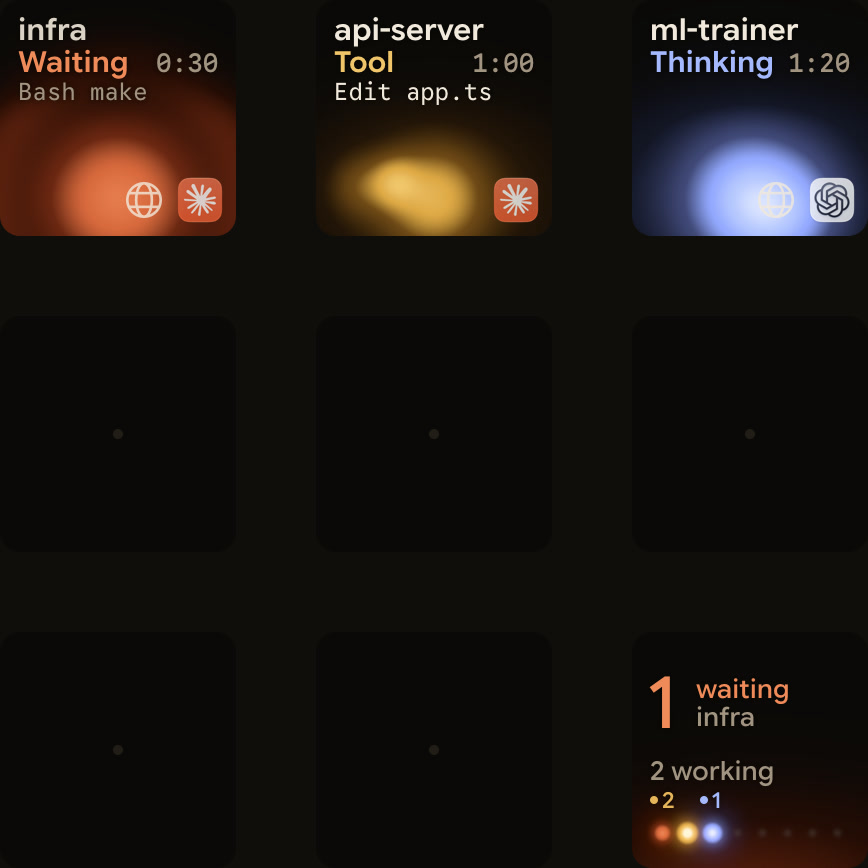
If your coding agents run on a server you reach over SSH, Orbtile can show those sessions on your keypad or phone, next to the ones on your computer. Add the host by its SSH alias, install the agent's integration on the host from Orbtile's menu, and each remote session gets its own key, marked with a globe next to the agent's icon. For Claude Code and ZCode CLI sessions on a server, you answer permissions and questions on the server.
What you need
| Item | Requirement |
|---|---|
| Computer | A Mac with Apple silicon and macOS 14 or later, or a Windows 11 PC (x64), running Orbtile |
| Server | A host you reach with ssh <alias> from your ~/.ssh/config, using keys, with no password prompt |
| Agents on the server | Claude Code, the Codex CLI or the ZCode CLI |
| Python 3 on the server | Needed for Codex and ZCode CLI tracking |
| Display | The Logitech MX Creative Keypad, or an Android phone with Orbtile Mobile |
Set it up
- Check that
ssh <alias>logs in to the server without asking for a password. - In Orbtile, open Settings > Remote Hosts, choose Add Host and pick the alias.
- From the host's menu, install the integration for each agent you use there:
- Claude Code: choose Install Claude Code Plugin, then start a new Claude Code session on the server.
- Codex: choose Install Codex Hooks. Then, on the server, open Codex, enter
/hooks, and review and trust the 12 Orbtile hooks. Codex asks again whenever a hook changes. - ZCode CLI: choose Install ZCode CLI Hooks.
- Start or continue a session on the server. Its key appears with a globe next to the agent's icon.
If the connection drops, the host's keys show offline until it's back.
What the keys show
- State and tool labels for every session, with its title or model when the agent supplies one.
- Codex text as each assistant message completes during a turn. It updates message by message, not word by word.
- Claude Code and ZCode CLI text from the session's hooks.
What travels, and where
Orbtile connects with your own SSH alias and keys. On the server, the hooks write a private event log, and Orbtile reads it over SSH. Only display events travel from the server to your computer, including a bounded amount of the assistant's text. For Codex, Orbtile also reads a bounded selection of its state database and the end of its session files; the database and full transcripts aren't copied. None of it is sent to our servers.
Answering from the keypad
Claude Code and ZCode CLI sessions on a server are display-only: when one asks for permission or asks a question, you answer in the session on the server. A ZCode CLI session on a server doesn't show that it's waiting for permission; its key keeps showing Thinking. On a Mac, a Codex terminal session on a server can take Allow from the keys for command approvals. There's no Deny: to say no, answer in the session on the server. Sessions on your own computer can still be answered on the keys.
Removing a host
Remove Host stops following the server and leaves its integrations installed. To uninstall them, choose Remove Claude Code Plugin, Remove Codex Hooks or Remove ZCode CLI Hooks from the host's menu first. Orbtile keeps a backup of your original Codex hooks file beside it, as ~/.codex/hooks.json.orbtile-bak.
FAQ
Do I need to open a port on the server?
No. Orbtile reaches the server over SSH, the same way you do.
Which agents work on a remote host?
Claude Code, the Codex CLI and the ZCode CLI. ZCode desktop workspaces on a remote host don't appear.
Can I approve a remote tool call from the keypad?
Not for Claude Code or the ZCode CLI: answer in the session on the server. On a Mac, a Codex terminal session on a server can take Allow for command approvals; to say no, answer on the server.
Can I get notified without Orbtile?
Yes, for one session at a time. Claude Code's notifications reach you from a session over SSH; inside tmux, add set -g allow-passthrough on to ~/.tmux.conf on the server. See Get notified when Claude Code needs approval or finishes and, for Codex, Know when a Codex task is waiting for you.