

Antigravity can tell you an agent needs you in a few ways, depending on where it runs. The Antigravity CLI can notify you when a task finishes. The desktop app can push a notification to your phone through Remote Control. To see which of several conversations is waiting, and answer its multiple-choice questions without switching windows, Orbtile puts each one on a key of the Logitech MX Creative Keypad or a tile on an Android phone.
1. In the Antigravity CLI
The CLI's notifications setting is off by default. Turn it on with /config, or set "notifications": true in its settings.json. When a task finishes, you get a system desktop notification and a terminal bell.
2. In the desktop app: Remote Control
- Open Settings (Cmd+, on a Mac, Ctrl+, on Windows) and go to App.
- Turn on Enable Remote Control. A nickname helps if you use more than one computer.
- Open your sessions in the browser on your phone and install the web app to your home screen.
The phone then gets a push notification when an agent finishes a task or asks for input.
3. Get asked less often
Settings > General > Permission Settings sets how often Antigravity stops for terminal commands:
| Preset | Terminal commands |
|---|---|
| Default | Run in the sandbox; ask before running outside it |
| Request Review | Always ask |
| Turbo | Run without asking |
On a keypad or phone with Orbtile
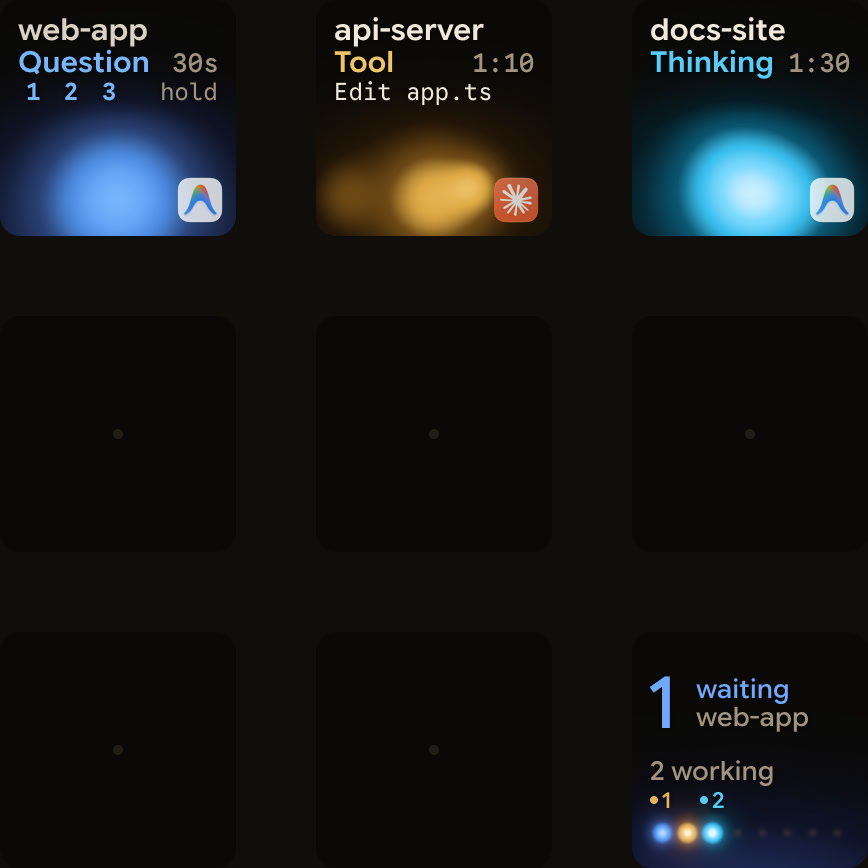
Orbtile shows every conversation in the Antigravity desktop app as its own key, with its title and state. A conversation that's waiting on a question moves to the front, and its key says Question. With Orbtile 0.2.18 or later, replies also appear as live text, and when the keys can answer a question, the key shows its option numbers, such as 1 2 3 hold. Otherwise it reads Waiting in Antigravity.
Antigravity updates itself, and Orbtile isn't tied to one version. If an update changes how Antigravity talks to Orbtile, live text and keypad answers stop until Orbtile catches up; the conversations and their states keep showing, and you answer in Antigravity.
Questions with numbered options can be answered from the keys:
- In Orbtile, turn on Settings > Agents > Antigravity > Answer questions from the keypad.
- When a question comes in, hold the conversation's key. The options appear on the keys.
- Tap your picks, then hold Send. Sent means Antigravity received your answer.
Up to four questions with two to four choices each work this way. Permission requests and written answers stay on the computer, and the question in Antigravity always works too.
Orbtile follows the desktop app only; Antigravity IDE and CLI sessions don't appear. It works the same way on a Windows PC.
FAQ
Can Orbtile approve Antigravity terminal commands?
No. Approve those in Antigravity, or choose a permission preset that asks less often.
Does it work with the Antigravity CLI or IDE?
No, Orbtile follows the Antigravity desktop app.
Can I use a phone instead of the keypad?
Yes. Orbtile Mobile on an Android phone shows the same conversations.