

Both put your Claude Code sessions on the Logitech MX Keypad or MX Creative Keypad, with live status and Allow and Deny on the keys. Logitech's Claude Desktop (Beta) plugin runs inside Logi Options+ and covers Claude Code sessions in the Claude desktop app. Orbtile drives the keypad itself, without Options+, and shows Claude Code, Codex, ZCode and Antigravity together, on the keypad or on an Android phone.
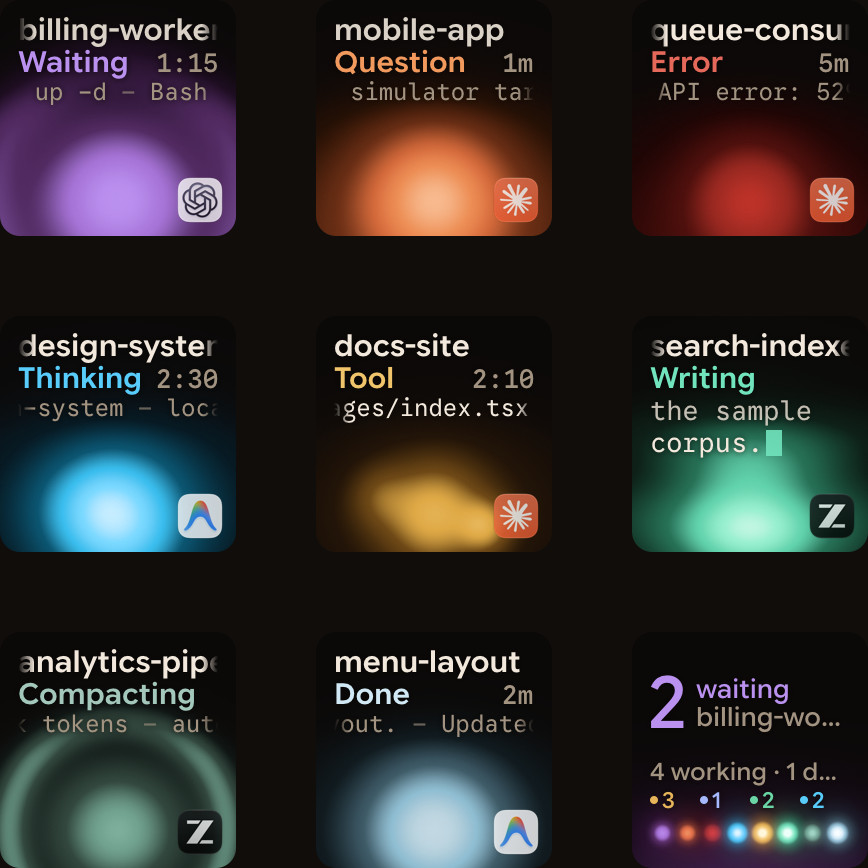
Side by side
| Logitech Claude Desktop (Beta) | Orbtile | |
|---|---|---|
| Made by | Logitech, on the Logi Marketplace | Orbtile |
| Runs in | Logi Options+ | Its own app; Options+ isn't needed |
| Agents | Claude Code, in the Claude desktop app's Code mode | Claude Code, Codex, ZCode and Antigravity |
| Sessions on the keys | Up to 16 tiles | Every session, the waiting one first, across pages |
| On each key | Live session status | State and latest words over an animated orb |
| Answers on the keys | Allow All, Always Allow All, Deny Permission, Stop Session | Deny with a press, Allow with a hold, per request; questions with options |
| Other screens | The keypad | The keypad, or an Android phone with Orbtile Mobile |
| Sessions on servers | Not mentioned | Claude Code, Codex and ZCode CLI over SSH |
| Computers | macOS and Windows | Apple silicon Macs and Windows 11 PCs |
When Logitech's plugin is the better fit
- You run Claude Code in the Claude desktop app, and that's your only agent.
- You already use Options+ for your keypad, and want Claude next to your other actions on the same pages.
When Orbtile is the better fit
- You run several agents: Claude Code in terminals, plus Codex, ZCode or Antigravity.
- You want one view that sorts every session, with the one waiting for you first.
- You'd rather use an old Android phone than buy a keypad, or use both.
- Your sessions run on a server you reach over SSH.
Can I use both?
Not on the keypad at the same time: one app drives the keys. Orbtile hands the keypad back to Options+ when you quit it, switch from Orbtile's menu, or hold both page buttons for 1.5 seconds, so you can move between the two in a second. How the hand-over works is in Use the Logitech MX Creative Keypad without Logi Options+.
FAQ
Is Logitech's plugin free?
Check its page on the Logi Marketplace for the current terms; it's listed as a beta.
Does Orbtile need Logi Options+?
No. It drives the keypad directly over USB. Options+ can stay installed for your other devices.
Does Orbtile work with the standalone MX Keypad?
Yes. It's the same keypad as the one in the MX Creative Console.