

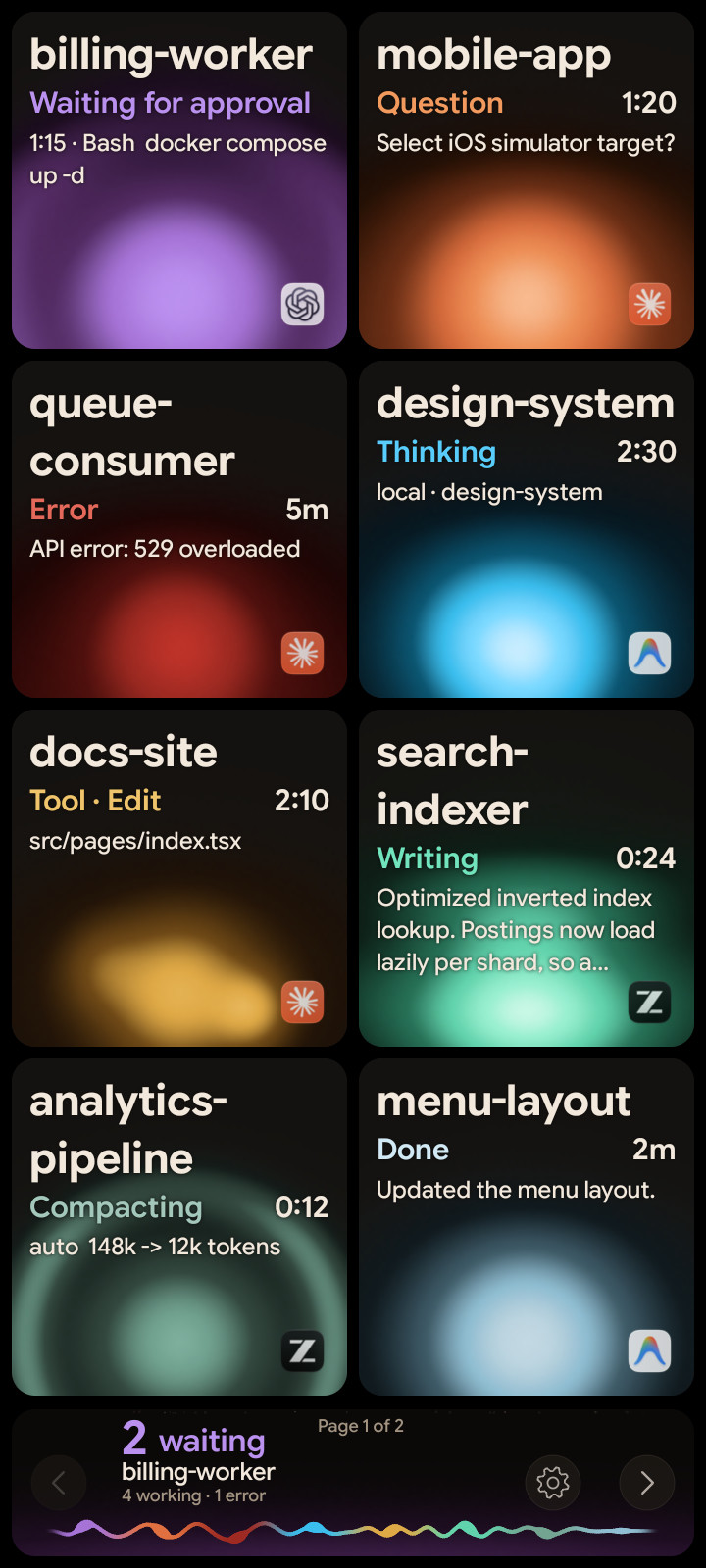
A spare Android phone makes a good status pad for your coding agents. With Orbtile Mobile it shows one tile per Claude Code, Codex, ZCode or Antigravity session, puts the one that's waiting first, and lets you answer supported requests from the phone. It costs nothing during the beta and needs Android 8.0 or later.
What you need
| Item | Requirement |
|---|---|
| Phone | Android 8.0 or later. Orbtile Mobile is Android-only for now. |
| Computer | A Mac with Apple silicon and macOS 14 or later, or a Windows 11 PC (x64), running Orbtile |
| Network | Phone and computer on the same local network |
| Account | One free Orbtile account, used on both |
Phones don't count toward the number of computers on your account. On a Windows PC, Claude Code and Antigravity are supported today; Codex and ZCode are being tested there.
What the phone shows
- A tile per session, with its name, state (Thinking, Tool, Writing, Waiting, Done) and its latest words, over the same animated orb as on the Logitech MX Creative Keypad.
- Waiting sessions first. A session that needs you moves to the front and glows in its agent's alarm colour.
- Tap or hold. A tap on a tile opens that session's window on your computer. A hold opens its focus view: the latest response, its tools and helpers, and history.
- Answers from the phone. Permission requests and supported questions get their own decision area. Allow needs a hold, so a brushed screen never approves anything.
Set it up
- On your computer, install Orbtile from the download page and sign in (Settings > Account on a Mac).
- Turn on Phone pad: Settings > General > Phone pad on a Mac, or Phone pad in Orbtile's settings on Windows.
- On Windows, the first time, allow Orbtile.App when Windows Security asks about networks, so the phone can reach the PC. Orbtile only listens on private networks.
- On the phone, download Orbtile Mobile from the download page, open the file, and allow installing from this source when Android asks.
- Open Orbtile Mobile and sign in with the same account.
After that, Orbtile Mobile updates itself from inside the app.
Where the data goes
The tiles and your taps go directly between the phone and your computer on your local network. They're never sent to our servers. Your account is only used for the phone to find your computer.
Phone or keypad?
| Android phone | Logitech MX Creative Keypad | |
|---|---|---|
| Cost | A phone you already have | Bought separately |
| Answers | Tap and hold on screen | Physical keys, hold to allow |
| Text | More room for the latest response | Short lines across the keys |
| Setup | Sign in on both | Plug in, no account |
You can use both at once with the same sessions.
FAQ
Is there an iPhone version?
Not yet. Orbtile Mobile is Android-only for now; the download page has a way to ask for the iPhone.
Does the phone need to stay on the same Wi-Fi?
Yes. The phone talks to your computer over your local network.
Can I use the phone and the keypad together?
Yes. Both show the same sessions, and you can answer from either.