
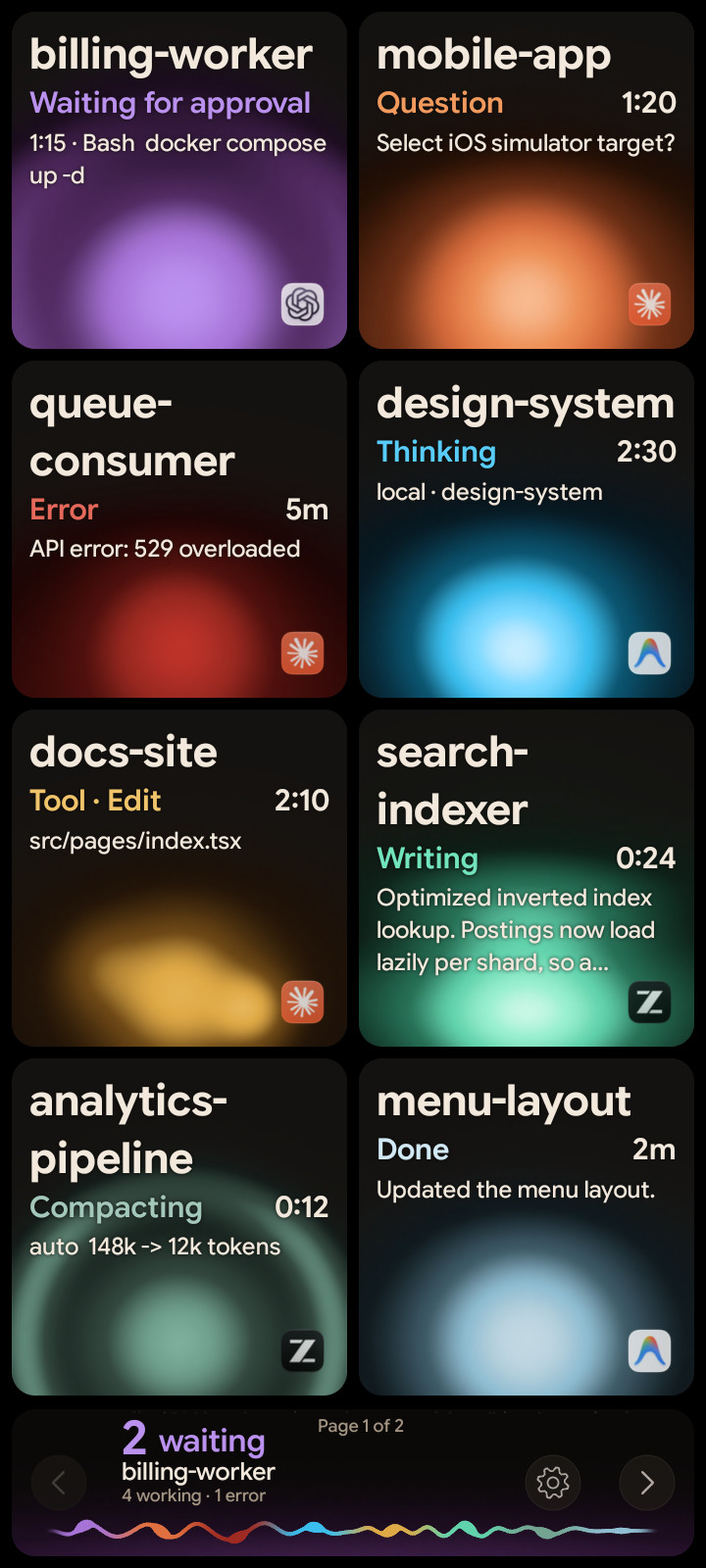
Not everyone has a Logitech MX Creative Keypad on their desk. Most of us do have an old Android phone in a drawer. From today, Orbtile Mobile turns that phone into the status pad for your coding agents.
The same pad, on a phone
Orbtile Mobile shows one tile per session, with the same orbs, states and order as the keypad. The session waiting for you comes first, the hub shows what's happening across all of them, and a tap on a tile opens that session's window on your Mac.
The phone has more room than a key, so it shows more of each session's latest text. Questions with options can be answered on the phone too, and sending needs a hold, so a brushed screen never sends anything.
Setting it up
- Install Orbtile on your Mac and sign in.
- On the phone, download Orbtile Mobile from orbtile.com/download, open the file, and allow installing from this source when Android asks.
- Sign in on the phone with the same account.
- On the Mac, turn on Phone pad in Orbtile's General settings.
Orbtile Mobile needs Android 8.0 or later, and the phone and Mac need to be on the same local network.
Where the data goes
The tiles and your taps travel directly between the phone and your Mac on your local network. They're never sent to our servers. Your account is only used for the phone to find your Mac.
Phone, keypad or both
You can use the phone and the keypad together: both show the same sessions, and you can answer from either. The full comparison is in Your old Android phone as a free status pad for coding agents.