
See work as it happens
One key per session. Read its state, tool and latest words where supported, without opening every chat.
Orbtile Mobile for iPhone is on the App Store. It works with Orbtile on your Mac or Windows PC.
Get it on the App Store15-day trial. No account needed on your computer. Notarised by Apple and on the Microsoft Store. Works on your computer screen, the Logitech MX Creative Keypad, an iPhone or an Android phone.



A live view of your sessions, with waiting agents first. Approve a request or choose an answer from the pad, for supported agents.
Allow needs a hold. Typed answers and unsupported requests stay on your computer. See what your agent supports.
One key per session. Read its state, tool and latest words where supported, without opening every chat.
Waiting sessions come first, followed by working sessions and recent finishes. Labels and your agent’s alarm colour show what needs you.
Tap the hub to open the first waiting session. Hold it to see your sessions on your computer. Supported agents can also take approvals and answers from the keypad.
The label tells you the state. Motion and your agent’s alarm colour help you spot requests, so colour is never the only signal.
Waiting for your approval.
Waiting for your answer.
An API or tool error stopped the turn.
Running a tool; its name and command appear on the key.
Writing text; supported agents show the latest words.
Working on the next step.
Summarising a long context.
Finished, and you have not looked yet.
Open and waiting for a prompt.
The session ended or stopped reporting.
These views come from Orbtile’s keypad renderer. See the guide for the full state legend and motion settings.
Orbtile Mobile turns an iPhone (App Store, iOS 17+) or an Android phone into the status pad for your coding agents, next to Orbtile on your Mac or Windows PC.
Both interfaces are shown at the top of this page.
Connect Claude Code, Codex, ZCode, Antigravity or Kimi Code. Use the pad on your computer screen, an iPhone (App Store, iOS 17+), an Android phone or the Logitech MX Creative Keypad. Open Orbtile from Applications and take over the keypad from the menu bar, or open it from the Start menu on Windows. Connect your agents in Settings > Agents on a Mac, or with each agent’s Install button on Windows. Local hooks use a private socket on your Mac, or a private pipe on your PC that only your Windows account can use; some agents use local session files. Each integration can be turned off or removed. Logi Options+ stays installed if you have it, but is not required. Read what gets installed and read.
Each session shows its name and state. Waiting sessions come first; supported agents also show the latest text. See which agents provide live text.
Labels and your agent’s alarm colour draw attention to a request. Tap a key to open its session where supported.
Allow or deny from the keys and pick answers to multiple-choice questions, for agents that support it. Allow needs a hold. The question stays on screen too. See what each agent supports.
| Agent | Live text | Keypad answers |
|---|---|---|
| Claude Code (terminal or desktop) | Yes | Approvals + questions |
| Codex desktop | Yes | Supported approvals + multiple-choice questions |
| Codex terminal | Yes | Answer on computer |
| ZCode | Task state | Approvals; questions on screen |
| Antigravity desktop | Live response text and activity state | Supported local questions |
| Kimi Code | Yes | Supported approvals + multiple-choice questions in Kimi's own server |
| Adapters | As declared | As declared |
| Remote sessions | Display events; bounded completion text | On the host |
Keypad decisions are always on where the agent supports them. Allow needs a hold. Typed answers and unsupported questions use Answer on computer. See supported actions and limitations.
Orbtile Mobile works on iPhone (App Store, iOS 17+) and Android, and the Logitech MX Creative Keypad is supported today. Connect your own agent through an adapter.
Or try Orbtile now on your computer screen, iPhone or Android phone.
An adapter brings the sessions of any agent, script or tool to the keypad and the Orbtile panel, next to the agents Orbtile supports out of the box.
Explore what is outside the public build.
Orbtile Enterprise EUR 159.99 per 3 computers · An edition for organisations that need Orbtile managed, with no accounts or usage reports.
No. Orbtile doesn’t need Options+; it drives the keypad over USB by itself. If Options+ is installed, it stays installed and keeps updating; Orbtile never modifies it. Switch between Orbtile and Options+ at any time from the menu bar on a Mac or the tray on Windows, or hold both page buttons on the keypad for 1.5 seconds. When you quit Orbtile, the keypad goes back to Options+.
It adds optional plugins or hooks for supported agents. Review each integration before enabling it. Session files and task databases are read for display; databases are opened read-only. Turn agents off or remove their integrations in Settings. Remote hooks are installed only on SSH hosts you choose. See the files, reads and removal steps.
The supported agents can share the keypad, with a colour you choose for each. Supported approvals and questions can be answered on the keypad. See the integration guide for support details, or connect another agent through the Adapter API.
For supported agents, pick numbered options, including multiple choices when allowed, then hold Send for 0.6 seconds. The question stays on screen. Support varies by agent; typed answers are entered on screen. See the key map and gestures.
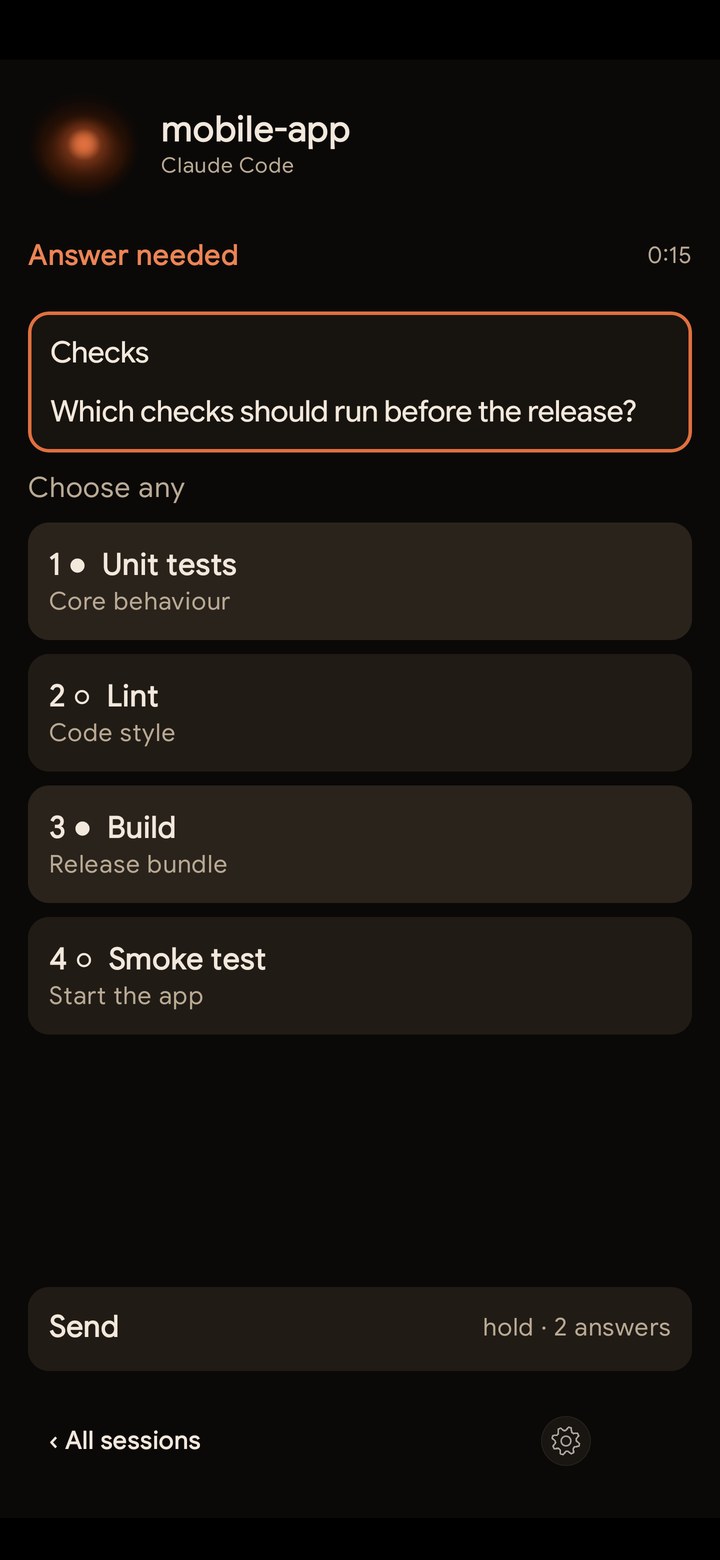
The Frosted orb on each session key shows what that session is doing. Its motion follows the kind of tool in use.
The Logitech MX Creative Keypad (its nine LCD keys and the two page buttons). Other devices come when enough owners ask: request yours.
Orbtile checks a signed status file at orbtile.com and sends a small usage summary at most hourly while it runs, only when it changed: counts and minutes (app starts, sessions per agent, AI model names, features used) under a pseudonymous machine ID. You can turn it off in Settings, General, Privacy, Send usage summary. The server keeps daily totals and changes by UTC hour of report receipt per pseudonymous computer. Automatic reports never send prompts, transcripts, file paths or names. Chosen remote hosts send display events over SSH. Local agent events travel over a private Unix-domain socket that only your user account can open, and stay on your Mac; on Windows they use a private named pipe that only your Windows account can open, and stay on your PC. Feedback messages contain what you type and are stored as submitted; please leave out secrets, personal information and private task text. Each computer gets a 15-day trial, and the keypad needs no account. Signing in is used only for encrypted settings sync and Orbtile Mobile, which signs in with the same account as your Mac or PC. Read the privacy notice for details.
Yes. On the Mac, Orbtile is signed with an Apple Developer ID and notarised by Apple: drag it to Applications, open it, and click Open when macOS asks about an app downloaded from the internet.
On Windows, get Orbtile from the Microsoft Store or download the installer. See the download page for install steps and checksums.
Each computer gets a 15-day trial; then a licence keeps Orbtile running: pay what you want from EUR 19 for up to 3 computers, Mac or Windows, or from EUR 39 for the Founder licence, first 1000 only. Licences are on sale now. Read the pricing details.
Not for the Logitech MX Creative Keypad: it works without one. Orbtile Mobile needs one: sign in with Google or email, with the same account on your Mac or PC and your phone. Sign in on your computer also for encrypted settings sync. The keypad needs no account: a licence key is enough.
An Apple silicon Mac (macOS 14 Sonoma or later) or a Windows 11 PC (x64), a supported agent, plus an iPhone (App Store, iOS 17+), an Android phone (Android 8.0+) with Orbtile Mobile or a Logitech MX Creative Keypad.
Existing sessions can appear from local files. If your agent loads hooks only at launch, restart its sessions after installing or updating the integration. See the setup guide for your agent.
Want Orbtile on another device? Press yours and it counts as a request.
Orbtile already works on your computer screen, an iPhone or an Android phone.
Talk to us at hello@orbtile.com