
The Google Antigravity CLI (agy) runs Antigravity's coding agent in your terminal. You set it up with slash commands such as /config, /permissions and /hooks, or in its settings.json and hooks.json files. An execution mode, the toolPermission setting and allow, ask and deny rules decide what the agent may do without asking you.
Configure the Antigravity CLI with /config and settings.json
The CLI keeps persistent preferences in ~/.gemini/antigravity-cli/settings.json. It saves only values that differ from the defaults.
{
  "agentMode": "accept-edits",
  "toolPermission": "strict",
  "notifications": true
}
How the settings file works:
- Saving:
/config,/model,/effort,/statusline,/titleand/permissionswrite to the file. So does choosing always allow or always deny at a permission prompt. Setting an option back to its default removes its key, and only your user can read the file (0600). - Editor help: a
$schemakey at the top of the file gives autocomplete and validation in editors such as VS Code and JetBrains IDEs. The CLI keeps the key when it saves. - Settings panel: type
/config(or/settings) and pressEnter. Start typing to filter the list, change values with the arrow keys orEnter, and pressEscto close. - One-session flags: flags such as
agy --sandbox --model="Gemini 3.8 Flash"apply to the current session only and are not saved to the file. - Broken files: if
settings.jsonhas an invalid value or invalid JSON, a Settings Error screen appears. You can exit and fix it by hand, continue with defaults for this session, or overwrite the file with defaults. Overwriting backs up the file assettings.json.corrupted.<timestamp>and resets every setting, permission rules included.
Other settings live in their own files:
- Keyboard shortcuts:
~/.gemini/antigravity-cli/keybindings.json, opened with/keybindings. Each action maps to an array of keys. An empty array ([]) turns a shortcut off, except the protectedcli.exitandcli.enter. - MCP servers:
~/.gemini/config/mcp_config.jsonfor all workspaces or<workspace>/.agents/mcp_config.jsonfor one, managed with/mcp. - Hooks:
~/.gemini/config/hooks.jsonglobally or<workspace>/.agents/hooks.jsonper workspace, managed with/hooks. Hooks placed insettings.jsonare not loaded. - Plugins:
~/.gemini/config/plugins/<plugin>/or<workspace>/.agents/plugins/<plugin>/, each with an optionalplugin.jsonmanifest.
Execution modes and tool permissions
Two settings decide how often the agent stops to ask you: the execution mode and toolPermission. Deny rules still block an action in every mode.
Set the mode with agentMode in settings.json, for one session with --mode, or cycle modes with Shift + Tab:
default(leaveagentModeunset): asks you to review diffs before files change.accept-edits: approves workspace file edits and creations automatically.auto(Preview): approves edits and safe commands, runs terminal commands inside the terminal sandbox by default, and pauses risky commands for approval. It needs v1.3.5 or later on macOS and Linux, or v1.4.4 or later on Windows. It is not available for business and enterprise accounts.plan: adds/planso the agent analyses the codebase and outlines a plan before editing.
toolPermission sets when the agent asks before running a tool:
request-review(default): asks before running write, bash, web or MCP tools.proceed-in-sandbox: runs terminal commands without asking when Sandbox Mode is on and the command runs inside the terminal sandbox.strict: asks before every tool action, file reads included. It overridesautomode.always-proceed: runs terminal commands, web requests and MCP tools without asking, except actions that match anaskordenyrule. It also overridesautomode.
Permission rules: allow, ask and deny
Rules use the form action(target) in allow, ask and deny lists under permissions in settings.json. These lists live in your global settings file. Conflicts follow a strict order: Deny, then Ask, then Allow. So with command(*) in ask and command(git) in allow, every command still prompts.
| Action | Example targets | Default |
|---|---|---|
read_file | read_file(/path) or read_file(*) | Ask, but workspace files are allowed |
write_file | write_file(/path) or write_file(*) | Ask, but workspace files are allowed |
read_url | read_url(domain) or read_url(*) | Ask |
execute_url | execute_url(domain) or execute_url(*) | Ask |
command | command(prefix) or command(regex:pattern) | Ask |
unsandboxed | unsandboxed(prefix) or unsandboxed(*) | Ask (business and enterprise accounts only) |
mcp | mcp(server/tool) or mcp(server/*) | Ask |
How rules match:
- Wildcards and patterns:
*matches every target for an action, such asmcp(*).commandrules match by prefix, word by word. Start the target withregex:to use a regular expression instead. Domains also match their subdomains. - Implied rules: allowing
write_fileon a path also allowsread_filethere. Denyingread_fileon a path also blockswrite_file. - Windows paths: drive letters such as
C:are removed and backslashes become forward slashes before rules are checked. - Editing at the prompt: when an
askprompt appears for a file, URL or MCP tool, you can widen the target, such as a file to its folder, before allowing it. This doesn't work for terminal commands.
Notifications and hooks
The notifications setting is off by default. Turn it on and the CLI rings the terminal bell and shows a desktop notification when the agent needs approval or an answer, or finishes its turn.
Hooks run your own shell commands at fixed points in the agent's loop. Type /hooks to see the active ones:
| Hook event | When it fires | Matcher |
|---|---|---|
SessionStart | Once, when a session starts, before the first model call | Ignored |
PreToolUse | Before a tool runs | Tool name (regex) |
PostToolUse | After a tool completes | Tool name (regex) |
PreInvocation | Before the model is called | Ignored |
PostInvocation | Right after each model call completes | Ignored |
Stop | When execution ends | Ignored |
Each hook receives JSON on stdin with fields such as conversationId, workspacePaths, transcriptPath and modelName, and replies with JSON on stdout. A PreToolUse hook can return a decision of allow, auto_approve, deny, ask, force_ask or deny_unless_prior_grant. A Stop hook that returns "decision": "continue" keeps the agent working.
Watch Antigravity sessions on a keypad or phone with Orbtile
Orbtile shows your coding agents on a Logitech MX Creative Keypad or an Android phone (Android 8.0 or later) running Orbtile Mobile. It runs on a computer with macOS 14.0 Sonoma or later on Apple silicon, or Windows 11 (x64).
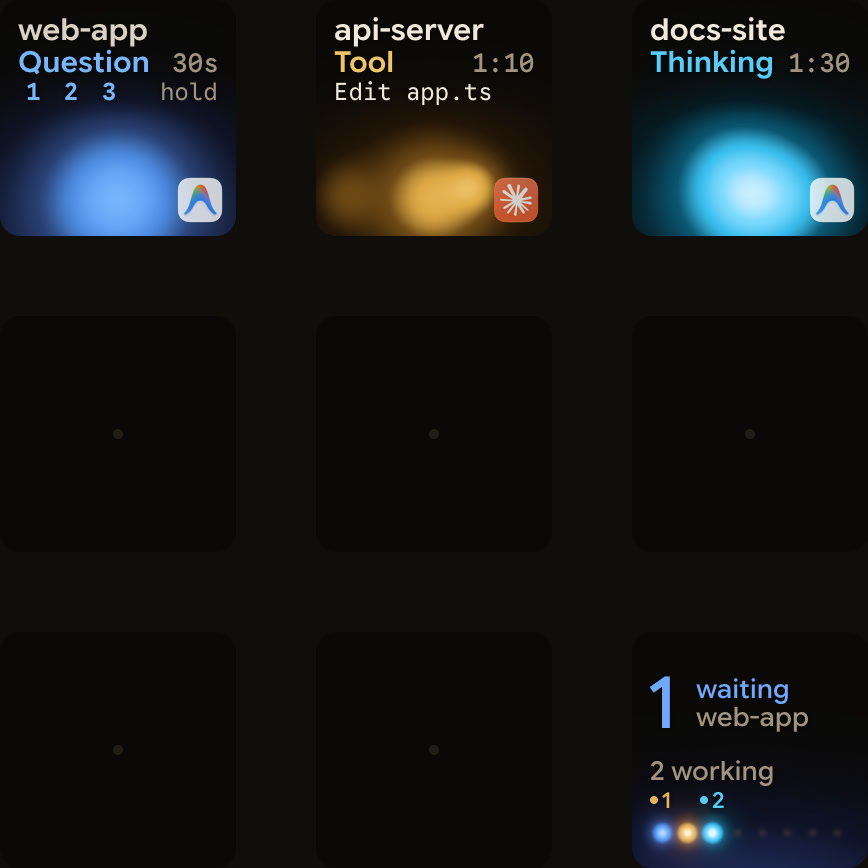
- Antigravity desktop app: Orbtile follows conversations in the Antigravity desktop app. Each one gets a key with its title, state and live reply text, and a conversation waiting on a question moves to the front. You can answer questions with numbered options from the keypad, up to four questions with two to four choices each. Permission requests and written answers stay on your computer.
- Antigravity CLI: CLI and IDE sessions don't appear automatically. CLI hooks receive the
conversationIdas JSON, so a hook script can report each session to Orbtile's local Adapter API. Turn on the Adapter API in Settings > Agents, then allow your adapter. It can report whether the session is thinking, running a tool, writing output, idle, waiting for input or in an error state. - Every agent on one pad: the same keypad or phone shows Claude Code, Codex and ZCode sessions, plus remote sessions over SSH. See Know when Google Antigravity is waiting for you and Show any script or agent on a keypad with the Orbtile Adapter API.
FAQ
Where does the Google Antigravity CLI store its settings and hooks?
Settings go in ~/.gemini/antigravity-cli/settings.json and keyboard shortcuts in keybindings.json in the same folder. Hooks go in ~/.gemini/config/hooks.json or .agents/hooks.json in your workspace. Hooks placed in settings.json are not loaded.
How does the Antigravity CLI handle conflicting permission rules?
Rules use the action(target) format in deny, ask and allow lists. When rules conflict, Deny wins over Ask, and Ask wins over Allow.
How do I turn on notifications in the Antigravity CLI?
Open /config and turn on Notifications, or set notifications to true in settings.json. The CLI then rings the terminal bell and shows a desktop notification when the agent needs approval or an answer, or finishes its turn.
Does Orbtile show Google Antigravity CLI sessions?
Not automatically. Orbtile follows the Antigravity desktop app, and CLI and IDE sessions don't appear. A hook script can send CLI session updates to Orbtile's local Adapter API, so each session shows on a Logitech MX Creative Keypad or an Android phone.