
Claude Code is Anthropic's agent for software work: it reads your codebase, edits files and runs commands, in your terminal, your IDE, the Claude desktop app or the browser. Claude Cowork is for knowledge work beyond coding, such as research, analysis and documents, and on Pro and Max plans its tasks run in the cloud. Both use the same agentic approach, so the choice comes down to the work you hand over and where it should run.
What Claude Cowork is
Cowork uses the same agentic architecture that powers Claude Code, with no terminal needed. You describe an outcome, and Claude carries out the steps.
- Who it's for. Anthropic says Cowork is built for non-coding knowledge work: research, analysis, document creation and other multi-step tasks.
- Plans. It's on the paid plans: Pro, Max, Team and Enterprise.
- Where you use it. Claude Desktop for macOS and Windows, the web at claude.ai, the Claude app for iOS and Android, and the Claude in Chrome side panel. Availability on each varies by plan.
- Where it runs. On Pro and Max, new Cowork tasks have run in the cloud, on Anthropic's servers, since 6 October 2026. Work continues if you close your laptop, and you can open the same session from another surface. On Team and Enterprise, cloud sessions are in beta.
- What it can touch. Claude can only read and write files in folders you've connected. Your folders stay on your computer, and Claude reaches them through the desktop app, only while it's open. On desktop it can also use a browser, and it works with connectors such as Google Drive, Gmail, Microsoft 365 and Slack. It hands back documents, spreadsheets with working formulas and presentations you can open in PowerPoint.
- Approvals. In Manual mode, you choose Allow or Deny for each action. Auto mode runs on with a safety check on each action. Cowork asks before it permanently deletes files.
Why you may not see a Cowork option
Anthropic is merging Cowork and chat. On accounts with the new experience, "Claude Cowork is now just Claude": you ask for what you need, and Claude decides whether it's a quick answer or a task. This is rolling out gradually, starting with Pro and Max. If your message box still shows separate Chat and Cowork options, you don't have it yet. The Code tab stays where it was.
What Claude Code is
Claude Code is an agentic coding tool for your codebase and your development tools. It runs in the terminal, in IDE extensions for VS Code and JetBrains, in the Code tab of the Claude desktop app, and on the web. Each surface connects to the same Claude Code engine, so your CLAUDE.md files, settings and MCP servers work across all of them.
A few parts matter when you compare it with Cowork:
- Agent view.
claude agentsopens one screen for all your background sessions: what's running, what needs your input and what's done. It's a research preview, and it runs sessions on your machine. - Background sessions. Start one with
claude --bg "<prompt>", or type/bgin a running session. They don't need a terminal open, survive sleep, and stop when the computer shuts down. - Hooks. Hooks are your own shell commands, HTTP endpoints and other actions that run at set points in Claude Code's lifecycle. Claude Code fires the same hook events in the terminal, IDE extensions, the desktop app and cloud sessions.
- Cloud work too. Claude Code on the web needs no local setup, and cloud scheduled tasks keep running when your computer is off.
Side by side
| Claude Cowork | Claude Code | |
|---|---|---|
| Built for | Research, analysis, documents and other multi-step knowledge work | Software engineering: writing, debugging and shipping code |
| Where you use it | Claude Desktop, claude.ai, the Claude mobile app, the Chrome side panel | Terminal, VS Code and JetBrains, the desktop app's Code tab, the web |
| Where tasks run | In the cloud on Pro and Max; local files through the desktop app while it's open | On your computer for terminal, IDE and agent view sessions; in the cloud for web sessions |
| What it works on | Folders you connect, a browser, connectors | Your codebase, your shell and your development tools |
| Several at once | Several tasks, with sub-agents for parallel work | Background sessions in agent view, subagents |
| Hooks | Not described on Anthropic's Cowork pages | Hook events at set points in each session |
Your ~/.claude folder | Not read; add skills and plugins in Customize | Read by the CLI |
Using both
If you write code, you may well use both. Hand Cowork the report, the spreadsheet or the research summary, and keep the codebase work in Claude Code.
They don't share local setup. Cowork loads what's enabled for your claude.ai account and doesn't read the Claude Code CLI's ~/.claude directory. To use a skill that exists only there, add it in Customize.
If you want a task to run only on your computer, Anthropic points you to Claude Code in the desktop app, which keeps your folders and history there. To move a Cowork task across, open it, choose Download task data, open the unzipped folder in Claude Code and run /port-task-data.
Keep track of your Claude Code sessions
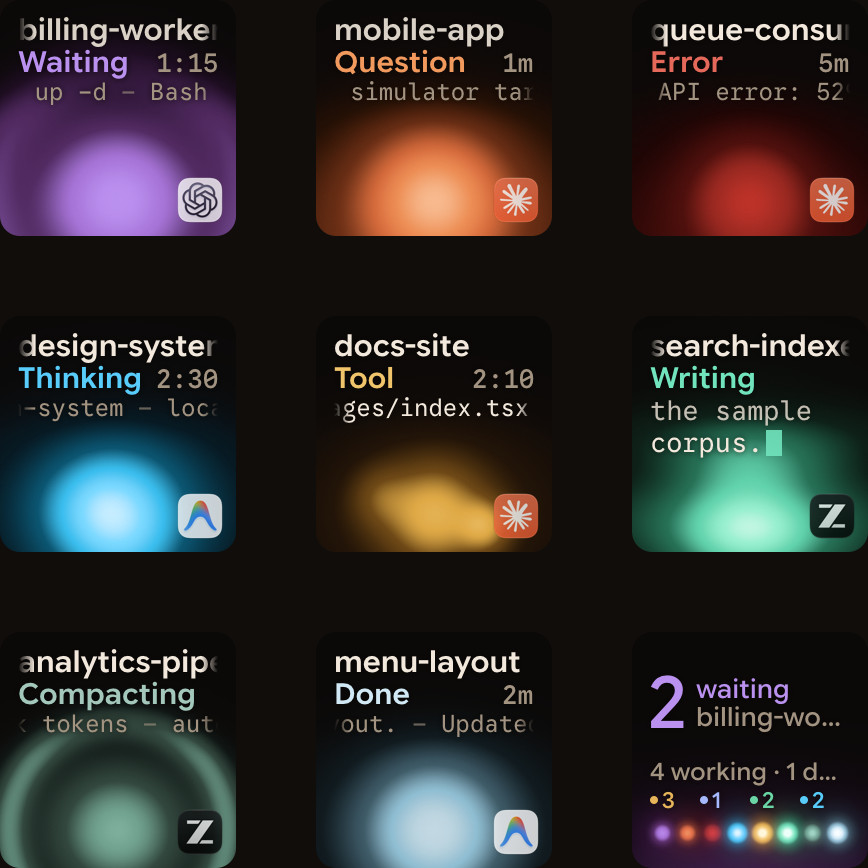
Cowork tasks show in the Claude apps, and a task you start at your desk shows up in Claude Mobile too. Claude Code sessions are spread across terminal windows, agent view and sometimes servers. Orbtile puts those sessions on a Logitech MX Creative Keypad or an Android phone next to your keyboard, on a Mac or a Windows 11 PC, so you see which one waits without switching windows.
- Your Claude Code sessions. Sessions in any terminal, agent view's background sessions (Orbtile asks once whether to show them; you can change that in Settings) and sessions on remote servers over SSH each get their own tile, with the waiting one first.
- Answers from the keys. For Claude Code sessions in your terminals, you answer permission requests and questions with up to four options from the pad: Deny with a tap, Allow with a hold. A background session's tile shows it waiting; answer it in agent view. Sessions on a server show their state, and you answer on the server. Written answers always go on the computer.
- Not Cowork or Chat. Orbtile's Claude Code adapter does not track Claude cloud Chat or Cowork sessions. Use the Claude apps for those.
FAQ
Is Claude Cowork the same as Claude Code?
No. They share the same agentic approach, but Cowork is built for non-coding knowledge work and Claude Code is built for software engineering. Cowork doesn't read Claude Code's ~/.claude directory.
Do I need the terminal for Cowork?
No. Cowork works in Claude Desktop, on claude.ai, in the Claude mobile app and in the Chrome side panel. Local files and browser use need the desktop app.
Does Cowork keep working when I close my laptop?
On Pro and Max, yes: tasks run in the cloud. Tasks that use files or apps on your computer need Claude Desktop open. Claude Code's background sessions run on your computer instead: they survive sleep and stop at shutdown.
Does Orbtile show Cowork tasks?
No. Orbtile shows Claude Code sessions: in your terminals, in agent view and on servers over SSH. It does not track Claude cloud Chat or Cowork sessions.
Sources
Anthropic's pages, read on 21 October 2026:
- Claude Cowork, claude.com
- Get started with Claude Cowork, Claude Help Center
- Use Claude Cowork on web, desktop, and mobile, Claude Help Center
- Claude Cowork and chat are one Claude, Claude Help Center, 16 September 2026
- Cowork overview, Claude documentation
- Claude Code overview, Claude Code docs
- Agent view, Claude Code docs
- Hooks reference, Claude Code docs
- Use Claude Code Desktop, Claude Code docs