
When Claude Code needs a decision, it asks you a multiple-choice question, and in plan mode it asks you to approve its plan. Both wait until you answer. Questions have no notification type of their own, so the dependable signal is a hook on the two tools that ask: AskUserQuestion and ExitPlanMode. Below: what each one looks like, a hook that tells you the moment one appears, and how to answer without going back to the terminal.
What Claude Code asks you
- Questions. Claude uses the AskUserQuestion tool when it needs a decision or a clarification. One call holds one to four multiple-choice questions, and a question can allow more than one answer. You pick an option, or type your own answer in the Other row or the notes field.
- Plan approval. In plan mode, Claude researches and writes a plan without editing your code. Turn it on with Shift+Tab, by starting a prompt with
/plan, or withclaude --permission-mode plan. When the plan is ready, Claude asks how to go on: approve it and switch to auto mode (or auto-accept edits), approve it and review each edit, or keep planning. Ctrl+G opens the plan in your editor first.
Both wait for you. A question stays open until you answer it, unless you set a timeout (see the FAQ). Plan approval, like every permission prompt, never times out.
Get a signal the moment Claude asks
Claude Code’s Notification hook has types for permission prompts (after about six seconds), for a session that has sat idle for about a minute, for MCP forms and for agent view, but none for a question. A PreToolUse hook runs as soon as Claude calls a tool, and its matcher takes tool names, so point it at the two tools that wait for you. On a Mac, this plays a sound:
{
  "hooks": {
    "PreToolUse": [
      {
        "matcher": "AskUserQuestion|ExitPlanMode",
        "hooks": [
          { "type": "command", "command": "afplay /System/Library/Sounds/Ping.aiff" }
        ]
      }
    ]
  }
}
Put it in ~/.claude/settings.json for every project, or in .claude/settings.json for one. The hook returns no decision, so the question or the plan still appears as usual. Pick a different sound from your other hooks and you’ll know a question from a finished turn by ear. On Windows, use the toast command from Get notified when Claude Code needs you on Windows.
| Claude is | What happens | Signal |
|---|---|---|
| Asking a question | AskUserQuestion waits for your answer | PreToolUse hook on AskUserQuestion, at once |
| Waiting for plan approval | ExitPlanMode waits for your choice | PreToolUse hook on ExitPlanMode, at once |
| Asking to run a tool | A permission prompt waits | Notification hook, permission_prompt, after about six seconds |
| Done, waiting for your next message | The turn has ended | Notification hook, idle_prompt, after about a minute; a Stop hook at once |
Answer from a keypad or your phone
A sound still sends you back to the terminal to answer. Orbtile puts each Claude Code session on a key of the Logitech MX Creative Keypad or on an old Android phone, next to your keyboard. When Claude asks a question or wants a plan approved, its key shows Question, so you see which session waits without switching windows.
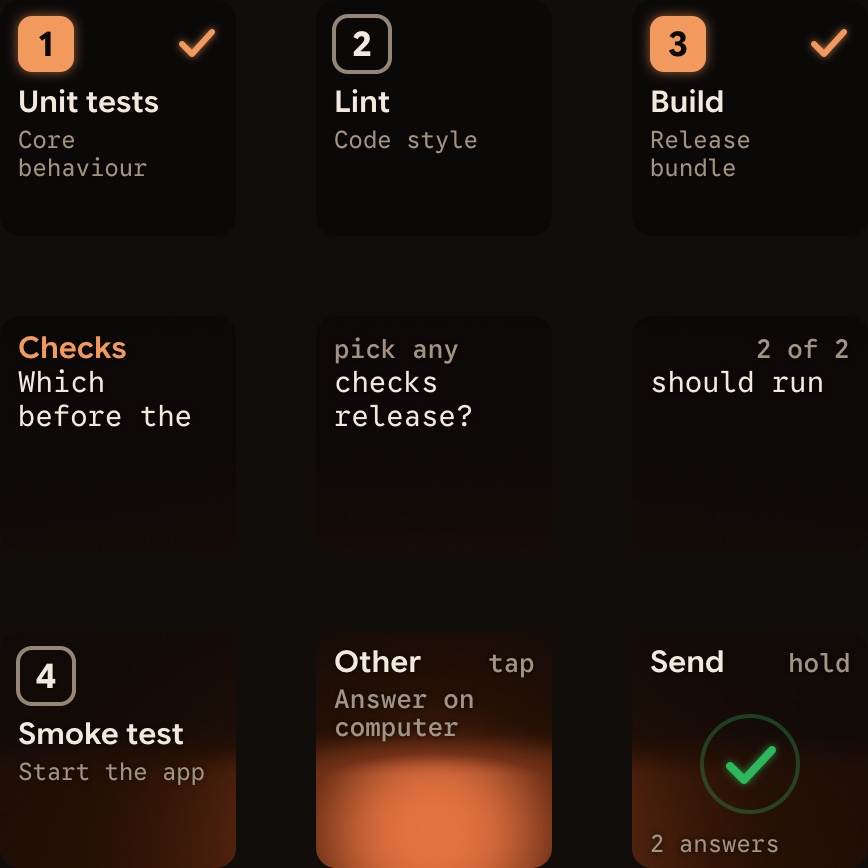
- Questions: for a Claude Code session on your computer, the keys show one question at a time. Its options sit on keys 1, 2, 3 and 7, and keys 4 to 6 show its short header with “pick one” or “pick any”. Tap an option, or several when the question takes more than one answer. Key 9 moves to the next question, and holding it on the last one sends your answers. Orbtile Mobile works the same way. Other, and any answer you’d type, go on the computer.
- Plan approval: the key shows Question with “On computer”. Approve the plan or keep planning in Claude Code itself; a tap on the key brings that session’s app to the front.
- Sessions on a server: a question from a session over SSH shows “Answer on host”. Answer it on that machine.
You don’t write the hook yourself: Orbtile installs its plugin through Claude Code’s own command line. See Approve agent tool calls without switching windows for what each agent supports.
FAQ
Can a question close on its own?
Only if you set askUserQuestionTimeout to 60s, 5m or 10m, in your user settings.json or in /config. After that long with no input, the dialog submits what you had selected and tells Claude you may be away, so it carries on and can ask again later. The timer never starts in a background session or with Remote Control, and plan approval never times out.
Why not use the Notification hook?
Its types cover permission prompts, idle sessions, MCP forms and agent view, not questions. The PreToolUse hook on AskUserQuestion runs the moment Claude asks.
Do background sessions ask questions too?
Yes. In agent view, a session that asks moves to Needs input, and while agent view is open the Notification hook fires with the agent_needs_input type. See Claude Code agent view: run and watch background sessions.