
Google Antigravity and Anthropic's Claude Code are both agentic coding tools with a desktop app, a terminal CLI, IDE extensions and an SDK. The main differences are in editors, platforms and SDKs. Antigravity has extensions for five editors, including Visual Studio, Zed and Xcode, plus a standalone IDE, Googlebook support and a Python SDK. Claude Code adds web and mobile access and a Python and TypeScript Agent SDK. It also keeps project memory in CLAUDE.md files and auto memory.
Side by side
| Feature | Google Antigravity | Anthropic Claude Code |
|---|---|---|
| Surfaces | Antigravity App, Antigravity CLI, 5 IDE extensions, standalone Antigravity IDE, Antigravity SDK | CLI, Desktop app, VS Code, JetBrains IDEs, web, mobile app, Agent SDK |
| Operating systems | macOS 12+, Windows 10 (64-bit) or 11, Linux (glibc 2.28+), Googlebook | macOS 13.0+, Windows 10 1809+ or Windows Server 2019+, Ubuntu 20.04+, Debian 10+, Alpine Linux 3.19+ |
| CLI command | agy | claude |
| Editor extensions | VS Code, JetBrains IDEs, Visual Studio 2026, Zed, Xcode | VS Code, JetBrains IDEs |
| SDK | Python 3.10+ (google-antigravity) | Agent SDK for Python and TypeScript (CLI only) |
| Git worktrees | New worktree mode when you start a project in the app | --worktree flag in the CLI; parallel Desktop sessions get their own worktrees |
| Run until done | /goal runs a task to completion without pausing for input | /goal runs until a condition is met, a model judges it impossible, or an error you must fix clears it |
| Scheduling | /schedule for a one-time delayed task or a recurring cron schedule | /loop and cron tools in a session, plus Desktop and cloud scheduled tasks |
| Browser | /browser for debugging and research in Google Chrome | Chrome integration to test web apps, fill forms and automate sites |
| Sign-in and cloud | Google Account, Gemini Enterprise, Gemini API key, Agent Platform | Claude account, Anthropic API key, Amazon Bedrock, Google Cloud's Agent Platform, Microsoft Foundry |
Surfaces and editors
Google Antigravity comes in five forms:
- Antigravity App: a desktop app for macOS, Windows, Linux and Googlebook. Agents work inside Projects, which set the repository boundaries, file scopes and permissions.
- Antigravity CLI: a terminal interface you start with
agy. - IDE extensions: for VS Code, IntelliJ-based JetBrains IDEs, Visual Studio 2026 on Windows, Zed on macOS or Linux, and Xcode on macOS.
- Antigravity IDE: a standalone editor. Google notes that Gemini 4 Argon is not available in it, so use the App, the CLI or an extension for that model.
- Antigravity SDK: a Python package for building your own agents.
Claude Code runs the same engine on every surface:
- CLI: the most complete surface. Scripting and the Agent SDK are CLI-only.
- Desktop app: a diff viewer, app preview and parallel sessions, on macOS, Windows and Linux.
- VS Code and JetBrains: inline diffs, file context and an integrated terminal in VS Code. A diff viewer, selection sharing and a terminal session in IntelliJ, PyCharm, WebStorm and other JetBrains IDEs.
- Web: cloud sessions at claude.ai/code that keep running after you disconnect.
- Mobile: the Claude app for iOS and Android starts and monitors cloud sessions. It steers local sessions through Remote Control and sends tasks to the Desktop app through Dispatch.
Configuration, project memory and MCP servers are shared across Claude Code's local surfaces.
Installation
Both CLIs install with one command. For the Antigravity CLI on macOS, Linux or Googlebook, run:
curl -fsSL https://antigravity.google/cli/install.sh | bashOn Windows PowerShell, run irm https://antigravity.google/cli/install.ps1 | iex, then check it with agy --version.
For Claude Code on macOS, Linux or WSL, run:
curl -fsSL https://claude.ai/install.sh | bashOn Windows PowerShell, run irm https://claude.ai/install.ps1 | iex, then check it with claude --version. Claude Code also installs through Homebrew, WinGet, apt, dnf, apk or npm. On Windows, it runs natively or inside WSL. Command sandboxing works in WSL 2 only.
Parallel work and project memory
Both tools keep parallel work apart with Git worktrees:
- Google Antigravity: when you start a project in the Antigravity App, you choose Local mode or New worktree mode. Local mode works directly in your folders. New worktree mode works in an isolated Git worktree.
- Claude Code:
claude --worktreestarts a session in its own worktree, so edits from parallel sessions don't collide. A.worktreeincludefile copies gitignored files, such as environment files, into each new worktree. Parallel sessions in the Desktop app get their own worktrees too.
Claude Code also carries knowledge between sessions in two ways:
- CLAUDE.md files: instructions you write, at user, project or organisation scope. Claude can read a repository's AGENTS.md instead when there is no CLAUDE.md.
- Auto memory: notes Claude writes itself from your corrections and preferences. The first 200 lines or 25KB of its index load at the start of each conversation.
/memorylets you browse it or turn it off.
Commands, review and SDKs
In the Antigravity CLI, Ctrl+R opens the Artifact Review screen. The arrow keys browse files, Tab shows inline diffs, Y approves and Esc closes it. Other slash commands include:
/grill-me: the agent interviews you about requirements before coding./plugin: manages Marketplace plugins./agents: switches between background subagents./usage: shows credit use and quota limits.
The Antigravity SDK installs with pip install google-antigravity in a Python 3.10+ virtual environment. Its LocalAgentConfig takes declarative allow, deny and ask_user policies for tool calls.
Claude Code has its own session commands:
/loop: re-runs a prompt on an interval while the session is open./context: lists the CLAUDE.md and rules files that loaded.
The Agent SDK runs Claude Code from Python or TypeScript. Claude Code also runs in GitHub Actions and GitLab CI/CD, answers @Claude mentions in Slack, and connects to other tools through MCP servers.
Watch Antigravity and Claude Code together with Orbtile
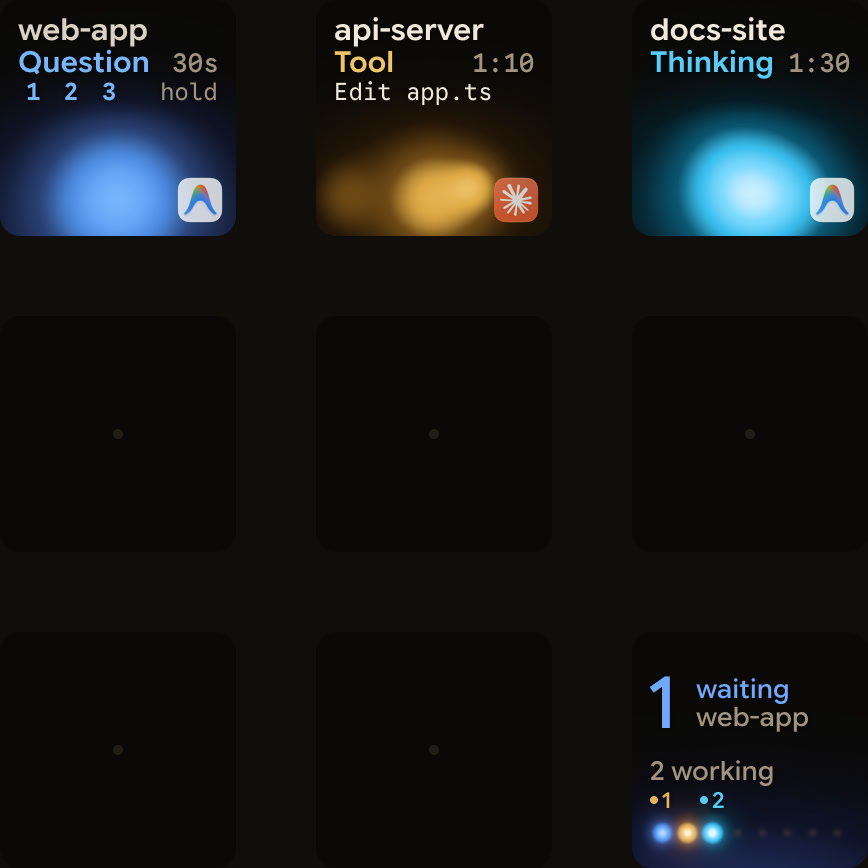
When you run Google Antigravity and Claude Code at the same time, their sessions live in separate windows. Orbtile puts both on a Logitech MX Creative Keypad or an Android phone (Android 8.0 or later) with Orbtile Mobile. It runs on a computer with macOS 14.0 Sonoma or later on Apple silicon, or Windows 11 (x64).
- One key or tile per session: each session shows its title, its state (such as Thinking, Tool, Writing, Approval, Question or Done) and live response text over an animated orb. Each agent has its own colour palette, and waiting sessions move to the front.
- Claude Code support: Orbtile tracks sessions in your terminal and the Claude desktop app, background sessions from agent view when Show background sessions is on, and remote sessions over SSH. For local sessions, tap Deny to decline a permission request or hold Allow for 0.6 seconds to approve. You can also pick options in multiple-choice questions and hold Send. Remote sessions are display-only.
- Antigravity support: Orbtile follows conversations in the Antigravity desktop app, with their state and live response text. Antigravity CLI and Antigravity IDE sessions do not appear. Questions with numbered options can be answered from the keypad: tap your picks and hold Send. This works for up to four questions with two to four choices each. Permission prompts and written answers stay on your computer.
See Know when Google Antigravity is waiting for you and Approve agent tool calls without switching windows for setup details.
FAQ
What is the main difference between Google Antigravity and Claude Code?
Both are agentic coding tools with a desktop app, a terminal CLI, IDE extensions and an SDK. Google Antigravity adds extensions for Visual Studio, Zed and Xcode, a standalone IDE and Googlebook support. Claude Code adds web and mobile access, a TypeScript as well as Python Agent SDK, and project memory in CLAUDE.md files and auto memory.
Which IDEs do Google Antigravity and Claude Code support?
Google Antigravity has extensions for VS Code, IntelliJ-based JetBrains IDEs, Visual Studio 2026, Zed and Xcode, plus the standalone Antigravity IDE. Claude Code has extensions for VS Code and JetBrains IDEs.
Can both agents isolate parallel tasks in Git worktrees?
Yes. The Antigravity App has a New worktree mode. Claude Code has a worktree flag, and parallel sessions in its Desktop app get their own worktrees.
How does Orbtile handle Google Antigravity and Claude Code sessions?
Orbtile shows Claude Code sessions from the terminal, the desktop app, agent view and SSH servers alongside Antigravity desktop app conversations, on a Logitech MX Creative Keypad or an Android phone. From the keypad you can answer local Claude Code permission requests and multiple-choice questions, and Antigravity multiple-choice questions. Antigravity permission prompts and written answers stay on your computer.