
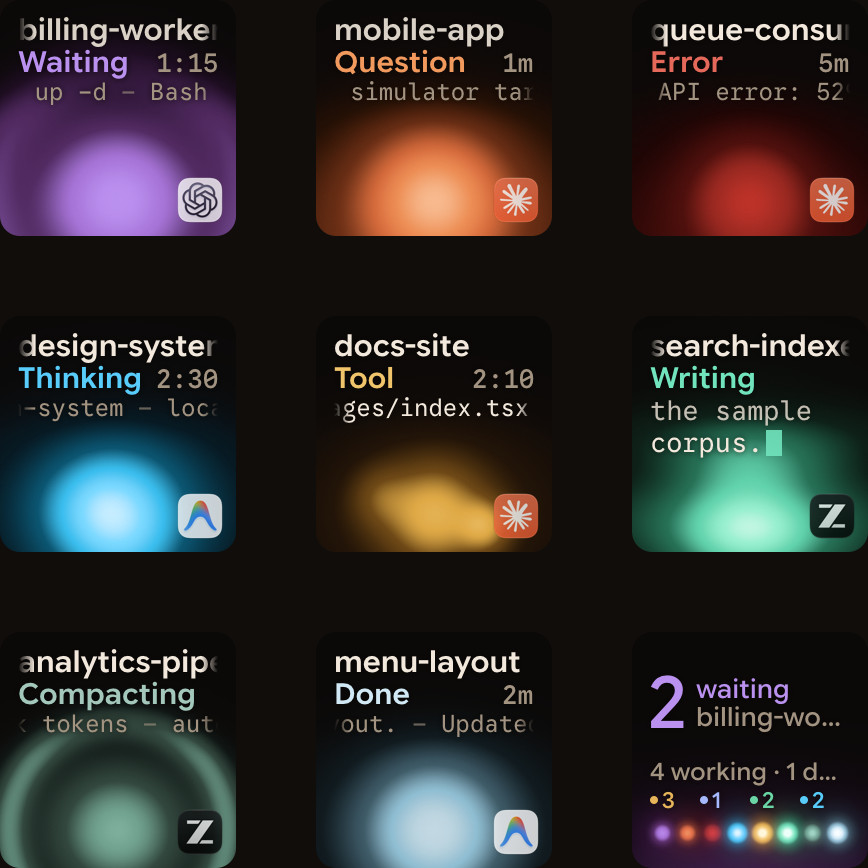
Claude Code's status line is a custom row at the bottom of the terminal that runs a local command or script and prints session details such as your workspace paths, repository name, session cost and lines changed. You can set it up automatically by running /statusline with natural language instructions, or configure the statusLine block yourself in ~/.claude/settings.json or your project settings. For a single terminal window it keeps those metrics in view, while Orbtile puts live status and waiting prompts from several Claude Code sessions onto a Logitech MX Creative Keypad or an Android phone.
Set up the status line with /statusline or settings.json
Claude Code gives you two ways to create a status line: let the CLI generate the script for you, or point your settings file to a command you wrote yourself.
- Generate it with
/statusline: run the/statuslinecommand inside Claude Code and describe what you want in natural language. Claude Code generates a script file in~/.claude/and updates your settings automatically. - Configure
settings.jsonmanually: add astatusLinefield in~/.claude/settings.jsonor in your project settings. Settypeto"command"and setcommandto a script path or an inline shell command.
{
  "statusLine": {
    "type": "command",
    "command": "python3 ~/.claude/statusline.py",
    "padding": 1,
    "refreshInterval": 5
  }
}
Alongside type and command, the statusLine object takes optional fields such as these:
| Field | Required | What it does |
|---|---|---|
type | Yes | Set to "command" to run a shell command or script |
command | Yes | Path to your script file or an inline shell command |
padding | No | Extra horizontal character spacing; defaults to 0 |
refreshInterval | No | Re-runs your command on a timer every N seconds (minimum 1 second) |
If you want to turn the status line off later, you have two options:
- Run
/statusline deleteor/statusline clearinside a Claude Code session. - Delete the
statusLinefield manually from yoursettings.jsonfile.
Read workspace and cost data from stdin JSON
Each time Claude Code runs your status line command, it passes a JSON payload on standard input (stdin). Your script reads that JSON to display information about the active workspace and the current session's activity.
| JSON path | What it contains |
|---|---|
workspace.current_dir (and cwd) | The current working directory of the session |
workspace.project_dir | The directory where Claude Code was launched, which may differ from cwd |
workspace.added_dirs | Additional directories added to the workspace |
workspace.git_worktree | Git worktree name, when the current directory is inside a linked worktree |
workspace.repo | Repository object containing host, owner and name |
cost.total_cost_usd | Estimated session cost in USD, computed client-side |
cost.total_duration_ms | Total elapsed duration of the session in milliseconds |
cost.total_api_duration_ms | Total API duration for the session in milliseconds |
cost.total_lines_added | Total lines added during the session |
cost.total_lines_removed | Total lines removed during the session |
Here is an example Python script (~/.claude/statusline.py) that reads the stdin JSON payload and prints the repository name, the current folder name, the lines added and removed, the API time in seconds and the estimated USD cost:
#!/usr/bin/env python3
import json
import os
import sys

data = json.load(sys.stdin)
workspace = data.get("workspace", {})
cost = data.get("cost", {})

repo = workspace.get("repo") or {}
repo_label = repo.get("name") or os.path.basename(workspace.get("project_dir") or "")
current_dir = os.path.basename(workspace.get("current_dir") or data.get("cwd") or "")

usd = cost.get("total_cost_usd", 0.0)
added = cost.get("total_lines_added", 0)
removed = cost.get("total_lines_removed", 0)
api_sec = int(cost.get("total_api_duration_ms", 0) / 1000)

print(f"{repo_label} ({current_dir}) | +{added} -{removed} | API {api_sec}s | ${usd:.2f}")
Format multiple rows, colours, links and terminal width
A status line command is not limited to a single plain string. Claude Code supports terminal formatting and passes the terminal dimensions in the environment so your script can adapt its layout:
- Multiple lines: each
echoorprintstatement from your script displays as a separate row in the status line. - Colours: you can include ANSI escape codes in your output to colour specific fields, such as green for
cost.total_lines_addedand red forcost.total_lines_removed. - Clickable links: in terminals that support them, you can output OSC 8 escape sequences to turn repository names or paths into clickable links.
- Terminal size: Claude Code sets the
COLUMNSandLINESenvironment variables when invoking your script so you can size or truncate output to fit the terminal window.
#!/usr/bin/env python3
import json
import os
import sys

data = json.load(sys.stdin)
cols = int(os.environ.get("COLUMNS", "80"))
workspace = data.get("workspace", {})
cost = data.get("cost", {})

GREEN = "\033[32m"
RED = "\033[31m"
RESET = "\033[0m"

row_one = f"Dir: {workspace.get('current_dir', '')}"[:cols]
row_two = (
    f"{GREEN}+{cost.get('total_lines_added', 0)}{RESET} "
    f"{RED}-{cost.get('total_lines_removed', 0)}{RESET} "
    f"${cost.get('total_cost_usd', 0.0):.2f}"
)

print(row_one)
print(row_two)
How the status line updates and behaves in the terminal
The status line runs locally on your computer and does not consume API tokens. Instead of polling continuously by default, Claude Code triggers your script on specific session events:
- Initial run: executes once when a session starts or resumes.
- Event updates: re-runs when a new assistant message arrives, when
/compactfinishes, when permission mode or vim mode changes, or when you change the status line command setting. - Timer updates: re-runs every N seconds if you configured
refreshIntervalinsettings.json. - Debouncing and cancellation: Claude Code debounces updates at 300ms so rapid changes batch together, and cancels any in-flight script if a new update triggers before the previous run finishes.
In the terminal, the status line follows these layout rules:
- Position: it renders at the bottom of Claude Code in its own row above the built-in footer badges.
- Footer hints: enabling a custom status line hides most built-in footer keyboard hints, such as
esc to interrupt. - Temporary hiding: the status line temporarily hides during certain UI interactions, including when the help menu or permission prompts are open.
Watch several Claude Code sessions on a keypad or phone
Claude Code's status line shows workspace and cost details inside a single terminal window, and it hides while a permission prompt is open. When you run several Claude Code sessions across terminal tabs or windows, you still need a way to see which session is waiting for your approval without cycling through every tab.
Orbtile puts every Claude Code session on its own key of the Logitech MX Creative Keypad or a tile on an Android phone (Android 8.0 or later) with Orbtile Mobile, next to a computer running macOS 14 Sonoma or later on Apple silicon or Windows 11 (x64):
- Live state and words per session: each tile shows the session's name, its current state (such as Thinking, Tool, Writing, Approval, Question or Done) and the latest words over an animated orb.
- Waiting sessions first: when a session stops for a permission prompt or a question, its tile glows in Claude Code's alarm colour and moves to the front automatically.
- Answer from the keypad or phone: for local Claude Code sessions, you can answer permission requests and multiple-choice questions with up to four options directly from the pad. On the keypad, press Deny once to decline, hold Allow for 0.6 seconds to approve, or tap numbered question options and hold Send; on the phone, Allow also needs a hold. The prompt in the terminal keeps working too, and whichever answers first wins.
- Other agents on the same pad: alongside Claude Code, the same pad can display sessions from Codex, ZCode and Antigravity, plus sessions on remote servers over SSH. See Build your own status display with Claude Code hooks and Run several Claude Code sessions and see which one needs you.
FAQ
Does the Claude Code status line use API tokens?
No. The status line script runs locally on your computer and does not consume API tokens.
Why does my Claude Code status line disappear during a permission prompt?
Claude Code temporarily hides the custom status line during certain interface interactions, including when the help menu or permission prompts are open.
How do I disable or remove the Claude Code status line?
Run /statusline delete or /statusline clear inside Claude Code, or remove the statusLine field from your settings.json file.
How can I see when one of several Claude Code sessions stops at a permission prompt?
Orbtile shows each Claude Code session as a live tile on a Logitech MX Creative Keypad or an Android phone, moves waiting sessions to the front, and lets you press Deny or hold Allow without switching terminal windows.