
You can use a keypad with Google Antigravity in two ways. The first is a manual profile in Logi Options+ that maps Antigravity App, agy CLI and IDE shortcuts to a Logitech MX Keypad or MX Creative Console. Logitech's MX Keypad page does not list Antigravity, so you build this profile yourself. The second is Orbtile, which shows Antigravity desktop app conversations on a Logitech MX Creative Keypad or a phone, and lets you answer multiple-choice questions from the keys.
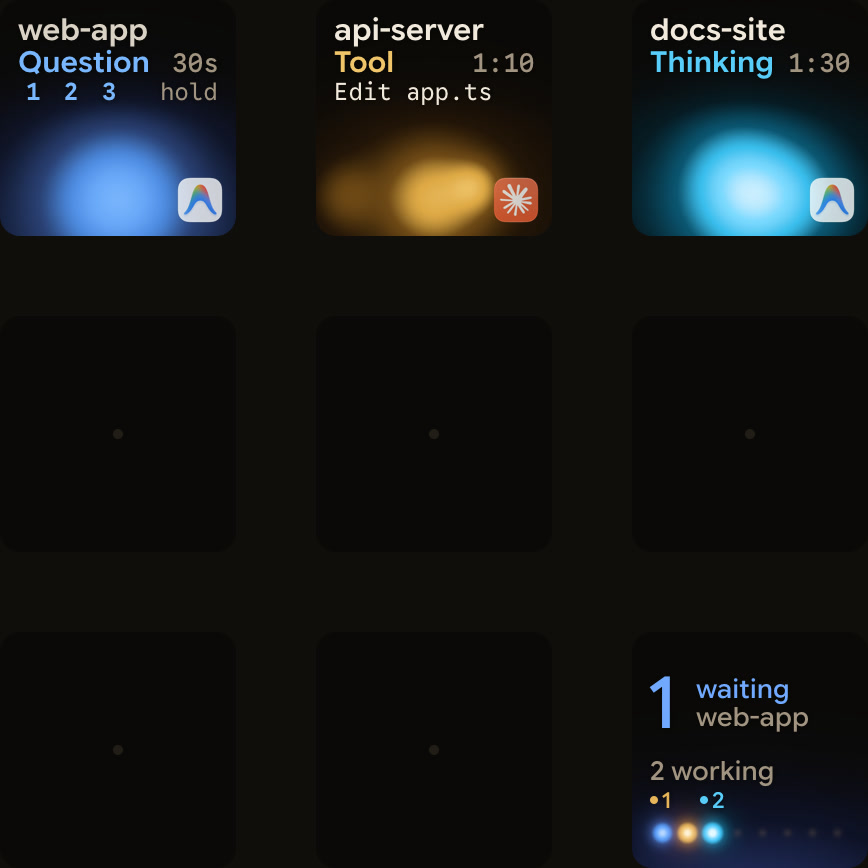
Two ways to use a keypad with Google Antigravity
Logitech sells the MX Keypad in its Master Series for $99.99, in Graphite. It has customisable LCD keys and works through the Logi Options+ app. It has native integrations for VS Code and IntelliJ. It can also run prompt macros, refactor code and launch voice commands across GitHub Copilot, Claude Code and OpenAI Codex. Those AI controls need an internet connection and an account with each AI provider. The keypad detects your active app and swaps tools as you move between VS Code, Slack, Figma and more.
Google Antigravity is not among the tools on Logitech's MX Keypad page. To use the keypad with Antigravity, create a manual shortcut profile in Logi Options+, or watch conversations with Orbtile.
| Setup | Hardware | Host software | Supported OS | What it does |
|---|---|---|---|---|
| Manual profile | MX Keypad or MX Creative Console | Logi Options+ 2.07+ (Keypad), 1.83+ (Console) | Windows 10+ (not ARM 64), macOS 13+ | Sends KEYBOARD SHORTCUT and DIAL ADJUSTMENT actions to the Antigravity App, CLI terminal or IDE |
| Orbtile status pad | Logitech MX Creative Keypad, iPhone or Android phone | Orbtile (no Logi Options+ needed) | macOS 14.0 Sonoma+ (Apple silicon), Windows 11 (x64) | Shows Antigravity desktop app conversation titles, states and live replies, and answers numbered-option questions |
Logi Options+ requirements and manual profile setup
Logitech's requirements for the MX Creative Console and MX Keypad:
- Software: the MX Keypad needs Logi Options+
2.07or later, and the MX Creative Console needs1.83or later. - The Logi Plugin Service powers the plugins and Marketplace, and it starts only when one of these devices is connected.
- Without Logi Options+, the MX Keypad cannot be used, and the Console dialpad keeps only a very limited set of basic actions.
- OS: Windows 10 or later and macOS 13 or later are supported, but Windows systems with ARM 64 processors are not.
- Languages: Options+ supports 19 languages, while the Console and Keypad configurator supports six.
- The six are English, French, German, Japanese, Italian and Spanish, set from the gear icon at the top right of the home page.
- The default profile and every action in the pre-installed
SYSTEMplugin work without signing in. - A Logi ID is needed to download other plugins or install other application profiles.
- You are asked to sign in during the Device Feature tour, when you click
INSTALLin the Marketplace, or when you add an application profile. - From Options+
1.99, every plugin on the official Logitech Marketplace goes through a security review. - Third-party plugins from other sources trigger a security notification about unverified software.
Create an Application Profile for Google Antigravity
Logitech's support page explains how to set up a profile by hand for an app that has no plugin:
- Click the
+icon in the profile bar and chooseAPPLICATION PROFILE. - Apps with plugin support are listed at the top.
- Select your Antigravity app, editor or terminal, or click
ADD APPLICATIONat the bottom to add it manually. - Click
START WITH A BLANK TEMPLATE, name the profile and clickCONFIRM.
Map keyboard shortcuts and dial adjustments with the System plugin
Assign shortcuts inside your blank profile using the pre-installed SYSTEM plugin:
- Click
ALL ACTIONSin the right panel and select theSYSTEMplugin. - Drag
KEYBOARD SHORTCUT, under theKEYBOARDcategory, onto a key. - Click the
KEYfield, press your Antigravity shortcut, optionally name the action and clickSave. - On the MX Creative Console dialpad, drag
DIAL ADJUSTMENT, underADVANCED, onto the dial. - Pick an optional initial shortcut that runs before the adjustment.
- Then set a separate shortcut for each turning direction.
See The Logitech MX Keypad for developers, with and without Options+ and Logi Options+ alternative for the MX Keypad.
Google Antigravity surfaces and where to point your profile
Point your Logi Options+ profile at the application you use for each Antigravity surface:
| Surface | Version and platforms | Host app for Logi Options+ |
|---|---|---|
| Antigravity App | v2.5+ on macOS 13+, Windows 10 (64-bit) or 11, Linux (glibc >= 2.28, glibcxx >= 3.4.25), Googlebook OS | Antigravity in Applications (macOS), the installed app (Windows) or ./Antigravity from Antigravity.tar.gz (Linux) |
Antigravity CLI (agy) | v1.2+, with install scripts for macOS, Linux, Googlebook and Windows (PowerShell or CMD) | Terminal running agy |
| Standalone Antigravity IDE | macOS 12+, Windows 10 (64-bit)+, Linux or Googlebook (glibc >= 2.28, glibcxx >= 3.4.25) | Antigravity IDE from antigravity.google/download |
| IDE extensions | VS Code 1.90+, JetBrains IDEs 2026.2.1+, Visual Studio 2026 17.8+, Zed 0.140.0+ (macOS, Linux), Xcode 27 beta 6+, Eclipse 2026-06+ (Public Preview) | Host IDE application |
| Antigravity SDK | google-antigravity on Python 3.10+ (pip, Poetry or uv) | Terminal or IDE running python hello_agent.py |
How workspaces and modes work in the Antigravity App and CLI
On first launch of the Antigravity App, you choose a role: Software Engineering, Knowledge Work, Data & Analytics, Science, Design or Other. For personal accounts from v2.30.0, this sets the interface layout. You can change it in Settings > General > Interface Layout. Software Engineering can bring over your setup from Claude Code, Codex, Cursor and Gemini CLI. Projects use Local mode or New worktree mode. Knowledge Work runs directly in folders, and you can start chatting from Home without a project.
Install the CLI (agy) on macOS, Linux or Googlebook:
curl -fsSL https://antigravity.google/cli/install.sh | bashIn Windows PowerShell:
irm https://antigravity.google/cli/install.ps1 | iexIn Windows CMD:
curl -fsSL https://antigravity.google/cli/install.cmd -o install.cmd && install.cmd && del install.cmdVerify with agy --version. On first launch you set the colour scheme (Dark, Solarized Dark, Solarized Light or the terminal default), the rendering mode (Alt-Screen or Inline) and workspace trust.
Antigravity shortcuts and commands to map to MX Keypad keys
Record these shortcuts in Logi Options+ using KEYBOARD SHORTCUT actions.
Antigravity App and standalone Antigravity IDE shortcuts
| Action | Surface | macOS | Windows / Linux | Description |
|---|---|---|---|---|
| Conversation picker | App | Cmd + K | Ctrl + K | Search and switch conversations |
| File search | App | Cmd + P | Ctrl + P | Search project files |
| Command palette | App | Cmd + Shift + P | Ctrl + Shift + P | Run app commands |
| Find | App | Cmd + F | Ctrl + F | Find text |
| Focus input / Agent | App and IDE | Cmd + L | Ctrl + L | Focus the App message box, or the IDE Agent panel with the selected lines |
| New conversation (App) | App | Cmd + N | Ctrl + N | Start a new conversation |
| New conversation (IDE) | Standalone IDE | Cmd + Shift + L | Ctrl + Shift + L | New conversation in the IDE Agent panel |
| Previous / next conversation | App | Option + ↑ / ↓ | Alt + ↑ / ↓ | Move to the previous or next conversation |
In the standalone IDE, the Toggle Agent button in the title bar shows or hides the Agent panel. On the Console dialpad, you can map Option + ↑ / ↓ (Alt + ↑ / ↓) to a DIAL ADJUSTMENT to step through App conversations.
App slash commands:
/goalruns the task to completion without pausing./grill-meinterviews you about requirements before implementing./scheduleruns an instruction as a one-time delayed task or a recurring cron schedule./browserhands live UI testing, screenshots and web inspection to the browser subagent.- The browser subagent uses the built-in browser on personal accounts or Google Chrome.
/pluginmanages Marketplace plugins.
See Antigravity App vs Antigravity IDE: what's the difference and Google Antigravity Agent Manager: run and review agents.
Antigravity CLI (agy) and IDE extension shortcuts and commands
Run agy to launch the interactive TUI in the current directory. Use agy -i "prompt" to start with a prompt, or agy -p "prompt" for a single non-interactive reply. In default mode, press Y to approve file creation. In auto mode, workspace edits and sandboxed commands run automatically.
| Surface | Shortcut or command | Action |
|---|---|---|
CLI (agy) | Ctrl + R | Open Artifact Review for plans and diffs |
CLI (agy) | Shift + Tab | Cycle auto, plan, default and accept-edits modes |
CLI (agy) | Tab | Inspect file diffs and tool details |
CLI (agy) | Ctrl + O | Expand or collapse the active tool execution pill |
CLI (agy) | Ctrl + C | Interrupt generation |
CLI (agy) | Ctrl + D or /exit | Exit the session |
CLI (agy) | Esc | Close the diff inspector or overlay |
VS Code (1.90+) | Cmd + Shift + X / Ctrl + Shift + X | Open the Extensions sidebar, then search for Google Antigravity |
Visual Studio 2026 (17.8+) | Ctrl + \, Ctrl + Alt + L | Open the Antigravity tool window |
Zed (0.140.0+) | Cmd + Shift + P / Ctrl + Shift + P, then agent: open settings | Install under External Agents > Add > Install from Registry |
Xcode (27 beta 6+) | Cmd + ,, then Intelligence | Click Get next to Antigravity |
Eclipse (2026-06+) | Cmd + Option + E / Ctrl + Alt + K | Toggle the chat view (Antigravity > Toggle Chat) |
CLI slash commands include /diff (review changes per turn), /agents (switch background subagents), /statusline (toggle or configure the status line) and /usage (credit consumption and quota). See Google Antigravity CLI: commands, settings and permissions.
Watch Antigravity conversations on a keypad or phone with Orbtile
Keyboard shortcuts send commands to Antigravity. Orbtile works the other way: it shows what each Antigravity desktop app conversation is doing. It drives the Logitech MX Creative Keypad without Logi Options+, and the keypad needs no account.
Orbtile runs on macOS 14.0 Sonoma or later on Apple silicon (M1 or later), and on Windows 11 (x64). Orbtile Mobile turns an iPhone (App Store, iOS 17+) or an Android phone (Android 8.0+) into the pad. Sign in with the same account on your computer and your phone. Then turn on Phone pad in Settings > Keypad on the computer.
While Orbtile is in control, your Options+ profile for the keypad pauses. To hand the keypad back, quit Orbtile, press Control-Option-Command-K (Ctrl+Alt+Win+K on Windows) or hold both page buttons for 1.5 seconds.
How Orbtile handles Google Antigravity:
- Orbtile follows conversations in the local Antigravity desktop app and shows each one's title and state.
- Antigravity uses an azure blue working palette, and from Orbtile 0.3.4 its waiting states use the shared terracotta alarm colour.
- From Orbtile 0.2.10, replies appear as live typewriter text.
- Waiting conversations come first, and a tap on key 9 focuses the first waiting session, including on other pages.
- A tap shorter than 0.6 seconds opens the conversation on your computer.
- Holding a key for 0.6 seconds or longer opens Focus mode across all nine keys.
- From Orbtile 0.2.6, questions with numbered options can be answered on the keypad.
- Keys 1, 2 and 3 show options 1 to 3, and key 7 shows option 4.
- On the last question, hold
Sendon key 9 for 0.6 seconds, andSentmeans Antigravity acknowledged the reply. - Up to four questions with two to four choices each are supported.
- Written answers, permissions, remote sessions and unsupported questions stay on the computer.
- If an Antigravity update changes how the app talks to Orbtile, live text and keypad answers stop until Orbtile catches up.
- Antigravity IDE and Antigravity CLI sessions do not appear automatically.
Orbtile also shows Claude Code, Codex, ZCode and Kimi Code sessions alongside Antigravity. See Antigravity notifications: CLI alerts and waiting agents, Use the Logitech MX Creative Keypad without Logi Options+ and Show any script or agent on a keypad with the Orbtile Adapter API.
FAQ
Does the Logitech MX Keypad have a built-in Google Antigravity plugin?
Logitech's MX Keypad page does not list Antigravity. It lists native integrations for VS Code and IntelliJ, plus AI controls for GitHub Copilot, Claude Code and OpenAI Codex. To use the MX Keypad with Antigravity, create an Application Profile from a blank template in Logi Options+ and map shortcuts with the pre-installed System plugin.
Which Google Antigravity keyboard shortcuts work best on a keypad?
In the Antigravity App, map Cmd+K or Ctrl+K for the conversation picker, Cmd+N or Ctrl+N for a new conversation, and Cmd+L or Ctrl+L to focus the message box. Option+Up and Option+Down, or Alt+Up and Alt+Down, move between conversations. In the Antigravity CLI, map Ctrl+R for Artifact Review, Shift+Tab to cycle execution modes, and Tab to inspect diffs.
Can I use the Logitech MX Keypad with Google Antigravity without Logi Options+?
Logitech's support page says the Keypad cannot be used without Logi Options+. Orbtile is separate software that drives the nine LCD keys and two page buttons of the Logitech MX Creative Keypad over USB, without Logi Options+. It runs on macOS 14 Sonoma or later on Apple silicon, and on Windows 11 (x64).
Which Google Antigravity sessions and prompts can Orbtile handle on the keypad?
Orbtile follows conversations in the local Antigravity desktop app. It shows each conversation's title, state and live reply text on a Logitech MX Creative Keypad, an iPhone or an Android phone. You can answer up to four questions with two to four numbered choices each. Permission requests and written answers stay on your computer, and Antigravity IDE and CLI sessions do not appear automatically.