
A Git worktree is a separate working folder for the same repository. It has its own files and branch but shares your main checkout's history and .git directory. Claude Code and OpenAI Codex can both start a session in its own worktree with a --worktree flag, so parallel agents stop editing the same files. The main difference: Claude Code creates worktrees inside your repository on a new branch, while Codex keeps them under $CODEX_HOME/worktrees in a detached HEAD. Both copy gitignored files such as .env through a .worktreeinclude file. Orbtile shows each parallel session on a Logitech MX Creative Keypad or an Android phone, so you can see which one needs you.
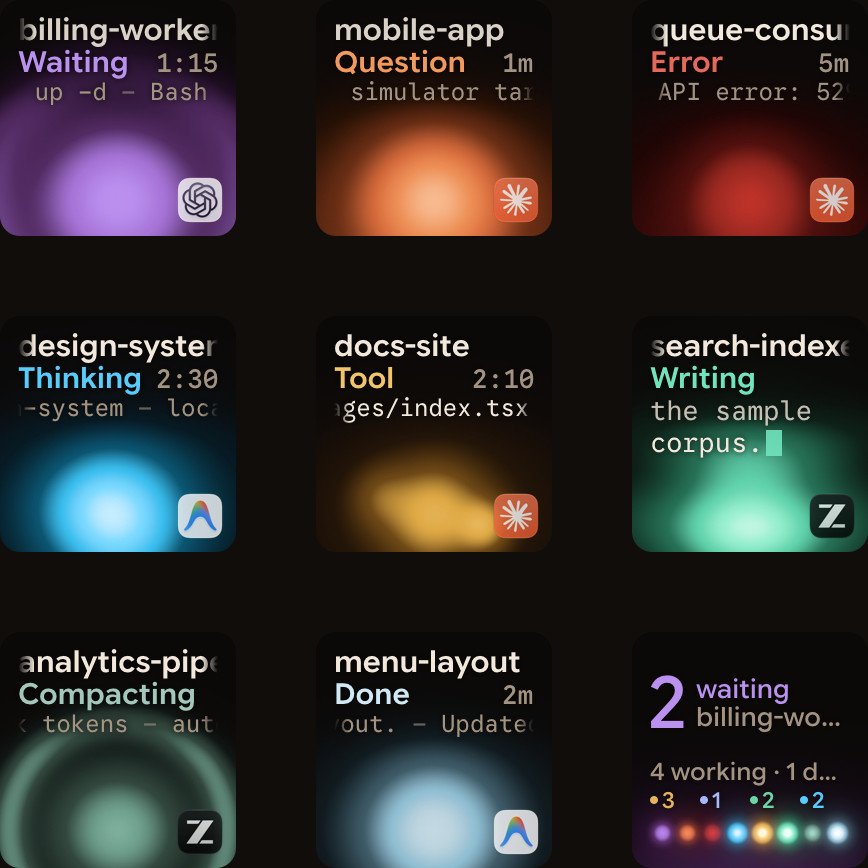
How Claude Code and Codex manage Git worktrees
Two agents in one checkout edit the same files and fight over the same branch. A worktree gives each session its own copy of the files to work on.
| Capability | Anthropic Claude Code | OpenAI Codex |
|---|---|---|
| CLI flag | claude --worktree [name] (-w [name]) | codex --worktree, codex exec --worktree |
| Default path | .claude/worktrees/<name>/ in repo root | $CODEX_HOME/worktrees (set in Settings > Worktrees) |
| Branch state | New branch worktree-<name> | Detached HEAD; optional Create branch here |
| Starting point | Remote default (worktree.baseRef: "fresh") or local HEAD ("head") | Selected branch HEAD plus uncommitted local changes |
| Other starting points | A pull or merge request: claude --worktree "#1234" or its URL | A forked session: codex [exec] fork <SESSION_ID> --worktree |
| Gitignored files | .worktreeinclude at repo root | .worktreeinclude (plus AGENTS.override.md) |
| Setup | Ask Claude, or run setup yourself | .codex setup scripts (ChatGPT desktop app) |
| Switching | EnterWorktree and ExitWorktree tools | Handoff between Local and Worktree |
| Cleanup | Clean unnamed removed on exit; cleanupPeriodDays sweep | Keeps 15 most recent; saves snapshot before delete |
Start and manage Claude Code worktrees
Pass --worktree or -w with a name. Claude Code creates the worktree under .claude/worktrees/feature-auth/ on a new branch, worktree-feature-auth:
claude --worktree feature-authRules for starting and reusing Claude Code worktrees:
- Names and
.gitignore: if you leave out the name, Claude picks one such asbright-running-fox. Add.claude/worktrees/to.gitignoreso worktrees do not show up as untracked files. - Workspace trust: interactive
--worktreeruns need workspace trust in that directory first. Runclaudethere once to accept it.claude -p --worktreeskips this check. - Pull or merge requests: pass a quoted
#<number>(claude --worktree "#1234"), a GitHub pull request URL or a GitLab merge request URL. Claude Code fetches that change's head commit fromorigininto.claude/worktrees/pr-<number>. The fetch never waits for input in your terminal. - Base branch: by default (
"fresh") worktrees branch from your remote default branch. If the repository has not been fetched in 24 hours, Claude Code fetches it, capped at five seconds, and uses the cached ref if that fails. With no remote, it falls back to your localHEAD. To branch from localHEAD, unpushed commits included, setworktree.baseRefto"head":
{
  "worktree": {
    "baseRef": "head"
  }
}- Reusing names: passing an existing name reopens that worktree. Under
"fresh", Claude Code resets it to the default branch only when it has no uncommitted or untracked files, is still on its own branch, and has no commits of its own (or its pull request was merged and the remote branch deleted). Otherwise it reopens at its old tip. - Mid-session worktrees: ask Claude to "work in a worktree" and it uses the
EnterWorktreetool. Ifpermissions.blockWritesOutsideWorkingDirectoriesis on, Claude Code removesEnterWorktreeandExitWorktree. Start withclaude --worktreeorclaude --bg --worktreeinstead.
How Claude Code enforces isolation and shares state
Claude Code applies four checks so a worktree session does not change your main checkout:
- File edits: blocks
Edit,WriteandNotebookEditcalls that target the main checkout. - Working directory: blocks
Bash,PowerShellandMonitorcommands that run in the main checkout, or whose directory it cannot verify. - Git redirects: blocks
BashandMonitorcommands that pointgitat the main checkout throughgit -C,--git-dir,GIT_DIR,GIT_WORK_TREEorcd. - Command shape: blocks
BashandMonitorcommands when it cannot tell from the text wheregitwill run, such as a command name computed at runtime.PowerShellgets only the working-directory check.
A worktree still shares some state with the main checkout:
.gitand plugins: Git writes go to the shared.gitdirectory. Plugins installed at project scope load in every worktree. If the worktree has no.claude/skills,.claude/agentsor.claude/commandsof its own, Claude Code reads the main checkout's copies.- Permissions and hooks: "Yes, and don't ask again" Bash rules save to the main checkout's
.claude/settings.local.json. On Windows, and in other cases where Claude Code does not use the repository root, the rule stays with the worktree.${CLAUDE_PROJECT_DIR}keeps pointing at the starting project root, whilecwdin hook input JSON follows the worktree. See Claude Code hooks: events, matchers, settings and handlers.
Cleaning up and resuming Claude Code worktrees
When you exit an interactive session, Claude Code checks the worktree for changed or untracked files, uncommitted work in submodules and new commits:
- Clean unnamed worktrees: removed automatically, along with their branch.
- Named or changed worktrees: Claude asks whether to keep or remove them. Resume a kept one with
claude --worktree <name> --resume. - Non-interactive
-pruns: have no exit prompt, so the worktree stays. Its lock stays until a later stale-lock sweep. To remove it yourself, rungit worktree unlockand thengit worktree remove.
Isolate Claude Code subagents and non-git hooks
Ask Claude to "use worktrees for your agents", or add isolation: worktree to a subagent's frontmatter in .claude/agents/ or ~/.claude/agents/:
---
name: refactorer
description: Applies mechanical refactors across many files
isolation: worktree
---- Isolation and instructions: the subagent runs its
BashandPowerShellcommands inside its worktree. Bash commands get the same git checks as above, while PowerShell gets only the working-directory check. Subagent worktrees use the sameworktree.baseRef. They take their instructions from the main conversation, and skip theCLAUDE.mdand.claude/rules/inside.claude/worktrees/. - Locks and cleanup: while a subagent or a backgrounded
--worktreesession runs, Claude Code holds agit worktree lockon its worktree. A subagent worktree with no changes is removed when the subagent finishes. One with changes stays until thecleanupPeriodDayssweep can remove it without losing work.
For SVN, Perforce, Mercurial or custom paths, configure WorktreeCreate and WorktreeRemove hooks in settings.json. The hook replaces the git logic, so .worktreeinclude is not processed. WorktreeCreate reads .name from stdin and prints the new path on stdout:
{
  "hooks": {
    "WorktreeCreate": [
      {
        "hooks": [
          {
            "type": "command",
            "command": "bash -c 'NAME=$(jq -r .name); DIR=\"$HOME/.claude/worktrees/$NAME\"; svn checkout https://svn.example.com/repo/trunk \"$DIR\" >&2 && echo \"$DIR\"'"
          }
        ]
      }
    ]
  }
}
Run parallel worktrees in OpenAI Codex
OpenAI Codex supports Git worktrees in the CLI and in the ChatGPT desktop app, which codex app opens on macOS and Windows.
Codex CLI worktree and directory flags
Pass --worktree to start a CLI session in a new managed worktree:
codex --worktree "implement the billing webhook handler"
codex exec --worktree "run the migration and fix failing tests"
codex exec fork <SESSION_ID> --worktree "try an alternative caching approach"--worktree: works with newcodexsessions,codex fork <SESSION_ID>,codex execandcodex exec fork. It needs local execution. You cannot combine it withresume,review,--ephemeralor--ignore-user-config.--cd(-C <path>) and--add-dir <path>:--cdsets the agent's working directory, such as a worktree you made yourself.--add-dirgives write access to extra directories, and you can repeat it.
See OpenAI Codex CLI: install, commands, config.toml and codex exec for all flags and config.toml options.
ChatGPT desktop app worktrees, detached HEAD and Handoff
In the ChatGPT desktop app, pick Worktree and a base branch for a new chat. The ChatGPT mobile app can control Codex on a connected computer, worktree chats included. In Git repositories, scheduled tasks run on their own background worktrees.
- Detached
HEADin$CODEX_HOME/worktrees: worktrees live under$CODEX_HOME/worktrees, and you can change the root inSettings > Worktrees. Each starts at the selected branch'sHEAD, with that branch's uncommitted changes applied. Worktrees start in a detachedHEAD, so they are not checked out as branches. - Branching on the worktree: click
Create branch hereto turn the worktree into a branch. The branch name gets acodex/prefix by default. Git lets a branch be checked out in only one place, so checking it out in your main checkout then fails (fatal: 'feature/a' is already used by worktree). - Moving work with Handoff: click
Hand offin the chat header to move a chat and its code betweenLocal(the foreground checkout) andWorktree(the background one). Codex runs the Git steps, and a chat handed back returns to the same worktree.
Local environment setup scripts and worktree cleanup
Local environments live in the .codex folder at your project root:
- Setup scripts and actions: setup scripts such as
npm installandnpm run buildrun automatically when Codex creates a new worktree. You can add separate scripts for macOS, Windows or Linux. Actions such asnpm startappear in the app's top bar and run in its integrated terminal. In the diff pane you can stage or revert changes, leave inline comments, commit and push a branch. - Cleanup and snapshots: by default the app keeps the 15 most recent managed worktrees. It never deletes worktrees for pinned or in-progress chats. Before it deletes one, after archiving or when over the limit, it saves a snapshot you can restore by reopening the chat.
Copy gitignored files with .worktreeinclude and manage manual worktrees
Both Claude Code and OpenAI Codex (for local ChatGPT desktop app managed worktrees) read .worktreeinclude at the repository root. It uses .gitignore syntax:
.env
.env.local
config/secrets.json- Ignored files only: a file is copied only if it matches a pattern and is also gitignored, so tracked files are never duplicated.
- Agent rules: Claude Code applies
.worktreeincludeto--worktreesessions, subagents and parallel Claude desktop sessions. With aWorktreeCreatehook, copy the files in your script instead. Codex applies it to local desktop app worktrees only. It skips symlinks, never overwrites existing files, and copies an ignoredAGENTS.override.mdautomatically. See Share context between Claude Code and Codex. - Manual worktrees: to check out an existing branch or use a folder outside the repository, run
git worktreeyourself. Then startclaudeinside it, or passcodex --cd ../project-feature-a:
git worktree add ../project-feature-a -b feature-a
git worktree remove ../project-feature-a
Watch parallel worktree sessions on a keypad or phone with Orbtile
Worktrees keep file edits apart, but parallel sessions still stop in separate windows to ask for approvals or answers.
Logitech's MX Keypad works with Logi Options+ to run prompt macros across tools such as Claude Code and OpenAI Codex, with native integrations for VS Code and IntelliJ. Without Options+, Orbtile drives the keypad's nine LCD keys and two page buttons over USB. It can also use an Android phone (Android 8.0 or later) running Orbtile Mobile. Orbtile runs on a computer with macOS 14.0 or later on Apple silicon, or Windows 11 (x64).
- One key per session: shows Claude Code sessions (terminal, desktop app, SSH, and background sessions when
Show background sessionsis on) and Codex sessions (desktop app, terminalcodex,codex execand SSH). Each key shows the session name, its state (Thinking,Tool,Streaming,Permission,QuestionorDone) and its latest words over an amber gold (Claude Code) or cool blue (Codex) orb. - Group by Project, Agent or Host: set
Group byinSettings > Keypad. Hold key 9 for 0.6 seconds to open the topic picker, or tap it to focus the first waiting session. - Inspect isolated subagents: hold a session key for 0.6 seconds to open Focus mode, then press key 2 to see its subagents. Keys 1 to 8 show one subagent each, with its state, tool, text and elapsed time, eight per page.
- Answer prompts from the keys: waiting sessions move to the front. For local Claude Code sessions and compatible Codex desktop chats, press Deny (key 7) or hold Allow (key 9) for 0.6 seconds in Focus mode. You can also pick options on keys 1, 2, 3 and 7 and hold Send on key 9. Terminal Codex approvals offer Allow only, so decline those in the terminal.
See Run several Claude Code sessions and see which one needs you, Approve agent tool calls without switching windows and The Logitech MX Keypad for developers, with and without Options+.
FAQ
Where do Claude Code and OpenAI Codex create their Git worktrees?
Claude Code creates worktrees inside your repository under .claude/worktrees/<name>/ on a new branch named worktree-<name>. OpenAI Codex creates managed worktrees in $CODEX_HOME/worktrees in a detached HEAD state. You can change that folder in the ChatGPT desktop app under Settings and Worktrees.
How do I copy gitignored .env files into new agent worktrees automatically?
Create a .worktreeinclude file at the root of your repository and list the gitignored files or patterns in .gitignore syntax, such as .env and .env.local. Claude Code and the ChatGPT desktop app's local managed worktrees in Codex both copy matching gitignored files into each new worktree.
How do I give a Claude Code subagent its own isolated Git worktree?
Add isolation: worktree to the frontmatter of the subagent file in .claude/agents/ or ~/.claude/agents/, or ask Claude to use worktrees for its agents. Claude Code creates a temporary worktree for the subagent and removes it automatically if the subagent finishes without making changes.
Can Orbtile show Claude Code and Codex worktree sessions on the same keypad?
Yes. Orbtile shows parallel Claude Code and Codex sessions together on a Logitech MX Creative Keypad or an Android phone running Orbtile Mobile. Waiting sessions move to the front, and you can group sessions by Project or Agent. You can also inspect subagents and answer supported approvals and multiple-choice questions from the keys.