
Claude Code sends built-in desktop notifications only in Ghostty, Kitty and iTerm2, so sessions in Windows Subsystem for Linux (WSL) inside Windows Terminal or VS Code stay silent when a task finishes or a permission prompt waits. To get Claude Code WSL notifications on Windows, set preferredNotifChannel to "terminal_bell" in ~/.claude/settings.json, configure a Notification hook calling powershell.exe via Windows interop, or enable mobile push notifications with Remote Control. To see which of several sessions is waiting, Orbtile puts Claude Code sessions on a Logitech MX Creative Keypad or an Android phone.
How Claude Code runs in WSL and why it stays silent
In WSL, you install Claude Code with the native Linux installer (curl -fsSL https://claude.ai/install.sh | bash) and launch claude from the WSL shell rather than PowerShell or CMD. On Windows 10 or 11 with WSL 2, you can also start a WSL session from the Claude Desktop app's Code tab, running the process, its tools and git inside the distribution.
A WSL session is the right choice when your repository is in the Linux filesystem (/home/<user name>/Project) rather than a mounted drive (/mnt/c/). Working on those files from Windows goes through a network filesystem that is slow and breaks file watching, and running the session inside the distribution avoids both. WSL 2 also supports Bash command sandboxing (sandbox.enabled).
Claude Code fires a notification event when a task finishes or a permission prompt pauses while you appear away from the terminal. What happens depends on your terminal emulator:
- Ghostty, Kitty and iTerm2: receive a built-in desktop notification by default (iTerm2 requires enabling Notification Center Alerts and escape sequence-generated alerts in profile settings).
- Apple Terminal: receives a silent bell character when Audible bell is off in the front window's profile, or nothing otherwise.
- Windows Terminal, Warp, VS Code and other terminals: receive nothing by default.
Because Windows Terminal and VS Code are not on the built-in list, a WSL session gives no alert until you enable the terminal bell, add a hook or connect Remote Control.
| Notification method | Where you configure it | What happens on Windows | When it triggers |
|---|---|---|---|
Terminal bell (terminal_bell) | ~/.claude/settings.json in WSL and bellStyle in Windows Terminal | Audible sound, window flash, taskbar flash or all | Task completion and permission prompts |
Notification hook with powershell.exe | ~/.claude/settings.json or .claude/settings.json in WSL | Opens a Windows dialog box or runs a PowerShell command | permission_prompt (after ~6s), idle_prompt (after ~60s) or other matched types |
PermissionRequest or Stop hook | ~/.claude/settings.json or .claude/settings.json in WSL | Runs your command, such as a PowerShell dialog | Immediately when a tool needs approval (PermissionRequest) or a turn ends (Stop) |
| Remote Control mobile push | /config in WSL and the Claude app on Android or iOS | Sends a push notification to your phone | When Claude decides or when actions are required while you are away |
Enable the terminal bell in WSL and Windows Terminal
To get an alert from WSL in Windows Terminal, tell Claude Code to ring the bell character in any terminal. In /config, preferredNotifChannel appears as Local notifications and accepts auto, terminal_bell, iterm2, iterm2_with_bell, kitty, ghostty or notifications_disabled.
In your WSL distribution, open ~/.claude/settings.json (in your Linux home directory, separate from your Windows user folder) and set preferredNotifChannel to "terminal_bell":
{
  "preferredNotifChannel": "terminal_bell"
}
Choose how Windows Terminal reacts with bellStyle and bellSound
In Windows Terminal's settings.json, set bellStyle in your WSL profile object or in the defaults block above list:
"defaults": {
  "bellStyle": "all"
}
Windows Terminal supports two bell profile properties:
bellStyle: accepts"all","audible","window","taskbar"or"none"(defaults to"audible")."all"plays a sound and flashes the taskbar icon; when unfocused, only the taskbar icon flashes.bellSound: optional whenbellStyleis"all"or"audible". Accepts a file path string or an array of paths chosen at random.
Pass notifications through tmux in WSL
Inside tmux, desktop notifications and progress bar updates never reach the outer terminal by default, and Shift+Enter submits your prompt instead of inserting a newline. Add these lines to ~/.tmux.conf in WSL and apply them with tmux source-file ~/.tmux.conf:
set -g allow-passthrough on
set -g focus-events on
set -s extended-keys on
set -as terminal-features 'xterm*:extkeys'
allow-passthrough lets notifications and progress updates reach the outer terminal, and extended-keys distinguishes Shift+Enter from Enter.
If your outer terminal supports the OSC 7501 Program Status Protocol, Claude Code v2.1.295+ reports whether each interactive session is working, waiting on you or done, unless CLAUDE_CODE_DISABLE_TERMINAL_TITLE is 1. Inside tmux, Claude Code checks tmux itself for OSC 7501 support regardless of allow-passthrough, so start the session outside tmux to use it.
Trigger a Windows alert from WSL with a Notification hook
You can configure a Notification hook in WSL that calls Windows PowerShell alongside the built-in notification.
WSL executes Windows binaries from Linux when you include the .exe extension and match the file case, such as powershell.exe. These tools run as the active Windows user, mostly retain the working directory and appear in Windows Task Manager.
Add this Notification hook to ~/.claude/settings.json in WSL (or .claude/settings.json in a project):
{
  "hooks": {
    "Notification": [
      {
        "matcher": "",
        "hooks": [
          {
            "type": "command",
            "command": "powershell.exe -Command \"[System.Reflection.Assembly]::LoadWithPartialName('System.Windows.Forms'); [System.Windows.Forms.MessageBox]::Show('Claude Code needs your attention', 'Claude Code')\""
          }
        ]
      }
    ]
  }
}
If ~/.claude/settings.json already has hooks, add Notification as a sibling key. Type /hooks in Claude Code to confirm it appears under Notification.
To test it, press Esc to close /hooks, press Shift+Tab until the status bar shows ⏸ manual mode on, ask Claude to run a command needing permission, and switch away from the terminal.
Check Windows interop, PATH and terminalSequence in WSL
Keep these WSL environment rules in mind:
- Windows interop and
PATH: Windows interop must be enabled andpowershell.exemust be on your WSLPATH. Test the PowerShell command on its own first. - Re-enabling interop: if disabled by writing
0to/proc/sys/fs/binfmt_misc/WSLInterop,.execommands fail. Re-enable it by exiting all WSL sessions and runningbash.exeagain, or runningecho 1 > /proc/sys/fs/binfmt_misc/WSLInteropas root. - Dialog focus:
System.Windows.Forms.MessageBoxopens a dialog box rather than a corner notification, so it can open behind your terminal window. - Sharing variables with
WSLENV: useWSLENVto pass variables or paths between WSL andpowershell.exe./ptranslates between WSL Linux and Win32 paths,/lmarks a path list,/upasses only from Win32 to WSL, and/wpasses only from WSL to Win32. - Emitting escape sequences: hooks have no controlling terminal, so writing an escape sequence to
/dev/ttyfails. Return an allowlisted sequence (OSC 0,1,2,9,99,777orBEL) in theterminalSequenceJSON field so Claude Code emits it.OSC 9covers Windows Terminal notifications.
For the full hook schema, including command, HTTP, MCP tool, prompt and agent hooks, see Claude Code hooks: events, matchers, settings and handlers.
Filter notification types or alert without a delay
An empty matcher ("" or "*") on Notification fires on every notification event. To filter events, set matcher to one type or a pipe-separated list:
permission_prompt: Claude needs approval for a tool use or (in v2.1.246+) a sandboxed command's network request, after waiting about six seconds without keystrokes.idle_prompt: Claude finished responding about 60 seconds ago without keystrokes and no background agent is running.elicitation_dialogandelicitation_url_dialog: an MCP server opens an elicitation form or browser URL prompt and waits about six seconds without keystrokes.agent_needs_inputandagent_completed: a background session waits for input or finishes while agent view is open.auth_success: authentication completes.quota_auto_resume_fired,quota_auto_resume_staleandquota_auto_resume_disabled: usage-limit continuation events in v2.1.234+.
Because permission_prompt waits ~6s and idle_prompt waits ~60s, use a different hook event for an immediate alert:
PermissionRequest: fires immediately when a tool call needs approval. Itsmatcherfilters by tool name ("Bash","Edit|Write", or"*").Stop: fires immediately when a turn ends, with no matcher.PreToolUse:Notificationhas no matcher for multiple-choice questions. Match"AskUserQuestion|ExitPlanMode"onPreToolUsefor immediate question or plan alerts. See Know when Claude Code asks you a question or wants a plan approved.
{
  "hooks": {
    "PermissionRequest": [
      {
        "matcher": "*",
        "hooks": [
          {
            "type": "command",
            "command": "powershell.exe -Command \"[System.Reflection.Assembly]::LoadWithPartialName('System.Windows.Forms'); [System.Windows.Forms.MessageBox]::Show('Claude Code is waiting for permission', 'Claude Code')\""
          }
        ]
      }
    ]
  }
}
Get mobile push notifications from WSL with Remote Control
Remote Control connects the Claude app for Android or iOS (and claude.ai/code) to a Claude Code session running on your computer, here inside WSL. Code execution, tools and the filesystem stay local, and the session makes outbound HTTPS requests only, without opening inbound ports.
To set up mobile push notifications from WSL:
- Start with
claude --remote-control(or--rc),claude remote-controlfor server mode, or/remote-controlin an existing session. - Install the Claude app on Android or iOS, sign in with the same account and organisation, and allow OS notifications.
- In
/config, enablePush when Claude decides(agentPushNotifEnabled) for pushes Claude thinks are worth sending, such as when a long task finishes,Push when actions required(inputNeededNotifEnabled) for permission prompts and questions, or both.
Pushes are skipped while you type in or focus the connected terminal. To skip them whenever you are at the machine, set CLAUDE_CLIENT_PRESENCE_FILE to a marker file path; notifications are skipped while that file exists.
Watch several Claude Code sessions on a keypad or phone with Orbtile
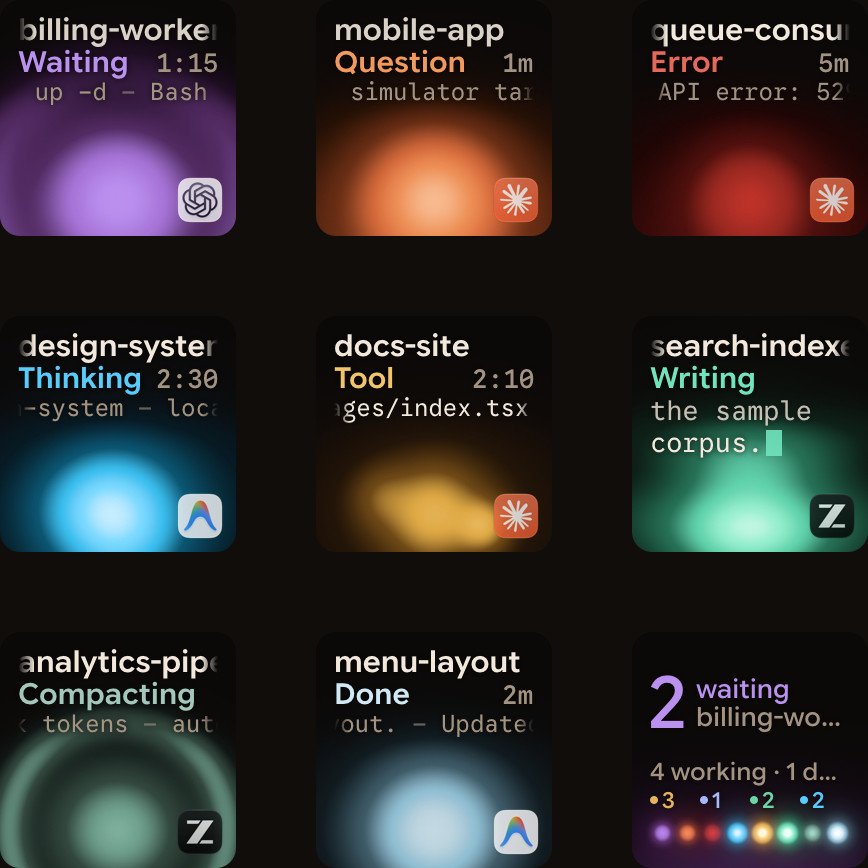
When several sessions are open across tabs and windows, a bell or dialog does not show which one stopped. Orbtile runs on Windows 11 (x64) or macOS 14.0 Sonoma+ on Apple silicon, putting each coding-agent session on a key of the Logitech MX Creative Keypad or a tile on an Android 8.0+ phone with Orbtile Mobile.
- One key or tile per session: shows the session title, state (
Thinking,Tool,Streaming,Permission,QuestionorDone) and latest words over an animated orb. Waiting sessions move to the front and glow in a terracotta alarm colour, and a tap on key 9 focuses the first waiting session. - Answers from the keypad or phone: for local Claude Code sessions in your terminal or the Claude desktop app, hold a waiting key to open Focus mode, then press Deny on key 7 or hold Allow on key 9 for 0.6 seconds. For multiple-choice questions with up to four options, pick on keys 1, 2, 3 and 7, then hold Send on key 9.
- Remote hosts and other agents: Orbtile follows Claude Code, Codex and ZCode CLI sessions on servers you add by SSH alias in Settings > Remote Hosts (remote Claude Code sessions are display-only). It also shows Codex, ZCode, Antigravity desktop app and Kimi Code sessions, and scripts can report their own state through its local Adapter API.
The Orbtile site does not mention WSL sessions, so check that yours appear before you rely on it for them.
See Get notified when Claude Code needs you on Windows and Show any script or agent on a keypad with the Orbtile Adapter API.
FAQ
Why does Claude Code not show desktop notifications in WSL on Windows Terminal?
By default, Claude Code only sends built-in desktop notifications in Ghostty, Kitty and iTerm2, and sends nothing in Windows Terminal or the VS Code terminal. To get alerts in WSL, set preferredNotifChannel to terminal_bell in your WSL settings.json file or configure a Notification hook that calls powershell.exe.
How do I run a Windows PowerShell notification from a Claude Code hook in WSL?
Add a Notification hook in your WSL settings.json file that runs powershell.exe with the Command flag. WSL can launch Windows executables directly from a Linux shell when you include the .exe extension, provided Windows interop is enabled and powershell.exe is on your PATH.
What is the difference between the Notification hook and the PermissionRequest and Stop hooks?
In terminal sessions, the Notification hook waits about six seconds without keystrokes before firing for a permission_prompt and about 60 seconds after Claude finishes before firing for an idle_prompt. PermissionRequest fires immediately when a tool call needs approval, and Stop fires immediately at the end of every turn.
How does Orbtile help when I run several Claude Code sessions on Windows?
Orbtile runs on Windows 11 and shows each coding-agent session on a Logitech MX Creative Keypad or an Android phone with Orbtile Mobile. Waiting sessions move to the front and glow in their alarm colour, and you can answer supported permission requests and multiple-choice questions from the keypad or phone.