
OpenAI Codex CLI is an Apache-2.0 licensed coding agent from OpenAI that runs locally in your terminal. Run codex interactively to inspect repositories, edit files, run local tools and review code, or codex exec non-interactively in scripts and CI pipelines. It reads ~/.codex/config.toml and project .codex/config.toml files, loads AGENTS.md instructions, and enforces boundaries with sandboxes and approval policies.
Where Codex CLI fits alongside OpenAI's other Codex surfaces
OpenAI offers Codex across several surfaces:
- Codex CLI (
codex): lightweight local coding agent in your terminal against your repository and local tools. - IDE extensions: available for VS Code, Cursor and Windsurf. The CLI and IDE extension share the same configuration layers.
- Desktop app (
codex app): runcodex appor visit the Codex App page on chatgpt.com. - Codex Web (
chatgpt.com/codex): cloud agent.codex cloudbrowses cloud chats, submits work to a configured environment, and applies results locally.
Install and update the OpenAI Codex CLI
Install the Codex CLI via the standalone installer script, a package manager, or GitHub Releases.
Standalone installers on macOS, Linux and Windows
On macOS or Linux, install or update from your shell:
curl -fsSL https://chatgpt.com/codex/install.sh | shOn Windows, run in PowerShell to install or update:
powershell -ExecutionPolicy ByPass -c "irm https://chatgpt.com/codex/install.ps1 | iex"Standalone installers download from https://releases.openai.com/codex and fall back to GitHub Releases if a download is unavailable. To force GitHub Releases, set CODEX_INSTALLER_USE_RELEASES_OPENAI_COM to false (0 or no also work):
curl -fsSL https://chatgpt.com/codex/install.sh | CODEX_INSTALLER_USE_RELEASES_OPENAI_COM=false shPackage managers and GitHub Release binaries
- npm:
npm install -g @openai/codexto install. - Homebrew:
brew install --cask codexto install. - GitHub Releases: download
codex-aarch64-apple-darwin.tar.gzorcodex-x86_64-apple-darwin.tar.gz(macOS), orcodex-x86_64-unknown-linux-musl.tar.gzorcodex-aarch64-unknown-linux-musl.tar.gz(Linux). Extract the platform-named executable and rename it tocodex.
Sign in and start a task
Run codex inside a Git repository. On first launch, choose Sign in with ChatGPT (Plus, Pro, Business, Edu or Enterprise) or configure an API key. Create Git checkpoints before and after runs to revert changes cleanly.
Interactive CLI commands and terminal workflows
Manage context, reviews, tools and permissions from your shell or an interactive session:
| Command or flag | What it does |
|---|---|
codex resume | Reopens a recent repo chat or searches local chats |
codex --image | Passes a screenshot, diagram or design reference with the first prompt |
codex --search | Switches a run to live web search |
codex mcp | Adds local or remote MCP servers, authenticates, and inspects tools |
codex cloud | Browses cloud chats, submits work to a configured environment, and applies results locally |
codex completion | Generates shell completions; also supports syntax themes and VISUAL or EDITOR |
/permissions | Sets when Codex edits files or runs commands without asking; shows the active sandbox and writable roots |
Two built-in workflows assist with larger changes:
- Local code review: reviews uncommitted changes, a commit, or a base branch and reports prioritised findings without modifying your working tree.
- Subagents: delegates focused investigations to specialised subagents and returns findings to the main session.
Configure Codex with config.toml
Codex stores personal defaults in ~/.codex/config.toml and project overrides in .codex/config.toml (also accessible in the IDE extension via the gear icon under Codex Settings > Open config.toml).
Codex loads project .codex/ layers (config, hooks and rules) only in trusted projects; untrusted projects use only user and system configuration.
Configuration precedence
From highest precedence to lowest:
- CLI flags and
--config(-c) overrides - Project
.codex/config.tomlfiles, from project root to current directory (closest wins, trusted projects only) - Profile files via
--profile profile-name(~/.codex/profile-name.config.toml) - User config (
~/.codex/config.toml) - Cloud-managed
config.tomldefaults for the workspace - System config (
/etc/codex/config.tomlon Unix) - Built-in defaults
On managed machines, organisations can also enforce constraints via requirements.toml, such as disallowing approval_policy = "never" or sandbox_mode = "danger-full-access".
Common config.toml settings and feature flags
model = "gpt-6.1-sol"
model_reasoning_effort = "medium"
approval_policy = "on-request"
sandbox_mode = "workspace-write"
web_search = "cached"
personality = "none"

[shell_environment_policy]
ignore_default_excludes = false

[shell_environment_policy.filters]
"PATH" = "include"
"HOME" = "include"

[features]
prefer_mxc = true
Key config.toml options:
- Model and reasoning:
modelsets the default CLI/IDE model;model_reasoning_efforttunes reasoning depth. - Approvals and sandboxing:
approval_policysets command prompts (values such as"on-request"or"never";"untrusted"is retired).sandbox_modesets filesystem/network limits (like"workspace-write"). Built-in profiles (:read-only,:workspace,:danger-full-access) and custom[permissions.<name>]tables are also supported. - Web search:
web_searchdefaults to"cached"(OpenAI cache, reducing prompt injection risk). Use"indexed"to gate access through the search index,"live"for current pages (same as--search, and default under full-access sandboxes like--yolo), or"disabled". - Communication style:
personality = "none"drops the built-inPersonalityprompt section while keeping custom base instructions (friendly,pragmaticand/personalityare retired). - TUI keymap and logs:
[tui.keymap.global],[tui.keymap.composer]and[tui.keymap.chat]set shortcuts (empty list unbinds).log_dirsets the log path and enables plaintextcodex-tui.log. - Shell environment: under
[shell_environment_policy],ignore_default_excludesdefaults totrue. Setfalseto exclude variables containingKEY,SECRETorTOKEN, or set[shell_environment_policy.filters]. - Feature flags:
[features]togglesapps,goals,hooks,fast_mode,memories(off by default),multi_agent,remote_plugin,shell_snapshot,shell_toolandunified_exec, or passcodex --enable feature_name.
Layer custom instructions with AGENTS.md
Codex builds its AGENTS.md instruction chain once at session start:
- Global instructions: in
~/.codex(orCODEX_HOME), Codex loadsAGENTS.override.mdfirst, falling back toAGENTS.md. - Project and nested instructions: walking from the project root (usually Git root) to your current directory, Codex loads at most one non-empty file per folder:
AGENTS.override.md, thenAGENTS.md, then names inproject_doc_fallback_filenames. - Merge order and size cap: files concatenate from root down so closer instructions override broader rules, up to
project_doc_max_bytes(32 KiBdefault inconfig.toml).
To audit loaded files, run codex -c log_dir=./.codex-log and check ./.codex-log/codex-tui.log.
Run scripts and CI pipelines with codex exec
Run Codex non-interactively with codex exec:
codex exec "summarise the repository structure and list the top 5 risky areas"Key codex exec behaviours:
- Stdout and stderr: progress streams to
stderrwhile only the final message prints tostdoutfor piping or saving via-o <path>(--output-last-message <path>). Use--ephemeralto skip writing session rollout files. - Piping stdin: piped input serves as context when paired with a prompt argument, or as the entire prompt when you omit the argument or pass
codex exec -. - Sandbox flags: defaults to read-only. Pass
--sandbox workspace-writeto edit files, or--sandbox danger-full-accessonly in a controlled environment. (--full-autois retired; use--sandbox workspace-write, or--approve-for-mefor automatic approval review with workspace-write.) - Clean automation:
--ignore-user-configskips$CODEX_HOME/config.toml,--ignore-rulesskips.rulesfiles, and--skip-git-repo-checkbypasses the Git repo requirement. If an MCP server markedrequired = truefails to initialise,codex execexits with an error. - Structured output:
--jsonstreams JSON Lines events (thread.started,turn.started,item.*,turn.completed,turn.failed,error).--output-schema ./schema.jsonenforces a JSON Schema. - Resuming runs: run
codex exec resume --last "<prompt>"orcodex exec resume <SESSION_ID> "<prompt>". - CI authentication: pass
CODEX_API_KEY=<api-key> codex exec ...inline for a single run rather than as a job-level variable in workflows that run repository-controlled code, or useopenai/codex-action@v1in GitHub Actions, which starts a proxy for the API key.
Windows sandboxing: mxc, elevated and unelevated
On Windows, Codex can run natively in PowerShell with a Windows sandbox, so WSL or a virtual machine is not required. Windows 11 is recommended. Windows 10 is best-effort and needs version 1809 or newer for ConPTY. winget should be available.
| Implementation | How it isolates commands | Setup and limits |
|---|---|---|
mxc | Native Microsoft Execution Containers process isolation on Windows 11 (24H2 build 26100.9278, 25H2 build 26200.9278) | Recommended; no admin setup, extra accounts or firewall rules; enable with prefer_mxc = true under [features] |
elevated | Dedicated lower-privilege sandbox users, filesystem boundaries and local firewall rules | Legacy, but the preferred fallback when MXC is unavailable; needs administrator-approved setup, which IT can provision with codex sandbox setup --elevated |
unelevated | Restricted Windows token from current user with ACL filesystem boundaries | Legacy fallback when elevated setup is unavailable and policy allows it; weaker network isolation, no denied read paths |
On Codex CLI 0.162.0+, test mxc support without changing saved config:
codex -c windows.sandbox=mxc sandbox --include-managed-config --permission-profile :workspace -- cmd.exe /d /c echo MXC_OKWatch Codex CLI sessions on a keypad or phone with Orbtile
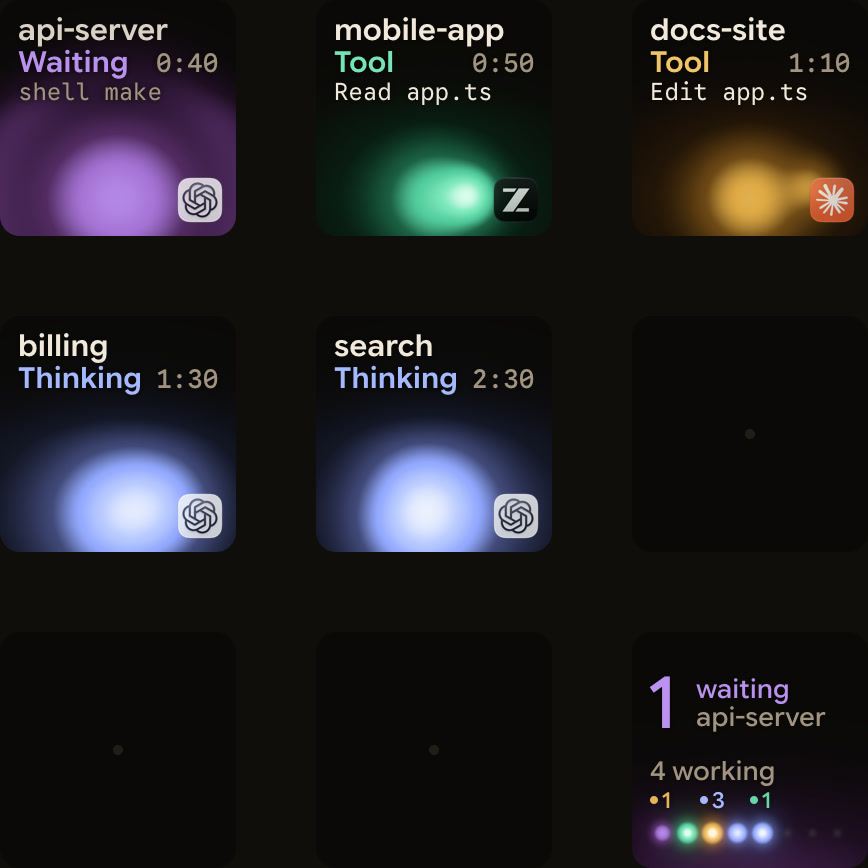
When running multiple codex terminals, codex exec scripts and desktop chats, Orbtile shows each session on a Logitech MX Creative Keypad or Android phone (Android 8.0+ with Orbtile Mobile), paired with macOS 14.0 Sonoma+ (Apple silicon) or Windows 11 (x64).
- Zero-install detection: Orbtile reads Codex's thread files and its own signals. Terminal
codex,codex execand desktop app chats each get a tile showing state, tool labels, waits and latest assistant text. - Urgency and colours: working sessions use cool blue and glow magenta-violet when waiting. Waiting sessions move to the front automatically, and key 9 jumps to the first waiting session.
- Approvals from the pad: for compatible local desktop app chats, press Deny or hold Allow (0.6s) on command approvals and answer supported multiple-choice questions. Terminal
codexcommand approvals offer Allow on the keys (decline in the terminal).codex execruns do not ask for command approval (Codex 0.159.0), and other terminal waits show Answer on computer so tapping brings the session forward. - Optional hooks and SSH: for a compacting state and earlier updates, install optional hooks in Settings > Agents > Codex and trust them in Codex under Settings > Hooks. Orbtile also tracks remote Codex CLI sessions over SSH alongside Claude Code and ZCode CLI sessions. See Know when a Codex task is waiting for you and Watch Claude Code and Codex running on a remote server over SSH.
FAQ
How do I install the OpenAI Codex CLI?
On macOS or Linux, run the install.sh script from chatgpt.com/codex with curl and sh, or install with Homebrew or npm. On Windows, run the install.ps1 script from chatgpt.com/codex in PowerShell. Then run codex inside a project directory and sign in with your ChatGPT account or an API key.
Where does the OpenAI Codex CLI store its configuration and instructions?
Codex reads your personal settings from ~/.codex/config.toml and project overrides from .codex/config.toml in trusted repositories. It reads global custom instructions from ~/.codex/AGENTS.md and layers repository instructions from AGENTS.md and AGENTS.override.md files from the project root down to your working directory.
How does codex exec work in scripts and CI pipelines?
The codex exec command runs Codex non-interactively without opening the terminal interface. It streams progress to standard error, prints the final message to standard output, and runs in a read-only sandbox by default unless you pass workspace-write or danger-full-access with the sandbox flag.
Can I approve Codex CLI terminal commands from the Logitech MX Creative Keypad with Orbtile?
For terminal Codex command approvals, Orbtile offers Allow on the keypad by holding the Allow key for 0.6 seconds, while declining a command is done in the terminal. For compatible local Codex desktop app chats, the keypad offers both Allow and Deny for command approvals as well as answers to supported multiple-choice questions.