
The main alternatives to a standalone Logitech MX Keypad on its default setup are the MX Creative Console, a manual profile built from the pre-installed System plugin, and a custom plugin made with the Logi Actions SDK. All three still run through Logi Options+. To watch AI coding agents without Logi Options+, Orbtile drives the keypad over USB. It can also show the same sessions on an iPhone, an Android phone or your computer screen.
MX Keypad vs Logitech and coding-agent alternatives
On 12 November 2026, Logitech's US store listed the standalone MX Keypad at $99.99, in its Master Series, as "AI control keys for developers". It comes in Graphite, is made with recycled plastic and has customisable LCD keys. Logitech says it lets you trigger AI agents, automate tasks and control your tools with a single tap.
Which alternative fits depends on whether you want a dial, no Logi ID account, support for an unlisted app or a live view of parallel coding agents:
| Option | Hardware and controls | Software and account requirements | Supported operating systems | What it does for developers |
|---|---|---|---|---|
| Standalone Logitech MX Keypad with Marketplace plugins | Customisable LCD keys in Graphite | Logi Options+ 2.07 or later, Logi ID required for Marketplace plugins or other app profiles | Windows 10+ (not ARM 64), macOS 13+ | Native VS Code and IntelliJ integrations, app-aware switching, and prompt macros for GitHub Copilot, Claude Code and OpenAI Codex |
| Logitech MX Creative Console | Keypad plus a dialpad with a dial | Logi Options+ 1.83 or later, Logi ID required for Marketplace downloads | Windows 10+ (not ARM 64), macOS 13+ | Adds dial adjustments alongside the LCD keys |
| Manual profile with the pre-installed System plugin | MX Keypad or MX Creative Console | Logi Options+, and adding a new app profile prompts for a Logi ID | Windows 10+ (not ARM 64), macOS 13+ | Maps KEYBOARD SHORTCUT and DIAL ADJUSTMENT actions to any app without a Marketplace plugin |
| Custom plugin via the Logi Actions SDK | MX Keypad or MX Creative Console | Logi Options+ and the Logi Actions SDK | Windows 10+ (not ARM 64), macOS 13+ | Builds custom tools by hand or with AI to share with a team or on the Logi Marketplace |
| Orbtile on keypad, phone or screen | MX Creative Keypad or standalone MX Keypad, iPhone, Android phone or on-screen popover | Orbtile app, no Logi Options+ needed, and the keypad needs no account | macOS 14.0 Sonoma or later (Apple silicon), Windows 11 (x64) | Shows live session state and latest words for Claude Code, Codex, ZCode, Antigravity desktop app and Kimi Code, with waiting sessions first |
In Logi Options+, native integrations for VS Code and IntelliJ navigate code, launch agents, manage debuggers and toggle terminals. AI controls run prompt macros, refactor code and launch voice commands across GitHub Copilot, Claude Code and OpenAI Codex. Logitech notes that these need an active internet connection and an account with each third-party AI provider.
App-aware context switching detects the active app and swaps tools as you move between apps such as VS Code, Slack and Figma. See MX Creative Console: setup, profiles, plugins and agents.
Software, operating system and language requirements in Logi Options+
Logitech's support documentation lists these rules for the MX Creative Console and the standalone MX Keypad:
- The MX Creative Console needs Logi Options+ 1.83 or later.
- The standalone MX Keypad needs Logi Options+ 2.07 or later.
- Both run on Windows 10 and later, but not on Windows computers with ARM 64 processors.
- Both run on macOS 13 and later.
- The keypad cannot be used at all without Logi Options+.
- Without Logi Options+, the MX Creative Console dialpad keeps only a very limited set of basic actions.
- The Logi Plugin Service runs the devices, plugins and marketplace, and it only runs when one of these devices is connected.
Configurator language support in Logi Options+
Logi Options+ supports 19 languages, but the MX Creative Console and MX Keypad configurator supports six: English, French, German, Japanese, Italian and Spanish.
To change language, open Logi Options+ and click the Settings gear icon in the top right of the home page. Pick your language from the dropdown. The change takes effect immediately.
Use the MX Keypad without a Logi ID or a Marketplace plugin
Logi Options+ includes a pre-installed System plugin, so you can set up keys without installing Marketplace plugins or signing in.
What works without a Logi ID account
You can use the default profile and all pre-installed System plugin actions without signing in. A Logi ID is required to download other Marketplace plugins or install other application profiles.
To sign in or create an account, click the Account icon in the top right of the main Logi Options+ window. Logi Options+ also asks you to sign in during the device feature tour, when you click INSTALL on a Marketplace profile or plugin, and when you add a profile for an application.
Create a manual profile for an app without a plugin
When an app has no Marketplace plugin, you can configure a profile by hand with System actions:
- Click the
+icon in the profile bar and selectAPPLICATION PROFILE. - Choose your app from the list, where plugin-supported apps appear at the top.
- If your app is not listed, scroll down and click
ADD APPLICATIONto point to its executable. - Click
START WITH A BLANK TEMPLATE, name the profile and clickCONFIRM. - In the right panel, open
ALL ACTIONS, choose theSYSTEMplugin and dragKEYBOARD SHORTCUT, found underKEYBOARD, onto a key. - Click the
KEYtext field, press your key combination, optionally rename the action and clickSave.
To map the MX Creative Console dial for an app with no plugin, such as Adobe's UXP Developer Tool:
- Drag
DIAL ADJUSTMENT, found underADVANCEDin theSYSTEMplugin, onto the dial, a key or a button. - Optionally choose a keyboard shortcut to run before the actual adjustment.
- Assign a separate shortcut to each turning direction.
See The Logitech MX Keypad for developers, with and without Options+.
Marketplace plugins, the Logi Actions SDK and supported app versions
In Logi Options+, a plugin packages the actions for an app or feature, grouped in the right panel. Most application plugins come with a default profile, though some may not be available in the Marketplace yet.
- Web-service plugins such as Spotify, IFTTT, Philips Hue and Twitch need no local app.
- When a Photoshop profile is active, only the Photoshop plugin is available, and Premiere Pro plugins may not be.
- To browse plugins, open your device configuration page, click
All Actionsand selectFIND MORE FROM MARKETPLACEat the bottom of the plugin section. - Creating a new profile for an app installs its plugin, if one is available.
- A pulsing purple dot next to an installed plugin means an update is ready.
Build custom plugins with the Logi Actions SDK and plugin security
With the Logi Actions SDK, you can build custom tools by hand or with AI. You can share them with your team or the world, and the Logi Marketplace offers ready-made plugins.
From Logi Options+ 1.99, every Marketplace plugin goes through a security review. You can still install plugins from other sources, but Logi Options+ then shows a security notification about potential risks.
Supported app versions
Logitech's plugins page lists minimum supported versions for apps such as Photoshop, Premiere Pro, Zoom, MS Teams, Discord and OBS Studio. Some features, such as haptics, need a later version. Logitech recommends the latest version of each app, because older versions are not guaranteed to work.
Watch coding agents on a phone, screen or keypad with Orbtile
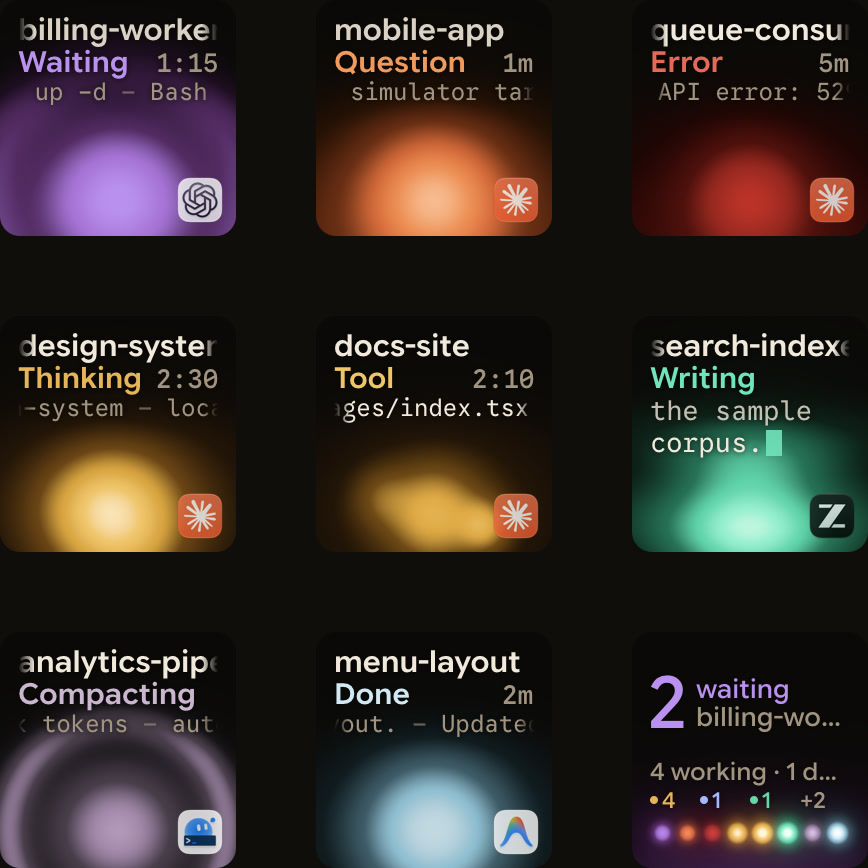
If you run several AI coding agents across terminals, desktop apps and SSH servers, Orbtile shows each session's state on a keypad, a phone or your screen. It drives the Logitech MX Creative Keypad, the same keypad as the standalone MX Keypad, directly over USB without Logi Options+. It runs on macOS 14.0 Sonoma or later on Apple silicon (M1 or later), or on Windows 11 (x64).
- Keypad over USB: Orbtile uses the nine LCD keys and two page buttons, and the keypad needs no account.
- Options+ hand-back: with Logi Options+ installed, your Options+ profile pauses while Orbtile holds the keypad and returns when you quit Orbtile or press
Control-Option-Command-K(Ctrl+Alt+Win+Kon Windows). - Phone pad: Orbtile Mobile turns an iPhone (iOS 17 or later) or an Android phone (Android 8.0+) into a status pad over your local network.
- On-screen popover:
Control-Option-Command-O(Ctrl+Alt+Win+Oon Windows) opens the menu bar or system tray popover with the same session tiles. - One key per session: keys 1 to 8 show Claude Code, Codex, ZCode, Antigravity desktop app and Kimi Code sessions, plus remote SSH hosts and Adapter API scripts.
- Waiting first: waiting sessions sort to the front, and tapping key 9 focuses the first waiting session.
- Answers from the keypad: for local Claude Code sessions, press Deny on key 7 or hold Allow on key 9 for 0.6 seconds.
- Remote sessions: SSH sessions are display-only, except Allow for Codex terminal approvals.
See Use the Logitech MX Creative Keypad without Logi Options+ and Your old Android phone as a status pad for coding agents.
FAQ
What happens if I uninstall Logi Options+ while using the MX Keypad or MX Creative Console?
According to Logitech support, the keypad cannot be used without Logi Options+, and the MX Creative Console dialpad keeps only a very limited set of basic actions. For AI coding agents, Orbtile is a separate app that drives the keypad over USB without Logi Options+.
Can I use the Logitech MX Keypad without signing in to a Logi ID account?
Yes. In Logi Options+, you can use the default profile and all actions from the pre-installed System plugin without signing in. You only need a Logi ID to download other plugins from the Logi Marketplace or to install another application profile.
How do I configure the MX Keypad for an application that has no Marketplace plugin?
Click the plus icon in the Logi Options+ profile bar and choose Application Profile. Select your app, or click Add Application to point to its executable, then choose Start With a Blank Template. Open All Actions in the right panel, select the System plugin and drag Keyboard Shortcut onto a key to record your shortcut.
How can I watch coding agents without buying an MX Keypad or running Logi Options+?
Orbtile runs on an Apple silicon Mac with macOS 14 or later, or a Windows 11 x64 PC. It shows your coding-agent sessions in its menu bar or system tray popover, or on an iPhone or Android phone running Orbtile Mobile. If you already have the MX Keypad, Orbtile also drives it over USB without Logi Options+.