
AI fatigue is the drained feeling after a day of steering AI coding agents. Much of the work becomes watching, judging and approving, and research shows that monitoring and interrupted work are effortful and stressful even when they look light. What helps: fewer approvals, check-ins at set times, and breaks away from the screen.
What AI fatigue feels like
You finish the day tired, yet you typed very little. The agents wrote most of the code. You read diffs, answered permission prompts, chose between options and kept track of which terminal needed you. By late afternoon small decisions feel heavy, it is hard to focus on anything long, and you feel busy without feeling productive.
That is a common response to a particular kind of work, not a diagnosis. Some people search for "ai burnout" when they feel this way, but this guide is not about any health condition. It is about ordinary tiredness across a working day. If the tiredness lasts for weeks, or follows you into evenings and weekends, talk to a doctor or someone you trust.
This guide is about energy through one day. The worry that agents dull your skills over months is a different question, covered in AI brain rot: are coding agents dulling your skills?.
Why supervising agents is tiring
Working with agents moves you from doing the task to supervising it. Three lines of research are relevant: a review of many vigilance studies, a contested idea about decisions, and a single lab study of interruptions.
Watching is hard mental work
Monitoring looks easy. You sit, you wait, you react when something happens. Vigilance researchers used to think so too. In a 2008 review in Human Factors, Warm, Parasuraman and Matthews note that vigilance tasks "have typically been viewed as undemanding assignments". Their review of the evidence points the other way: people rate the workload of vigilance as high, and physiological and self-reported measures show that vigilance tasks lower task engagement and raise distress, the review's word for stress caused by the task, not a diagnosis. The authors conclude that vigilance "requires hard mental work and is stressful", and say this applies to most human-machine systems that need human monitoring, especially those with automated parts.
In her 1983 paper "Ironies of Automation", Lisanne Bainbridge summed up earlier vigilance studies. She wrote that even a highly motivated person cannot keep effective visual attention on a source where very little happens for more than about half an hour.
These studies were about people watching displays and industrial processes, not developers. But the shape is familiar: long stretches where an agent needs nothing from you, then a prompt you must notice and judge.
Every approval is a small decision
"Decision fatigue" is the idea that each decision makes the next one harder. The best-known evidence comes from a 2011 PNAS study by Danziger, Levav and Avnaim-Pesso. They examined 1,112 judicial rulings by eight experienced judges sitting on parole boards. Within each session between food breaks, the share of favourable rulings fell from about 65% to nearly zero, and returned to about 65% after a break.
That finding is contested. In 2016 Andreas Glöckner showed with simulations that much of the pattern could come from a statistical artefact: favourable rulings take longer, so a judge who avoids starting a long case just before a break produces a similar curve. He concluded that the original effect is overestimated.
The broader theory behind it, called ego depletion, has also struggled in replications:
- A 2016 replication across 23 labs and 2,141 participants found an effect of d = 0.04, with a confidence interval that included zero.
- A 2021 project across 36 labs and 3,531 participants found a nonsignificant effect of d = 0.06 in its preregistered tests.
So the popular picture of willpower draining like a battery with each choice is not well supported. A safer, practical reading: every approval is an interruption that pulls your attention away from what you were doing, which is the subject of the next section. Fewer decisions, made at moments you choose, interrupt you less.
Interrupted work can be faster and more stressful
In a 2008 CHI study, Gloria Mark, Daniela Gudith and Ulrich Klocke interrupted 48 people, most of them German university students, while they answered emails in a simulated office task in a lab. Interrupted participants finished in less time with no difference in quality. The cost showed up elsewhere: they reported "more stress, higher frustration, time pressure and effort". After only 20 minutes of interrupted work, stress and frustration were already significantly higher.
That was a lab study, not a study of developers. But if the same holds for agent work, the output can look fine while the price shows up in how you feel at the end of the day.
What helps during the day
| What tires you | What to try |
|---|---|
| Watching agents work | Stop watching, and let one clear signal call you back |
| Many small approvals | Allow rules for routine commands, so fewer prompts reach you |
| Constant pings | Check in at set times instead of on every alert |
| No real pause | Short breaks away from the screen and away from the agents |
Cut the number of approvals
Many prompts in a day are for the same few commands: running tests, building, reading files. If you always approve them, approving by hand adds decisions and little safety.
- Write narrow allow rules for commands you always approve, such as your test and build scripts.
- Keep prompts for what deserves a look: deleting files, network calls, pushing code.
- Review your rules once a week and remove any that have grown too broad.
For how modes and rules work in Claude Code, see Claude Code permission modes: settings, flags and rules.
Check in at set times
An alert that arrives while you are deep in a task is an interruption, whatever it contains. You can choose when to look instead.
- Give agents larger, well-described tasks, so each one needs you less often.
- Look at your agents when you reach a natural stopping point, not mid-thought.
- Where your tools allow it, keep alerts for blocked sessions and check finished ones at your next stop.
Get notified when Claude Code needs approval or finishes covers the alert options. With several sessions, Run several Claude Code sessions and see which one needs you shows how to tell which one is waiting.
Do not stare at the stream
Since watching is hard work, avoid watching for its own sake. Reading an agent's output as it scrolls feels productive, but it is vigilance work with little to catch. Work on something else, such as a review, a design question or a test you want to write yourself, and let the waiting signal bring you back.
Take short breaks that are real breaks
A 2022 meta-analysis in PLOS ONE by Albulescu and colleagues pooled 22 study samples with 2,335 participants. Micro-breaks had small but significant effects, raising vigour (d = .36) and reducing fatigue (d = .35). The effect on overall performance was not significant (d = .16). For performance after highly depleting tasks, the authors suggest that recovery may need breaks longer than 10 minutes.
In practice:
- Stand up and look away from screens for a few minutes between tasks.
- Do not spend the break checking on agents. That is still supervision.
- After a long, demanding stretch, take a longer break rather than a quick one.
Close the day on purpose
Before you stop, leave each agent with a clear next step or stop it. A session left running overnight tends to invite one more check in the evening. A short written note on where each task stands makes the morning start easier too.
Where a status display helps
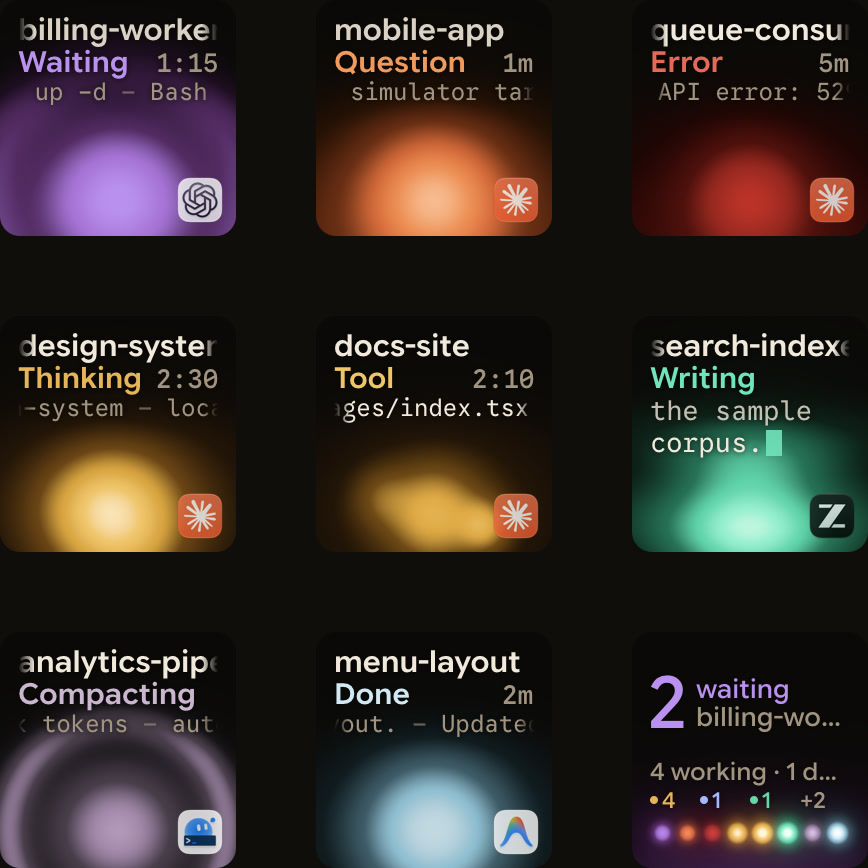
Part of the drain is the tour: switching windows to find out which agent needs you. Orbtile shows each coding-agent session as a key on the Logitech MX Creative Keypad, a tile on an iPhone or Android phone with Orbtile Mobile, or on your computer screen. Waiting sessions come first, so a glance replaces the tour, and a tap on key 9 focuses the first waiting session. For local Claude Code sessions, Focus mode lets you press Deny on key 7 or hold Allow on key 9 for 0.6 seconds. Orbtile runs on an Apple silicon Mac with macOS 14 Sonoma or later, or on Windows 11 (x64).
It does not reduce how many decisions you make. Allow rules and fewer check-ins do that. It makes the remaining ones easier to find.
FAQ
Is AI fatigue a medical condition?
No. AI fatigue is an informal name for feeling tired and drained after a day of steering AI tools. It is not a diagnosis. If the tiredness lasts for weeks or affects your life outside work, talk to a doctor.
Why am I tired when the agent wrote the code?
Supervising is work. Vigilance research finds that monitoring is rated as high workload and stressful, and interrupted work in a lab study raised stress and frustration within 20 minutes, even when output quality held up.
Is decision fatigue real?
The evidence is mixed. A well-known study of parole judges has been challenged as a statistical artefact, and large replications of ego depletion found effects close to zero. Either way, fewer prompts mean fewer breaks in your attention.
Does Orbtile reduce the number of approvals?
No. Allow rules in your agent do that. Orbtile shows which session is waiting and lets you answer supported local Claude Code permission requests from the keypad, so you spend less time searching for the prompt.