
Google Antigravity has a free tier with a weekly quota and three paid Google AI plans. Google AI Pro costs $20/month. Google AI Ultra costs $100/month for 5X the tokens of Pro, or $200/month for 20X. Pro and Ultra refresh their quota every five hours and can use AI credits for overages. Teams can use Gemini Enterprise instead, through Google Cloud consumption billing or Standard and Plus seats with $10/month and $15/month of pooled credits.
Google Antigravity plans and pricing at a glance
Individual accounts use Antigravity under terms derived from Google's Terms of Service. Teams use it under Google Cloud terms through Gemini Enterprise.
| Plan or tier | Monthly price | Quota refresh and rate limits | Token limit vs Pro | Overages and billing |
|---|---|---|---|---|
| Free & Google AI Plus | Free, or with Google AI Plus (price not listed) | Meaningful quota refreshed weekly, weekly rate limit | Not given | No AI credit overages |
| Google AI Pro | $20/month | High quota refreshed every five hours, higher weekly limit | Reference | Optional AI credits at Gemini Enterprise rates |
| Google AI Ultra ($100) | $100/month | Highest five-hour quota and weekly limits | 5X | Optional AI credits at Gemini Enterprise rates |
| Google AI Ultra ($200) | $200/month (was $250) | Highest five-hour quota and weekly limits | 20X | Optional AI credits at Gemini Enterprise rates |
| Gemini Enterprise Standard | Seat licence, includes $10/month pooled seat credits | First-party Gemini models draw from pooled seat credits | Not given | Managed overages, token billing for third-party models |
| Gemini Enterprise Plus | Seat licence, includes $15/month pooled seat credits | First-party Gemini models draw from pooled seat credits | Not given | Managed overages, token billing for third-party models |
| Google Cloud project and API | Invoiced Cloud Billing | Set by your project | Not given | Pay-as-you-go consumption billing |
What every plan includes, and what none of them offer:
- Every plan includes Gemini models such as Gemini 3.8 Flash as the core agent model.
- Every plan includes unlimited Tab completions and all product features, such as scheduled tasks and the CLI.
- Antigravity does not support bring-your-own-key or bring-your-own-endpoint for extra rate limits.
- Antigravity does not offer organisational tiers through a custom contract.
Individual Google AI Pro and Ultra tiers and token multipliers
Before 19 May 2026, individual users chose between two plans. The $20/month Google AI Pro plan gave "entry-level quota for experimentation". The $250/month Google AI Ultra plan gave the highest quota for using Antigravity as a "daily driver". Google then added a middle Ultra tier and cut the price of the top one:
- Accounts without Pro or Ultra get a meaningful quota, refreshed weekly.
- Google AI Pro refreshes its quota every five hours until the weekly limit is reached.
- The $100/month Google AI Ultra plan is aimed at lighter, regular development and gives 5X the tokens of Pro.
- The $200/month Google AI Ultra plan, down from $250/month, gives 20X the tokens of Pro.
- Both Ultra plans have the highest five-hour quota, the highest weekly rate limits and access to third-party models.
- Google says the 5X and 20X ratios also apply during promotional periods when it has excess capacity.
How Antigravity rate limits and shared model pools work
Baseline rate limits mainly depend on available capacity and are there to prevent abuse. Google may change them to manage capacity and stability. They track the work the agent does rather than a fixed number of prompts. Quick tasks therefore give you more prompts, and complex tasks use up more quota.
Shared Gemini pool vs fixed third-party rate limits
Gemini Flash and Gemini Pro used to have separate limits. Since May 2026 they share one Gemini pool, drawn down according to API pricing. Google's example: if Gemini Flash is 8x cheaper than Gemini Pro, you can use X tokens on Pro, 8X tokens on Flash, or any mix of the two. Because of capacity constraints, non-Gemini models stay on a separate fixed rate limit.
To check your usage, open View Usage in the model selector under the prompt box. It shows Weekly Limit Remaining and Five Hour Limit Remaining for Gemini Models and for Claude and GPT models. The Settings page also shows baseline quota usage by model.
AI credits and overage billing on Pro and Ultra
Google removed AI credits from the base Google AI plans and raised the base Gemini entitlements for Antigravity. On Google AI Pro and Ultra, purchased or promotional AI credits now work only as an overage mechanism. They are billed at standard Gemini Enterprise consumption pricing.
The AI Credit Overages setting on the Settings page controls what happens when a model's baseline quota runs out:
AI Credit Overages | Behaviour when baseline quota is exhausted |
|---|---|
Never | Never spends credits automatically, and waits for the baseline quota to refresh |
Always | Spends AI credits until the baseline quota refreshes, then switches back |
Model availability across Antigravity plans
Pick a reasoning model and a thinking level (Low, Medium or High) from the selector under the prompt box. Your choice persists across messages in a conversation. If you switch models mid-run, the agent keeps the previous model until the current turn ends or you cancel it.
| Reasoning model | Thinking levels | Free & Plus | Pro | Ultra | Enterprise |
|---|---|---|---|---|---|
| Gemini 4 Argon | Low, Medium, High | No | Paid plans, or trial with eligible premium devices | Yes | Yes |
| Gemini 3.8 Flash | Low, Medium, High, Fast label | Yes | Yes | Yes | Yes |
| Gemini 3.7 Flash | Low, Medium, High, Fast label | No | No | No | Yes |
| Gemini 3.6 Flash | Low, Medium, High, Fast label | No | No | No | Yes |
| Gemini 3.1 Pro | Low, High | No | No | No | Yes |
| Claude Sonnet 5.5 (thinking) | Enterprise: low, medium, high, max | No | Non-trial only | Yes | Admin opt-in |
| Claude Opus 5.5 (thinking) | Enterprise: low, medium, high, max | No | Non-trial only | Yes | Admin opt-in |
| Claude Sonnet 4.6 (thinking) | Not listed | Yes | Yes | No | No |
| Claude Opus 4.6 (thinking) | Not listed | Yes | Yes | No | No |
| GPT-OSS 120B | Medium | Yes | Yes | Yes | No |
Two more model rules:
- To move from a Google AI Pro trial to a paid Pro plan, which the Claude Sonnet 5.5 and Claude Opus 5.5 models need, you submit a request.
- Antigravity uses Nano Banana 2, which you cannot change, to generate images such as UI mockups and architecture diagrams.
Gemini Enterprise pricing, seat credits and Google Cloud billing
Gemini Enterprise runs every Antigravity session under Google Cloud's enterprise security controls, data residency guarantees and the Google Cloud Terms of Service. It supports the Antigravity App, the Antigravity CLI (agy) and IDE extensions for Visual Studio Code, Visual Studio, JetBrains, Zed, Xcode and Eclipse. The JetBrains, Zed, Xcode and Eclipse extensions are in Preview. The standalone Antigravity IDE is not supported. Legacy Gemini Code Assist extensions support only first-party Gemini models.
How organisations connect and pay:
- A Google Cloud project with an invoiced Cloud Billing account gives pay-as-you-go consumption billing.
- A Gemini Enterprise Standard or Plus seat licence includes first-party quotas, managed overages and admin controls.
- A seat licence needs no separate per-user Antigravity licence.
- First-party Gemini models are on by default and draw from pooled seat credits of $10/month on Standard and $15/month on Plus.
- Third-party Claude models need an administrator to opt in and are billed by token consumption.
Background models, thinking levels and token charges
You can use Anthropic Claude Opus 5.5 or Claude Sonnet 5.5 for the main reasoning work. Lightweight first-party Gemini models still run in the background for tasks such as context management and summaries, and these can incur charges.
On Enterprise, Claude Opus 5.5 and Claude Sonnet 5.5 have four thinking levels: low, medium (the default), high and max. In the App and IDE extensions, each level is a separate entry under Other Models, such as Claude Opus 5.5 (High). In agy, put the level in the model ID with --model, for example claude-opus-5-5-high. You can also set the level with --effort, or with /effort mid-session, which needs agy v1.2.11 or later.
Before buying Gemini Enterprise licences
An administrator must enable aiplatform.googleapis.com in the Google Cloud Console first. Wait about five minutes for it to take effect before completing licence purchases.
- Administrators need the
roles/discoveryengine.agentspaceAdminrole. - Everyone who uses Antigravity, administrators included, needs the
roles/discoveryengine.agentspaceUserrole. - The available locations are
global,usandeu, and image generation works only onglobalendpoints.
For agy flags, settings and permission rules, see Antigravity CLI (agy): settings and allow all permissions. For how Antigravity's apps and CLI compare with Anthropic's agent, see Google Antigravity vs Claude Code: what's the difference.
Watch Google Antigravity conversations on a keypad or phone with Orbtile
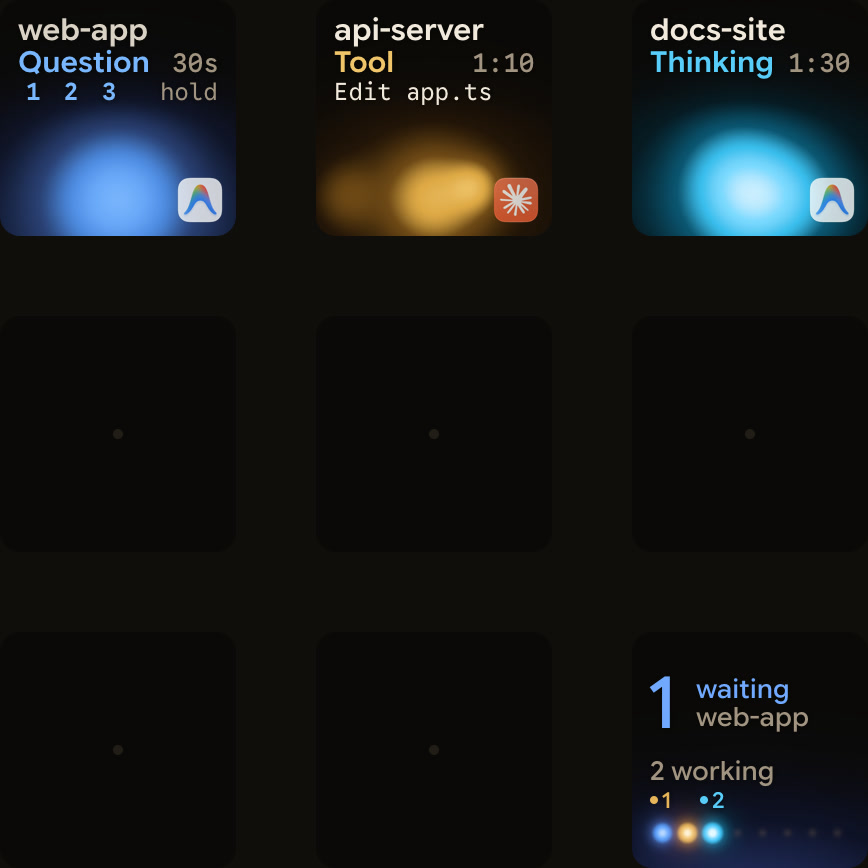
Orbtile shows your agent sessions on a Logitech MX Creative Keypad, an iPhone or an Android phone. It drives the keypad's nine LCD keys and two page buttons directly over USB, without Logi Options+ or an account. Phones use Orbtile Mobile, on iOS 17 or later or Android 8.0 or later. Orbtile runs on a computer with macOS 14.0 Sonoma or later on Apple silicon, or Windows 11 (x64).
- Each Antigravity desktop app conversation gets its own key with its title and state.
- From Orbtile 0.2.10, replies also appear as live typewriter text.
- Antigravity uses an azure blue working palette.
- From Orbtile 0.3.4, Antigravity's waiting states use the shared terracotta alarm colour.
- Waiting conversations move to the front, and a tap on key 9 focuses the first waiting one.
- To answer a question with numbered options, hold its key, pick options on keys 1, 2, 3 and 7, then hold Send on key 9.
- This works for up to four questions with two to four choices each, and
Sentmeans Antigravity acknowledged the reply. - Written answers and permission prompts stay on your computer.
- Antigravity IDE and CLI sessions do not appear automatically.
- A CLI hook script can report each Antigravity CLI session to Orbtile's local Adapter API.
- The same pad also shows Claude Code, Codex, ZCode and Kimi Code sessions.
To set up alerts for waiting agents, see Antigravity notifications: CLI alerts and waiting agents. To report CLI sessions yourself, see Show any script or agent on a keypad with the Orbtile Adapter API.
FAQ
How much does Google Antigravity cost for individual developers?
Google Antigravity has a free tier with a weekly quota. Google AI Pro costs 20 USD per month. Google AI Ultra costs 100 USD per month for 5X the tokens of Pro, or 200 USD per month for 20X. All plans include Gemini 3.8 Flash, unlimited Tab completions, scheduled tasks and the CLI.
How do Google Antigravity rate limits and AI credit overages work?
Baseline rate limits track the work the agent does rather than a fixed number of prompts. Gemini Flash and Gemini Pro share one pool drawn down by API pricing, while non-Gemini models have a separate fixed limit. On Google AI Pro and Ultra, purchased or promotional AI credits cover overages at standard Gemini Enterprise consumption pricing. The AI Credit Overages setting on the Settings page decides whether they are used, with a choice of Always or Never.
How is Google Antigravity priced in Gemini Enterprise?
Organisations can connect Antigravity to a Google Cloud project with an invoiced Cloud Billing account for consumption billing. They can also use Gemini Enterprise Standard or Plus seat licences, which need no separate per-user Antigravity licence. First-party Gemini models draw from pooled seat credits of 10 USD per month on Standard and 15 USD per month on Plus. Claude models need administrator opt-in and are billed by token consumption.
Does Orbtile show Google Antigravity sessions on a keypad or phone?
Yes. Orbtile follows conversations in the Antigravity desktop app and shows each one's title, state and live response text. You see them on a Logitech MX Creative Keypad, an iPhone or an Android phone, and Orbtile runs on macOS 14 or later on Apple silicon or Windows 11 x64. From the keypad you can answer up to four multiple-choice questions with two to four options each. Permission requests and written answers stay on your computer. Antigravity CLI and IDE sessions do not appear automatically, though a CLI hook script can report CLI sessions to Orbtile's local Adapter API.