
OpenAI Codex connects to local STDIO and remote Streamable HTTP Model Context Protocol (MCP) servers. Add one with codex mcp add, from the MCP servers settings in the ChatGPT desktop app or Codex IDE extension, or with an [mcp_servers.<server-name>] table in ~/.codex/config.toml. All three local clients share that configuration. OpenAI removed codex mcp-server, which hosted Codex itself as a server, but codex mcp for external tools remains.
Where Codex MCP servers work and how configuration is shared
MCP lets ChatGPT and Codex use tools and information from other systems. An MCP server describes its tools and handles requests. The ChatGPT desktop app, Codex CLI and Codex IDE extension share MCP configuration from ~/.codex/config.toml, and trusted projects can use .codex/config.toml.
| Surface | Connects to | Manage or inspect | Reads local config.toml |
|---|---|---|---|
Codex CLI (codex) | STDIO and Streamable HTTP servers | codex mcp, /mcp in the TUI, or config.toml | Yes |
| Codex IDE extension | STDIO and Streamable HTTP servers | Gear menu > MCP servers > Add server | Yes |
| ChatGPT desktop app | STDIO and Streamable HTTP servers | Settings > MCP servers > Add server, and /mcp in the composer | Yes |
| ChatGPT web | MCP tools through plugins only | Plugins tab | No |
User and project config.toml layers and precedence
Codex stores user-level configuration in ~/.codex/config.toml. To apply settings to one project or subfolder, add a .codex/config.toml file to the repo. Codex loads project .codex/ layers only when you trust the project. In untrusted projects, user and system config still load.
Precedence from highest to lowest:
- CLI flags and
--configoverrides. - Trusted
.codex/config.tomlfiles, from the project root down to the current working directory, with the closest winning. - Profile files selected with
--profile profile-name, stored as~/.codex/profile-name.config.toml. - User config in
~/.codex/config.toml. - Cloud-managed
config.tomldefaults delivered for the signed-in workspace. - System config in
/etc/codex/config.tomlon Unix. - Built-in defaults.
See OpenAI Codex CLI: install, commands, config.toml and codex exec and Share context between Claude Code and Codex.
Supported MCP transports and server instructions
Codex supports these MCP server features:
STDIOservers run as a local process started by a command, and they support environment variables.Streamable HTTPservers are reached at an address.- Both transports can use environment variables and bearer tokens for auth.
Streamable HTTPservers can also use OAuth, including CIMD and DCR, or ChatGPT session auth for trusted first-party servers.- Codex reads the
instructionsfield returned at initialization and uses it as server-wide guidance. - Server authors should put cross-tool workflows, constraints and server-wide rate limits in
instructions, and keep the first 512 characters self-contained. - Example servers include OpenAI Docs MCP, Context7, Figma (local and remote), Playwright, Chrome DevTools, Sentry and GitHub.
Add and manage MCP servers in the CLI, desktop app and IDE
Configure with the Codex CLI and TUI
Add a local STDIO server, such as Context7, from your terminal:
codex mcp add <server-name> --env VAR1=VALUE1 --env VAR2=VALUE2 -- <stdio server-command>
codex mcp add context7 -- npx -y @upstash/context7-mcp- Run
codex mcp listto view configured servers, orcodex mcp --helpto see the subcommands. - In the interactive TUI, type
/mcpto see active servers. - Run
codex mcp login <server-name>to sign in to an OAuth server. - Without a local browser, add
--no-browser, open the printed URL elsewhere, and paste the full redirect URL back into the terminal.
Configure in the ChatGPT desktop app and Codex IDE extension
- In the ChatGPT desktop app, open
Settings, thenMCP servers, thenAdd server. - Enter a name, choose
STDIOorStreamable HTTP, and give the command or URL. Save, then selectRestart. - In the desktop app, type
/mcpin the composer to view connected servers. - In the Codex IDE extension, open the gear menu, then
MCP servers, thenAdd server. - Fill in the same fields, save the server, then select
Restart extension.
Configure [mcp_servers.<server-name>] in config.toml
Define each server in an [mcp_servers.<server-name>] table in ~/.codex/config.toml or a trusted .codex/config.toml:
[mcp_servers.context7]
command = "npx"
args = ["-y", "@upstash/context7-mcp"]
env_vars = ["LOCAL_TOKEN"]

[mcp_servers.context7.env]
MY_ENV_VAR = "MY_ENV_VALUE"

[mcp_servers.figma]
url = "https://mcp.figma.com/mcp"
bearer_token_env_var = "FIGMA_OAUTH_TOKEN"
http_headers = { "X-Figma-Region" = "us-east-1" }

[mcp_servers.chrome_devtools]
url = "http://localhost:3000/mcp"
enabled_tools = ["open", "screenshot"]
disabled_tools = ["screenshot"] # applied after enabled_tools
default_tools_approval_mode = "prompt"
startup_timeout_sec = 20
tool_timeout_sec = 45
enabled = true

[mcp_servers.chrome_devtools.tools.open]
approval_mode = "approve"
output_token_limit = 30000
Key under [mcp_servers.<id>] | Type or values | Default | Details |
|---|---|---|---|
command | string | Required for STDIO | Command that starts the local STDIO process |
args | array | Not stated | Arguments for command |
env | table | Not stated | Environment variables for the server |
env_vars | array of strings or { name, source } tables | String entries use source = "local" | Extra environment variables to forward to a STDIO server |
cwd | string | Not stated | Working directory for the server |
url | string | Required for Streamable HTTP | Server address |
auth | oauth or chatgpt | oauth | Auth fallback after configured bearer tokens and authorization headers |
bearer_token_env_var | string | Not stated | Environment variable that holds the bearer token |
http_headers | table | Not stated | Static header values |
env_http_headers | table | Not stated | Headers filled from environment variables |
http_headers_helper | string | Not stated | Local command that prints a JSON object of headers |
environment_id | string | local | Use a registered ID for a remote executor |
startup_timeout_sec | number | 10 | Startup timeout in seconds; startup_timeout_ms is the alias in milliseconds |
tool_timeout_sec | number | 60 | Per-tool timeout in seconds |
enabled | boolean | Not stated | false disables the server without deleting it |
required | boolean | Not stated | Startup fails if this enabled server isn't ready |
startup_readiness | connection or catalog | connection | catalog lets a valid cached tool catalog satisfy startup |
enabled_tools | array | Not stated | Tool allow list |
disabled_tools | array | Not stated | Tool deny list, applied after enabled_tools |
omit_tools_from | array of direct, deferred or code_mode | Not stated | Omits the server's tools from those model-facing surfaces |
default_tools_approval_mode | auto, prompt, writes or approve | Not stated | Default approval for the server's tools |
tools.<tool>.approval_mode | auto, prompt, writes or approve | Not stated | Per-tool approval override |
tools.<tool>.output_token_limit | positive number | Not stated | Token budget for one tool's output, before the standard 20% serialisation allowance |
supports_parallel_tool_calls | boolean | false | Marks every tool on the server as safe to run in parallel |
tool_input_schema_max_bytes | positive integer | 5,000 bytes | Compacts a tool's input schema above this size |
Environment forwarding, dynamic HTTP headers and startup readiness
For a STDIO server, env_vars takes plain names or { name, source } tables. A plain name or source = "local" reads Codex's local environment. source = "remote" reads the remote executor and requires remote MCP STDIO:
env_vars = ["LOCAL_TOKEN", { name = "REMOTE_TOKEN", source = "remote" }]http_headers_helperworks only for locally connected HTTP MCP servers.- After a same-origin
401or403, Codex refreshes the helper headers once and retries only if the values changed. - Explicit bearer tokens and OAuth credentials take precedence over a helper-provided
Authorizationheader. - If no credential source resolves, Codex connects to the server without authentication.
- The top-level
mcp_optional_startup_grace_msdefaults to1000. - Setting it to
0waits for each server'sstartup_timeout_sec. Required servers always use their startup timeouts.
Tool approvals, elicitations and memory settings
- The
writesapproval mode prompts for tools that are not marked read-only. approval_policy.granular.mcp_elicitations = truelets MCP elicitation prompts surface instead of being auto-rejected.features.skill_mcp_dependency_installallows prompting for and installing missing MCP dependencies for skills. It is stable and on by default.memories.disable_on_external_context = truekeeps threads that use external context, such as MCP tool calls, web search or tool search, out of memory generation.
See Approve agent tool calls without switching windows.
Authenticate Streamable HTTP servers with OAuth, CIMD and DCR
Pre-registered OAuth clients and callback selection
Pass --oauth-client-id to use a pre-registered client. For a confidential client, also pass --oauth-client-secret:
codex mcp add example --url https://mcp.example.com --oauth-client-id my-client --oauth-client-secret "$MCP_CLIENT_SECRET"Codex stores the secret in config.toml, so keep that file private. Register the exact callback that codex mcp add prints.
- Codex uses
mcp_oauth_callback_url, orhttp://127.0.0.1/callbackwhen unset, with a callback ID appended. - Codex uses the shared
/callbackpath when the authorization server advertisesauthorization_response_iss_parameter_supported: true. - Without issuer support, Codex appends a server-specific callback ID.
- Codex checks any returned
issbefore exchanging the code. A mismatchedissalways fails. - A missing
issfails when the server advertises issuer support. mcp_oauth_callback_urlsets a custom callback base URL, such as a devbox ingress URL.- For
http://127.0.0.1callbacks without a port, Codex inserts the active listener port during authorisation, per RFC 8252, Section 7.3. mcp_oauth_callback_portsets a fixed global listener port. An explicit port in the callback URL doesn't configure the listener.mcp_servers.<server-name>.oauth.callback_portoverrides the global port for one server.- Set
scopesin config, or pass--scopesfor one login withcodex mcp login <name>. - Without either, Codex uses the scopes from the server's
WWW-Authenticatechallenge, then the protected resource metadata.
Automatic CIMD and DCR client registration
A configured client ID is used and skips registration. Otherwise, Codex picks Client ID Metadata Documents (CIMD) when the server advertises client_id_metadata_document_supported: true, includes none in token_endpoint_auth_methods_supported, and the callback is a supported loopback URL. If not, it uses Dynamic Client Registration (DCR). CIMD uses https://chatgpt.com/oauth/codex/client.json or https://chatgpt.com/oauth/codex/<callback_id>/client.json. You can force a method for one login, and the choice isn't saved:
codex mcp login <server-name> --oauth-client-registration cimd # or dcrPlugin-bundled MCP servers, Work Cloud limits and codex mcp-server removal
Plugin-provided MCP servers
Plugins can bundle MCP servers in their manifest. The plugin launches them, so user config doesn't set their transport command. You control their enabled state and tool policy under plugins.<plugin>.mcp_servers.<server>:
[plugins."sample@test".mcp_servers.sample]
enabled = true
default_tools_approval_mode = "prompt"
enabled_tools = ["read", "search"]

[plugins."sample@test".mcp_servers.sample.tools.search]
approval_mode = "approve"
Plugin HTTP MCP servers can declare OAuth in .mcp.json with clientId, callbackUrl and callbackPort. callbackPort overrides mcp_oauth_callback_port, and if neither is set, Codex picks an ephemeral port.
Enterprise requirements, hooks and Work Cloud
- In Local computer access with Work Cloud, the enterprise
mcp_serversrequirement applies to local executors. - Local execution settings don't carry over to Work cloud containers or dots cloud computers.
- Work Cloud supports admin-defined MCP hooks on the cloud coordinator for supported lifecycle and tool events.
- MCP hooks don't provide a complete Compliance API audit trail.
- Command hooks and hooks from local config or plugins aren't supported with cloud orchestration.
- In local config,
hooks.<Event>[].hookssupports command and MCP tool hooks. See Claude Code and Codex hooks: payload reference.
Removal of codex mcp-server and migration to app-server
OpenAI removed the codex mcp-server command and the standalone codex-mcp-server binary, which hosted Codex as an MCP server. Integrations that launch either one must migrate before upgrading Codex. External MCP servers managed with codex mcp are still supported. The replacement is the Codex app server, which handles authentication, conversation history, approvals and streamed agent events. It uses its own JSON-RPC protocol and isn't an MCP server or a drop-in replacement for an MCP client. The app server is experimental and not supported for production workloads.
Watch Codex sessions on a keypad or phone with Orbtile
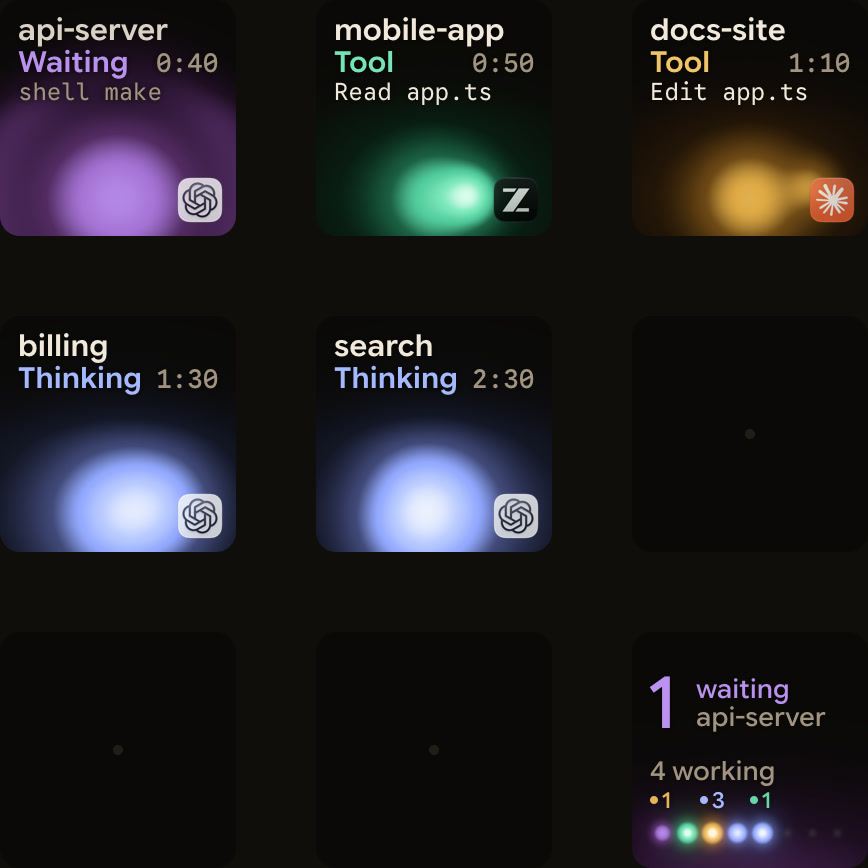
Orbtile puts Codex desktop threads, terminal codex sessions and codex exec runs on a Logitech MX Creative Keypad, an iPhone (iOS 17+) or an Android phone (Android 8.0+) with Orbtile Mobile. It runs on a computer with macOS 14.0 Sonoma or later on Apple silicon, or Windows 11 (x64). The same pad also shows Claude Code, ZCode, Kimi Code and Antigravity sessions, and sessions on remote servers over SSH.
- Nothing to install: Orbtile reads Codex thread files and Codex's own signals for session state, tool labels, waits and assistant text.
- Optional hooks, installed from Settings > Agents > Codex and trusted in Codex, add a Compacting state and slightly earlier updates.
- Working sessions glow cool blue. Waiting and permission states glow magenta-violet and move to the front.
- Tap a session key to open its window, or tap key 9 to focus the first waiting session.
- Hold a session key for 0.6 seconds to open Focus mode across all nine keys.
- Compatible Codex desktop chats offer the app's Allow or Deny decisions for command approvals.
- Supported multiple-choice questions in Codex desktop chats can be answered from the keypad.
- Terminal command approvals offer Allow only. To decline one, answer in the terminal.
- Other waits and unsupported questions say Answer on computer.
FAQ
Where does OpenAI Codex store MCP server settings?
Codex stores personal MCP server settings in ~/.codex/config.toml, and trusted projects can add their own in .codex/config.toml. The ChatGPT desktop app, the Codex CLI and the Codex IDE extension share this configuration. ChatGPT on the web doesn't read these files and uses MCP tools only through plugins.
What is the difference between codex mcp and the removed codex mcp-server command?
The codex mcp command manages the external STDIO and Streamable HTTP MCP servers that Codex connects to, and it is still supported. The removed codex mcp-server command and codex-mcp-server binary hosted Codex itself as an MCP server. Integrations that used them must migrate to the experimental Codex app server, which uses its own JSON-RPC protocol.
How do I sign in to an OAuth MCP server in the Codex CLI?
Run codex mcp login with the server name in your terminal. Without a local browser, add the no-browser flag, open the printed URL in a browser elsewhere, and paste the full redirect URL back into the terminal.
How does Orbtile handle Codex sessions and approvals on a keypad or phone?
Orbtile shows Codex desktop threads, terminal sessions and codex exec runs on a Logitech MX Creative Keypad, an iPhone or an Android phone, and moves waiting sessions to the front. Compatible Codex desktop chats offer Allow or Deny for command approvals and take supported multiple-choice answers. Terminal command approvals offer Allow only, and other waits say Answer on computer.