
Claude Code runs background work in three main ways. Claude can hand a side task to a subagent, which starts in the background by default and returns a summary. You can move a whole session to the background with claude --bg, /bg or ← on an empty prompt, then watch it in agent view with claude agents. A long Bash command can also run in the background while you keep prompting: press Ctrl+B.
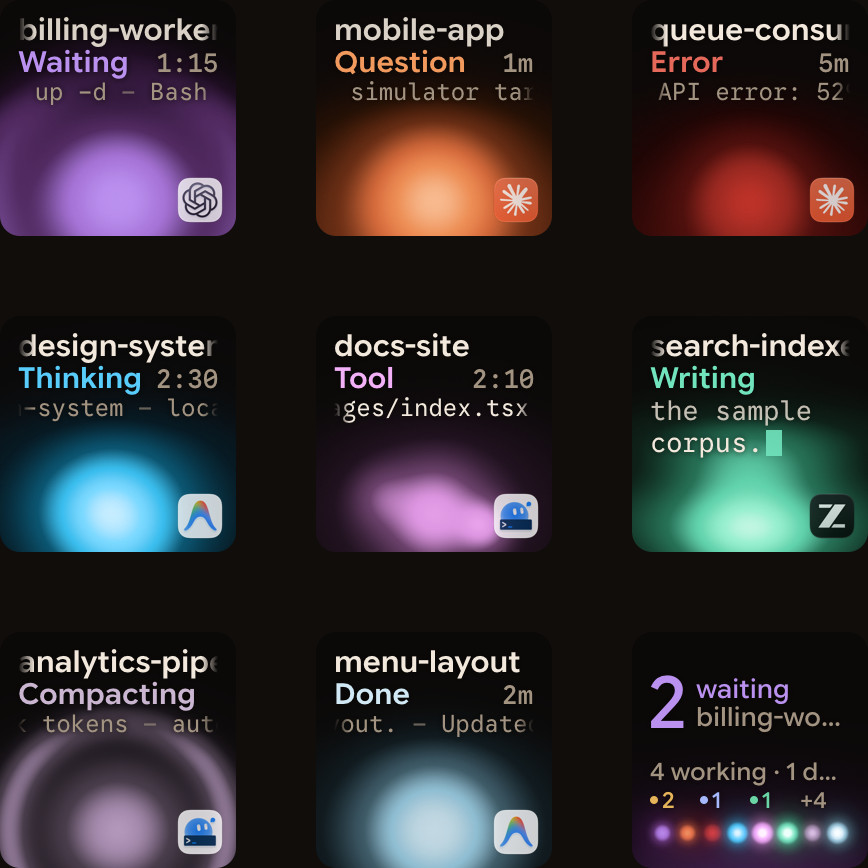
Inside a session, /tasks lists background shells and subagents. Hooks such as SubagentStop and Notification let you react when one finishes or needs you. To see which session is waiting without switching windows, Orbtile shows them on a Logitech MX Creative Keypad or an Android phone.
Ways to run background agents and tasks in Claude Code
Anthropic lists several ways to run work in parallel. They differ in who coordinates the work and where it runs.
| Approach | What it runs | How you start or check it | Use it when |
|---|---|---|---|
| Subagents | Delegated workers inside one session, each with its own context | Claude calls the Agent tool. Check with /tasks or the @ typeahead | A side task would flood your main conversation |
| Agent view | Background sessions that need no open terminal. Research preview | claude --bg, /bg, or claude agents | You have several independent tasks and want to step in only when one needs you |
| Background Bash | One shell command, without spawning an agent | Ctrl+B, or Claude sets run_in_background: true. Check with /tasks | Long builds, tests or dev servers |
| Dynamic workflows | A script that runs many subagents and cross-checks their results | The Workflow tool. Check with /workflows | Codebase-wide audits, large migrations or cross-checked research |
| Agent teams | Coordinated sessions with a shared task list and messaging, run by a lead | Experimental and disabled by default | You want Claude to split a project and keep the workers in sync |
| Projects | Parallel threads at claude.ai/code or in the desktop app | In the cloud, or on your computer through Remote Control. Public beta on Pro, Max and Ultra | Work spans days or weeks and should keep running when your computer is off |
A few related tools help with parallel work:
- Worktrees give each session its own git checkout, so parallel sessions edit separate copies of the files.
- The
/batchskill has Claude split one large change into 5 to 30 subagents, each in its own worktree. /subtaskstarts a forked subagent that inherits your full conversation context./forkcopies the whole session into a new background session that runs alongside the original.- Running several sessions or subagents at once multiplies token usage.
Spawn and configure background subagents
Claude delegates through the Agent tool. With nothing configured, a subagent that Claude spawns from your main conversation starts in the background. Each subagent works in its own context window and returns a summary to the conversation that started it.
- The
Agenttool needs no permission prompt, so launching a subagent doesn't stop to ask you. - A foreground subagent passes its permission prompts to you as they come up.
- A background subagent shows its prompt in your main session and names the subagent that is asking.
- Press
Escto deny that one tool call without stopping the subagent.
Built-in subagents and how to restrict them
Claude Code ships with built-in subagents. Explore is a fast, read-only agent for searching code. Plan is a read-only research agent that Claude uses during plan mode. general-purpose handles complex, multi-step tasks. claude is a catch-all with every tool available to subagents, and agent view uses it for dispatched sessions unless you set another default agent.
To block one built-in type, add it to permissions.deny, for example Agent(Explore). To block all delegation, deny the Agent tool itself.
Create custom subagents in .claude/agents/
A custom subagent is a Markdown file with YAML frontmatter. Only name and description are required, and the body becomes the subagent's system prompt. Project subagents live in .claude/agents/, and user subagents in ~/.claude/agents/ apply to all your projects. When two subagents share a name, Claude Code uses the higher-priority one. Managed settings come first, then the --agents CLI flag, project subagents, user subagents and, last, a plugin's agents/ directory.
Example .claude/agents/test-runner.md:
---
name: test-runner
description: Runs test suites and diagnoses failures. Use after modifying code.
tools: Read, Grep, Glob, Bash
model: sonnet
background: true
isolation: worktree
---

Run the relevant test suite, inspect failures, and return root cause and fix.| Field | Required | What it controls |
|---|---|---|
name | Yes | A unique ID of at most 256 characters. It can't contain : |
description | Yes | When Claude should delegate. Claude Code warns at startup when combined custom descriptions exceed 15,000 tokens |
background | No | true keeps the subagent in the background even when Claude asks to wait for it |
isolation | No | worktree runs the subagent in a temporary git worktree |
tools, disallowedTools | No | The tools it can use, and tools to remove from that list |
model | No | sonnet, opus, haiku, fable, a full model ID such as claude-opus-5-5, or inherit |
maxTurns | No | The maximum number of agentic turns before the subagent stops |
Once an agent directory exists, Claude Code picks up edits to its files within a few seconds, with no restart. See Git worktrees for parallel coding agents: Claude Code and Codex.
Start and manage background sessions in agent view
Background sessions are full conversations run by a background service called the supervisor. They keep working after you close agent view or your terminal. They survive auto-updates and sleep, but shutting down or restarting your computer stops them.
- From the shell, run
claude --bg "task"or its long form,claude --background. - Add
--agent <name>to run a named subagent as the session's main agent. - Inside a session, run
/bgto move the conversation to the background. - Press
←on an empty prompt to background the session and open agent view. - Run
claude agentsand type a prompt in the input at the bottom to dispatch a new session. - While sessions wait on you, the footer counts them, such as
← 2 agents.
Peek, reply, attach and run CLI management commands
Agent view puts the sessions that need you at the top, with Ready for review and Needs input above Working and Completed. A Haiku-class model writes a one-line summary for each row.
- Press
Spaceto peek at a session and type a reply. - A reply of exactly
/stopstops the session at once. - A reply doesn't answer a permission prompt, so attach with
→to answer it. - Press
Enteror→to attach, and←on an empty prompt or/exitto detach. - Press
Ctrl+Xto stop a session, thenCtrl+Xagain within two seconds to delete it from the list.
The same sessions can be managed from the shell:
claude agents --json --all
claude attach 7c5dcf5d
claude logs 7c5dcf5d
claude stop 7c5dcf5d
claude rm 7c5dcf5d
See Claude Code agent view: run and watch background sessions.
Run background Bash commands and track work with /tasks
Background Bash commands run while you keep prompting:
- Press
Ctrl+Bto move a running Bash command to the background, or press it twice inside tmux. - You can also ask Claude to run a command in the background, and Claude can set
run_in_background: trueitself. - The output goes to a file, which Claude reads with the
Readtool. - The
Monitortool runs a command in the background and feeds each output line back to Claude. - A command that reaches its timeout moves to the background instead of stopping, unless it starts with
sleep. - In a local terminal, desktop app or VS Code session, background commands have no time limit.
- In an unattended session, such as a
-prun or a cloud session, a background command gets 30 minutes, or up to 2 hours if Claude asks. - Background tasks stop automatically if their output exceeds 5GB.
Manage running subagents and shells in the current session
/taskslists everything running in the background of the session, including finished subagents.- From
/tasksyou can check on, attach to or stop each item. - Named background subagents show their status in the
@typeahead. - Claude can stop a background task or a named background agent with the
TaskStoptool. - Press
Ctrl+X Ctrl+Ktwice within 3 seconds to stop all running background subagents in the session. - Set
CLAUDE_CODE_DISABLE_BACKGROUND_TASKS=1, or start in bare mode, to turn off background commands andCtrl+B.
Automate background agents with Claude Code hooks
Hooks from settings files, managed policy settings and plugins also run inside subagents. When a subagent calls a tool, PreToolUse and PostToolUse hooks fire as usual. Their input carries agent_id and agent_type, so your script knows which subagent fired them.
| Hook event | When it fires | matcher filter |
|---|---|---|
SubagentStart / SubagentStop | A subagent starts or finishes | Agent type, such as general-purpose, Explore, Plan, a custom name or ^my-plugin:reviewer$ |
TaskCreated / TaskCompleted | A task is created with TaskCreate, or marked completed | None |
Notification | Claude Code sends a notification | Type, such as permission_prompt, idle_prompt, agent_needs_input or agent_completed |
{
  "hooks": {
    "SubagentStop": [{
      "matcher": "*",
      "hooks": [{"type": "command", "command": "jq -c '{agent_id: .agent_id, agent_type: .agent_type, cwd: .cwd}' >> ~/.claude/subagents.log"}]
    }],
    "Notification": [{
      "matcher": "agent_needs_input|permission_prompt",
      "hooks": [{"type": "command", "command": "osascript -e 'display notification \"Agent needs input\" with title \"Claude Code\"'"}]
    }]
  }
}- A command hook with
"async": trueruns in the background without blocking. - A command hook with
"asyncRewake": trueruns in the background and wakes Claude on exit code2. - Agent hooks, with
"type": "agent", spawn a subagent that can check conditions with tools likeRead,GrepandGlob. - Agent hooks are experimental, and their default timeout is 60 seconds.
See Claude Code hooks: events, matchers, settings and handlers.
Watch background sessions and subagents on a keypad or phone with Orbtile
Orbtile shows each Claude Code session, background sessions included, on a Logitech MX Creative Keypad or an Android phone with Orbtile Mobile. It drives the keypad's nine LCD keys and two page buttons over USB, without Logi Options+. It runs on a Mac with Apple silicon and macOS 14 or later, or a Windows 11 PC (x64). The phone needs Android 8.0 or later.
- Install the Claude Code plugin in Settings > Agents > Claude Code on a Mac, or with its Install button on Windows.
- Restart Claude Code sessions that were already running, so they load the plugin.
- Turn on Show background sessions, so scheduled or headless runs without a window get keys too.
- Keys 1 to 8 show each session's name, state and latest words over an animated Frosted orb.
- A waiting Claude Code session glows terracotta and moves to the front.
- Tap key 9 to open the first waiting session.
Hold a session key for 0.6 seconds to open Focus mode. Key 2 then shows the session's subagent count with activity dots.
- Press key 2 to open the subagents view, with one subagent on each of keys 1 to 8.
- Each subagent key shows its state, current tool or command, streamed text and elapsed time.
- Tap a subagent to open its own Focus page.
- Tap key 9 to go back to Focus mode, or hold key 9 to go back to the grid.
- For a local session, press Deny on key 7 or hold Allow on key 9 for 0.6 seconds.
- For a multiple-choice question, tap options on keys 1, 2, 3 or 7, then hold Send on key 9.
- After you stop an agent, its subagent count can stay high for up to 30 minutes.
See Run several Claude Code sessions and see which one needs you and Approve agent tool calls without switching windows.
FAQ
How do I run a Claude Code session or command in the background?
From your shell, run claude with the bg flag and a prompt. Inside an open session, run the bg slash command, or press the Left Arrow key on an empty prompt. To move a running Bash command to the background, press Ctrl+B, or press it twice inside tmux.
What is the difference between a background subagent and a background session in Claude Code?
A background subagent is started by Claude through the Agent tool inside one session. It works in its own context window and returns a summary to that conversation. A background session is a separate, full Claude Code conversation run by a background service. It keeps running without a terminal, and you manage it with claude agents.
How do I stop background subagents or tasks in Claude Code?
Run the tasks slash command to list background shells and subagents and stop any of them. Press Ctrl+X Ctrl+K, then press it again within 3 seconds, to stop all running background subagents. For a background session, press Ctrl+X on its row in agent view, or run claude stop with its ID.
How does Orbtile display Claude Code background sessions and subagents?
Turn on Show background sessions in Orbtile's settings. Background sessions then get their own keys on a Logitech MX Creative Keypad, or tiles on an Android phone with Orbtile Mobile. Hold a session key for 0.6 seconds to open Focus mode, then press key 2 to see each subagent's state, current tool, live text and elapsed time.