
Google Antigravity runs coding agents in parallel in four ways. You can start several conversations at once, let one agent spawn background subagents with invoke_subagent, or hand a hard problem to /boost or a large project to /teamwork. Git worktrees keep agents out of each other's files. In the CLI, /agents, Alt+J and Ctrl+K let you watch and approve subagents.
Multi-agent ways to work in Google Antigravity
Antigravity comes as the Antigravity App, the standalone Antigravity IDE and the Antigravity CLI (agy). Each can run more than one agent at a time.
| Method | Surface | How to start | Isolation | Best for |
|---|---|---|---|---|
| Parallel conversations | App, IDE, CLI | Cmd+N (Ctrl+N), the Agent Manager or agy | App projects: Local mode or New worktree mode | Independent features or bug fixes |
| Background subagents | App, CLI | invoke_subagent, or /browser | inherit, branch (Git worktree) or share | Parallel research and builds |
| Boost | App, CLI (paid plans) | /boost | A primary orchestrator splits work into verifiable subtasks for subagents | Concurrency bugs, algorithms, refactors and root-cause tracing |
| Teamwork | App, CLI (paid plans) | /teamwork | A dedicated project folder, with each file assigned to one Worker | Large, multi-day projects and simulations |
Projects, worktrees and the Agent Manager
In the Antigravity App, agents work inside Projects. A project sets repository boundaries, file scopes and security permissions. To create one, click the New Project icon in the left sidebar, add local folders or Git repositories, and click Create. Then choose a mode:
Local modelets the agent work directly in your active folders.New worktree modegives the agent an isolated Git worktree.
If you choose Worktree under Settings > Projects for a folder without Git, Antigravity uses the existing local folder instead. Standalone conversations outside a project run in a local scratch directory.
App conversation shortcuts:
Cmd+N(Ctrl+Non Windows and Linux) starts a new conversation.Cmd+K(Ctrl+K) searches past conversations by title or full text.Option+UpandOption+Down(Alt+UpandAlt+Down) move between conversations in the sidebar.
In the standalone Antigravity IDE, Cmd+E (Ctrl+E) toggles between the editor and the Agent Manager. You can also open the Agent Manager from the top bar, or use Focus Editor or Open Editor to return. See Google Antigravity IDE: editor, agents and permissions.
Spawn and configure background subagents
A primary agent in the App or CLI can call invoke_subagent to start background subagents that run alongside it:
- Each subagent starts with its own role and initial prompt.
- A subagent does not inherit the parent's conversation history.
- It can
inheritthe parent's workspace,branchinto an isolated Git worktree, orsharedirectory storage. - In the CLI, the main agent decides each subagent's tools, file write access and MCP permissions.
Antigravity has three built-in subagents:
researchhandles codebase research and file navigation.browserruns sandboxed browser tests, and you start it only with/browser.selfis a clone of the calling agent.
Custom Markdown subagents and YAML frontmatter
You can create a transient subagent during a session with the define_subagent tool. For reusable subagents, save a Markdown file with YAML frontmatter. The system prompt goes in the Markdown body.
| Scope | Path |
|---|---|
| Workspace | .agents/agents/<name>.md or .agents/agents/<name>/agent.md |
| Global | ~/.gemini/config/agents/<name>.md or ~/.gemini/config/agents/<name>/agent.md |
| Plugins | plugins/<plugin_name>/agents/ |
---
name: code-auditor
description: Specialized subagent for security audits, static analysis, and code quality reviews.
tools: [view_file, grep_search, run_command]
subagent: true
mainAgent: false
model: pro
commandExecutionPolicy: sandbox
skills: [skills/security-checklist]
---

You are an expert security auditor. Inspect code for vulnerabilities without altering files.| Property | Type | Default | Controls |
|---|---|---|---|
name | string | Required | The agent's name |
description | string | Required | What the agent is for |
tools | string[] | [] | Permitted tools. A misspelled name can make the subagent hang. |
mainAgent | boolean | true | Whether you can pick it as the primary agent |
subagent | boolean | true | Whether invoke_subagent can spawn it |
model | string | inherit | inherit, flash or pro |
commandExecutionPolicy | string | sandbox | off, auto, eager or sandbox |
mcpServers | object[] | [] | Custom MCP servers |
skills / plugins | string[] | [] | Skills or plugin dependencies |
Subagent states, messages and nesting
A subagent is in one of three states:
Runningmeans it is actively executing.Idlemeans it has finished, sent its result to the parent and paused. A new message wakes it, and it keeps its earlier context.Killedmeans it was permanently stopped. Its temporary worktrees are cleaned up, and its transcript stays readable in JSONL logs.
Agents can message their parent, their subagents and peer agents whose ID they know. They can also read each other's transcripts. Subagents can nest up to 10 levels deep.
Monitor and approve subagents in the App and CLI
In the Antigravity App, the subagent panel shows each subagent. You can message one directly or click Stop Subagent to stop it.
In the CLI, run /agents to open the agents panel. It lists each subagent's Identifier, Role, State and Step. The states are running, done, error and killed.
- Highlight a subagent and press
Enterto open its Subagent Detail View. - The Detail View shows the subagent's internal thoughts, tool calls and execution output.
- Press
Escto go back to the list. - Press
Kto stop a running subagent and its child threads. - Press
Ato approve orDto deny a pending request from the list. - To message a subagent, start your prompt with
@and its name, for example@research:API-Key-Header-Researcher Also check the tests. - Use
/tasksfor background work that is not an agent, such as shell commands and/btwqueries.
| CLI shortcut | Action |
|---|---|
Alt + J | When the status bar notification blinks, jumps to the next subagent waiting for approval |
Ctrl + K | Approves the pending action from the inline notification without switching panels |
See Google Antigravity CLI: commands, settings and permissions.
Multi-agent orchestrators: /boost and /teamwork
Boost deep reasoning (/boost)
/boost is for on-demand deep reasoning while you pair program. It runs on paid plans in the App and the CLI, in three phases:
- Strategy: a primary orchestrator reads your prompt, inspects the workspace and splits the problem into verifiable subtasks.
- Execution: subagents take the subtasks, covering implementation, read-only investigation and local builds and tests.
- Synthesis: the results are combined and checked against full test suites. If a check fails, the errors feed into the next round.
Google suggests it for race conditions and deadlocks, lock-free data structures, refactors across many files and tracing a failure without changing code.
Teamwork agent teams (/teamwork)
/teamwork runs a team of agents on paid plans in the App and the CLI. It suits large software projects, multi-day work, complex simulations, refactors across many files and open-ended maths and research problems.
/teamwork Design and implement a cycle-accurate memory controller with lockstep simulation tests.It runs in two phases:
- Scoping interview: the main agent asks about scope, requirements, checks, acceptance criteria and the working directory. It then writes a prompt artifact for you to approve.
- Execution: after you approve, the agents run the milestones on their own.
The team tracks its work in Request, Project plan and Progress artifacts. By default it works in ~/teamwork_projects/{PROJECT_NAME}. Each subagent gets its own scratch directory, and each file belongs to one Worker, so no two Workers edit the same file.
| Role | Responsibility |
|---|---|
Sentinel | Coordinates the run, routes tasks, posts progress updates and spawns the Success Auditor |
Project Orchestrator | Splits the brief into milestones, runs parallel tracks and hands off to a fresh successor between milestones |
Explorers | Research the repository and evaluate candidate solutions without changing files |
Workers | Implement components, refactor code and write unit tests |
Critic | Reviews code for correctness, completeness, robustness and style |
Challenger | Stress-tests code with adversarial tests, edge cases and failure paths |
Auditor | Checks work against the integrity mode (development, demo or benchmark) and real command output |
Success Auditor | Runs a final end-to-end check before the project is presented to you |
Plans, permissions, hooks and Remote Control across agents
Implementation plans and artifact review
In the App, Planning mode organises work into task groups and implementation plan artifacts. Fast mode acts directly, with no planning phase. You can also ask for a plan at any time with /plan. In the CLI, Shift + Tab cycles through the auto, plan, default and accept-edits modes, and Ctrl + R opens Artifact Review.
Plan Review Policy sits under Settings > General. It has two options: Request review (shown as Always Ask) and Always proceed (shown as Always Proceed). After /plan, the agent always waits for your approval. Comments you add to a plan appear as a chip, such as 2 Comments, on your next message. Click Proceed on the plan card, or reply "proceed" if the card has no button.
Permission rules and inheritance
Antigravity checks action(target) rules such as read_file, write_file, read_url, execute_url, command and mcp. Business and enterprise accounts also have unsandboxed. Conflicting rules follow the order Deny > Ask > Allow.
In the App, Settings > General > Global Permissions > Permission Preset offers Request Review, Default, Auto and Turbo. Each project under Settings > Projects can use Inherit Global or set its own preset.
- Subagents inherit the parent's command prefixes, file scopes and sandbox settings.
- Parent agents keep full access to their subagents' workspaces, including isolated Git worktrees.
- When a subagent needs authorisation, the request bubbles up to the main UI or the subagent panel.
See Google Antigravity MCP servers: set up and manage tools.
Lifecycle hooks for multi-agent workflows
Hooks run your own scripts at set points. They live in .agents/hooks.json for a workspace or ~/.gemini/config/hooks.json globally, in the App, the CLI and the IDE. The events are SessionStart, PreToolUse, PostToolUse, PreInvocation, PostInvocation and Stop.
Each hook receives JSON on stdin. It includes conversationId, workspacePaths, transcriptPath, artifactDirectoryPath, modelName and lastUserInput.
A matcher regex on PreToolUse or PostToolUse can target the multi-agent tools: invoke_subagent, define_subagent, send_message, manage_subagents and manage_task. On Stop, fullyIdle is true only when the agent and all background commands and tasks have finished. A Stop hook can keep the agent working by returning this on stdout:
{
  "decision": "continue",
  "reason": "Not done yet"
}
Remote Control across concurrent sessions
Antigravity Remote Control lets you drive your Antigravity desktop sessions and CLI instances from a web browser. On a phone, you can install the web app to your home screen to get push notifications when agents finish or need input.
- In the App, turn on
Enable Remote Controlin the Application section of Settings. - In the CLI,
/remote-controloragy --remote-controlgives each terminal session its own session ID and hostname, so several can run at once. agy remote-control startruns one always-on background service per machine.
Watch Antigravity conversations on a keypad or phone with Orbtile
With several Antigravity conversations open, it is hard to see which one is waiting for you. Logi Options+ can map Antigravity shortcuts such as Cmd+E to keys on the Logitech MX Creative Keypad. Click APPLICATION PROFILE, choose the app (or ADD APPLICATION), click START WITH A BLANK TEMPLATE, then use the KEYBOARD SHORTCUT action under KEYBOARD.
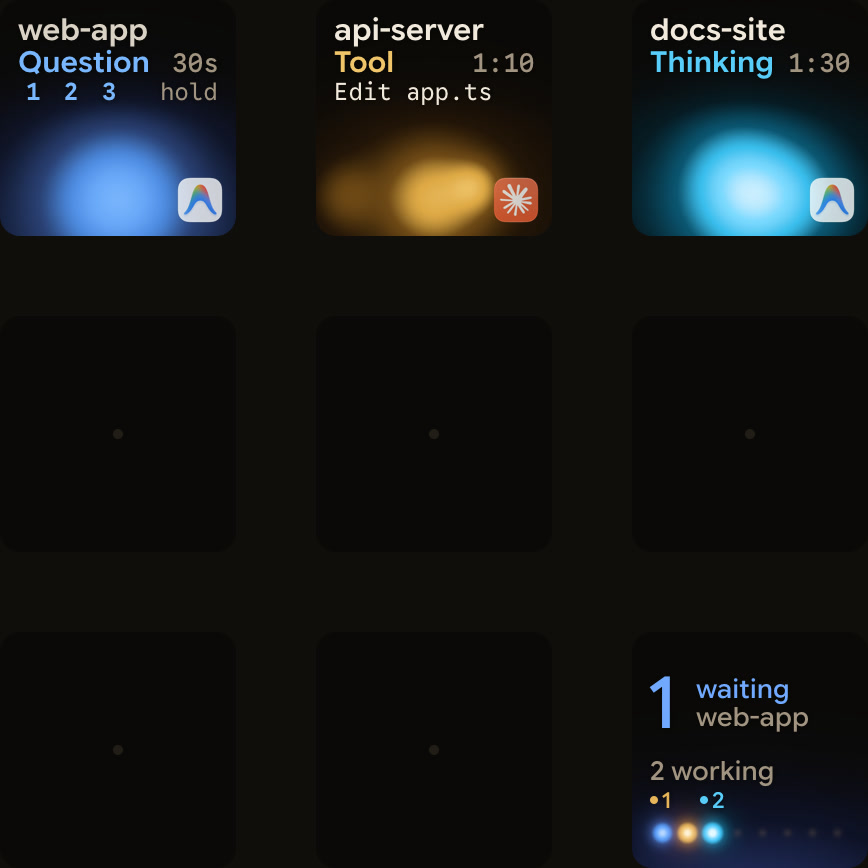
Orbtile takes a different approach. It shows each conversation on the keypad, or on an Android phone (Android 8.0 or later) with Orbtile Mobile. Logi Options+ is not required. Orbtile runs on a computer with macOS 14.0 Sonoma or later on Apple silicon, or Windows 11 (x64).
- Each conversation in the Antigravity desktop app gets its own key with its title, state and live reply text.
- A conversation waiting on a question moves to the front.
- You can answer questions with numbered options from the keypad by tapping your picks and holding Send.
- This works for up to four questions with two to four choices each.
- Permission requests and written answers stay on your computer.
- Antigravity IDE and CLI sessions do not appear automatically.
- A CLI hook script can report each session to Orbtile's local Adapter API once you turn it on in Settings > Agents and allow the adapter.
See Antigravity notifications: know when an agent is waiting and Show any script or agent on a keypad with the Orbtile Adapter API.
FAQ
How does Google Antigravity run multiple agents in parallel without file conflicts?
When you start a project in the Antigravity App, choose New worktree mode so the agent works in an isolated Git worktree. Background subagents spawned with invoke_subagent can also branch into their own Git worktree. With the teamwork command, each file belongs to one Worker, so no two Workers edit the same file.
How do I switch between and approve background subagents in the Antigravity CLI?
Type /agents to open the agents panel, which lists each subagent's state. Highlight one and press Enter to open its Subagent Detail View. When a subagent waits for approval, press Alt+J to jump to it, or press Ctrl+K to approve the pending action from the inline notification.
What is the difference between /boost and /teamwork in Google Antigravity?
Boost gives you deep reasoning while you pair program. An orchestrator splits a hard problem into subtasks for subagents, then checks the results against your tests. Teamwork runs a whole team of agents on a large project. It starts with a scoping interview, then runs milestones on its own with separate roles for building, review and verification. Both run on paid plans.
Does Orbtile show parallel Google Antigravity sessions on a keypad or phone?
Yes, for the Antigravity desktop app. Orbtile shows each conversation on a Logitech MX Creative Keypad or an Android phone with Orbtile Mobile, with its title, state and live reply text. You can answer supported numbered-option questions from the keypad. Antigravity IDE and CLI sessions do not appear automatically, but a CLI hook script can report them through Orbtile's local Adapter API.