
Run Claude Code in Windows Terminal natively in PowerShell or CMD, or inside a WSL profile. Shift+Enter inserts a newline without setup, Alt+Shift++ and Alt+Shift+- split panes, and "preferredNotifChannel": "terminal_bell" in ~/.claude/settings.json turns on bell alerts. Across multiple sessions, Orbtile shows each session on a Logitech MX Creative Keypad or Android phone.
Choose a Windows Terminal profile: PowerShell, CMD or WSL
Claude Code runs on Windows 10 1809+ or Windows Server 2019+, with 4 GB+ RAM, an x64 or ARM64 processor and an internet connection. It works in Bash, Zsh, PowerShell or CMD. ripgrep is usually included. Git is optional. If Git is installed, claude plugin eval needs 2.31 or later, and so do uploads of a local repository to a cloud session from WSL.
| Windows setup | Requirements | Sandboxing | When to use |
|---|---|---|---|
| Native (PowerShell or CMD) | Git for Windows optional | Not supported | Windows-native projects |
| WSL 2 | WSL 2 enabled | Supported | Linux toolchains or sandboxing |
| WSL 1 | WSL 1 enabled | Not supported | If WSL 2 is unavailable |
How native Windows and WSL profiles differ when running tools:
- Without Git for Windows, native sessions run shell commands through the PowerShell tool.
- With Git for Windows installed, Claude Code uses Git Bash for the Bash and Monitor tools.
- The PowerShell tool stays available alongside Bash, and it is on by default for claude.ai and Console accounts.
- On Amazon Bedrock, Google Cloud's Agent Platform and Microsoft Foundry, set
CLAUDE_CODE_USE_POWERSHELL_TOOL=1to enable the PowerShell tool. - Set
CLAUDE_CODE_USE_POWERSHELL_TOOL=0to turn the PowerShell tool off. - WSL profiles run the Linux build of Claude Code and do not need Git for Windows.
If Claude Code cannot find Git Bash on native Windows, set CLAUDE_CODE_GIT_BASH_PATH in settings.json:
{
  "env": {
    "CLAUDE_CODE_GIT_BASH_PATH": "C:\\Program Files\\Git\\bin\\bash.exe"
  }
}
See Claude Code in PowerShell: install, setup and commands on Windows for execution policies and PATH configuration.
Install and launch Claude Code in Windows Terminal
Run the installer that matches your active tab's shell. The prompt shows PS C:\ in PowerShell and C:\ in CMD. Administrator rights are not required.
In PowerShell:
irm https://claude.ai/install.ps1 | iexIn CMD:
curl -fsSL https://claude.ai/install.cmd -o install.cmd && install.cmd && del install.cmdIn WSL, install and launch Claude Code inside the WSL terminal:
curl -fsSL https://claude.ai/install.sh | bashThe token '&&' is not a valid statement separator means you ran the CMD command in PowerShell. 'irm' is not recognized means you ran the PowerShell command in CMD.
The native installer shows no progress while it downloads, and native installations update automatically in the background. You can also install with winget install Anthropic.ClaudeCode, or with npm install -g @anthropic-ai/claude-code, which needs Node.js 22 or later. WinGet installs do not auto-update by default. Run winget upgrade Anthropic.ClaudeCode, or set CLAUDE_CODE_PACKAGE_MANAGER_AUTO_UPDATE=1 so Claude Code runs the upgrade for you. If Windows locks the running executable, Claude Code shows the manual command instead.
When the installer finishes, open a new terminal window. Check the install with claude --version, run claude doctor for read-only diagnostics, then start a session:
claude --version
claude doctor
claude
Signing in requires a Pro, Max, Ultra, Team, Enterprise or Console account. You can also use Amazon Bedrock, Google Cloud's Agent Platform or Microsoft Foundry.
Keyboard shortcuts, multiline prompts and terminal bell alerts
Claude Code works in Windows Terminal without running /terminal-setup.
Multiline prompts, Backspace behaviour and large pastes
Enter submits, and Shift+Enter inserts a newline without setup. Ctrl+J and \ followed by Enter also insert newlines. To swap Enter and Shift+Enter, map the chat:newline and chat:submit actions in your keybindings file.
Inside tmux in WSL, Shift+Enter submits by default, and desktop notifications never reach the outer terminal. Add these lines to ~/.tmux.conf, then run tmux source-file ~/.tmux.conf:
set -g allow-passthrough on
set -g focus-events on
set -s extended-keys on
set -as terminal-features 'xterm*:extkeys'
Input and display settings:
- On Windows, a Backspace that arrives as
^Hdeletes the previous word, except whenTERM_PROGRAMisminttyorTERMiscygwin. - Set
CLAUDE_CODE_BS_AS_CTRL_BACKSPACE=0so Backspace andCtrl+Herase one character each. - Pastes of more than 800 characters or more than three lines collapse into a placeholder such as
[Pasted text #1 +120 lines]. - The full pasted content is still sent when you submit.
- Invisible Unicode characters in a paste are removed when you press
Enter, and you send the cleaned prompt with anotherEnter. - Set
maxProseWidthin your settings to wrap prose at a set number of columns in wide windows. - Run
/theme, or use the theme picker in/config, and choose the auto option to follow your terminal's light or dark background. - Turn on Vim mode in
/configunder Editor mode, or set"editorMode": "vim"in~/.claude/settings.json.
Terminal bell, Notification hooks and OSC 7501 status
When Claude finishes a task or pauses for a permission prompt while you seem to be away, it fires a notification event. By default, Claude Code sends desktop notifications only in Ghostty, Kitty and iTerm2, and nothing in other terminals.
To make Claude Code send a terminal bell in Windows Terminal, set preferredNotifChannel in ~/.claude/settings.json:
{
  "preferredNotifChannel": "terminal_bell"
}
You can also add a Notification hook in ~/.claude/settings.json. See Get notified when Claude Code needs you on Windows and Claude Code WSL notifications: get alerts on Windows.
In terminals that implement OSC 7501, Claude Code v2.1.295 or later reports whether each interactive session is working, waiting or done. Background sessions do not report this status. Set CLAUDE_CODE_DISABLE_TERMINAL_TITLE=1 to turn it off.
Fix fullscreen rendering and stale text in Windows Terminal
Fullscreen rendering is a research preview that draws on the terminal's alternate screen buffer. It eliminates flicker, keeps memory usage flat in long conversations, adds mouse support and keeps the input box fixed at the bottom.
Turn it on with /tui fullscreen. Run /tui default to return to the classic renderer, or /tui to see which renderer is active. You can also set CLAUDE_CODE_NO_FLICKER in PowerShell or in the env block of ~/.claude/settings.json:
$env:CLAUDE_CODE_NO_FLICKER = "1"; claudeFix stale or misplaced text on ConPTY hosts
Windows Terminal and other ConPTY-backed hosts can combine incremental screen updates incorrectly. This leaves fragments of earlier output on screen until you resize the window. Set CLAUDE_CODE_ALT_SCREEN_FULL_REPAINT=1 to repaint every cell on every frame. On Windows, Claude Code already does this for background sessions and agent view, so you only need it for interactive fullscreen sessions you start directly:
$env:CLAUDE_CODE_ALT_SCREEN_FULL_REPAINT = "1"
claude
Press Ctrl+L to redraw a garbled screen. To force the classic renderer, set CLAUDE_CODE_DISABLE_ALTERNATE_SCREEN=1 or CLAUDE_CODE_NO_FLICKER=0.
Mouse selection, clipboard and scrolling in fullscreen mode
| Action in fullscreen mode | Shortcut or gesture | What it does |
|---|---|---|
| Scroll half a screen | PgUp or PgDn | Scrolls and pauses auto-follow when scrolled up |
| Jump to start or latest | Ctrl+Home or Ctrl+End | Jumps to top, or to latest with auto-follow re-enabled |
| Select and copy text | Click and drag | Copies to Windows clipboard on release via PowerShell Set-Clipboard |
| Native terminal selection | Shift + click and drag | Bypasses mouse capture |
| Open link or file path | Ctrl + click | Opens http:// or https:// URLs in browser and tool-output paths in file manager |
| Search transcript | Ctrl+o, then / | Searches transcript; n or N steps through matches |
| Export to scrollback | Ctrl+o, then [ | Writes full conversation and expanded tool output to native scrollback |
With Copy on select turned off in /config, press Ctrl+Shift+c to copy. With a selection active, Ctrl+c also copies. Set CLAUDE_CODE_DISABLE_MOUSE=1 to turn off mouse capture, or CLAUDE_CODE_DISABLE_MOUSE_CLICKS=1 to keep only wheel scrolling. Use /scroll-speed or CLAUDE_CODE_SCROLL_SPEED to adjust scroll speed.
Run parallel Claude Code sessions with split panes and worktrees
Split panes run several command-line apps side by side in one Windows Terminal tab. The focused pane has a border in your Windows accent colour:
| Action | Default shortcut or gesture | Command |
|---|---|---|
| Vertical pane (right) | Alt+Shift++ | splitPane ("split": "vertical") |
| Horizontal pane (below) | Alt+Shift+- | splitPane ("split": "horizontal") |
| Auto-split (default or chosen profile) | Alt + click new tab button or profile in dropdown | splitPane ("split": "auto") |
| Duplicate focused pane | Right-click tab > Split Tab | splitPane ("splitMode": "duplicate") |
| Move focus / resize pane | Alt + arrows / Alt+Shift + arrows | moveFocus / resizePane |
| Close focused pane | Ctrl+Shift+W | closePane |
| Command Palette (zoom / read-only) | Ctrl+Shift+P | togglePaneZoom, toggleReadOnlyMode |
A splitPane or newTab key binding can name a profile by name or GUID, or by zero-based index. It can also set startingDirectory, commandline and tabTitle:
{
  "command": {
    "action": "splitPane",
    "split": "vertical",
    "profile": "Windows PowerShell",
    "startingDirectory": "C:\\foo",
    "tabTitle": "Claude Code",
    "commandline": "claude"
  },
  "keys": "ctrl+a"
}
Isolate parallel panes in Git worktrees
To stop parallel panes colliding in the same checkout, pass --worktree or -w with a name. Claude Code creates .claude/worktrees/<name>/ on a new branch named worktree-<name>:
claude --worktree feature-authWorktree behaviour on Windows:
- Add
.claude/worktrees/to.gitignoreso worktree contents do not show as untracked files. - List gitignored files such as
.envand.env.localin a.worktreeincludefile at the project root to copy them into new worktrees. - Worktree sessions block
Edit,WriteandNotebookEditcalls that target the main checkout. - They also block Bash, PowerShell and Monitor commands whose working directory resolves to the main checkout.
- On Windows, choosing "Yes, and don't ask again" for a Bash command saves the rule with that worktree, not the main checkout.
- Removing a worktree on Windows deletes only the link for NTFS junctions and directory symlinks, not the files they point to.
See Git worktrees for parallel coding agents: Claude Code and Codex.
Map shortcuts or watch Claude Code sessions on a keypad with Orbtile
With a Logitech MX Creative Console or MX Keypad, Logi Options+ can map Windows Terminal shortcuts to keys. The MX Keypad needs Options+ 2.07 or later, and the MX Creative Console needs 1.83 or later, on Windows 10 and later. Click + in the profile bar and choose APPLICATION PROFILE. Select the app, or click ADD APPLICATION, then pick START WITH A BLANK TEMPLATE. Under ALL ACTIONS, choose the SYSTEM plugin and drag KEYBOARD SHORTCUT onto a key. Then press the pane split or focus shortcut you want.
Orbtile shows the sessions themselves. It drives the MX Creative Keypad's nine LCD keys and two page buttons over USB without Logi Options+. It can also use an Android phone with Android 8.0 or later running Orbtile Mobile. Orbtile runs on a Windows 11 PC (x64) or an Apple silicon Mac with macOS 14.0 or later.
- On Windows, Orbtile installs for your user without administrator rights and keeps running in the system tray.
- Click Install for Claude Code in Orbtile's window, then restart any Claude Code sessions that were already running.
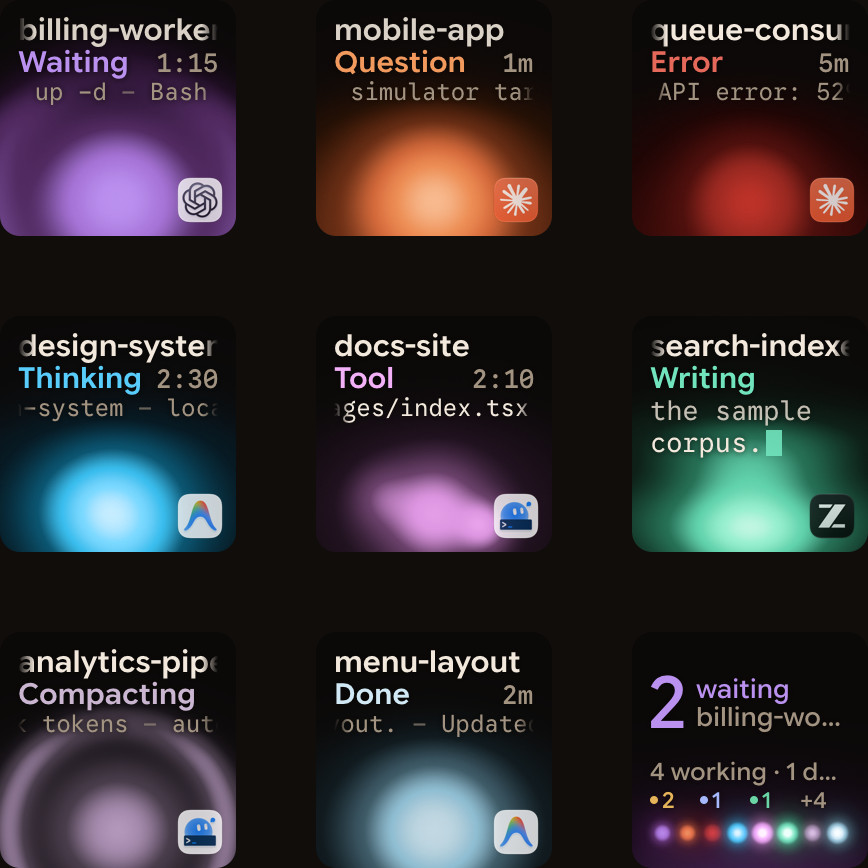
- Keys 1 to 8 show one session each, with its name, state and latest words over an animated Frosted orb.
- States include Thinking, Tool, Streaming, Permission, Question and Done.
- Waiting Claude Code sessions glow terracotta and move to the front.
- Tap key 9 to focus the first waiting session, including sessions on other pages.
- Tap a session key to open its window, or hold it for 0.6 seconds for Focus mode across all nine keys.
- In Focus mode for a local permission prompt, press Deny on key 7 or hold Allow on key 9 for 0.6 seconds.
- For a local multiple-choice question, pick options on keys 1, 2, 3 and 7, then hold Send on key 9 for 0.6 seconds.
- On Windows, Orbtile supports Claude Code, Codex, ZCode and Antigravity from version 0.3.0, Kimi Code from 0.3.6, and sessions on remote servers.
While Orbtile controls the keypad, your Logi Options+ profile for it pauses. To hand the keypad back, use the Windows tray, press Ctrl+Alt+Win+K, hold both page buttons for 1.5 seconds, or quit Orbtile. See Run several Claude Code sessions and see which one needs you and Approve agent tool calls without switching windows.
FAQ
How do I install Claude Code in Windows Terminal?
Open a Windows PowerShell tab in Windows Terminal and run irm https://claude.ai/install.ps1 | iex, or open a CMD tab and run the curl install.cmd command. For a WSL profile, run the Linux install.sh script inside the WSL terminal rather than from PowerShell or CMD. Open a new terminal window afterwards and run claude --version to check it.
Why does Claude Code leave stale text on screen in Windows Terminal fullscreen mode?
Windows Terminal and other ConPTY-backed hosts can combine incremental screen updates incorrectly in fullscreen rendering. This leaves fragments of earlier output on screen until you resize the window. Set the environment variable CLAUDE_CODE_ALT_SCREEN_FULL_REPAINT to 1 before starting an interactive fullscreen session, so Claude Code repaints every cell on every frame.
How do I get notifications from Claude Code in Windows Terminal?
By default, Claude Code sends desktop notifications only in Ghostty, Kitty and iTerm2. To get a terminal bell in Windows Terminal when a task finishes or pauses for permission, set preferredNotifChannel to terminal_bell in your ~/.claude/settings.json file, or add a Notification hook.
How can I watch several Windows Terminal Claude Code sessions at once?
Orbtile runs on a Windows 11 PC (x64) and shows each Claude Code session on a key of the Logitech MX Creative Keypad, or on a tile on an Android phone running Orbtile Mobile. Waiting sessions move to the front and glow in their alarm colour. On the keypad, you can press Deny or hold Allow for local permission prompts.