
Run Kimi Code and Claude Code together, and Orbtile shows their sessions on the same keypad or phone. Kimi Code state and live text need nothing installed, while Claude Code connects through Orbtile's plugin with one Install click. Local Claude Code sessions accept answers directly; Kimi Code answers require sessions in Kimi's own server.
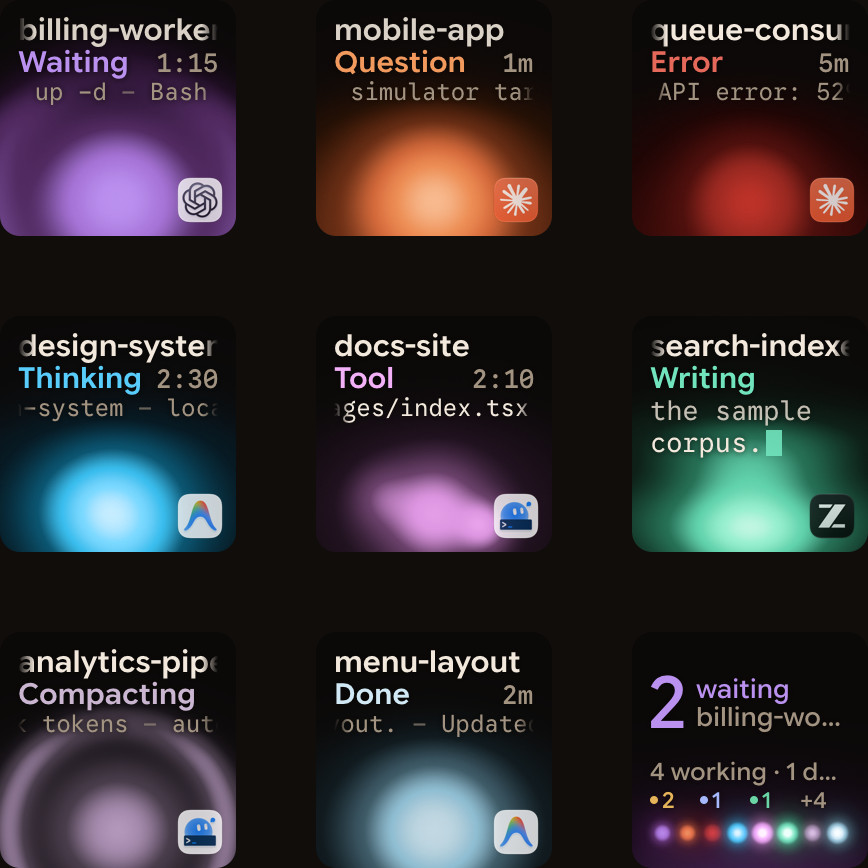
Side by side in Orbtile
| Feature | Kimi Code | Claude Code |
|---|---|---|
| Sessions on the pad | Local Kimi Code sessions read from Kimi's own files | Terminal and desktop sessions through the Orbtile plugin |
| Setup for state and live text | Nothing to install | One Install click in Settings > Agents, then restart existing sessions |
| Working colour | Magenta | Warm amber gold |
| Waiting colour | Shared terracotta alarm | Terracotta |
| Permission answers | Sessions in Kimi's own server only | Supported local terminal and desktop requests |
| Questions with options | Supported sessions in Kimi's own server | Supported local sessions |
| Typed answers | On your computer | On your computer |
| Tap a session | Opens its terminal or Kimi window | Opens its terminal or desktop window |
Both appear as individual keys or tiles with a title, state and latest response text. Waiting sessions move to the front, so you can run both without checking two sets of windows.
Which Kimi Code and Claude Code sessions show
Orbtile reads Kimi Code's session index, each session's state.json and the end of its main wire log. These live in ~/.kimi-code, or %USERPROFILE%\.kimi-code on Windows, and KIMI_CODE_HOME can override the folder. Every local Kimi Code session can show its state and live text without an integration install. Kimi's own session titles appear on the pad.
Optional Kimi Code hooks add a Compacting state and slightly earlier updates. They are observational only: they never approve or deny anything. You do not need them for the basic session display.
Claude Code uses the Orbtile plugin for session events and live text. In Orbtile, open Settings > Agents > Claude Code and click Install once. Restart any Claude Code session that predates the install or an update so it loads the plugin. Terminal and Claude desktop sessions then share the pad with Kimi Code.
Kimi Code also has a browser interface. Start it with kimi web or /web, and its sessions share the CLI's configuration and session data. This browser UI is separate from Orbtile Mobile: Orbtile's phone app shows Kimi and Claude sessions together rather than opening one agent's own interface.
Which sessions take answers from the pad
For Claude Code, supported local terminal and desktop permission requests show Deny and Allow in the focus view. Press Deny once, or hold Allow for 0.6 seconds. For a supported multiple-choice question, pick the options and hold Send. The prompt in Claude Code remains available, and whichever answer arrives first wins.
Kimi Code has a narrower answer path. Orbtile can send decisions only for sessions running in Kimi's own server:
- Start
kimi weborkimi rc, or type/rcin a Kimi terminal session to hand it over. - Open the waiting session's focus view to deny or hold Allow for a supported permission request.
- Answer within 2 minutes, or within Kimi Code's own shorter limit. After that, the pad shows Answer on computer.
- For questions with listed options, make your picks and hold Send.
- Use the computer for other Kimi sessions, unsupported questions and written answers.
Kimi's Server API is experimental. If a Kimi update changes it, pad answers stop until Orbtile catches up, but sessions still show.
Set up both agents on one pad
- Install Orbtile on your computer from the download page. You need an Apple silicon Mac with macOS 14 or later, or a Windows 11 PC (x64).
- Under Settings > Agents > Claude Code, click Install once. Restart existing Claude Code sessions.
- Leave Kimi Code enabled under Settings > Agents. Its sessions need nothing installed to show. Add the optional hooks only if you want Compacting and slightly earlier updates.
- For Kimi answers, run the session with
kimi weborkimi rc, or hand over a terminal session with/rc. - Connect a Logitech MX Creative Keypad, or use Orbtile Mobile on your phone. For iPhone, get Orbtile Mobile on the App Store with iOS 17 or later. For Android 8.0 or later, join the beta on Google Play.
On the phone, sign in with the same account as your computer and turn on Settings > Keypad > Phone pad. Keep the phone and computer on the same local network.
Read both agents at a glance
Kimi Code working sessions use a magenta palette. Claude Code working sessions use warm amber gold. Waiting sessions use the shared alarm colour and move ahead of working, recently finished and idle sessions.
A tap opens the selected session on your computer. A 0.6-second hold opens its focus view, where you can read more of the latest response and any supported request. This gives you one place to check without merging the two agents or changing how either one works.
For Kimi's own alerts, web interface and configuration, see Kimi Code notifications and Kimi Code web UI. For Claude Code's alerts, see Get notified when Claude Code needs approval or finishes.
FAQ
What is the main difference when using Kimi Code vs Claude Code with Orbtile?
Kimi Code state and live text need nothing installed, but answers require a session in Kimi's own server. Claude Code connects with one Install click and supports answers for local terminal and desktop sessions. Both show their state and latest text on the same pad.
Do I need to install Orbtile hooks for every Kimi Code session to appear?
No. Orbtile reads Kimi Code's own session files for state and live text. Optional hooks only add Compacting and slightly earlier updates, and they never approve or deny anything.
Why does my Kimi Code tile say Answer on computer?
Pad answers work only for sessions in Kimi's own server, started with kimi web or kimi rc, or handed over with /rc. Permission answers also expire after up to 2 minutes, or sooner under Kimi's own limit. Other sessions and written answers stay on your computer.
Can Kimi Code and Claude Code share one iPhone status pad?
Yes. Orbtile Mobile shows both on an iPhone with iOS 17 or later. The app is on the App Store, and the phone needs the same Orbtile account and local network as your computer.