
For developers, the MX Creative Keypad emphasises IDE controls and prompt macros, Loupedeck Live S combines touch controls with two dials, and the classic Stream Deck offers 15 LCD keys. None automatically monitors every coding-agent session. Orbtile adds that role to the Logitech keypad only, with live tiles and permission answers.
Side-by-side comparison
This comparison uses the standalone Logitech MX Keypad, also called the MX Creative Keypad, the Loupedeck Live S and the classic 15-key Stream Deck. The MX Creative Console adds a separate dialpad to the Logitech keypad.
| MX Creative Keypad | Loupedeck Live S | Classic Stream Deck | |
|---|---|---|---|
| Main controls | Nine LCD keys and two page buttons | 15 touch-sensitive buttons, two analogue dials and four RGB buttons | 15 customisable LCD keys with membrane switches |
| Extra pages or layouts | Application profiles in Logi Options+ | Layouts and up to 14 additional touch-screen pages | Profiles, folders and pages in the Stream Deck app |
| Host software | Logi Options+ 2.07 or later | Loupedeck software | Stream Deck app, with Key Logic requiring 7.0 or newer |
| Vendor-listed operating systems | Windows 10+, macOS 13+ | Windows 10+, macOS 10.15+ | Windows 11+, macOS 13+ |
| Developer features | VS Code and IntelliJ integrations, prompt macros and custom shortcuts | Custom Profiles, macros, shortcuts and plugin actions | Hotkeys, Multi Actions, Key Logic, profiles and plugins |
| Agent-specific examples named by vendor | GitHub Copilot, Claude Code and OpenAI Codex | Custom shortcuts for the target application | Claude Code Shortcut Profile and Claude Code Usage plugin |
| Orbtile hardware support | Yes | No | No |
Logitech does not support the standalone keypad with Logi Options+ on Windows ARM 64 systems.
MX Creative Keypad: native developer actions and prompt macros
Logitech positions the MX Keypad as AI control keys for developers. Its native VS Code and IntelliJ integrations navigate code, launch agents, manage debuggers and toggle terminals. Its AI controls execute prompt macros, refactor code and launch voice commands across GitHub Copilot, Claude Code and OpenAI Codex. An active internet connection and an account with each third-party AI provider are required for those features.
The keypad automatically swaps tools as you move between supported applications. Most plugins include ready-to-use profiles, so the initial layout can work before you customise individual keys. Developers can also create tools with the Logi Actions SDK.
For an application without a plugin, Logitech's documented route is a manual application profile. The pre-installed System plugin provides Keyboard Shortcut actions for the keypad and Dial Adjustment actions for a dialpad. Downloading additional plugins or adding another application profile requires a Logi ID sign-in.
The standalone keypad needs Logi Options+ 2.07 or later. Logitech's support page says the keypad cannot be used without Logi Options+. Orbtile is a separate route that drives the keypad directly, covered below.
When the MX Creative Console makes more sense
The MX Creative Console combines the keypad with a wireless dialpad. Logitech describes an aluminium low-friction dial for precise adjustments, a smooth roller for navigation and adjustment, and customisable keys for shortcuts. The console supports up to 15 keypad pages per application through Logi Options+.
That bundle is relevant if your daily work mixes coding with design, video or other analogue controls. If you only need terminal commands or agent tiles, the separate dialpad adds hardware rather than a new monitoring capability.
For setup and plugin details, see The Logitech MX Keypad for developers, with and without Options+ and MX Creative Console: setup, profiles, plugins and agents.
Loupedeck Live S: dials, touch pages and foreground shortcuts
Loupedeck Live S has two analogue dials with press functions, 15 touch-screen buttons and four RGB buttons. Its touch controls confirm input with haptic feedback. Four tactile buttons switch layouts, while swiping the touch screen reaches up to 14 pages of extra controls.
Dynamic Mode changes profiles automatically based on the current activity. Loupedeck lists plugins and profiles for streaming, creative and productivity software, including OBS Studio, Photoshop, Premiere Pro, Final Cut Pro, Zoom and Microsoft products. Live S connects over USB-C or USB-A and supports Windows 10 or later and macOS 10.15 or later.
For development, the general mechanism is a Custom Profile. Loupedeck says these shortcut-based profiles can target any application and map its shortcuts to buttons and dials. Custom actions, complex macros, toggles and dial adjustments cover repeated workflows.
There is an important boundary for coding agents. Loupedeck explains that shortcut-based custom actions emulate keyboard input and always go to the active foreground application. Plugin-supported application profiles can send actions directly to a running application in the background. A generic terminal profile therefore does not provide the same routing or session awareness as a dedicated plugin.
Live S is the clearest fit when you want analogue dials and touch pages across creative tools as well as shortcuts for development. It is not documented by Loupedeck as a native Claude Code or Codex session monitor.
Stream Deck: LCD keys, Multi Actions and Claude profiles
The classic Stream Deck provides 15 LCD keys with membrane switches and a removable stand. Elgato's software supports application control through hotkeys and dedicated plugins. Multi Actions trigger a planned sequence from one key, with delays available between actions.
Key Logic adds another way to conserve keys. In Stream Deck 7.0 or newer, one key can trigger one action on a press, another on a double press and a third on a press-and-hold. Elgato lists Key Logic for all Stream Deck models, including Neo and Virtual Stream Deck.
Elgato's own Claude workflow article lists a community Claude Code Shortcut Profile with 57 slash commands across eight folders. It also lists the Windows-only Claude Code Usage plugin, which shows spend, plan limits and a session countdown and can launch or watch background agents. These are specific profile and plugin capabilities, not a promise that every Stream Deck layout can monitor every terminal session.
Stream Deck is a flexible option for developers who want a large shortcut surface and access to community integrations. Check each plugin's operating system and session coverage before treating it as a monitoring tool. A profile that sends slash commands still depends on the target terminal receiving those commands.
For the two-way Logitech and Elgato comparison, see Stream Deck or MX Creative Keypad for AI coding agents.
What matters for coding-agent work
The three devices overlap on shortcuts, but their documented strengths differ when you break the work into tasks.
| Development task | MX Creative Keypad | Loupedeck Live S | Stream Deck |
|---|---|---|---|
| Navigate or debug in a supported IDE | Native VS Code and IntelliJ integrations | Custom shortcuts, unless a specific plugin exists | Hotkeys or a dedicated plugin |
| Send a saved agent prompt | Prompt macros for named AI tools | Text or shortcut-based custom actions | Prompt and shortcut profiles |
| Run a sequence of terminal actions | System actions and custom profiles | Custom actions and macros | Multi Actions with optional delays |
| Adjust an analogue value | Dialpad with MX Creative Console | Two analogue dials on Live S | Choose a different Stream Deck model with dials |
| Watch several agent sessions | Requires agent software such as Orbtile or a suitable plugin | Requires a suitable integration | Requires a suitable plugin |
| Answer a permission prompt on the pad | Supported local requests through Orbtile | Not provided by Orbtile | Depends on the selected plugin |
The last two rows are the deciding ones for parallel agents. Sending a command is straightforward compared with knowing which background session needs input. Look for an integration that reads session state rather than only a profile with attractive key labels.
Where Orbtile fits, and where it does not
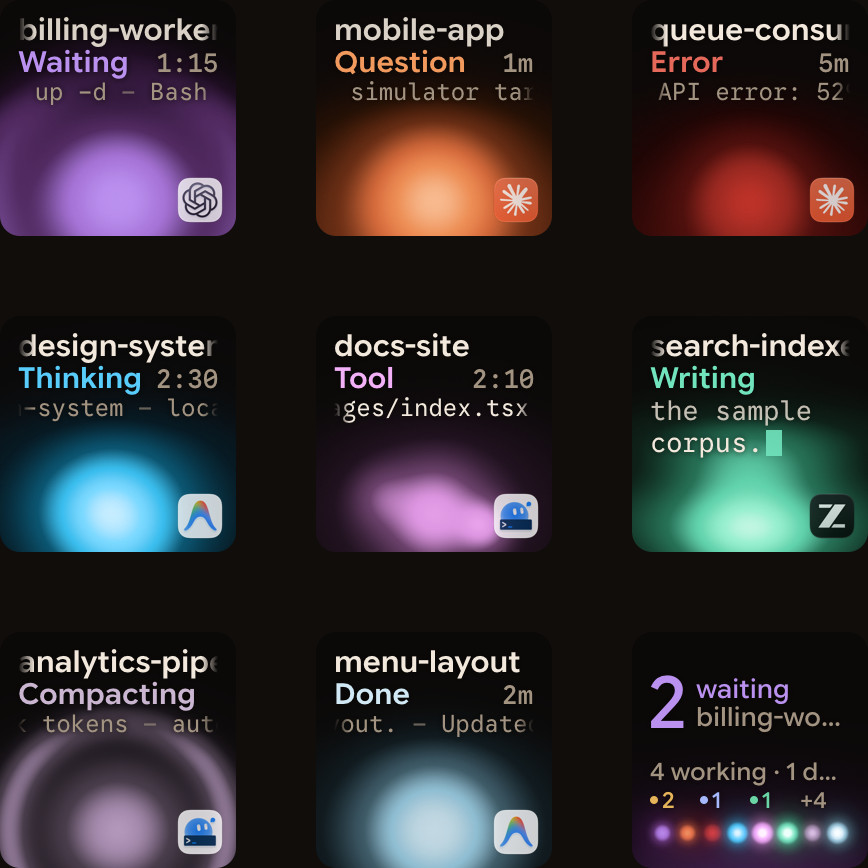
Orbtile gives the Logitech keypad a persistent session-monitoring role without Logi Options+. Keys 1 to 8 show sessions from Claude Code, Codex, ZCode, the Antigravity desktop app and Kimi Code. Key 9 summarises activity and opens the first waiting session. Each session key shows its name, state and latest words.
Waiting sessions move to the front. A short tap opens the session's application or terminal window on your computer, and a hold opens Focus mode. For supported local permission requests, press Deny on key 7 or hold Allow on key 9 for 0.6 seconds. Supported multiple-choice questions use the option keys and a held Send action.
Orbtile runs on an Apple silicon Mac with macOS 14.0 Sonoma or later, or a Windows 11 PC (x64). Orbtile Mobile provides session tiles on an iPhone with iOS 17 or later (App Store) or an Android phone with Android 8.0 or later (beta on Google Play). Remote SSH sessions appear beside local ones, but they are display-only except Allow for Codex terminal command approvals.
Orbtile does not support Loupedeck Live S or any Stream Deck model. On the Logitech keypad, it does not reproduce your Logi Options+ profiles or the MX Creative Console's creative shortcuts. It also leaves typed answers, unsupported requests and full code review in the agent's own interface.
For alternatives that include phone apps and smaller macro pads, read Stream Deck alternatives for developers and coding agents. For monitoring methods beyond hardware, see How to monitor multiple Claude Code sessions.
FAQ
Is Loupedeck Live S better than Stream Deck for developers?
Neither is universally better. Live S adds two analogue dials and haptic touch controls, while the classic Stream Deck has 15 physical LCD keys and Elgato's profile and plugin workflow. Your applications and required integrations decide the fit.
Does the MX Creative Keypad work without Logi Options+?
Logitech says its keypad cannot be used without Logi Options+ for Logitech's own profiles and plugins. Orbtile is separate software that drives the keypad over USB for supported coding-agent displays and answers.
Can all three devices send shortcuts to Claude Code?
All three can send keyboard input through their documented customisation tools. That does not mean they can identify a particular background session or read its permission prompt. Those capabilities require a suitable agent integration.
Which device does Orbtile support in this comparison?
Orbtile supports the Logitech MX Creative Keypad, including the standalone MX Keypad. It does not support Loupedeck Live S or Stream Deck hardware. An iPhone or Android phone can also show the session tiles.