
Claude Code skills are SKILL.md files with YAML frontmatter and Markdown instructions. Claude loads a skill when it is relevant, or you run it yourself with /skill-name. Unlike CLAUDE.md content, a skill's body loads only when it's used. Claude Code also ships bundled skills such as /doctor, /verify, /code-review and /batch.
How skills compare with CLAUDE.md, rules, subagents and hooks
Anthropic's rule of thumb is to keep CLAUDE.md under 200 lines. If it grows, move reference content to skills or split it into .claude/rules/ files.
| Extension | When it loads | Context cost | Best for |
|---|---|---|---|
CLAUDE.md | Session start | Full content in every request | Core conventions, build commands and "always do X" rules |
.claude/rules/ | Every session, or when matching files are opened | Saves context when scoped with paths | Language-specific or directory-specific guidelines |
| Skill | Descriptions at session start, full content when used | Low, and zero for user-only skills until invoked | Reference material and repeatable workflows |
| Subagent | When spawned | Isolated from the main session | Tasks that read many files, parallel work, specialised workers |
| Hook | On a lifecycle event, such as PostToolUse or SessionStart | Zero, unless the hook returns output | Linting after edits, blocking unsafe commands, notifications |
| MCP server | Tool names at session start, full schemas on demand | Low until a tool is used | External services and data |
- Custom commands in
.claude/commands/have been merged into skills, and existing command files keep working. .claude/commands/deploy.mdand.claude/skills/deploy/SKILL.mdboth create/deploy. If both exist, the skill wins.- At the terminal prompt, you can chain up to six skills in one message, such as
/skill-a /skill-b do XYZ. - Chained skills all load, and the trailing text goes to each of them as arguments.
CLAUDE.mdand skills are instructions, not guarantees. To make sure Claude never edits.env, use aPreToolUsehook that blocks the edit.
For hook events and settings, see Claude Code hooks: events, matchers, settings and handlers.
To connect external tools, databases and APIs with claude mcp add or .mcp.json, see Claude Code MCP servers: add, configure and manage tools.
Create a skill in SKILL.md and inject dynamic context
A SKILL.md file starts with YAML frontmatter between --- markers, followed by Markdown instructions. Claude Code reads the frontmatter only when the opening --- is the file's first line. Otherwise it treats the whole file as skill content. If the YAML doesn't parse, the skill still loads with no fields set.
- Reference content adds knowledge Claude applies to your work, such as conventions, style guides or domain knowledge.
- Task content gives step-by-step instructions for an action, like a deployment or a commit.
- Task skills are often ones you run directly with
/skill-namerather than letting Claude decide.
Keep the body concise. Anthropic suggests keeping SKILL.md under 500 lines and moving detailed reference material to separate files.
This example from Anthropic's docs is saved as ~/.claude/skills/summarize-changes/SKILL.md:
---
description: Summarizes uncommitted changes and flags anything risky. Use when the user asks what changed, wants a commit message, or asks to review their diff.
---

## Current changes

!`git diff HEAD`

## Instructions

Summarize the changes above in two or three bullet points, then list any risks you notice such as missing error handling, hardcoded values, or tests that need updating. If the diff is empty, say there are no uncommitted changes.- The `
!git diff HEAD - This happens before Claude sees the skill. If the command fails, the invocation stops and Claude never sees the content.
- Run the skill with
/summarize-changes, or ask what changed and let Claude load it.
Bundled skills in Claude Code
Bundled skills are prompt-based. They give Claude instructions and let it orchestrate the work with its tools. Claude invokes some of them automatically when relevant. Others, including /verify, run only when you invoke them.
| Bundled skill | What it does |
|---|---|
/doctor (alias /checkup) | Diagnoses installation, settings, extension and CLAUDE.md problems, and proposes fixes that Claude applies after you confirm |
/run | Launches and drives your app to see a change working, not only passing tests |
/verify | Builds and runs your app to confirm a change does what it should, rather than relying on tests or type checks |
/code-review (alias /review) | Reviews the current diff, or a PR number, branch or path you pass, for correctness bugs |
/simplify | Runs four review agents in parallel to find cleanup opportunities in changed code and apply the fixes |
/batch <instruction> | Splits a large change into 5 to 30 units, then runs one background subagent per unit in its own worktree once you approve |
/claude-api | Loads Claude API and Managed Agents reference material, and activates when code imports anthropic or @anthropic-ai/sdk |
/debug [description] | Turns on debug logging for the session and troubleshoots from the debug log |
/loop [interval] [prompt] (alias /proactive) | Runs a prompt repeatedly while the session stays open |
- Set
disableBundledSkillstotrueto turn bundled skills off. /doctorstays available when bundled skills are off. Hide it withDISABLE_DOCTOR_COMMANDor"doctor": "off"inskillOverrides./skillslists your skills. Presstto sort by token count, orSpaceorEnterto cycle a skill's visibility./skill-doctorshows each skill's context cost and how often it is used. It needs v2.1.252 or later and feature-flag fetching.
Where skills load, name resolution and claude.ai sync
| Location | Path | Loads in |
|---|---|---|
| Enterprise | .claude/skills/<name>/SKILL.md in the managed settings directory | All users on machines where your organisation deploys it |
| Personal | ~/.claude/skills/<name>/SKILL.md | All your projects, but not Cowork or cloud sessions |
| Project | .claude/skills/<name>/SKILL.md | Sessions in this repository, but not cloud threads in a project |
| Nested | <subdir>/.claude/skills/<name>/SKILL.md | Sessions started in or below <subdir> |
| Additional directory | .claude/skills/ in a directory passed with --add-dir | That session |
| Plugin | <plugin>/skills/<name>/SKILL.md | Wherever the plugin is enabled, as /plugin-name:skill-name |
| claude.ai account | Skills enabled for your account | Cowork, cloud and signed-in terminal sessions |
Monorepos, git worktrees and live file watching
- Claude Code loads project skills from the start directory and each parent up to the repository root.
- Skills below the start directory load the first time Claude reads or edits a file there.
- In a linked git worktree, the search stops at the worktree root.
- Claude Code watches skill directories, so changes apply without a restart, except in bare mode.
- Run
/reload-skillsafter creating a new top-level skills directory.
Name precedence and reserved names
- When names collide, enterprise beats personal, and personal beats project.
- Your skill replaces a same-named bundled skill, but not its aliases.
- A project
/code-reviewskill replaces the bundled one, but/reviewstill runs the bundled version. - Don't name a skill folder
syncedoranthropic-skills. Claude Code reserves both for skills synced from claude.ai.
How claude.ai skills sync to the terminal
- From v2.1.273, terminal sessions signed in with a claude.ai account download your enabled skills to
~/.claude/skills/synced/. - Sync is one way. Claude Code never uploads synced skills, and a later sync can overwrite local edits in that folder.
- Claude Code never runs
!commands from synced skills on your machine. - Set
syncClaudeAiSkillstofalsein user settings to stop syncing. Already-synced skills move to~/.claude/skills/.trash/.
For how Cowork and the terminal differ, see Claude Cowork vs Claude Code: what's the difference.
Configure SKILL.md frontmatter, subagents and the Agent SDK
All fields are optional, but description is recommended. Field names use lowercase words separated by hyphens, except when_to_use. Claude Code ignores a field it doesn't recognise, without reporting an error.
| Field | Purpose |
|---|---|
name | Command name in the / menu. Defaults to the directory name |
description | What the skill does and when to use it. Defaults to the first non-empty line of content |
when_to_use | Extra trigger context, appended to description. Together they are capped at 1,536 characters in the listing |
argument-hint | Autocomplete hint, such as [issue-number] |
arguments | Named positional arguments for $name substitution |
disable-model-invocation | true stops Claude loading the skill on its own. Default false |
user-invocable | false hides the skill from the / menu. Default true |
allowed-tools | Tools Claude can use without asking during the invoking turn |
disallowed-tools | Tools removed from the pool while the skill is active |
model | Model for the rest of the current turn, or inherit |
effort | low, medium, high, xhigh or max for the rest of the current turn |
context | fork runs the skill in a forked subagent |
agent | Subagent type when context: fork is set |
background | With context: fork, false waits for the subagent's result. Default true |
hooks | Hooks registered when the skill is invoked, for the rest of the session |
paths | Glob patterns that limit automatic loading |
shell | bash (default) or powershell for ! commands |
metadata, license, compatibility | Accepted, but Claude Code doesn't act on them |
Skills uploaded to claude.ai, sent through the Skills API or packaged with package_skill.py accept only six keys. These are name, description, license, compatibility, metadata and allowed-tools. Any other key causes a hard error.
Preload skills into subagents or fork a skill
Set context: fork to run a skill in a subagent. To give a subagent skills at startup, list them in its skills field. Subagent files live in .claude/agents/ or ~/.claude/agents/:
---
name: api-developer
description: Implement API endpoints following team conventions
skills:
  - api-conventions
  - error-handling-patterns
---

Implement API endpoints. Follow the conventions and patterns from the preloaded skills.- The full content of each listed skill loads at startup, up to the first 32 distinct names.
- You can't preload skills that set
disable-model-invocation: true, and that includes the bundled/verifyskill. - Without a
skillsfield, a subagent can still invoke project, user and plugin skills through the Skill tool. - To block that, omit
Skillfrom the subagent'stoolslist or add it todisallowedTools.
Filter and dispatch skills in the Claude Agent SDK
The Agent SDK loads skills from the filesystem through settingSources, or setting_sources in Python. This TypeScript example from Anthropic's docs enables every discovered skill and pre-approves three tools:
import { query } from "@anthropic-ai/claude-agent-sdk";

for await (const message of query({
  prompt: "Check this project for security issues",
  options: {
    settingSources: ["user", "project"], // Load skills from filesystem
    skills: "all",
    allowedTools: ["Read", "Grep", "Glob"]
  }
})) {
  console.log(message);
}- The
skillsoption takes"all",[]or a list of exact skill names. - Setting
skillsadds the Skill tool toallowedTools. If you also pass atoolslist, include"Skill"yourself. - The
initsystem message lists user-invocable skills. Auser-invocable: falseskill is left out but stays available to Claude. - Sending
/<name>in a prompt runs a user-invocable skill, even when yourskillslist omits it.
Watch Claude Code sessions and subagents with Orbtile
Skills such as /batch, or any skill with context: fork, run work in subagents. A long-running skill can also stop to ask for permission. Orbtile shows each Claude Code session on a Logitech MX Creative Keypad, or on an iPhone or Android phone with Orbtile Mobile. It runs on a Mac with Apple silicon and macOS 14 or later, or a Windows 11 PC (x64). Orbtile Mobile needs iOS 17 or later, or Android 8.0 or later. Logi Options+ is not required.
- Install the Claude Code plugin in Settings > Agents > Claude Code on a Mac, or with its Install button on Windows.
- Restart any running Claude Code sessions once so they load the plugin.
- Keys 1 to 8 show each session's name, state and latest words over an animated Frosted orb.
- A waiting Claude Code session glows terracotta and moves to the front. Tap key 9 to open the first waiting session.
- Hold a session key for 0.6 seconds to open Focus mode. Press key 2 to open the subagents view, with one subagent on each of keys 1 to 8.
- Each subagent key shows its state, current tool or command, streamed text and elapsed time.
- For a local session, press Deny on key 7 or hold Allow on key 9 for 0.6 seconds.
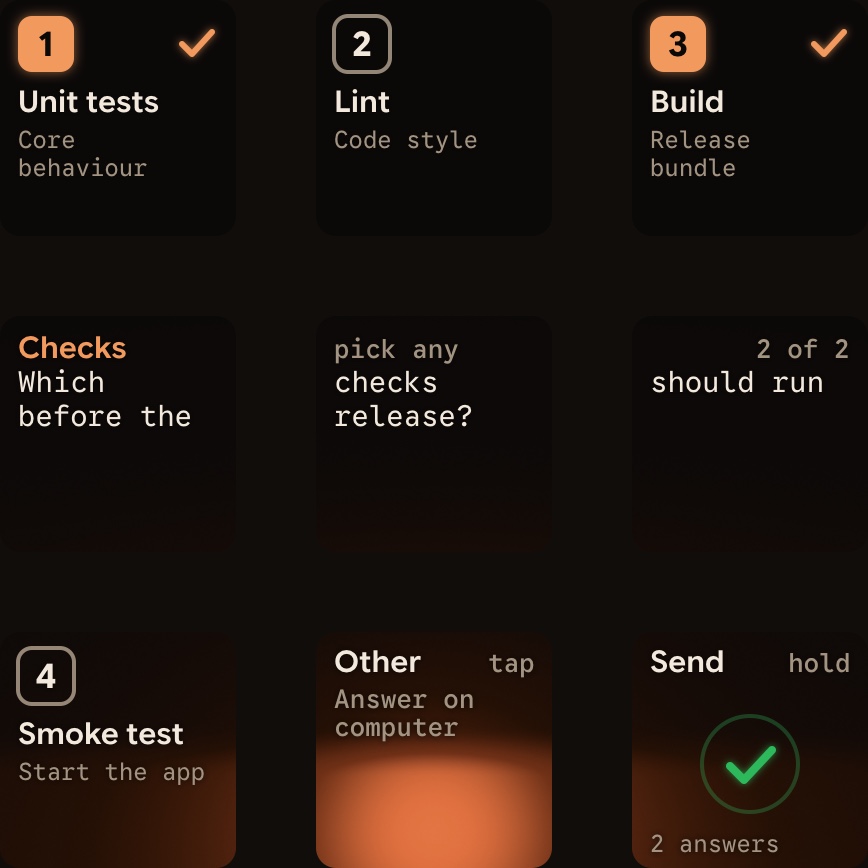
- For a multiple-choice question, tap options on keys 1, 2, 3 or 7, then hold Send on key 9.
- Written answers stay on the computer. Sessions on a server over SSH are display-only.
- The same pad also shows Codex, ZCode, Kimi Code and Antigravity desktop app sessions.
See Approve agent tool calls without switching windows and Run several Claude Code sessions and see which one needs you.
FAQ
What is the difference between CLAUDE.md and a Claude Code skill?
CLAUDE.md loads its full content at the start of every session, so it suits rules and build commands that always apply. A skill keeps only its description in context by default. Its full content loads when you run it with a slash command, or when Claude matches it to your task.
How do I stop Claude from running a skill automatically?
Set disable-model-invocation to true in the skill's frontmatter. Claude then can't invoke the skill on its own, and its description stays out of Claude's context. For a skill you didn't write, set skillOverrides in your settings to keep its description out of Claude's context without editing its file.
How does Orbtile help when Claude Code skills spawn subagents or ask for approval?
Orbtile shows each Claude Code session on a Logitech MX Creative Keypad, an iPhone or an Android phone with Orbtile Mobile, and waiting sessions move to the front. Hold a session key to open Focus mode, then press key 2 to see its subagents. For local sessions, you can answer permission requests and questions with up to four options from the keys.