
Claude Code agent teams coordinate several independent Claude Code instances under one lead session. Teammates work in their own context windows, claim tasks from a shared list and message each other directly. The feature is experimental, so enable it with CLAUDE_CODE_EXPERIMENTAL_AGENT_TEAMS=1 in settings.json or your shell. Teammates then run in-process in your main terminal, or in split panes with tmux or iTerm2. Orbtile can show your Claude Code sessions on a keypad or phone.
When to use agent teams vs subagents and parallel sessions
One session acts as the team lead, assigning tasks and synthesising results. You can also message any teammate directly, without going through the lead.
Agent teams work best for parallel exploration:
- Research and review: teammates investigate different aspects of a problem at the same time and challenge each other's findings.
- New modules or features: each teammate owns a separate piece of work without stepping on the others.
- Competing hypotheses: teammates test different debugging theories in parallel.
- Cross-layer coordination: frontend, backend and test changes are each owned by a different teammate.
For sequential tasks, same-file edits or work with many dependencies, a single session or subagents are more effective.
| Feature | Subagents | Agent teams |
|---|---|---|
| Context | Own context window; results return to caller | Own context window; fully independent |
| Communication | Return result to caller; named subagents can message each other | Teammates message each other directly |
| Coordination | Main agent manages all work | Self-coordination via messages, plus a shared task list for agents with the Task tools |
| Best for | Focused tasks where only the result matters | Complex work requiring discussion and collaboration |
| Token cost | Lower: results summarised back | Higher: each teammate is a separate instance |
Anthropic lists five ways to work on several tasks at once: subagents, agent view, agent teams, dynamic workflows and projects. Agent teams fit when you want Claude to plan, assign and supervise a group of workers. The /batch skill is different: it splits one large change into 5 to 30 worktree-isolated subagents.
Agent teams do not isolate teammates in git worktrees, so give each teammate a different set of files to prevent overwrites. See Git worktrees for parallel coding agents: Claude Code and Codex and Claude Code background agents: subagents, tasks and hooks.
Enable and start an agent team
Agent teams are disabled by default. Without CLAUDE_CODE_EXPERIMENTAL_AGENT_TEAMS=1, Claude writes no team directories and spawns no teammates. Set it in your shell or under env in settings.json:
{
  "env": {
    "CLAUDE_CODE_EXPERIMENTAL_AGENT_TEAMS": "1"
  }
}
Then describe the task and the teammates you want in natural language. Claude populates the shared task list when the Task tools are available, spawns teammates and synthesises their findings:
Spawn three teammates to review PR #142: security, performance and test coverage.Launch rules:
- Teammates need an interactive session, so non-interactive
-pand Agent SDK sessions never spawn them. - While teams are enabled, a subagent that Claude names launches as a teammate, unless the call is a fork or passes
isolation. - Claude names ordinary subagents on its own, so a team can form even when you did not ask for one.
- If Claude spawns subagents instead of a team, ask again and explicitly request an agent team.
- To get ordinary named subagents back, set the variable to
0insettings.json, with no new session needed.
Choose a display mode: in-process or split panes
Set teammateMode in ~/.claude/settings.json, or pass the experimental --teammate-mode flag for a single session. The flag does not appear in claude --help:
claude --teammate-mode autoteammateMode | Display behaviour | Requirements and fallback |
|---|---|---|
"in-process" | All teammates inside main terminal (default) | Any terminal, no extra setup |
"auto" | Split panes when already inside a tmux session, or in iTerm2 with the it2 CLI | Falls back to in-process |
"tmux" | Split panes, auto-detecting tmux or iTerm2 from your terminal | In iTerm2 with tmux available, offers to install it2 or switch to tmux |
"iterm2" | iTerm2 native split panes | Requires it2 CLI; shows an error with the install command if missing |
Split panes need tmux, or iTerm2 with the it2 CLI and iTerm2 → Settings → General → Magic → Enable Python API turned on. tmux traditionally works best on macOS, and tmux -CC in iTerm2 is the suggested entry point. Split panes are not supported in VS Code's integrated terminal, Windows Terminal or Ghostty.
Navigate the agent panel and message teammates
In in-process mode, use the agent panel below the prompt input:
- Up/Down: select a teammate.
- Enter: view its transcript and message it directly.
- Escape: clear selection, or interrupt the viewed teammate's turn.
- x: stop the selected teammate.
- Ctrl+T: toggle the shared task list.
While you view a teammate, plain text and skills go to that teammate, but built-in slash commands go to the lead. /model and /fast do not run from that view, because a teammate's model and fast mode are fixed at spawn. Idle rows hide 30 seconds after every agent goes idle, and the teammate stays addressable. In split-pane mode, click into a teammate's pane to interact with it.
Models, subagent definitions, plan mode and permissions
Name teammate counts and models in your prompt, or let Claude choose. Claude Code picks each teammate's model from the first of these that applies:
- Spawn prompt: the model your prompt names for that teammate.
- Subagent definition: the definition's
model, whereinherituses the lead's model. - Environment variable:
CLAUDE_CODE_SUBAGENT_MODELwhen it is notinherit. - Lead model: the fallback when nothing above applies.
CLAUDE_CODE_SUBAGENT_MODEL_FORCE=1 skips the first two sources (Claude Code v2.1.257 or later). Claude Code also checks the chosen model against your organisation's availableModels allowlist.
Reuse subagent definitions for teammates
You can spawn a teammate from a project, user, managed or plugin subagent definition:
Spawn a teammate using the security-reviewer agent type to audit the auth module.The definition's tools list and model apply in either display mode. Its body is added to the default system prompt for an in-process teammate, and replaces it for a split-pane teammate. Its skills never apply, because teammates load skills from your project and user settings.
Plan mode and permission inheritance
A teammate spawned while the lead is in plan mode also works in plan mode until its plan is ready. If you have not changed its mode since spawn, Claude Code approves the plan as soon as it arrives. The teammate then takes the lead's current mode, or Manual if the lead is in plan mode. See Claude Code Plan Mode: how to use it and approve plans.
Permission inheritance rules:
- Teammates start with the lead's permission mode, including
bypassPermissionsfrom--dangerously-skip-permissions. - If the lead is in
dontAskmode, teammates start in Manual mode instead. - Cycle a running teammate's mode with
Shift+Tabin its pane or transcript view. - Teammate permission prompts appear in the lead session for you to approve.
- Split-pane teammates do not get
--allowedTools, so pre-approve their actions underpermissions.allowin--settingswhen you start the lead. - A teammate cannot approve a prompt for you, because
SendMessagemarks its messages as coming from another Claude session.
See Claude Code permission modes: settings, flags and rules.
Architecture, shared tasks, hooks and token costs
Claude Code stores teams and tasks locally under a name made of session- plus the first eight characters of the session ID:
- The team config at
~/.claude/teams/{team-name}/config.jsonis removed when the session ends, and hand edits are overwritten. - Each agent's mailbox is a JSON file at
~/.claude/teams/{team-name}/inboxes/{agent-name}.json. - The task list at
~/.claude/tasks/{team-name}/stays on disk after the session, governed bycleanupPeriodDays.
Shared tasks move through pending, in progress and completed. A task that depends on others shows as blocked until they complete, then unblocks automatically. Teammates only self-claim unassigned, unblocked tasks, and file locking prevents race conditions. You or the lead can still assign a blocked task.
Teammates load CLAUDE.md, MCP servers, skills and the spawn prompt, but not the lead's conversation history. They notify the lead when they finish or hit an API error.
Quality gate hooks and graceful shutdown
Three hooks can send feedback and block an action by exiting with code 2:
- TeammateIdle: keeps an about-to-idle teammate working.
- TaskCreated: prevents task creation.
- TaskCompleted: prevents marking a task complete.
See Claude Code hooks: events, matchers, settings and handlers. To shut a teammate down gracefully, ask the lead by name. The teammate can approve, or reject with an explanation. If a tmux session persists after Claude Code ends, clean it up:
tmux ls
tmux kill-session -t <session-name>
Token usage and current limitations
Agent teams use approximately 7x more tokens than standard sessions when teammates run in plan mode. To control costs:
- Use Sonnet for teammates.
- Start with 3-5 teammates and about 5-6 self-contained tasks for each.
- Keep spawn prompts focused, because everything in them adds to each teammate's context.
- Shut teammates down when their work is done.
- Set
subagentPromptCacheTtlto1hto keep an in-process teammate's prompt cache for an hour instead of five minutes, at a higher cache write rate.
Current experimental limitations:
- A session has exactly one team, and the lead cannot transfer leadership.
- Teammates cannot spawn their own teammates.
- In-process teammates cannot spawn background subagents, and
background: truereturns an error. /resumeand/rewinddo not restore in-process teammates.- Teammates finish their current request or tool call before shutting down.
- Task completion status can lag.
Watch Claude Code sessions and subagents on a keypad or phone with Orbtile
An agent team lives inside one lead session, and you may run other Claude Code sessions beside it. Orbtile shows each Claude Code session on a Logitech MX Creative Keypad, an iPhone (iOS 17+) or an Android phone (Android 8.0+) with Orbtile Mobile. It drives the keypad over USB without Logi Options+. It runs on a Mac with Apple silicon and macOS 14 or later, or a Windows 11 PC (x64).
- Install the Claude Code plugin in Settings > Agents > Claude Code on a Mac, or with its Install button on Windows.
- Restart Claude Code sessions that were already running, so they load the plugin.
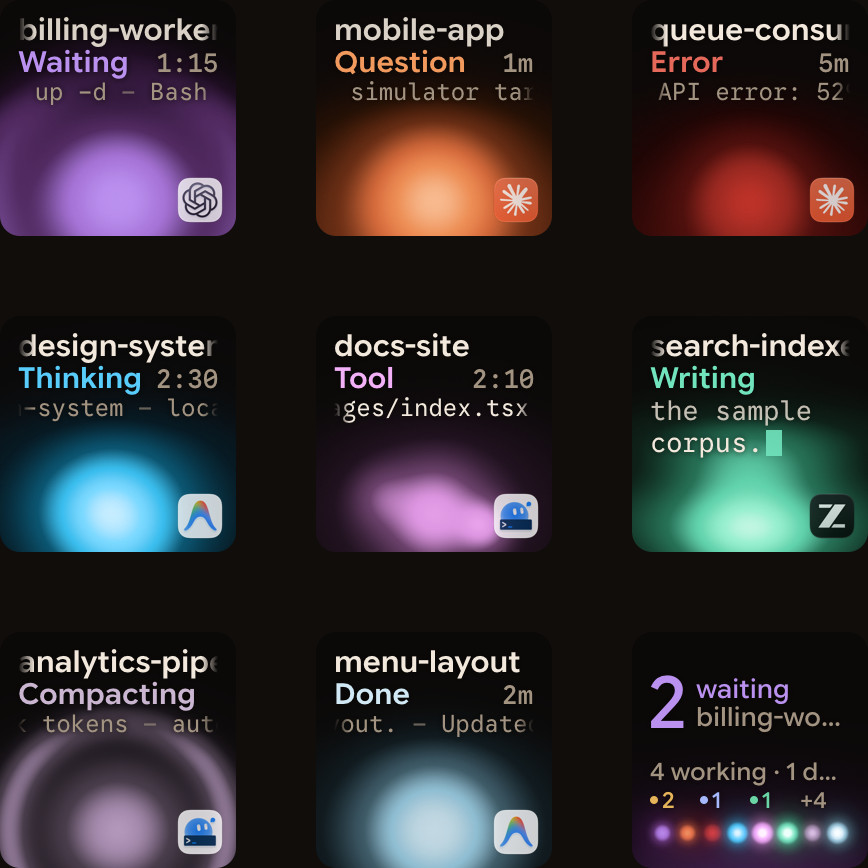
- Keys 1 to 8 show each session's name, state and latest words over an animated Frosted orb.
- A waiting Claude Code session glows terracotta and moves to the front.
- Tap key 9 to open the first waiting session.
- Hold a session key for 0.6 seconds to open Focus mode.
- In Focus mode, press key 2 to open the subagents view, with one subagent on each of keys 1 to 8.
- For a local permission request, press Deny on key 7 or hold Allow on key 9 for 0.6 seconds.
- For a multiple-choice question, tap options on keys 1, 2, 3 or 7, then hold Send on key 9.
Written answers stay on your computer, and Claude Code sessions over SSH are display-only. Orbtile also supports Codex, ZCode, Kimi Code and Antigravity. See Approve agent tool calls without switching windows and Run several Claude Code sessions and see which one needs you.
FAQ
How do I enable agent teams in Claude Code?
Agent teams are experimental and disabled by default. Set the CLAUDE_CODE_EXPERIMENTAL_AGENT_TEAMS environment variable to 1 in your shell or under the env key in settings.json. Then ask Claude in natural language to spawn teammates inside an interactive session.
What is the difference between in-process and split-pane mode for teammates?
In-process mode is the default and runs all teammates inside your main terminal, where you select and message them from the agent panel. Split-pane mode gives each teammate its own pane, so you can see all output at once. It needs tmux, or iTerm2 with the it2 CLI.
Do Claude Code agent teams isolate teammates in separate git worktrees?
No. Subagents and sessions you run yourself can each use a separate worktree, but agent teams do not isolate teammates in worktrees. Two teammates editing the same file will overwrite each other, so give each teammate a different set of files.
How does Orbtile help when running Claude Code sessions and subagents?
Orbtile shows each Claude Code session on a Logitech MX Creative Keypad, an iPhone or an Android phone with Orbtile Mobile, and moves waiting sessions to the front. Hold a session key for 0.6 seconds to open Focus mode. There you can press Deny or hold Allow for local permission requests, or press key 2 to see subagents.