
OpenAI's codex exec (alias codex e) runs the Codex CLI in non-interactive mode from scripts and CI pipelines without opening the interactive terminal UI (TUI). Codex streams progress to stderr and writes only the final agent message to stdout, in a read-only sandbox by default. Pass --sandbox workspace-write for file edits, --json for JSON Lines (JSONL) events, or --output-schema for a JSON Schema.
When to use codex exec and how output streams work
In OpenAI's CLI command reference, codex exec has a Stable maturity label for scripted or CI runs that finish without human interaction. OpenAI lists four main uses:
- Run Codex in pipelines for CI, pre-merge checks and scheduled jobs.
- Generate output such as release notes or summaries and pipe it into other tools.
- Chain command output into Codex and pass the output to downstream CLI tools.
- Execute tasks with explicit, pre-set sandbox and approval settings.
Pass the prompt as a single argument:
codex exec "summarize the repository structure and list the top 5 risky areas"Because codex exec sends progress logs to stderr and prints only the final agent message to stdout, you can pipe or redirect the final answer into files or commands:
codex exec "generate release notes for the last 10 commits" | tee release-notes.mdPass -o <path> (--output-last-message <path>) to write the final message to a file while still printing it to stdout.
Session rollout files and the Git repository check
Codex requires codex exec to run inside a Git repository to prevent destructive changes. It also persists session rollout files to disk unless you tell it not to:
- Pass
--ephemeralto skip persisting session rollout files to disk. - Pass
--skip-git-repo-checkto run outside a Git repository when the environment is safe.
codex exec --ephemeral "triage this repository and suggest next steps"Pipe stdin into codex exec: context vs full prompt
When another command produces output for Codex to inspect, codex exec supports two stdin piping patterns:
- Use
prompt-plus-stdinto pass the instruction as the prompt argument and pipe command output intostdinas context. - Use
codex exec -(or omit the prompt argument) whenstdinis the entire prompt.
Pass piped command output as context with prompt-plus-stdin
With piped stdin and a prompt argument, Codex uses the argument as the instruction and the piped data as context:
# Format fetched JSON into a Markdown table
curl -s https://jsonplaceholder.typicode.com/comments \
  | codex exec "format the top 20 items into a markdown table" > table.md

# Summarise failing tests and propose the smallest likely fix
npm test 2>&1 \
  | codex exec "summarize the failing tests and propose the smallest likely fix" \
  | tee test-summary.md

# Triage the last 200 lines of an application log
tail -n 200 app.log \
  | codex exec "identify the likely root cause, cite the most important errors, and suggest the next three debugging steps" > log-triage.md

# Inspect TLS or HTTP failures from curl
curl -vv https://api.example.com/health 2>&1 \
  | codex exec "explain the TLS or HTTP failure and suggest the most likely fix" > tls-debug.md
You can also pipe GitHub CLI logs into codex exec and pass the result to another command. OpenAI's examples copy a Slack update to the clipboard and post a pull request comment:
gh run view 123456 --log | codex exec "write a concise Slack-ready update on the CI failure, including the likely cause and next step" | pbcopy
gh run view 123456 --log | codex exec "summarize the failure in 5 bullets for the pull request thread" | gh pr comment 789 --body-file -
Pipe the full prompt with the - sentinel
Omit the prompt argument or pass - (codex exec -) to read the entire prompt from stdin when scripts build prompts dynamically or read prompt files:
cat prompt.txt | codex exec -
printf "Summarize this error log in 3 bullets:\n\n%s\n" "$(tail -n 200 app.log)" | codex exec -
generate_prompt.sh | codex exec - --json > result.jsonl
Configure sandboxes, approvals, config and rules
By default, codex exec runs in a read-only sandbox and cannot modify files. Grant the minimum permissions required:
# Allow edits inside the workspace
codex exec --sandbox workspace-write "<task>"

# Allow broader access only in an isolated CI runner or container
codex exec --sandbox danger-full-access "<task>"
You can also use the short form -s, as in -s workspace-write.
Why --full-auto was replaced by --sandbox workspace-write and --approve-for-me
OpenAI notes that --full-auto is no longer supported. Update scripts to one of these flags:
--sandbox workspace-writeallows file edits in the workspace.--approve-for-me(alias--not-so-yolo) uses automatic approval review withon-requestapprovals and theworkspace-writesandbox.--approve-for-meconflicts with--sandboxand--yolo.
A separate flag, --dangerously-bypass-approvals-and-sandbox (alias --yolo), bypasses approval prompts and sandboxing completely. OpenAI says to use it only inside an isolated runner or an externally hardened environment.
Isolate config.toml, execpolicy rules, hooks and MCP servers
For repeatable automation runs independent of local user files:
--ignore-user-configskips loading$CODEX_HOME/config.toml, while authentication still usesCODEX_HOME.--ignore-rulesskips user and projectexecpolicy.rulesfiles.--strict-configexits with an error on unrecognisedconfig.tomlfields.--dangerously-bypass-hook-trustruns hooks without persisted hook trust, for automation that already vets hook sources.
If an enabled Model Context Protocol (MCP) server has required = true and fails to initialise, codex exec exits with an error.
For config.toml precedence, AGENTS.md and interactive commands, see OpenAI Codex CLI: install, commands, config.toml and codex exec.
Reference table of codex exec flags and subcommands
The CLI inherits defaults from ~/.codex/config.toml, and -c key=value flags override them for that run. Most global codex flags propagate to subcommands, but codex exec rejects --remote.
| Flag or subcommand | Values | What it does in codex exec |
|---|---|---|
PROMPT | string or - | Task instruction, or - to read from stdin |
--sandbox, -s | read-only, workspace-write, danger-full-access | Shell command sandbox policy (read-only by default) |
--approve-for-me, --not-so-yolo | boolean | Automatic approval review with on-request approvals and workspace-write; conflicts with --sandbox and --yolo |
--dangerously-bypass-approvals-and-sandbox, --yolo | boolean | Bypass approvals and sandboxing; isolated runners only |
--ephemeral | boolean | Do not persist session rollout files |
--json, --experimental-json | boolean | Print JSONL events to stdout |
--output-last-message, -o | path | Write the final message to a file and stdout |
--output-schema | path | JSON Schema file constraining the final response |
--cd, -C | path | Set the workspace root |
--worktree | boolean | Run a new or forked session in a managed Git worktree (local only) |
--skip-git-repo-check | boolean | Allow running outside a Git repository |
--ignore-user-config | boolean | Skip $CODEX_HOME/config.toml (auth still uses CODEX_HOME) |
--ignore-rules | boolean | Skip user and project execpolicy .rules files |
--dangerously-bypass-hook-trust | boolean | Run hooks without persisted hook trust |
--model, -m | string | Override the model (for example gpt-6.1-sol) |
--profile, -p | string | Layer $CODEX_HOME/profile-name.config.toml over base config |
-c, --config | key=value | Repeatable inline config override (parsed as TOML if possible) |
--image, -i | path[,path...] | Attach images to the first message |
--color | always, never, auto | Control ANSI colour in stdout |
--oss and --local-provider | boolean and lmstudio or ollama | Use a local open source provider (--oss requires --local-provider or oss_provider) |
--thread-source | SOURCE | Source label for a new or forked thread (resume keeps original) |
--cyber-access-program | standard, daybreak_blue, daybreak_red | Request an experimental cyber access program (OpenAI provider only; not with review; fork needs a prompt) |
codex exec resume [SESSION_ID] | SESSION_ID, --last, --all, --image, PROMPT | Resume a session by ID or with --last |
codex exec fork <SESSION_ID> [PROMPT] | SESSION_ID, --worktree, --image, PROMPT | Copy a saved session into a new session |
Stream JSONL events and enforce a JSON Schema
Pass --json (or --experimental-json) to turn stdout into a JSON Lines (JSONL) stream where each line is a state change object:
codex exec --json "summarize the repo structure" | jq- Event types include
thread.started,turn.started,turn.completed,turn.failed,item.*anderror. item.*types include agent messages, reasoning, command executions, file changes, MCP tool calls, web searches and plan updates.
Sample JSONL stream:
{"type":"thread.started","thread_id":"0199a213-81c0-7800-8aa1-bbab2a035a53"}
{"type":"turn.started"}
{"type":"item.started","item":{"id":"item_1","type":"command_execution","command":"bash -lc ls","status":"in_progress"}}
{"type":"item.completed","item":{"id":"item_3","type":"agent_message","text":"Repo contains docs, sdk, and examples directories."}}
{"type":"turn.completed","usage":{"input_tokens":24763,"cached_input_tokens":24448,"output_tokens":122,"reasoning_output_tokens":0}}
Constrain the final response with --output-schema
Pass --output-schema <path> with a JSON Schema file to enforce structured JSON output. Combine it with -o <path> to save the final JSON object:
{
  "type": "object",
  "properties": {
    "project_name": { "type": "string" },
    "programming_languages": { "type": "array", "items": { "type": "string" } }
  },
  "required": ["project_name", "programming_languages"],
  "additionalProperties": false
}codex exec "Extract project metadata" --output-schema ./schema.json -o ./project-metadata.jsonResume, fork and isolate non-interactive sessions in worktrees
Continue an earlier non-interactive run with codex exec resume:
codex exec "review the change for race conditions"
codex exec resume --last "fix the race conditions you found"- Pass
--lastto resume the most recent session in the current directory, and add--allto include other directories. - Pass a
<SESSION_ID>to resume a specific session, with an optional prompt or-to read it fromstdin. - Run
codex exec fork <SESSION_ID> [PROMPT]to copy a saved session into a new session. - A fork without a prompt is created without starting a turn.
- A fork needs a prompt when you pass images,
--output-schema,--output-last-messageor--ephemeral. - Add
--worktreetocodex execorcodex exec fork <SESSION_ID>to run in a new managed Git worktree. --worktreeneeds local execution and cannot be combined withresume,review,--ephemeralor--ignore-user-config.
codex exec --worktree "implement the next step"
codex exec fork <SESSION_ID> --worktree "try an alternative approach"
Authenticate codex exec in CI and GitHub Actions
codex exec reuses saved CLI authentication (~/.codex/auth.json) by default. In CI, OpenAI recommends scoping API keys tightly so repository code cannot read them:
- Never set
OPENAI_API_KEYorCODEX_API_KEYas a job-level variable in workflows that run repository-controlled code. - In other automation environments, set
CODEX_API_KEYonly for the invocation that needs it. - Keep untrusted code out of the process environment that holds the key.
CODEX_API_KEYworks withcodex exec,codex review, the TypeScript SDK andcodex exec-server --remote.
CODEX_API_KEY=<api-key> codex exec --json "triage open bug reports"ChatGPT-managed auth in CI is an advanced option for trusted runners. Treat ~/.codex/auth.json like a password, because it holds access tokens. Never use it for public repositories. Seed it from secure storage and persist the refreshed auth.json between runs.
Run codex exec in GitHub Actions with openai/codex-action@v1
In GitHub Actions, OpenAI recommends openai/codex-action@v1. It installs the Codex CLI, starts the Responses API proxy when you provide openai-api-key, and runs codex exec:
- name: Run Codex
  id: run_codex
  uses: openai/codex-action@v1
  with:
    openai-api-key: ${{ secrets.OPENAI_API_KEY }}
    prompt-file: .github/codex/prompts/review.md
output-file: codex-output.md- Pass
promptorprompt-file, but not both. - Pass extra
codex execflags incodex-args, as a JSON array or a shell string. - Other inputs include
sandbox,model,effort,output-file,codex-versionandcodex-home. - Read the
final-messageoutput in later steps. - Keep the default
safety-strategy: drop-sudo, which removessudofor the rest of the job. - Use
safety-strategy: unprivileged-userwithcodex-userto run Codex as a specific account. - On Windows runners, you must set
safety-strategy: unsafe.
For automated CI fixes, OpenAI describes a two-job workflow. The generate_fix job runs with contents: read only. It lets Codex work and saves git diff --binary HEAD > codex.patch as an artifact. The open_pr job has contents: write and pull-requests: write but no API key. It applies the patch, pushes a branch and opens the pull request.
Watch codex exec runs alongside interactive sessions with Orbtile
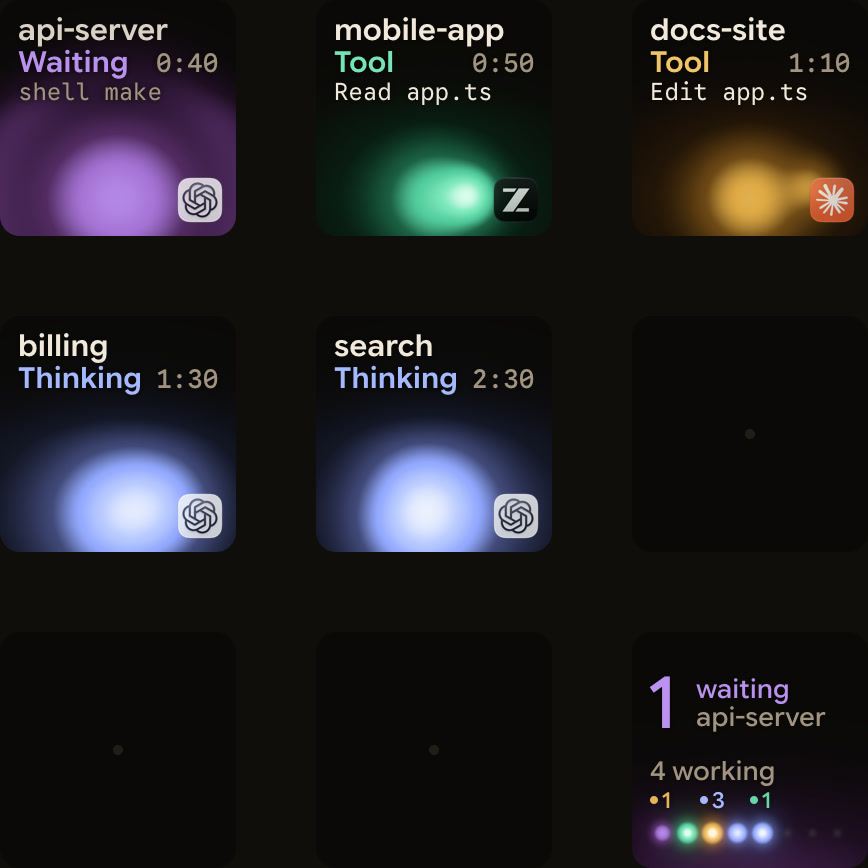
When local scripts or other coding agents launch codex exec tasks alongside interactive chats, Orbtile shows every session in one place. Use a Logitech MX Creative Keypad, or an iPhone (App Store, iOS 17+) or Android phone (Android 8.0+) with Orbtile Mobile. Orbtile runs on a Mac with macOS 14.0 Sonoma or later on Apple silicon (M1 or later), or a Windows 11 PC (x64).
- Nothing extra is required: Orbtile reads Codex thread files and Codex's own signals.
- Desktop threads, terminal
codexsessions andcodex execruns show as Codex, even when launched from another agent. - Each key shows session state, tool labels, waits and assistant text.
- Working Codex sessions glow cool blue, and waiting or permission states glow magenta-violet and move to the front.
- Tap key 9 to focus the first waiting session, including sessions on other pages.
- A short press under 0.6 seconds on a session key opens that session in its application or terminal window.
codex execnever asks for command approval in Codex 0.159.0.- Compatible local Codex desktop chats accept Deny, Allow and supported multiple-choice answers from the keypad.
- Terminal
codexcommand approvals offer Allow on the keys. To decline one, answer in the terminal. - Optional Codex hooks, installed in
Settings > Agents > Codexand trusted inCodex > Settings > Hooks, add a Compacting state and slightly earlier updates. Settings > Remote Hostsfollows Codex sessions on servers you add by SSH alias.
See Know when a Codex task is waiting for you and Watch Claude Code and Codex running on a remote server over SSH.
FAQ
How do I run OpenAI Codex in non-interactive mode?
Run codex exec (or the short alias codex e) followed by your prompt string inside a Git repository. Codex runs without opening the interactive terminal UI, streams progress logs to standard error, and prints only the final agent message to standard output.
Why does codex exec refuse to edit files or reject --full-auto?
By default, codex exec runs in a read-only sandbox, and the --full-auto flag is no longer supported. Pass --sandbox workspace-write to allow file edits in your workspace, or pass --approve-for-me to use automatic approval review with the workspace-write sandbox.
How do I pipe command output or a prompt file into codex exec?
If you pipe standard input and also pass a prompt argument, codex exec uses the prompt argument as the instruction and the piped data as additional context. If you omit the prompt argument or pass - as the prompt argument, codex exec reads the entire prompt from standard input.
Does Orbtile show codex exec runs on a keypad or phone?
Yes. Orbtile reads Codex thread files with nothing extra installed. Codex exec runs appear alongside Codex desktop chats and terminal sessions on a Logitech MX Creative Keypad, an iPhone or an Android phone, even when launched from another agent.