
Kimi Code offers Kimi K3 under two model IDs. k3 has up to 1M (1048576) tokens of context, and k3-256k has up to 256K (262144) tokens at about half the quota. Pick K3 with /model in Kimi Code CLI, the model picker in Kimi Code Desktop or the dropdown in Kimi Code for VS Code. You can also set kimi-code/k3 in ~/.kimi-code/config.toml, or call both IDs through the Kimi Code API.
Kimi K3 models in Kimi Code: k3 vs k3-256k
Kimi Code is the programming service included in Kimi membership. It comes as a Desktop app, a CLI and a VS Code extension, and its API Keys work in third-party tools. It offers six model IDs, including K3, the 2.8T-parameter previous flagship, in two variants:
| Specification | k3 | k3-256k | k3.1-pro | k3.1-pro-highspeed | kimi-for-coding | kimi-for-coding-highspeed |
|---|---|---|---|---|---|---|
| Version and role | K3 (2.8T, previous flagship) | K3 (256K context) | K3.1 Pro (3T-class, latest flagship) | K3.1 Pro Highspeed | K2.8 Preview (close to K3, more efficient thinking) | K2.7 Code Highspeed |
| Context | Up to 1048576 | Up to 262144 | Up to 1048576 | Up to 1048576 | Up to 1048576 | Up to 262144 |
| Speed and quota | Regular (~2x k3-256k quota) | Regular | Regular | ~2-3x speed, ~2x quota | Regular | ~6x speed, ~3x quota |
| Effort | low, high, max (default high) | low, high, max (default high) | low, high, max (always thinking) | low, high, max (always thinking) | low, high, max (default max) | Thinking:ON (effort not adjustable) |
| New plans | Plus+ (1M: Pro+) | Plus+ | Plus+ (1M: Pro+) | Pro+ | Plus+ | Pro+ |
| Legacy plans | Moderato+ (1M: Allegretto+) | Moderato+ | Moderato+ (1M: Allegretto+) | Allegretto+ | Andante+ | Allegretto+ |
| Input | Image, video | Image only | Image, video | Image, video | Image, video | Image, video |
Key differences in daily work:
k3suits large codebase analysis, multi-file refactoring and long documents, with up to 1M context on Pro or Allegretto plans and above.k3-256ksuits everyday Q&A, code completion and single-file or small-file edits.k3-256kgives the same results ask3within 256K context, at about half the quota.k3-256kaccepts image input but not video.
Switch to Kimi K3 in official clients
Members can use Kimi K3 in Kimi Code Desktop, Kimi Code CLI and Kimi Code for VS Code without managing an API Key. Kimi Code Desktop runs on macOS (Apple Silicon and Intel), Windows and Linux (AppImage, DEB and RPM). JetBrains and Zed connect through the CLI's ACP protocol.
Kimi Code CLI is moving from Python and uv to Node.js. Install it with:
# macOS / Linux
curl -fsSL https://code.kimi.com/kimi-code/install.sh | bash# Windows (PowerShell)
irm https://code.kimi.com/kimi-code/install.ps1 | iexRun kimi and then /login to connect your account. To select K3:
- Desktop: use the model picker inside the Composer.
- CLI: run the
/modelslash command. - VS Code: use the dropdown in the input bar.
- Missing model: if K3 does not appear yet, restart the app or sign in again.
Context cache rules and switching between 1M and 256K
- Changing models or thinking effort mid-session invalidates the context cache, so the next request is prefilled again and uses more tokens.
- The docs recommend starting a new session when you change model or effort.
- Reasoning chains from different models can affect each other.
- Switching to the new models inside an existing K3 series session lowers output quality and cache hits.
- K3 (1M) to
k3-256k: tools such as Kimi Code CLI and Claude Code compact on their side when needed, but the docs recommend compacting manually first. - If the conversation history includes video files, switching straight to
k3-256kfails because it does not accept video, so compact first. k3-256kto K3 (1M): this switch does not affect the cache, so near the 256K limit you can move tok3instead of compacting.
Configure Kimi K3 in ~/.kimi-code/config.toml
Kimi Code CLI creates ~/.kimi-code/config.toml for runtime settings on first run. Terminal UI preferences live in tui.toml in the same folder. Setting KIMI_CODE_HOME moves the folder, and the file names stay the same. Field names use snake_case, and table keys containing . must be quoted.
Signing in with /login provisions a kimi-code/k3 entry under the managed:kimi-code provider. The docs' full example looks like this:
default_model = "kimi-code/k3"
default_permission_mode = "manual"
default_plan_mode = false

[providers."managed:kimi-code"]
type = "kimi"
base_url = "https://api.kimi.com/coding/v1"
api_key = ""

[models."kimi-code/k3"]
provider = "managed:kimi-code"
model = "k3"
max_context_size = 1048576
capabilities = [ "thinking", "always_thinking", "image_in", "video_in", "tool_use" ]
display_name = "K3"
support_efforts = [ "low", "high", "max" ]
default_effort = "max"

[thinking]
enabled = true
effort = "high"
keep = "all"
This example sets default_effort = "max", while elsewhere the same page says the /login default for kimi-code/k3 is high.
| Table and field | Type and default | What it controls |
|---|---|---|
default_model | string (none) | Default CLI model alias matching a key in [models] |
[models."<alias>"].provider | string (required) | Key in [providers], for example "managed:kimi-code" |
[models."<alias>"].model | string (required) | Model ID sent to the API, for example "k3" |
[models."<alias>"].max_context_size | integer (required) | Max context tokens (1048576 for k3, minimum 1) |
[models."<alias>"].capabilities | array<string> | Tags such as "thinking", "always_thinking", "image_in", "video_in" and "tool_use" |
[models."<alias>"].support_efforts | array<string> | Allowed efforts ([ "low", "high", "max" ] for k3) |
[models."<alias>"].default_effort | string | Model default effort, which managed refreshes may rewrite |
[thinking].enabled | boolean (true) | Turns thinking on by default (false forces it off) |
[thinking].effort | string (none) | Global effort (low, medium, high, xhigh, max), falling back to the model default |
[thinking].keep | string ("all") | Preserved thinking passthrough, overridden by KIMI_MODEL_THINKING_KEEP |
Pinning model settings with overrides
- Put custom values under
[models."<alias>".overrides]so they survive provider refreshes, which may rewritesupport_effortsanddefault_effort. - Overrides accept
max_context_size,max_input_size,max_output_size,capabilities,display_name,reasoning_key,adaptive_thinking,support_efforts,default_effortandoff_effort. - Overrides do not accept
provider,model,protocol,beta_api,base_urlorupgrade. KIMI_MODEL_*environment variables create a temporary provider in memory that is gone after a restart.
For desktop alerts, Notification hooks, and NotifyUser, see Kimi Code notifications: hooks, NotifyUser and TUI settings.
Assign Kimi K3 and custom effort variants to subagents
Subagents use the caller's model unless [secondary_model] is set in ~/.kimi-code/config.toml. Run /secondary-model (alias /subagent-model) in the TUI to pick its default_model. New subagents use the change straight away, with no restart.
When the pool in [secondary_model.models] lists two or more aliases, the main agent gets a model parameter when it spawns a subagent. You can register a k3-max variant next to kimi-code/k3:
[models.k3-max]
provider = "managed:kimi-code"
model = "k3"
max_context_size = 1048576
capabilities = [ "thinking", "always_thinking", "image_in", "video_in", "tool_use" ]
support_efforts = [ "low", "high", "max" ]

[models.k3-max.overrides]
default_effort = "max"

[secondary_model]
default_model = "kimi-code/k3"
[secondary_model.models]
"kimi-code/k3" = "Default high effort. Good for most implementation, analysis, and multi-turn interaction tasks."
k3-max = "The same model at max thinking effort. Good for the hardest subtasks."
Subagent variant rules:
- Under
managed:kimi-code, only thek3family currently declares effort levels. - A variant does not inherit fields, so copy
capabilities,support_effortsand other metadata in full. - The variant's
default_effortmust be one of itssupport_efforts. - For the main agent, the global
[thinking].effortoverrides the variant'sdefault_effort. - For subagents, the variant's
default_effortwins over[thinking].effort, and only[secondary_model].default_effortoutranks it. primaryis a reserved alias and cannot be a pool key.- A broken alias in
[secondary_model]makes session startup fail with an error that names the alias.
Use Kimi K3 in third-party tools over the Kimi Code API
Members can create up to 5 API Keys in the Kimi Code Console, and each key is shown only once. Use them in tools such as Claude Code, OpenCode and Codex. Kimi Code is a membership subscription with rate limits. The Kimi Platform (https://api.moonshot.cn/v1 or https://api.moonshot.ai/v1) is pay-as-you-go instead.
| Protocol | China Base URL | Overseas Base URL |
|---|---|---|
| OpenAI compatible (Responses and Chat Completions) | https://api.kimi.com/coding/v1 | https://api.kimi.ai/coding/v1 |
| Anthropic compatible | https://api.kimi.com/coding/ | https://api.kimi.ai/coding/ |
Some tools, such as Claude Code, need only the Base URL and add the rest of the path themselves. Others, such as Trae, need the full address, for example https://api.kimi.com/coding/v1/chat/completions or https://api.kimi.com/coding/v1/responses. Tools that support the Responses API should use the native Responses format.
Model IDs, User-Agent policy, and effort mapping
- Pass the exact model ID,
k3ork3-256k, because a display name or a typo silently falls back to K2.8 Preview without thinking. - Keep the tool's real
User-Agentheader, because changing it is a violation that may suspend membership benefits. - In Kimi Code CLI, providers do not read shell variables, so set
api_key,api_key_envorenvinconfig.toml.
| Third-party tool input | Resulting behaviour on k3 and k3-256k |
|---|---|
| No value | Model default (high) |
ultra, max, xhigh | Mapped to max |
high, medium | Mapped to high |
low, minimum, light | Mapped to low |
off, none, disabled | Served by K2.8 Preview without thinking (rejected on K3.1 Pro) |
| Any other value | Rejected with HTTP 400 |
HTTP 403 means your plan does not include the model or 1M context. HTTP 400 can mean the request exceeds the model's context limit, or an effort value the API does not recognise.
Watch Kimi Code sessions on a keypad or phone with Orbtile
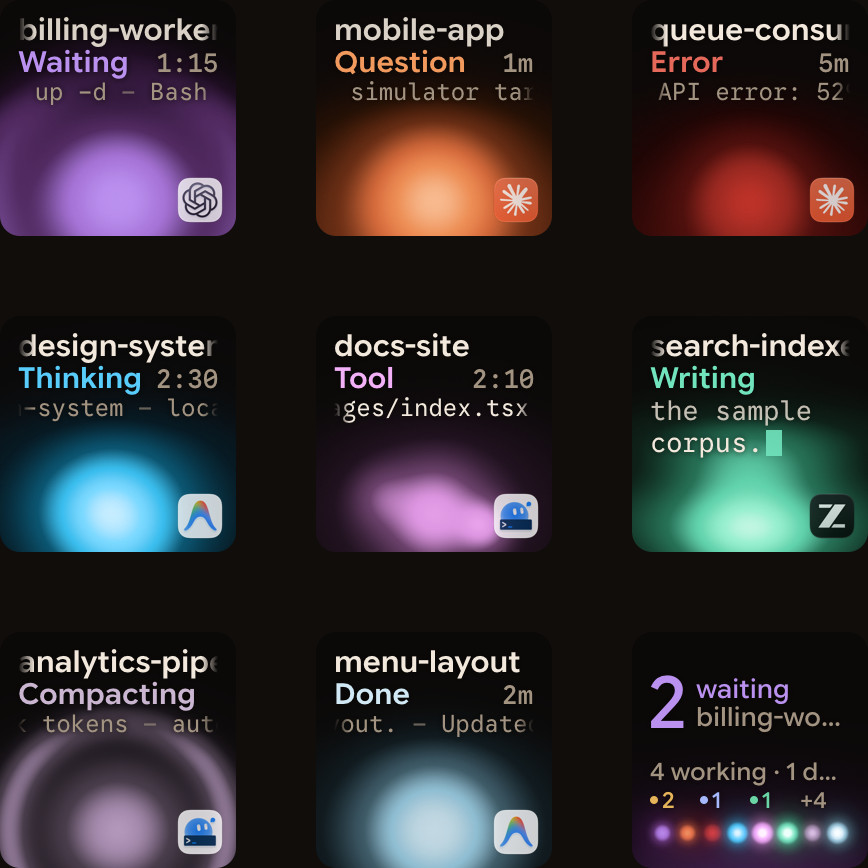
Orbtile shows Kimi Code, Claude Code and Codex sessions on a Logitech MX Creative Keypad, or on an iPhone (iOS 17+) or Android phone (8.0+) with Orbtile Mobile. It runs on a computer with macOS 14.0 Sonoma or later on Apple silicon, or a Windows 11 PC (x64). On Windows, Kimi Code is supported from Orbtile 0.3.6.
- Nothing needs to be installed for Kimi Code sessions to show.
- Orbtile reads the session index, each session's
state.jsonand the last 2 MiB of its main wire log. - These files live in
~/.kimi-code, or%USERPROFILE%\.kimi-codeon Windows, andKIMI_CODE_HOMEoverrides the folder. - Each key shows the session name, state and live text, and working Kimi Code sessions glow magenta.
- During
Starting, the key shows the model name when it is available. - Hold a session key for 0.6 seconds to open Focus mode, which shows the session name and model on key 1.
- In Focus mode, key 2 shows the subagent count and opens a view with one subagent on each of keys 1 to 8.
- Waiting sessions turn terracotta and move to the front, and a tap on key 9 focuses the first waiting session.
- A tap on a session key brings its terminal or Kimi window to the front.
- Optional Kimi Code hooks, chosen in Settings > Agents, add a Compacting state and never approve or deny anything.
To answer from the keypad on a Mac or a Windows PC, run the session in Kimi's own server with kimi web or kimi rc, or type /rc in a Kimi terminal session. Orbtile then reads the server's registration files in server/instances/ and its access token, server.token.
- When a permission request arrives, hold the glowing session key for 0.6 seconds to open Focus mode.
- Press Deny on key 7 to decline, or hold Allow on key 9 for 0.6 seconds to approve.
- The keypad can answer for up to 2 minutes, or less if Kimi Code's own limit is shorter.
- After that, the key shows Answer on computer.
- For a question with listed options, pick options on keys 1, 2, 3 and 7, then hold Send on key 9.
- Other Kimi Code sessions, other questions and written answers stay on your computer.
See Kimi Code web UI: kimi web, /web, tokens and LAN setup and Kimi Code vs Claude Code: run both and see which needs you.
FAQ
What is the difference between k3 and k3-256k in Kimi Code?
In Kimi Code, k3 is the 2.8T-parameter K3 model with up to a 1M token context window for Pro or Allegretto members and above, and it accepts both image and video input. The k3-256k model ID caps the context window at 262144 tokens and accepts images only. It gives the same results as k3 within 256K context and uses about half the quota of 1M k3.
How do I switch to Kimi K3 in Kimi Code CLI, Desktop and VS Code?
In Kimi Code CLI, run /model to switch models, or log out and log in again if the model is not listed yet. In Kimi Code Desktop, use the model picker inside the Composer. In Kimi Code for VS Code, choose the model from the dropdown menu in the input bar.
Why does switching from k3 to k3-256k fail or lose cache hits?
Switching models or changing thinking effort within an active session invalidates the context cache and requires a new prefill. When moving from 1M k3 to k3-256k, the docs recommend compacting first so the context fits within 256K. Switching directly fails if the conversation history contains video files, because k3-256k does not accept video input.
What happens if I mistype the k3 model ID or disable thinking in a third-party tool?
If you pass a display name such as K3 or mistype the model ID in a third-party tool, the Kimi Code API falls back to K2.8 Preview without thinking. Passing off, none or disabled as the thinking effort on K3 also sends the request to K2.8 Preview without thinking.