
To play a Claude Code notification sound when a task finishes or a permission prompt waits, set preferredNotifChannel to "terminal_bell" in ~/.claude/settings.json, or add a Notification or Stop hook. By default, Claude Code sends desktop notifications only in Ghostty, Kitty and iTerm2, and /terminal-setup turns off the audible bell in Apple Terminal. With several sessions open, Orbtile shows which one is waiting.
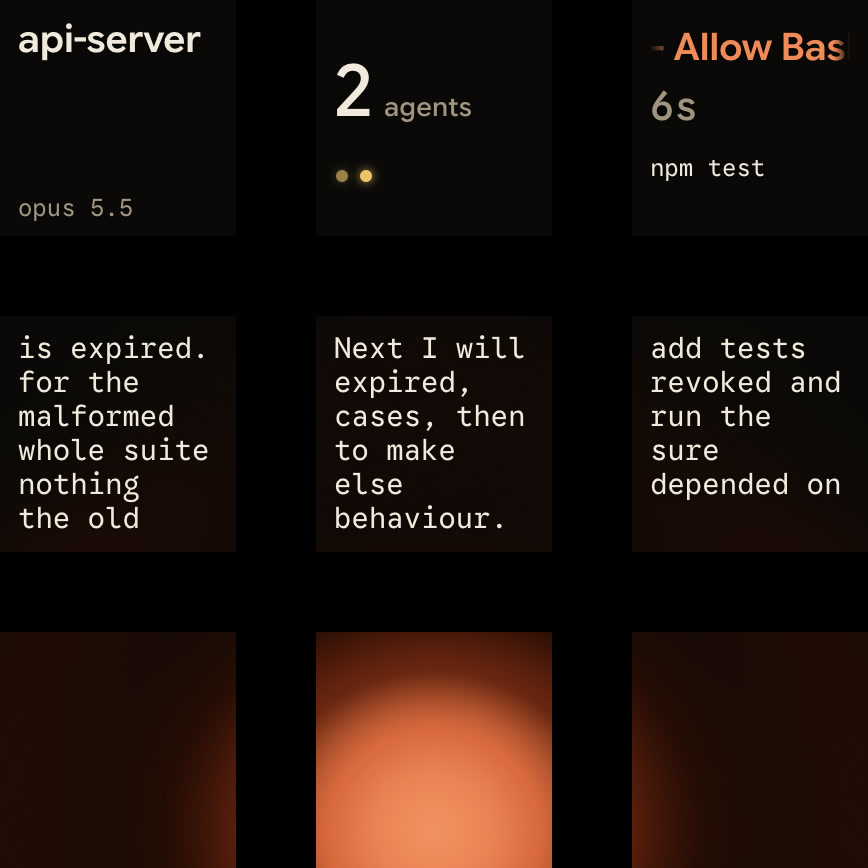
How Claude Code notifications and terminal bells work by default
When Claude finishes a task or pauses for a permission prompt while you appear to be away from the terminal, Claude Code fires a notification event. What happens next depends on the terminal:
| Terminal emulator | Default behaviour | How to get sound |
|---|---|---|
| Ghostty, Kitty, iTerm2 | Desktop notification when detected (iTerm2 needs its alert settings turned on) | Set preferredNotifChannel to "terminal_bell" (or "iterm2_with_bell" in iTerm2), or add a Notification hook |
| Apple Terminal | No sound. A silent bell character when Audible bell is off in the front window's profile, otherwise nothing | Set preferredNotifChannel to "terminal_bell" and turn on Audible bell under Settings > Profiles > Advanced |
| Windows Terminal | Nothing | Set preferredNotifChannel to "terminal_bell" and bellStyle to "audible" or "all" |
| Warp, VS Code integrated terminal, others | Nothing | Set preferredNotifChannel to "terminal_bell" or add a Notification hook |
In Apple Terminal, the silent bell shows as a window flash, or a Dock bounce while Terminal is in the background, if that profile's Visual bell or Dock bounce option is on.
Enable the terminal bell with preferredNotifChannel
preferredNotifChannel chooses how Claude Code notifies you when a task completes or a permission prompt is waiting. It appears in /config as Local notifications. Set it to "terminal_bell" in ~/.claude/settings.json to ring the bell character in any terminal:
{
  "preferredNotifChannel": "terminal_bell"
}
It defaults to "auto" and accepts seven values:
"auto": a desktop notification in iTerm2, Ghostty or Kitty when detected, and a bell in Apple Terminal only when its audible bell is off."terminal_bell": rings the bell character in any terminal."iterm2","kitty","ghostty": a desktop notification for that terminal."iterm2_with_bell": an iTerm2 desktop notification plus the bell."notifications_disabled": no notification.
Where to save preferredNotifChannel across settings scopes
preferredNotifChannel has Any file scope, so it works in all four settings files:
| Scope | Location | Applies to |
|---|---|---|
User | ~/.claude/settings.json | All your projects |
Project | .claude/settings.json | One project, shareable |
Local | .claude/settings.local.json | One project, not shared |
Managed | Managed policy settings | Your organisation, as deployed |
Claude Code also reads a value left in ~/.claude.json by older versions.
Forward notifications over SSH and through tmux
Over SSH from a terminal running outside tmux, set preferredNotifChannel to "iterm2", "kitty" or "ghostty" on the machine running Claude Code. Ghostty and Kitty forward the notification to your OS notification centre without further setup. In iTerm2, open Settings → Profiles → Terminal, check Notification Center Alerts, click Filter Alerts, and enable Send escape sequence-generated alerts. If nothing appears, check that your terminal has notification permission in your OS settings.
Inside tmux, desktop notifications don't reach the outer terminal by default, and Shift+Enter submits instead of inserting a newline. Add these lines to ~/.tmux.conf, then run tmux source-file ~/.tmux.conf:
set -g allow-passthrough on
set -g focus-events on
set -s extended-keys on
set -as terminal-features 'xterm*:extkeys'
With allow-passthrough on and preferredNotifChannel set to "iterm2", "kitty" or "ghostty", a visible pane sends notifications to the outer terminal. A pane in a window you aren't viewing sends none.
Turn on the audible bell in Apple Terminal and Windows Terminal
With preferredNotifChannel set to "terminal_bell", your terminal decides what the bell does.
Apple Terminal on macOS: why /terminal-setup silences the bell
On macOS, accepting Claude Code's first-run terminal setup prompt runs /terminal-setup. It enables Use Option as Meta Key under Settings → Profiles → Keyboard and turns off the audible bell in your Apple Terminal profile. In screen reader mode, it leaves the bell unchanged. To get the sound back:
- Set
preferredNotifChannelto"terminal_bell"in your Claude Code settings. - In Apple Terminal, open
Settings > Profiles > Advancedand checkAudible bell.
Windows Terminal: bellStyle and custom bellSound files
In the Windows Terminal settings.json, put the settings inside one profile in list, or in defaults above list to apply them to all profiles:
"defaults":
{
    "bellStyle": "audible",
    "bellSound": "C:\\path\\to\\sound.wav"
},
"list":
[
    // PROFILE OBJECTS
]| Property | Default | Values and behaviour |
|---|---|---|
bellStyle | "audible" | Optional. Accepts "all", "audible", "window", "taskbar" or "none" for what happens on a BEL character |
bellSound | None given | Optional. A file location as a string, or an array of file locations picked at random |
- With
"all", the terminal plays a sound and flashes the taskbar icon. - When the terminal is not in focus,
"all"only flashes the taskbar icon. bellSoundapplies whenbellStyleis"all"or"audible".
See Get notified when Claude Code needs you on Windows and Claude Code in Windows Terminal: setup, profiles and keys.
Play a custom notification sound with a Notification hook
A Notification hook works in any terminal and runs alongside the built-in notification rather than replacing it. That suits terminals with no desktop notification, such as Warp or the VS Code integrated terminal. Add Notification inside hooks in ~/.claude/settings.json, next to any hooks you already have:
{
  "hooks": {
    "Notification": [
      {
        "hooks": [{ "type": "command", "command": "afplay /System/Library/Sounds/Glass.aiff" }]
      }
    ]
  }
}
Type /hooks to check that it appears under Notification. To test it, press Esc, press Shift+Tab until the status bar shows ⏸ manual mode on, ask Claude to do something that needs permission, and switch away from the terminal.
Native desktop notification commands across macOS, Linux and Windows
Anthropic's hooks guide also gives desktop notification commands. This is the macOS one:
{
  "hooks": {
    "Notification": [
      {
        "matcher": "",
        "hooks": [
          {
            "type": "command",
            "command": "osascript -e 'display notification \"Claude Code needs your attention\" with title \"Claude Code\"'"
          }
        ]
      }
    ]
  }
}- On macOS,
osascriptsends notifications through Script Editor and fails silently if Script Editor lacks notification permission. - Run
osascript -e 'display notification "test"'once, then turn onAllow NotificationsforScript EditorinSystem Settings > Notifications. - On Linux, use
notify-send 'Claude Code' 'Claude Code needs your attention'as the command. notify-sendneeds a desktop notification daemon. If the command isn't found, installlibnotify-binon Debian and Ubuntu.- On Windows, a PowerShell command opens a dialog box, which can open behind your terminal window.
- If you run Claude Code inside WSL,
powershell.exemust be on yourPATHthrough Windows interop.
Filter which events play a sound with Notification matchers
An omitted matcher, "" or "*" matches every notification type. You can also set matcher to one type, a list of types separated by | or ,, or a JavaScript regular expression:
{
  "hooks": {
    "Notification": [
      {
        "matcher": "permission_prompt|idle_prompt",
        "hooks": [
          {
            "type": "command",
            "command": "afplay /System/Library/Sounds/Glass.aiff"
          }
        ]
      }
    ]
  }
}| Matcher value | Fires when |
|---|---|
permission_prompt | Claude needs approval for a tool use or a sandboxed command's network request, and the prompt has waited about six seconds |
idle_prompt | Claude finished responding about 60 seconds ago and you haven't typed since |
auth_success | Authentication completes |
auth_storage_failure | Sign-in completes but Claude Code can't save the new credentials. Fires in place of auth_success |
elicitation_dialog | An MCP server opens an elicitation form and you haven't typed for about six seconds |
elicitation_url_dialog | An MCP server asks you to open a browser URL and you haven't typed for about six seconds |
elicitation_complete | An MCP server reports that a URL-mode elicitation is complete |
elicitation_response | An MCP elicitation response is sent back to the server |
agent_needs_input | A background session starts waiting on your input while agent view is open in a terminal |
agent_completed | A background session finishes or fails while agent view is open in a terminal |
quota_auto_resume_fired | Claude Code continues your task after a claude.ai usage limit paused it |
quota_auto_resume_stale | A claude.ai usage limit reset while your computer slept for more than about 30 minutes, so Claude Code waits for Enter |
quota_auto_resume_disabled | Claude Code ends its wait for a claude.ai usage limit without continuing your task |
plugin_notification | A mod raises a notification with $.ui.notify |
The three quota_auto_resume_* types need Claude Code v2.1.234 or later, and auth_storage_failure needs v2.1.288 or later.
Play a sound at the end of every turn with a Stop hook
Because idle_prompt waits about 60 seconds, use a Stop hook for a sound as soon as a turn ends:
{
  "hooks": {
    "Stop": [
      {
        "hooks": [
          {
            "type": "command",
            "command": "afplay /System/Library/Sounds/Glass.aiff"
          }
        ]
      }
    ]
  }
}Stopruns when the main Claude Code agent has finished responding.- It does not run when you interrupt Claude, and API errors fire
StopFailureinstead. Stophas no matcher support, so it fires on every occurrence.- Set
"async": trueto run the hook in the background without blocking Claude. - A command hook's
timeoutdefaults to 600 seconds, but Claude Code doesn't enforce it on an async hook. - On macOS and Linux, command hooks have no controlling terminal and can't open
/dev/tty. - To ring the bell, set a title or send a desktop notification from a hook, return
terminalSequencein its JSON output. - Hooks merge across user, project, local and managed settings rather than replacing each other.
- Set
"disableAllHooks": trueto turn hooks off, though it can't disable managed hooks from outside managed settings.
For questions and plan approvals, see Know when Claude Code asks you a question or wants a plan approved and Claude Code hooks: events, matchers, settings and handlers.
See which Claude Code session needs you with Orbtile
A sound tells you that some session needs you, not which tab or window it is in. Orbtile puts every coding-agent session on a key of the Logitech MX Creative Keypad. It can also show them on an iPhone (iOS 17 or later, from the App Store) or an Android phone (Android 8.0 or later) with Orbtile Mobile.
Orbtile runs on a computer with macOS 14.0 Sonoma or later on Apple silicon (M1 or later), or on Windows 11 (x64). It drives the nine LCD keys and two page buttons of the keypad over USB, without Logi Options+.
- Install the Claude Code plugin in Settings > Agents > Claude Code on a Mac, or with its Install button on Windows.
- Restart any running Claude Code sessions once so they load the plugin.
- Orbtile uses Claude Code's hooks through its own plugin, so your notifications keep working as before.
- Keys 1 to 8 show each session's name, state and latest words over an animated Frosted orb.
- States include Thinking, Tool, Streaming, Permission, Question, Done and Error.
- A waiting Claude Code session glows terracotta and moves to the front.
- Tap key 9 to focus the first waiting session, including on other pages.
- Hold a session key for 0.6 seconds to open Focus mode.
- For a local permission request, press Deny on key 7, or hold Allow on key 9 for 0.6 seconds.
- For a local multiple-choice question with up to four options, pick on keys 1, 2, 3 and 7, then hold Send on key 9.
- Typed answers stay on your computer, and remote sessions over SSH are display-only.
Orbtile also shows OpenAI Codex, ZCode, Kimi Code and Google Antigravity sessions. See Get notified when Claude Code needs approval or finishes and Approve agent tool calls without switching windows.
FAQ
Why is there no sound when Claude Code finishes in Apple Terminal?
By default, Claude Code sends only a silent bell character in Apple Terminal, and only when Audible bell is off in the front window's profile. Accepting the first-run terminal setup prompt runs /terminal-setup, which turns Audible bell off. To hear a sound, set preferredNotifChannel to terminal_bell in your Claude Code settings and turn on Audible bell under Settings, Profiles, Advanced in Apple Terminal.
How do I play a custom audio file when Claude Code needs attention?
Add a Notification command hook in ~/.claude/settings.json that runs an audio player, such as afplay /System/Library/Sounds/Glass.aiff on macOS. In Windows Terminal, you can instead set preferredNotifChannel to terminal_bell and set bellSound in your Windows Terminal profile to an audio file path, or to an array of paths.
What is the difference between a Notification hook and a Stop hook for playing sounds?
A Notification hook fires when Claude Code sends a notification, such as when a permission prompt has waited about six seconds or Claude has been idle for about 60 seconds. You can filter it by notification type with a matcher. A Stop hook has no matcher and runs whenever Claude finishes responding, except after a user interrupt or an API error.
How does Orbtile work alongside Claude Code notification sounds?
Orbtile uses Claude Code's hooks through its own plugin, so your notifications keep working as before. It shows each session on a Logitech MX Creative Keypad, an iPhone or an Android phone and moves waiting sessions to the front. For local permission requests, you can press Deny or hold Allow.