
Logitech's MX Keypad lists Claude Code on its product page. Through Logi Options+, it runs prompt macros, refactors code and launches voice commands. On any keypad, you can also map Claude Code actions, slash commands and a /voice dictation key in ~/.claude/keybindings.json, then send those shortcuts from a key. To see every session's state and answer local prompts on the keys, Orbtile drives the MX Creative Keypad over USB without Logi Options+, or turns an iPhone or Android phone into the pad.
Keypad and macro pad setups for Claude Code compared
Choose between active-window macros, dial shortcuts or a live multi-session display:
| Setup | Hardware | Host software | Supported OS | Claude Code capabilities |
|---|---|---|---|---|
| MX Keypad with Marketplace plugins | LCD keys, Graphite | Logi Options+ 2.07 or later, Logi ID | Windows 10 or later (not ARM 64), macOS 13 or later | Prompt macros, code refactoring, voice commands, VS Code and IntelliJ controls |
MX Keypad with the SYSTEM plugin | LCD keys | Logi Options+ 2.07 or later | Windows 10 or later (not ARM 64), macOS 13 or later | Sends KEYBOARD SHORTCUT combos that you map in ~/.claude/keybindings.json |
| MX Creative Console | MX Creative Keypad plus dialpad | Logi Options+ 1.83 or later | Windows 10 or later (not ARM 64), macOS 13 or later | Adds DIAL ADJUSTMENT turn shortcuts alongside the LCD key actions |
| Orbtile with an MX Creative Keypad or phone | 9 LCD keys and 2 page buttons, or an iPhone or Android phone | Orbtile, no Logi Options+ needed | macOS 14.0 Sonoma or later on Apple silicon, Windows 11 (x64) | One live session per key, waiting sessions first, local approvals and multiple-choice answers |
Logitech MX Keypad and MX Creative Console in Logi Options+
Logitech sells the Master Series MX Keypad for $99.99 in Graphite, made with recycled plastic. It calls it "AI control keys for developers", with customisable LCD keys. The MX Keypad sold on its own is the same keypad as the one in the MX Creative Console, which adds a dialpad.
The product page says it works with VS Code, GitHub Copilot, Claude Code, IntelliJ, Zoom and Figma. It also lists Slack, Spotify and Adobe Creative Cloud. In Logi Options+, it offers:
- AI controls that run prompt macros, refactor code and launch voice commands across GitHub Copilot, Claude Code and OpenAI Codex.
- These AI features need an active internet connection and an account with each third-party AI provider.
- Native VS Code and IntelliJ integrations that navigate code, launch agents, manage debuggers and toggle terminals.
- App-aware switching that changes the keys to match as you move between apps like VS Code, Slack and Figma.
- Ready-to-use profiles that come with most plugins.
- Custom tools you build by hand or with AI using the Logi Actions SDK, with ready-made plugins on the Logi Marketplace.
Software, operating system and Logi ID requirements
- The standalone MX Keypad needs Logi Options+ 2.07 or later, and the MX Creative Console needs 1.83 or later.
- Both run on Windows 10 or later and macOS 13 or later, but Windows systems with ARM 64 processors are not supported.
- The Logi Plugin Service powers the devices, plugins and Marketplace, and only activates when one of the devices is connected.
- The MX Keypad cannot be used without Logi Options+, and the dialpad keeps only a very limited set of basic actions.
- Logi Options+ supports 19 languages, and you change the language from the gear icon in the top right of the home page.
- The keypad configurator currently supports English, French, German, Japanese, Italian and Spanish.
- The default profile and the pre-installed
SYSTEMplugin work without signing in. - You are asked for a Logi ID during the Device Feature tour, when you click
INSTALLon a Marketplace plugin or profile, or when adding an application profile.
Logitech lists older utilities such as Logitech Options, SetPoint and the Unifying Software as no longer supported or maintained, and recommends Logi Options+ instead. See The Logitech MX Keypad for developers, with and without Options+ and Logi Options+ alternative for the MX Keypad.
Build a manual macro pad profile in Logi Options+
Logi Options+ groups plugin actions in the right panel. Most application plugins install with a default profile for their app, but some Marketplace plugins don't have one yet. Web-service plugins such as Spotify, IFTTT, Philips Hue and Twitch need no installed app. Click All Actions to reach the plugin section. At its bottom, FIND MORE FROM MARKETPLACE opens the Marketplace. A pulsing purple dot next to a plugin name means an update is available. Which plugins you can use depends on the active profile. Since Logi Options+ 1.99, Marketplace plugins go through a security review, and plugins from elsewhere show a warning for unverified software.
For terminals or editors without a Marketplace plugin, map shortcuts by hand:
- Click
+in the profile bar and chooseAPPLICATION PROFILE. - Select your terminal or editor, where apps with plugins are listed first.
- If your app is not listed, click
ADD APPLICATIONand point to its executable. - Click
START WITH A BLANK TEMPLATE, name the profile and confirm. - Under
ALL ACTIONS, open theSYSTEMplugin and dragKEYBOARD SHORTCUTfromKEYBOARDonto a key. - Click the
KEYfield, press your shortcut, rename the action if you like and clickSave.
On the MX Creative Console dialpad, use DIAL ADJUSTMENT under ADVANCED in the SYSTEM plugin to map shortcuts to the dial. Drag it to a key or button, optionally set an initial shortcut, then assign a shortcut for each turn direction. See MX Creative Console: setup, profiles, plugins and agents.
Map Claude Code actions and slash commands in ~/.claude/keybindings.json
Run /keybindings in Claude Code to create or open ~/.claude/keybindings.json. Changes apply automatically without restarting. Each block in bindings names a context and maps keystrokes to a namespace:action, or to null to unbind a default. In the Chat context, command:<name> runs /<name>. For example, "meta+g": "command:compact" makes Meta+G run /compact.
{
  "$schema": "https://www.schemastore.org/claude-code-keybindings.json",
  "$docs": "https://code.claude.com/docs/en/keybindings",
  "bindings": [
    {
      "context": "Chat",
      "bindings": {
        "ctrl+e": "chat:externalEditor",
        "meta+g": "command:compact",
        "meta+k": "voice:pushToTalk",
        "ctrl+s": null
      }
    },
    {
      "context": "Confirmation",
      "bindings": {
        "y": "confirm:yes",
        "n": "confirm:no"
      }
    }
  ]
}
Useful Claude Code actions to put on macro keys
| Context | Action | Default shortcut | What it does |
|---|---|---|---|
Global | app:toggleTodos | Ctrl+T | Toggles Claude's to-do checklist, which is not the /tasks view |
Global | app:toggleTranscript | Ctrl+O | Toggles the verbose transcript |
Chat | chat:cycleMode | Shift+Tab (Meta+M on Windows without VT mode) | Cycles permission modes |
Chat | chat:modelPicker, chat:fastMode, chat:thinkingToggle | Meta+P, Meta+O, Meta+T | Opens the model picker, toggles fast mode, toggles extended thinking |
Chat | chat:queueSubmit | Ctrl+X Enter (v2.1.247 or later) | Queues the message without interrupting the turn |
Chat | chat:sendNow | Ctrl+Enter, Ctrl+X Ctrl+S (v2.1.275 or later) | Sends queued messages and your draft right away |
Chat | chat:externalEditor | Ctrl+G, Ctrl+X Ctrl+E | Opens the external editor |
Chat | chat:killAgents | Ctrl+X Ctrl+K | Stops running background subagents, pressed twice within 3 seconds |
Chat | command:<name> | Unbound | Runs the slash command /<name> |
Chat | voice:pushToTalk | Space | Dictates a prompt when voice dictation is enabled |
Confirmation | confirm:yes, confirm:no | Enter, Escape | Confirms or declines |
Task | task:background | Ctrl+B, Ctrl+X Ctrl+B | Backgrounds the current task |
Agents | agents:switchView | Ctrl+S (v2.1.257 or later) | Switches claude agents grouping between state and directory |
Keystroke syntax, chords and reserved keys
- Join modifiers and keys with
+, such asctrl+korshift+k, and key names are case-insensitive. - Most terminals do not send the
cmdmodifier, so usectrlormetafor bindings you want to work everywhere. - Separate chord steps with spaces, such as
ctrl+k ctrl+s, and press each step within 3 seconds of the last. - Unbinding every
ctrl+xchord inTask,DiffPanel,Pane,PaneFieldandChatfreesctrl+xas a single key. Ctrl+C,Ctrl+D,Ctrl+M,Ctrl+[,Ctrl+I,Ctrl+HandCaps Lockcannot be rebound.Ctrl+Bconflicts with the tmux prefix,Ctrl+Awith the GNU screen prefix, andCtrl+Zwith Unix process suspend.- Start Claude Code with
--debugto see warnings for invalid JSON, unknown actions or duplicate bindings.
See Claude Code keypad: MX Keypad setup, keybindings and Orbtile and Claude Code permission modes: settings, flags and rules.
Set up a push-to-talk or tap-to-record voice macro key with /voice
Enable CLI voice dictation with /voice, or set it in your user settings file:
{
  "voice": {
    "enabled": true,
    "mode": "tap",
    "autoSubmit": true
  }
}
Dictation streams your audio to Anthropic's servers for transcription. It does not use Claude messages or tokens. It needs:
- A Claude.ai account, because it is not available with an Anthropic API key, Amazon Bedrock, Google Cloud's Agent Platform or Microsoft Foundry.
- A local microphone, because voice dictation does not work in cloud sessions or SSH sessions.
- WSLg if you run Claude Code in WSL, which comes with WSL2 from the Microsoft Store, or else native Windows.
On Linux, if the native audio module cannot load, Claude Code falls back to arecord from ALSA utils or rec from SoX.
Modes and bindings:
- Hold mode is the default and records while you hold the key, then inserts the text when you release it.
- In hold mode, dictation also works in the
claude agentsdispatch input and in peek-panel replies. - Tap mode, set with
/voice tap, starts on the first tap when the prompt is empty and stops on the second. - Tap mode, or hold mode with
"autoSubmit": true, sends the prompt when the transcript is at least three words long. - Rebinding
voice:pushToTalkto a modifier combination likemeta+kstarts recording on the first keypress with no warmup. - Press
EscorCtrl+Cto cancel a dictation and restore the prompt you had before.
Watch and answer Claude Code sessions on a keypad or phone with Orbtile
Macros act on the active window. Orbtile instead shows every Claude Code session at once. It drives the MX Creative Keypad's nine LCD keys and two page buttons over USB, without Logi Options+. It tracks sessions in your terminal and the Claude desktop app, background sessions, and remote sessions over SSH.
Orbtile runs on a computer with macOS 14.0 Sonoma or later on Apple silicon, or Windows 11 (x64). You control it from its menu bar on a Mac or its tray on Windows. Orbtile Mobile turns an iPhone with iOS 17 or later, from the App Store, or an Android phone with Android 8.0 or later into the pad.
- Install the Claude Code plugin in
Settings > Agents > Claude Codeon a Mac, or with its Install button on Windows. - Restart existing Claude Code sessions once so they load the plugin.
- Keys 1 to 8 show each session's name, state and latest words over an animated Frosted orb.
- A working session glows amber gold, and a waiting session glows terracotta and moves to the front.
- Key 9 summarises all sessions, and a tap on it opens the first waiting session.
- A short press under 0.6 seconds opens that session's window.
- Holding a session key for 0.6 seconds opens Focus mode across all nine keys, where key 2 opens the subagents view.
- For a local permission request, press
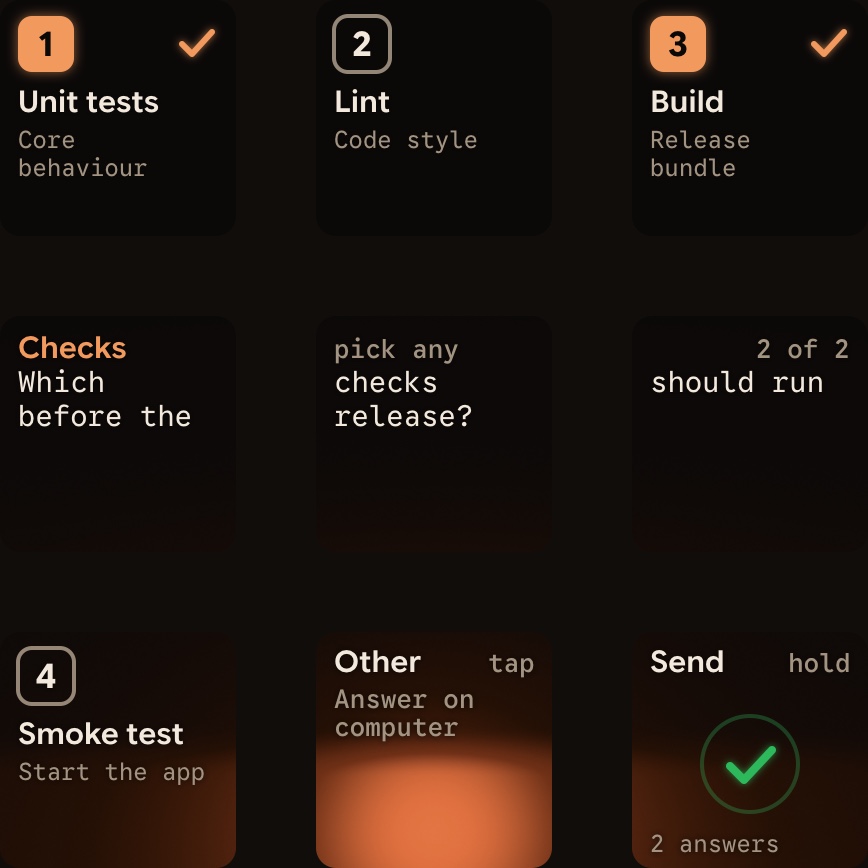
Denyon key 7 or holdAllowon key 9 for 0.6 seconds. - For a multiple-choice question, keys 1, 2, 3 and 7 show up to four options, then you hold
Sendon key 9. - Recent Claude Code versions start in auto mode, which approves low-risk actions without asking.
- To answer every request on the pad, switch to manual mode with
Shift+Tabor start withclaude --permission-mode manual. - Written answers stay on your computer, and Claude Code sessions over SSH are display-only.
Logi Options+ stays installed, and its keypad profile pauses while Orbtile holds the keypad. To hand the keypad back, choose Release keypad or press Control-Option-Command-K on a Mac (Ctrl+Alt+Win+K on Windows). You can also hold both page buttons for 1.5 seconds or quit Orbtile. Orbtile also shows Codex, ZCode, Antigravity and Kimi Code sessions. See Orbtile and Logitech's Claude plugin, compared, Use the Logitech MX Creative Keypad without Logi Options+ and Approve agent tool calls without switching windows.
FAQ
Which keypad lists Claude Code support?
Logitech's MX Keypad lists Claude Code on its product page, and the same keypad comes in the MX Creative Console. With Logi Options+ 2.07 or later on Windows 10 or later or macOS 13 or later, it runs prompt macros, refactors code and launches voice commands across Claude Code, GitHub Copilot and OpenAI Codex. These AI features need an active internet connection and an account with each third-party AI provider.
How do I map Claude Code shortcuts or slash commands to macro pad keys?
Run /keybindings in Claude Code to create or open ~/.claude/keybindings.json, where changes apply automatically without restarting. Bind a ctrl or meta key combination to an action such as chat:cycleMode, or to command: followed by a slash command name, such as command:compact. Then open Logi Options+, select the pre-installed System plugin under All Actions, drag Keyboard Shortcut onto a key and record the same key combination.
How do I set up a dedicated push-to-talk voice key for Claude Code?
Run /voice hold or /voice tap in the Claude Code CLI while signed in with a Claude.ai account on a computer with a local microphone. In ~/.claude/keybindings.json, bind a modifier combination such as meta+k to voice:pushToTalk in the Chat context, so recording starts on the first keypress with no warmup. Then map that same shortcut to a keypad button.
Can I use the Logitech MX Keypad with Claude Code without Logi Options+?
Logitech's support page says the MX Keypad cannot be used without Logi Options+. Orbtile is a separate app for macOS 14 Sonoma or later on Apple silicon and Windows 11 (x64). It drives the nine LCD keys and two page buttons of the Logitech MX Creative Keypad over USB without Logi Options+. It shows live Claude Code session states and lets you answer local permission requests and multiple-choice questions on the keys.