
Logitech's MX Keypad pages list no ZCode plugin, so there are two ways to use the keypad with ZCode. In Logi Options+, you build a blank application profile for ZCode and map its keyboard shortcuts to the LCD keys. Or Orbtile drives the keypad over USB without Logi Options+, showing live ZCode task states and answering local permission requests on the keys.
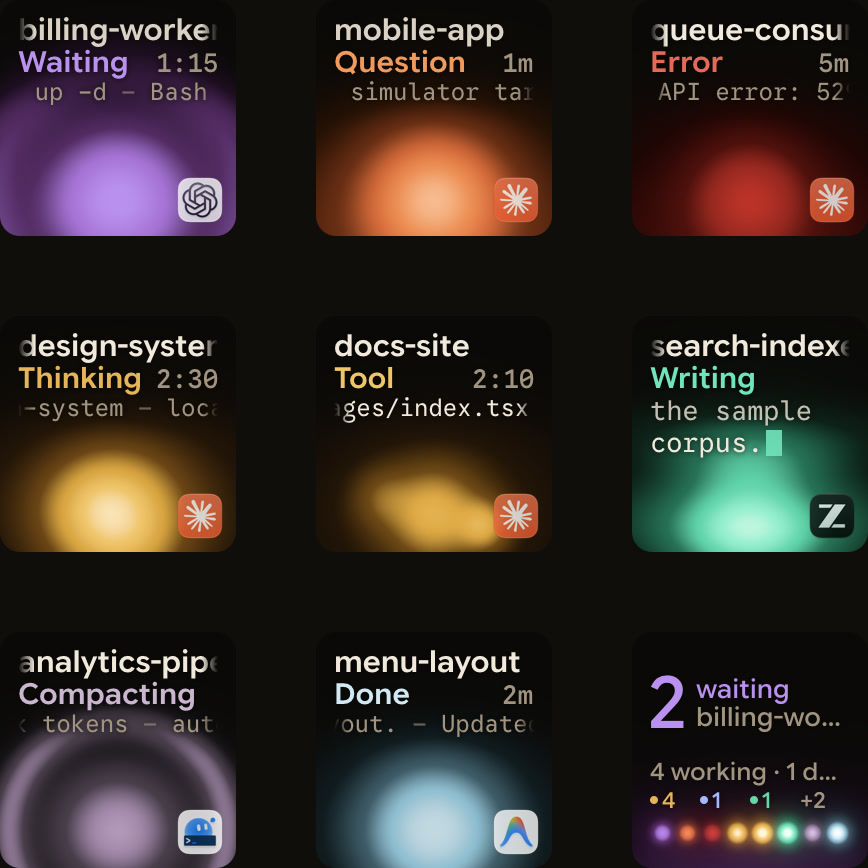
Ways to use the Logitech MX Keypad and MX Creative Console
Logitech sells the MX Keypad as a Master Series product with customisable LCD keys and calls them "AI control keys for developers." The US store lists it at $99.99 in Graphite, made with recycled plastic. Logitech's plugin support page also calls it the MX Creative Keypad.
Logitech's store page lists VS Code, GitHub Copilot, Claude Code, OpenAI Codex, IntelliJ, Zoom, Figma, Slack, Spotify and Adobe Creative Cloud. It does not list ZCode. For an app without a Logi Marketplace plugin, Logitech's support page shows how to build an application profile from a blank template with the pre-installed SYSTEM plugin.
| Setup mode | Required software | Supported OS | What the hardware controls |
|---|---|---|---|
| MX Keypad with Marketplace plugins | Logi Options+ 2.07+, Logi ID sign-in | Windows 10+ (not ARM 64), macOS 13+ | Native VS Code and IntelliJ actions, app-aware tool switching, prompt macros across GitHub Copilot, Claude Code and OpenAI Codex |
MX Keypad with manual SYSTEM profile | Logi Options+ 2.07+ (adding an app profile prompts for Logi ID) | Windows 10+ (not ARM 64), macOS 13+ | Custom KEYBOARD SHORTCUT combos mapped to LCD keys |
| MX Creative Console (keypad + dialpad) | Logi Options+ 1.83+ | Windows 10+ (not ARM 64), macOS 13+ | Keypad LCD actions plus DIAL ADJUSTMENT shortcuts on dial and roller |
| Logi Options+ uninstalled | None | N/A | Keypad unusable; dialpad keeps only very limited basic actions |
Compare workflows in The Logitech MX Keypad for developers, with and without Options+ and MX Creative Console: setup, profiles, plugins and agents.
Map keyboard shortcuts for an app without a Marketplace plugin
Logitech's example uses the Adobe UXP Developer tool and SYSTEM ACTIONS. The same steps work for ZCode:
- Click the plus icon in the top profile bar and choose
APPLICATION PROFILE. - Apps with plugin support appear at the top of the list.
- If ZCode is not listed, click
ADD APPLICATIONand select its executable file. - Click
START WITH A BLANK TEMPLATE, name the profile and clickCONFIRM. - Add actions from
SYSTEM ACTIONSin the right panel.
Assign KEYBOARD SHORTCUT actions on the MX Creative Keypad
Inside your manual profile, bind ZCode's shortcuts to LCD keys with the pre-installed SYSTEM plugin:
- Click
ALL ACTIONSin the right panel and select theSYSTEMplugin. - Find the
KEYBOARD SHORTCUTaction in the list, or search for "keyboard shortcut". - Drag the action onto a key or button.
- Click the
KEYfield to record your key combination. - Every key you press while recording is captured.
- Rename the action if you like, then click
Save.
Create a custom DIAL ADJUSTMENT on the Dialpad
With the MX Creative Console dialpad, you can also map shortcuts to the dial and roller:
- Find
DIAL ADJUSTMENTunderADVANCEDin theSYSTEMplugin and drag it to a key or button. - Set an optional initial keyboard shortcut to run before the adjustment begins.
- Scroll down to choose a separate shortcut for turning the dial each way.
Logi Options+ software, OS and Logi ID requirements
Logitech's software and platform rules for the hardware:
- The MX Creative Console requires Logi Options+ 1.83 or later.
- The standalone MX Keypad requires Logi Options+ 2.07 or later.
- Both support Windows 10 and later and macOS 13 and later, but not Windows on ARM 64 processors.
- Without Logi Options+, the keypad cannot be used, and the dialpad keeps only a very limited set of basic actions.
- All plugins and the Marketplace run through the
Logi Plugin Service, which activates only when one of these devices is connected.
Configurator languages and Logi ID sign-in rules
Logi Options+ supports 19 languages, but the MX Creative Console and MX Keypad configurator supports six: English, French, German, Japanese, Italian and Spanish. To change language, open the Settings gear icon at the top right and pick a language from the dropdown. The change takes effect immediately.
You can use the default profile and the pre-installed system actions without signing in. To download other plugins or application profiles, sign in with a Logi ID through the Account icon at the top right. Logi Options+ prompts for a Logi ID during the device feature tour, when you install a Marketplace profile or plugin, and when you add an application profile.
See Logi Options+ alternative for the MX Keypad and How to uninstall Logi Options+ completely on Windows and Mac.
Legacy Logitech software that is no longer maintained
Logitech says older software such as Logitech Options, SetPoint, Unifying Software and Logitech Control Center is no longer maintained, and it recommends Logi Options+. Logitech Gaming Software was succeeded by G HUB for new devices in 2019.
Native developer integrations, Marketplace plugins and the Actions SDK
Logitech's store page describes these MX Keypad features:
- Native VS Code and IntelliJ integrations navigate code, launch agents, manage debuggers and toggle terminals.
- AI control center actions run prompt macros, refactor code and launch voice commands across GitHub Copilot, Claude Code and OpenAI Codex.
- These AI actions need an active internet connection and an account with each AI provider.
- The keypad detects your active app and swaps tools as you move between VS Code, Slack, Figma and more.
- Most plugins ship with ready-to-use profiles.
- Developers can build custom tools with the
Logi Actions SDK, by hand or with AI.
Finding, updating and verifying Marketplace plugins
A plugin packages actions for an app or feature in groups and subgroups in the right panel. Each application plugin includes a default profile, though Logitech says some default profiles are not yet available.
- Open
All Actionsto reach the plugin section, then clickFIND MORE FROM MARKETPLACE. - Creating an application profile installs the matching plugin, if one exists.
- Your active profile limits which plugins are available.
- For example, a Photoshop profile may not offer Premiere Pro plugin actions.
- Web-service plugins such as Spotify, IFTTT, Philips Hue and Twitch need no local app installed.
- A plugin's Details page in the Marketplace shows its version compatibility.
- A pulsating purple dot next to a plugin's name means an update is ready.
- From Logi Options+ 1.99, every Marketplace plugin goes through a security review.
- Plugins from other sources trigger a security notice about unverified software.
Watch and approve ZCode tasks on a keypad or phone with Orbtile
Orbtile drives the nine LCD keys and two page buttons of the Logitech MX Creative Keypad over USB, without Logi Options+. It runs on a computer with macOS 14.0 Sonoma or later on Apple silicon (M1 or later), or Windows 11 (x64). The same tiles can appear on an iPhone (App Store, iOS 17+) or an Android phone (Android 8.0+) with Orbtile Mobile.
How Orbtile shows ZCode tasks:
- ZCode display needs nothing installed, because Orbtile opens ZCode's task databases on your computer read-only.
- Each key shows a task's title, state and latest assistant text.
- Waiting sessions come first, then working, recently finished and idle ones.
- Key 9 summarises all sessions, and a tap on it focuses the first waiting session.
- On a Mac, a tap on a ZCode key selects its exact task when Orbtile has Accessibility access, and otherwise just opens the app.
To answer from the keys, Orbtile adds a hook to ZCode's settings file and keeps a backup of the original. It applies to new ZCode conversations in local workspaces on your computer, when ZCode is in a mode that asks before changes. Conversations that were already open and remote workspaces keep using ZCode's own prompt. Questions, plans and workflows are always answered in ZCode.
When a task asks for permission, its key glows and ZCode shows a "Waiting for Orbtile keypad" line in the chat. Hold the key to open Focus mode. Press Deny on key 7, or hold Allow on key 9 for 0.6 seconds while its ring fills. The keypad can answer for about 25 seconds, and a timeout never decides anything. The prompt on screen keeps working, and whichever answers first wins.
Orbtile also follows ZCode CLI sessions on servers you add by SSH alias in Settings > Remote Hosts. Choose Install ZCode CLI Hooks from the host's menu, and make sure the server has Python 3. These remote sessions are display-only, so you answer on the server. Remote ZCode desktop workspaces don't appear.
If Logi Options+ is installed, it stays installed, and its keypad profile pauses while Orbtile is in control. To hand the keypad back, choose Release keypad, press Control-Option-Command-K (Ctrl+Alt+Win+K on Windows), hold both page buttons for 1.5 seconds, or quit Orbtile. The same pad also shows Claude Code, Codex, Antigravity desktop app and Kimi Code sessions. See Use the Logitech MX Creative Keypad without Logi Options+ and Watch Claude Code and Codex running on a remote server over SSH.
FAQ
Does the Logitech MX Keypad have a dedicated ZCode plugin in Logi Options+?
Logitech's MX Keypad store and plugin support pages list tools such as VS Code, IntelliJ, GitHub Copilot, Claude Code and OpenAI Codex, but not ZCode. To use the keypad with an app that has no Marketplace plugin, create an application profile from a blank template. Then map Keyboard Shortcut actions from the pre-installed System plugin.
How do I map keyboard shortcuts to the MX Keypad for an unlisted application?
Click the plus icon in the Logi Options+ profile bar and choose Application Profile. Select your app, or click Add Application and point to its executable file, then choose Start With a Blank Template. Open All Actions in the right panel, select the System plugin and drag Keyboard Shortcut onto a key. Click the Key field to record your shortcut and click Save.
What software and operating systems does the Logitech MX Keypad require?
The standalone MX Keypad requires Logi Options+ 2.07 or later, and the MX Creative Console requires 1.83 or later. Both support Windows 10 and later and macOS 13 and later, but not Windows on ARM 64 processors. Logitech says the keypad cannot be used without Logi Options+.
How does Orbtile work with ZCode on the Logitech MX Creative Keypad?
Orbtile drives the keypad over USB without Logi Options+, on a computer with macOS 14.0 Sonoma or later on Apple silicon, or Windows 11 (x64). It reads ZCode's local task databases to show each task's state on the keys. You can press Deny or hold Allow for permission requests in new local conversations. Questions, plans and workflows are answered in ZCode, and ZCode CLI sessions on a remote server are answered on the server.