
OpenAI Codex and Google Antigravity are both coding agents with a desktop app, a terminal CLI, editor extensions and an SDK. Codex comes with ChatGPT plans, adds the Codex Web cloud agent and uses Starlark rules files for commands. Antigravity comes with Google AI plans, adds a standalone IDE and six editor extensions, and uses action(target) permission rules and multi-agent orchestrators.
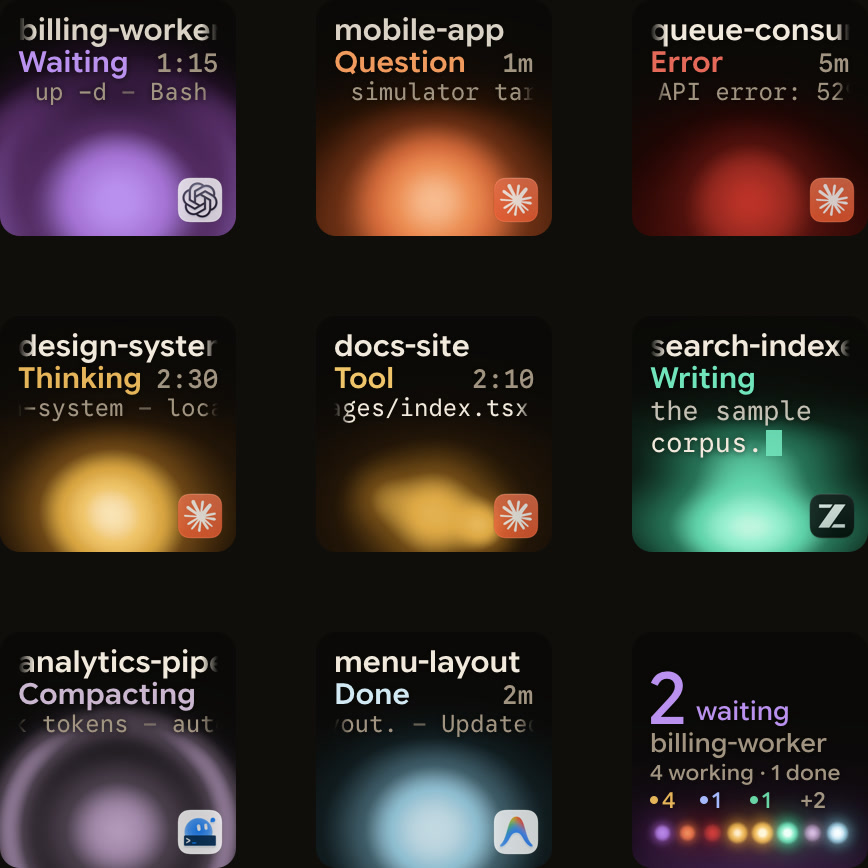
OpenAI Codex and Google Antigravity side by side
| Feature | OpenAI Codex | Google Antigravity |
|---|---|---|
| Surfaces | codex CLI, ChatGPT desktop app, IDE extensions, Codex Web, TypeScript SDK | Antigravity App, agy CLI, Antigravity IDE, 6 editor extensions, Python SDK |
| Operating systems | CLI installers for macOS, Linux and Windows | App on macOS 13+, Windows 10 (64-bit) or 11, Linux, Googlebook OS |
| Editor extensions | VS Code, Cursor, Windsurf | VS Code, JetBrains, Visual Studio 2026, Zed, Xcode, Eclipse (Public Preview) |
| Non-interactive runs | codex exec | agy -p |
| Sandbox | OS sandbox, network off by default | Terminal sandbox in the App's Default and Auto presets and the CLI's auto mode |
| Command rules | Starlark .rules files, forbidden > prompt > allow | action(target) rules, Deny > Ask > Allow |
| Worktrees | Worktree chats in the ChatGPT desktop app, with Hand off | New worktree mode in the App, branch worktrees for subagents |
| Subagents | Built-in default, worker, explorer, plus custom TOML agents | Built-in research, browser, self, plus custom Markdown agents and /boost, /swarm, /teamwork |
| MCP config | config.toml | mcp_config.json, tools lazy-loaded by default |
| Plans | ChatGPT Free, Go, Plus, Pro, Business, Edu, Enterprise, or an OpenAI API key | Google AI Pro, Google AI Ultra, Gemini Enterprise, or a weekly quota for other users |
Surfaces, editors, CLIs and SDKs
OpenAI Codex surfaces and installation
- The Codex CLI (
codex) runs locally on your computer, and its repository is Apache-2.0 licensed. codex execruns Codex from scripts, such as CI jobs, without opening the interactive terminal UI.- Editor extensions are available for VS Code, Cursor and Windsurf.
codex appopens the desktop app experience from the CLI.- Codex Web, the cloud-based agent, runs at
chatgpt.com/codex. - You sign in with your ChatGPT plan or use an API key.
Install the CLI on macOS or Linux, or on Windows:
curl -fsSL https://chatgpt.com/codex/install.sh | shpowershell -ExecutionPolicy ByPass -c "irm https://chatgpt.com/codex/install.ps1 | iex"You can also install with npm install -g @openai/codex or brew install --cask codex. See OpenAI Codex: CLI, desktop app, IDE extension and setup.
Google Antigravity surfaces and installation
- The Antigravity App runs on macOS 13 Ventura or later, Windows 10 64-bit or Windows 11, Linux and Googlebook OS.
- The Antigravity CLI,
agy, runs in the terminal, andagy -pruns a single prompt non-interactively. - The standalone Antigravity IDE has an Agent panel you reach with
Cmd + L, orCtrl + Lon Windows and Linux. - Extensions cover VS Code 1.90+, IntelliJ-based JetBrains IDEs 2026.2.1+, Visual Studio 2026 version 17.8+, Zed 0.140.0+ and Xcode 27 beta 6+.
- An extension for Eclipse 2026-06 or later is in Public Preview.
- The Python SDK installs into a Python 3.10+ virtual environment.
Install agy on macOS, Linux or Googlebook, or on Windows in PowerShell:
curl -fsSL https://antigravity.google/cli/install.sh | bashirm https://antigravity.google/cli/install.ps1 | iexSee Antigravity App vs Antigravity IDE: what's the difference and Google Antigravity CLI: commands, settings and permissions.
Sandboxing, permissions and command rules
OpenAI Codex sandboxes, approval policies and .rules files
Local Codex sessions run commands in an OS-level sandbox, with network access off by default. A sandbox mode sets what Codex can do, and an approval policy sets when it asks:
- The Auto preset is
--sandbox workspace-write --ask-for-approval on-request. - It edits files and runs commands in the working directory, and asks before editing outside the workspace.
- The other sandbox modes are
read-onlyanddanger-full-access. --yolois an alias for--dangerously-bypass-approvals-and-sandbox, which removes both the sandbox and approvals.- Approval policies include
on-request,neverandgranular.
Experimental Starlark .rules files control which commands Codex can run outside the sandbox. Each prefix_rule() allows, prompts for or forbids a command prefix. When several rules match, the strictest wins: forbidden > prompt > allow. Test a command with codex execpolicy check.
Google Antigravity permission presets and action(target) rules
Antigravity writes permissions as action(target) rules and checks conflicting rules in strict order: Deny > Ask > Allow. In the App, set a preset for all projects in Settings > General > Global Permissions > Permission Preset. Set one project in Settings > Projects, or use the picker in the message box.
| Preset | Sandbox | Terminal commands |
|---|---|---|
Request Review | Off | Always ask |
Default | On | Allowed in the sandbox, ask outside it |
Auto | On | Allowed in the sandbox, checked automatically outside it |
Turbo | Off | Allowed without restriction |
The terminal sandbox restricts access to your workspace and temp folders, with no network access.
In agy, you switch modes with Shift + Tab, --mode or /config. In auto mode, workspace file edits are approved and terminal commands run inside the sandbox. Rules take forms such as read_file(/path), write_file(/path), read_url(domain), execute_url(domain), mcp(server/tool) and command(regex:pattern).
Parallel sessions, Git worktrees and subagents
Worktrees, Hand off and TOML subagents in OpenAI Codex
The ChatGPT desktop app creates worktree chats in $CODEX_HOME/worktrees, in a detached HEAD state by default. Hand off in the chat header moves a chat between your local checkout and a worktree.
Subagents are on by default, and their activity appears in the desktop app, the CLI and the IDE extension:
- The built-in agents are
default,workerandexplorer. - Custom agents are TOML files in
~/.codex/agents/or.codex/agents/. - Subagents inherit your current sandbox policy.
- Custom agents cannot override the parent's permissions, provider or MCP servers.
- In the CLI,
/subagentslets you inspect and switch between agent threads.
See Git worktrees for parallel coding agents: Claude Code and Codex.
Worktrees, Markdown subagents and orchestrators in Google Antigravity
When you start a Project in the App, Local mode works directly in your folders. New worktree mode works in an isolated Git worktree. A parent agent starts subagents with the invoke_subagent tool:
- Each subagent starts without the parent's conversation history.
inheritshares the parent's workspace,branchcreates a Git worktree andshareshares directory storage.- Subagents can nest up to 10 levels deep.
- The built-in subagents are
research,browserandself. - Custom subagents are Markdown files with YAML frontmatter.
- In the CLI,
/agentsopens the Agent Manager. /boost, on paid plans, pairs an Orchestrator with a DeepCoder or DeepInvestigator coordinator and workers./swarm, on Google AI Pro and Ultra, coordinates workers on a shared@mentionsboard, with a verifier reviewing changes./teamwork, on paid plans, starts with a short scoping interview and checks work with Critic, Challenger, Auditor and Success Auditor roles.
See Google Antigravity multi-agent: run parallel coding agents.
Project instructions and MCP servers
AGENTS.md and config.toml MCP servers in OpenAI Codex
Codex reads AGENTS.md instructions, checking for AGENTS.override.md first in each folder. It includes at most one file per directory and stops at project_doc_max_bytes, which is 32 KiB by default.
The desktop app, CLI and IDE extension share MCP servers set in [mcp_servers.<server-name>] tables. These live in ~/.codex/config.toml, or in .codex/config.toml in trusted projects:
- STDIO servers take a
command, plus optionalargs,env,env_varsandcwd. - Streamable HTTP servers take a
url, plus optionalbearer_token_env_varandhttp_headers. - OAuth servers can use CIMD or DCR, and
codex mcp login <server-name>starts sign-in. codex mcp addandcodex mcp listmanage servers, and/mcpshows them in the app and the CLI.
See Codex MCP servers: setup, CLI, config.toml and OAuth.
Lazy-loaded MCP servers in Google Antigravity
Antigravity reads MCP servers from ~/.gemini/config/mcp_config.json, <workspace>/.agents/mcp_config.json and plugins. You can also manage them in the MCP Servers section of the App's Customizations page, with /mcp in the CLI, or in the IDE's MCP Store:
- Local servers start with a
commandover stdio. - Remote servers use
serverUrlorurlover Streamable HTTP, and the legacy HTTP+SSE transport is not supported. - Tools lazy-load by default, and the agent calls them through
call_mcp_tool. - Servers that support CIMD or DCR get OAuth 2.0 with PKCE automatically.
See Google Antigravity MCP servers: set up and manage tools.
Models and plans
OpenAI Codex is included in ChatGPT plans, and you can also use it with an OpenAI API key:
- Free ($0/month) and Go ($8/month) get GPT-6 Luna at Standard speed in the desktop app, subject to rollout.
- Plus costs $20/month, and Pro plans cost $100, $200 or $500 a month.
- Pro plans currently have no five-hour limit.
- API key usage is billed at API pricing and has no cloud-based features.
Google Antigravity's rate limits and models depend on your Google AI plan:
- Users not on Google AI Pro or Ultra get a quota refreshed weekly.
- Google AI Pro refreshes its quota every five hours until the weekly limit is reached.
- Google AI Ultra refreshes its quota every five hours and adds third-party models.
- Every plan includes Gemini 4 Hydrogen and Gemini 3.8 Flash, unlimited Tab completions, scheduled tasks and the CLI.
- With AI Credit Overages set to Always, AI credits are used once the quota runs out.
- Bring-your-own-key for extra rate limits is not supported.
See Google Antigravity pricing: plans, quotas, models and credits.
Watch OpenAI Codex and Google Antigravity sessions with Orbtile
When you run Codex and Antigravity at the same time, their sessions sit in separate windows. Orbtile puts them side by side on a Logitech MX Creative Keypad, which it drives over USB without Logi Options+. Orbtile Mobile shows the same sessions on an iPhone (iOS 17+) or an Android phone (Android 8.0+). Orbtile runs on a computer with macOS 14.0 Sonoma or later on Apple silicon (M1 or later), or Windows 11 (x64).
- Each session key shows its name, state and live text, and waiting sessions come first.
- Tap key 9 to focus the first waiting session, or hold a session key for 0.6 seconds to open Focus mode.
- Codex works with nothing installed, because Orbtile reads Codex thread files and Codex's own signals.
- Codex desktop chats, terminal
codexsessions andcodex execruns each show as Codex. - Codex keys glow cool blue while working and turn magenta-violet when a session waits for you.
- Compatible Codex desktop chats show Deny on key 7 and Allow on key 9 for command approvals.
- Terminal Codex command approvals offer Allow only, so you decline them in the terminal.
- Orbtile follows conversations in the local Antigravity desktop app, with an azure blue working palette and terracotta waiting states.
- Antigravity replies appear as live typewriter text.
- You can answer up to four Antigravity numbered-option questions with two to four choices each, then hold
Send. - Antigravity CLI and IDE sessions do not appear automatically.
- Antigravity permission prompts and written answers stay on your computer.
See Codex keypad: Codex Micro, MX Keypad and Orbtile setup and Antigravity keypad: MX Keypad shortcuts and Orbtile status pad.
FAQ
What is the main difference between OpenAI Codex and Google Antigravity?
Both are coding agents with a desktop app, a terminal CLI, editor extensions and an SDK. OpenAI Codex comes with ChatGPT plans and adds the Codex Web cloud agent. Google Antigravity comes with Google AI plans, adds a standalone IDE and offers the boost, swarm and teamwork orchestrators.
How do OpenAI Codex and Google Antigravity handle sandboxing and permissions?
OpenAI Codex runs local commands in an OS sandbox with network access off by default. It pairs sandbox modes with approval policies and uses experimental Starlark rules files for commands outside the sandbox. Google Antigravity's Default and Auto presets run terminal commands in a sandbox with no network access. Its action(target) rules are checked in Deny, Ask, Allow order.
How do OpenAI Codex and Google Antigravity configure MCP servers?
OpenAI Codex keeps STDIO and Streamable HTTP servers in config.toml, shared by the desktop app, CLI and IDE extension. Google Antigravity keeps servers in mcp_config.json, globally or per workspace, and lazy-loads tool schemas by default.
How does Orbtile work with OpenAI Codex and Google Antigravity sessions?
Orbtile shows Codex desktop chats, terminal codex sessions and codex exec runs alongside local Antigravity desktop app conversations. They appear on a Logitech MX Creative Keypad, an iPhone or an Android phone. You can answer compatible Codex desktop approvals and Antigravity numbered-option questions from the keys. Antigravity CLI and IDE sessions do not appear automatically.