
OpenAI Codex is a coding agent you can run in four places. These are the Codex CLI in your terminal, the ChatGPT desktop app, an IDE extension, and Codex Cloud at chatgpt.com/codex. You sign in with a ChatGPT account or an OpenAI API key. Local clients share the same MCP server configuration in ~/.codex/config.toml, and Codex reads project instructions from AGENTS.md. Orbtile shows every Codex session on a Logitech MX Creative Keypad or a phone.
OpenAI Codex surfaces: CLI, desktop app, IDE and cloud
| Surface | Where it runs | How to start | Core workflows |
|---|---|---|---|
Codex CLI (codex) | macOS, Linux and Windows terminals | codex for the terminal UI, or codex exec for scripts and CI | Terminal coding loops, sandboxed commands and non-interactive automation |
| ChatGPT desktop app | macOS, Windows and Linux | Open the app, or run codex app | Parallel projects, Git worktrees, terminal, browser, file previews, plugins, skills and scheduled tasks |
| Codex IDE extension | VS Code, VS Code Insiders, Cursor and Windsurf | The Codex icon, or Codex: Open Codex Sidebar | Prompts with open files and selections, focused diffs and hand-off to Codex web |
| Built-in IDE integrations | Xcode and JetBrains IDEs | The IDE's own integration | Editor-native Codex workflows |
Codex Cloud (chatgpt.com/codex) | Cloud environments run by OpenAI | Work in > Cloud | Background tasks that continue while your computer is asleep |
| Codex on mobile | ChatGPT mobile app | Codex in the mobile app | Start, guide, approve and review tasks on a connected computer |
Working in the Codex IDE extension
The extension's marketplace ID is openai.chatgpt. In VS Code, Cursor or Windsurf, choose the Codex icon. If it is hidden, run Codex: Open Codex Sidebar from the Command Palette. Xcode and JetBrains IDEs provide their own integrations instead.
- Reference open files, selected code and recent chats from the composer.
- Read a summary, inspect a focused diff and follow up in the same chat.
- Create Git checkpoints before and after a task so you can revert changes.
- Connect Codex web when a task needs more time and room.
See Codex app vs Codex CLI: desktop app and terminal compared.
Install and authenticate OpenAI Codex on macOS, Linux and Windows
Install the Codex CLI
The openai/codex repository is licensed under the Apache-2.0 License. On macOS or Linux, run the shell installer. On Windows, use PowerShell:
curl -fsSL https://chatgpt.com/codex/install.sh | shpowershell -ExecutionPolicy ByPass -c "irm https://chatgpt.com/codex/install.ps1 | iex"The installers download from https://releases.openai.com/codex by default and fall back to GitHub Releases. To force GitHub Releases, set CODEX_INSTALLER_USE_RELEASES_OPENAI_COM to false:
curl -fsSL https://chatgpt.com/codex/install.sh | CODEX_INSTALLER_USE_RELEASES_OPENAI_COM=false shYou can also install with npm or Homebrew, or download an executable from a GitHub Release:
npm install -g @openai/codex
brew install --cask codex
Then run codex to get started. See OpenAI Codex CLI: install, commands, config.toml and codex exec.
Set up the ChatGPT desktop app on Windows and WSL2
Install the app from the Microsoft Store or with winget. If PowerShell blocks scripts, OpenAI suggests the RemoteSigned execution policy. Check Microsoft's guide before you change it.
winget install --id 9PLM9XGG6VKS -s msstore
Set-ExecutionPolicy -ExecutionPolicy RemoteSigned
By default, the app uses the Windows-native Codex agent. It supports a native Windows sandbox when the agent runs in PowerShell. You can choose a default editor for Open, such as Visual Studio or VS Code. You can also pick a terminal: PowerShell, Command Prompt, Git Bash or WSL.
To run the agent in WSL2, switch it in Settings and restart the app. WSL1 was supported through Codex 0.114. From Codex 0.115, the Linux sandbox moved to bubblewrap, so WSL1 is no longer supported.
The Windows app uses %USERPROFILE%\.codex. To share settings, sign-in and sessions with the CLI in WSL, point CODEX_HOME at that folder:
export CODEX_HOME=/mnt/c/Users/<windows-user>/.codexGit may not be detected in projects opened from \\wsl$. Store the project on a Windows drive and open it in WSL through /mnt/<drive>/.... See Install Codex CLI on Windows: PowerShell, npm, sandbox and WSL.
Sign in with ChatGPT or an OpenAI API key
The app, the CLI and the IDE extension accept two sign-in methods. Sign in with ChatGPT for subscription access on Plus, Pro, Business, Edu and Enterprise plans. Or use an API key for usage-based access. Codex Cloud requires signing in with ChatGPT. If you log in with an email and password, you must set up multi-factor authentication before you use Codex Cloud.
Run codex login, or pipe in an API key or an access token:
printenv OPENAI_API_KEY | codex login --with-api-key
printenv CODEX_ACCESS_TOKEN | codex login --with-access-token- Run
codex login statusto see the active method, orcodex logoutto clear credentials. - The
cli_auth_credentials_storesetting accepts"file","keyring","auto"or"ephemeral". - With
file, credentials go inauth.jsonunderCODEX_HOME, which defaults to~/.codex. - On a headless or remote machine, OpenAI suggests
codex login --device-auth. - You can also copy
~/.codex/auth.jsonto that machine, and treat it like a password. - If you can forward ports, run
ssh -L 1455:localhost:1455 user@remote, thencodex loginin that session.
Sandboxing, approval policies and network controls
The sandbox mode sets what Codex can do. The approval policy sets when it must ask you first. By default, local sessions run with network access off, and writes are usually limited to the current workspace. OpenAI recommends Auto in version-controlled folders and read-only elsewhere. Use /permissions to switch modes and /status to see which folders are in the workspace.
| Preset | CLI flags | Behaviour |
|---|---|---|
| Auto | No flags, or --sandbox workspace-write --ask-for-approval on-request | Works in the workspace and asks before editing outside it or using the network |
| Safe read-only browsing | --sandbox read-only --ask-for-approval on-request | Read-only sandbox that asks before other actions |
| Read-only non-interactive (CI) | --sandbox read-only --ask-for-approval never | Read-only sandbox with no prompts |
| Auto-review | --sandbox workspace-write --ask-for-approval on-request -c approvals_reviewer=auto_review | Auto settings with the auto_review approvals reviewer |
| Full access (not recommended) | --dangerously-bypass-approvals-and-sandbox, alias --yolo | No sandbox and no approvals |
Codex no longer supports approval_policy = "untrusted", and it can stop Codex from starting. To keep stricter command approvals, leave out the approval policy. Then set trust_level = "untrusted" for the project in your user config. This also turns off project-local configuration.
[projects."/path/to/project"]
trust_level = "untrusted"
Inside writable folders, .git, .agents, .codex and .aws stay read-only, including everything under them.
OS-level sandboxes and network proxy rules
- macOS uses Seatbelt through
sandbox-exec. - Linux uses
bwrapwithseccomp. - Windows supports MXC, with
elevatedandunelevatedas legacy fallbacks. - To prefer MXC on Windows, set
prefer_mxc = trueunder[features].
Test a sandbox with codex sandbox macos, codex sandbox linux or codex sandbox windows. To give commands network access and add domain rules, edit ~/.codex/config.toml:
[sandbox_workspace_write]
network_access = true

[features.network_proxy]
enabled = true
domains = { "api.openai.com" = "allow" }
The proxy does not grant network access by itself. Its rules are allowlist-first, and "deny" wins over "allow".
Web search defaults to web_search = "cached". The other values are "live", "indexed" and "disabled", and --search equals "live". OpenTelemetry is off by default. Under [otel], exporter can be "none", "otlp-http" or "otlp-grpc". OpenAI advises keeping log_user_prompt = false unless your policy allows storing prompts.
Project instructions with AGENTS.md and parallel Git worktrees
Layer instructions with AGENTS.md
When a run starts, Codex first checks your Codex home folder. There, it reads AGENTS.override.md if it exists, and otherwise AGENTS.md. It then walks from the project root, usually the Git root, down to your current folder. It takes at most one file per folder.
Files closer to your current folder override earlier guidance, because they appear later in the combined prompt. To use other file names, add them to project_doc_fallback_filenames in your config. The combined size is capped by project_doc_max_bytes, which is 32 KiB by default.
For GitHub pull request reviews, add a ## Code Review Rules heading to the AGENTS.md nearest the code it covers. See Share context between Claude Code and Codex.
Isolate parallel tasks in Git worktrees
In the desktop app, select Worktree under the composer and choose the branch to base it on. Codex then works without touching your checkout.
- Codex creates managed worktrees in
$CODEX_HOME/worktrees, in a detached HEAD state. - If the branch has uncommitted changes, Codex applies them to the worktree as well.
- Use
Create branch herein the chat header to turn the worktree into a named branch. - Use
Hand offto move a chat betweenLocaland a worktree. - List ignored files such as
.envin a.worktreeincludefile at the repository root to copy them across. - Codex copies an ignored
AGENTS.override.mdinto managed worktrees automatically. - By default, Codex keeps your 15 most recent managed worktrees and saves a snapshot before deleting one.
See Git worktrees for parallel coding agents: Claude Code and Codex.
Model Context Protocol (MCP) servers, Codex Cloud and codex exec
Connect external tools with MCP servers
The ChatGPT desktop app, the Codex CLI and the IDE extension share one MCP configuration. Codex supports STDIO servers, which run as a local process, and Streamable HTTP servers, which you reach at an address. Servers go in ~/.codex/config.toml, or in .codex/config.toml for trusted projects only.
codex mcp add context7 -- npx -y @upstash/context7-mcp
codex mcp list
codex mcp login <server-name>
Each server has its own settings block:
startup_timeout_secdefaults to 10 seconds.tool_timeout_secdefaults to 60 seconds.enabled_toolsis an allow list, anddisabled_toolsis a deny list applied after it.default_tools_approval_modeacceptsauto,prompt,writesorapprove.
Type /mcp to see your active servers. See Codex MCP servers: setup, CLI, config.toml and OAuth.
Run cloud tasks in Codex Cloud
Start from Work in > Cloud, then select Create environment. Connect GitHub, or pick a GitLab.com repository. Codex sets up dependencies and tools. You review the setup report and select Publish. The install script prepares dependencies, and the Start skill starts services and checks they are ready.
- Environment variables are passed directly to programs in the environment.
- Network secrets are sent only to a specific HTTPS service on port 443, and programs see a placeholder.
- Your own values live in the Personal vault, and each person supplies their own.
For networking, the Package managers preset covers registries such as npm, PyPI, Go and Maven. Add other hosts under Additional allowed domains. Tailscale is the current VPN provider, through the proxy at proxy:8088. Tasks can also get short-lived credentials for AWS, Google Cloud and Azure through OIDC.
Plus plans get 2 vCPUs, 8 GiB memory and 8 GiB disk. Pro, Business and Enterprise plans get 4 vCPUs, 16 GiB memory and 32 GiB disk. By default, saved VM state is recoverable for up to seven days after your last turn.
Automate scripts and CI pipelines with codex exec
codex exec runs without prompts in a read-only sandbox by default. It streams progress to stderr and prints only the final agent message to stdout:
codex exec "generate release notes for the last 10 commits" | tee release-notes.md
codex exec "Extract project metadata" --output-schema ./schema.json -o ./project-metadata.json
CODEX_API_KEY=<api-key> codex exec --json "triage open bug reports"--jsonturnsstdoutinto a JSON Lines stream of every event.--ephemeralskips saving session rollout files to disk.codex exec resume --lastcontinues the most recent session.- In GitHub Actions, OpenAI recommends the
openai/codex-action@v1action.
See Codex exec non-interactive mode: flags, JSONL and CI setup.
Watch and answer OpenAI Codex sessions on a keypad or phone with Orbtile
With Logi Options+ 2.07 or later, Logitech's MX Keypad gives you one-tap prompt macros and other controls in tools such as OpenAI Codex, Claude Code and GitHub Copilot. Options+ runs on Windows 10 and later and macOS 13 and later. Windows computers with ARM64 processors are not supported.
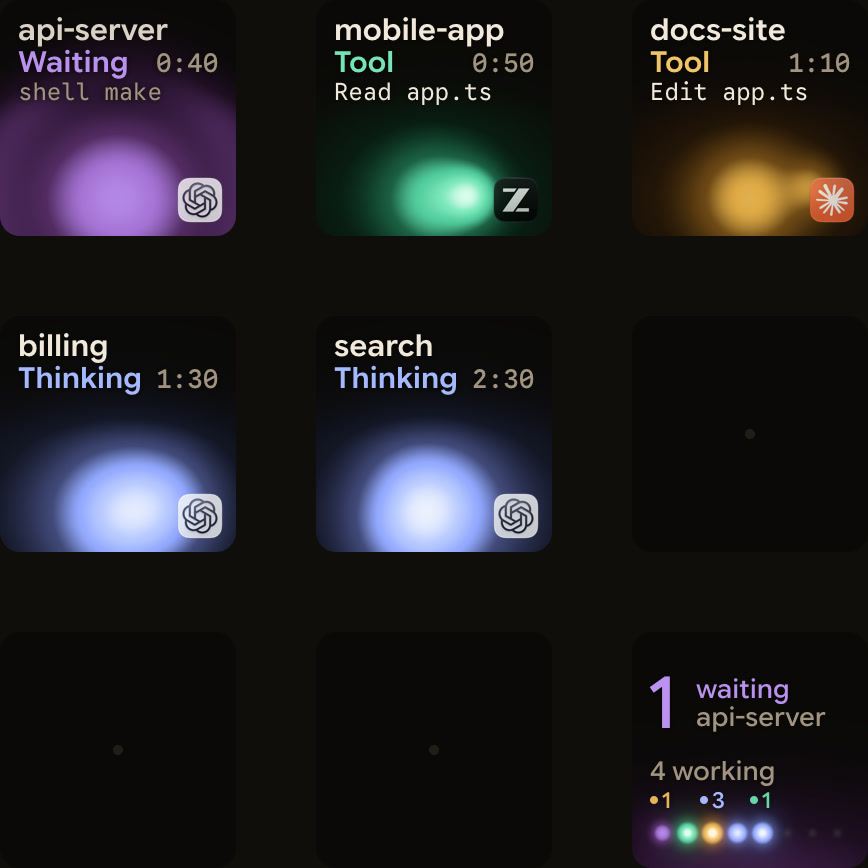
Orbtile shows the live state of every Codex session. It drives the Logitech MX Creative Keypad's nine LCD keys over USB, without Logi Options+. Orbtile Mobile shows the same sessions on an iPhone (iOS 17 or later) or an Android phone (Android 8.0 or later). Orbtile runs on a computer with macOS 14.0 Sonoma or later on Apple silicon, or Windows 11 (x64).
- Nothing needs installing in Codex, because Orbtile reads Codex thread files and Codex's own signals.
- Desktop chats, terminal
codexsessions andcodex execruns each show as Codex sessions. - Working sessions glow cool blue, and waiting sessions glow magenta-violet and move to the front.
- Tap key 9, in the bottom-right corner, to focus the first waiting session, including sessions on other pages.
- Hold a session key for 0.6 seconds to open Focus mode.
- For compatible desktop command approvals, press Deny on key 7 or hold Allow on key 9 for 0.6 seconds.
- For supported desktop multiple-choice questions, pick options on keys 1, 2, 3 and 7, then hold Send on key 9.
- Terminal command approvals offer Allow only, so you decline them in the terminal.
codex execnever asks for command approval in Codex 0.159.0.- Other terminal waits and unsupported requests show
Answer on computer. - Optional Codex hooks, installed in
Settings > Agents > Codex, add a compacting state and slightly earlier updates. - Through Remote Hosts, Orbtile can also show Codex sessions running on SSH hosts.
See Codex keypad: Codex Micro, MX Keypad and Orbtile setup and Approve agent tool calls without switching windows.
FAQ
Where can I run OpenAI Codex?
You can run OpenAI Codex in your terminal with the Codex CLI, in the ChatGPT desktop app, or in the IDE extension for VS Code, Cursor and Windsurf. Xcode and JetBrains IDEs have their own integrations. Codex Cloud runs tasks in cloud environments, which you can use on the web, on mobile or in the desktop app.
Can I sign in to OpenAI Codex with a ChatGPT account or an API key?
Yes. The ChatGPT desktop app, the Codex CLI and the IDE extension accept either a ChatGPT account or an OpenAI API key. Codex Cloud requires signing in with ChatGPT.
How does the Auto sandbox preset work in OpenAI Codex?
Auto pairs the workspace-write sandbox with on-request approvals. Codex can read files, edit files and run commands in your workspace. It asks before editing files outside the workspace or using the network. The .git, .agents, .codex and .aws folders stay read-only.
How does Orbtile work with OpenAI Codex sessions?
Orbtile reads Codex thread files, so nothing needs installing in Codex. It shows desktop chats, terminal codex sessions and codex exec runs on a Logitech MX Creative Keypad, an iPhone or an Android phone. Waiting sessions move to the front. Compatible desktop approvals and supported questions can be answered on the keys. Terminal command approvals offer Allow only.