
Claude Code shows session status in supporting terminal tabs through the OSC 7501 Program Status Protocol, and in agent view (claude agents) through coloured state icons. You can also add colour with custom themes and status lines, or send status events anywhere with lifecycle hooks. For a live status light per session on a device, Orbtile displays your sessions on a Logitech MX Creative Keypad, an iPhone or an Android phone.
Ways to get a Claude Code status indicator
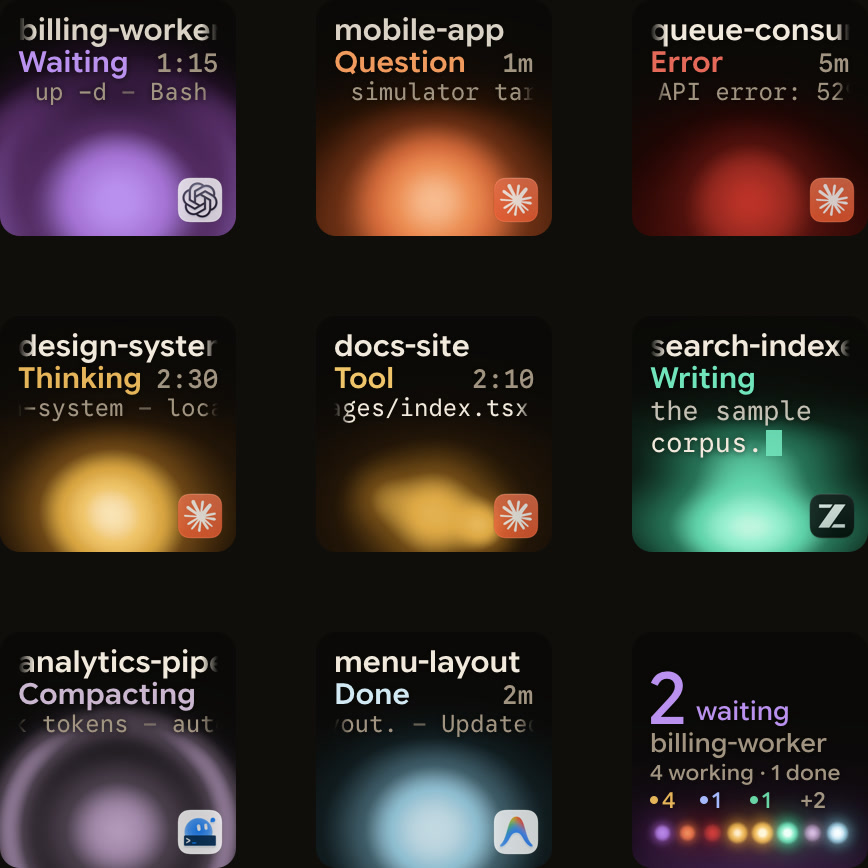
Claude Code has six built-in ways to show or export session status. The last row shows Orbtile, which builds on Claude Code hooks.
| Method | Where it appears | States or signals shown | What it requires |
|---|---|---|---|
| OSC 7501 Program Status Protocol | Supporting terminal tabs or UI | Working, waiting on you, or done (interactive sessions) | Claude Code v2.1.295+, outside tmux |
| Agent view state icons | claude agents screen and session footer | Animated working, yellow needs input, dimmed idle, green completed, red failed, grey stopped | Research preview; background sessions only |
| Custom theme colour tokens | Claude Code interface | success, error, warning, merged, planMode, autoAccept | JSON file in ~/.claude/themes/ or /theme |
| Custom status line | Bottom bar | JSON session fields, coloured with ANSI codes | /statusline or statusLine in settings.json |
| Terminal bell and notifications | OS notification, window flash or Dock bounce | Task finished or permission prompt while you appear away | Ghostty, Kitty, iTerm2, or "preferredNotifChannel": "terminal_bell" |
| Lifecycle hooks | Your scripts or HTTP endpoints | Hook events such as Notification, Stop and PermissionRequest | hooks in settings.json |
| Orbtile | Keypad keys, phone tiles or a pad on your computer screen | A glowing orb per session with its name, state and latest words | Orbtile and its Claude Code plugin |
Terminal session status with the OSC 7501 protocol
Terminals implementing the OSC 7501 Program Status Protocol display whether each interactive Claude Code session is working, waiting on you, or done. There is nothing to turn on in Claude Code. Check your terminal's documentation for support. In supporting terminals, Claude Code leaves the status glyph out of the tab title because the terminal shows the state itself.
If a supporting terminal shows no session status, check four causes:
- Run
claude --versionto verify Claude Code v2.1.295 or later. - Start the session outside
tmux, because insidetmuxClaude Code checkstmuxfor support instead of your terminal. - Background sessions report status in agent view instead of the terminal, even while you are attached.
- Unset
CLAUDE_CODE_DISABLE_TERMINAL_TITLEif you set it to1.
See How to monitor multiple Claude Code sessions.
Coloured state icons in agent view and the footer
claude agents opens agent view, which is in research preview. It shows what every background session is doing and which ones need your input. Subagents and teammates do not get separate rows. Interactive sessions appear only after you background them.
To background a session, start it with claude --bg "<prompt>" or claude --background "<prompt>". Inside a session, run /bg or /background, or press ← on an empty prompt.
In a regular claude session, the footer ← hint counts background sessions waiting on your input, such as ← 2 agents. When background sessions finish successfully and none wait, it briefly shows a count such as ← 2 done.
How to read agent view state icons and pull request badges
claude agents groups Ready for review and Needs input above Working and Completed. Each row starts with a state icon:
| Session state | Icon appearance | What it means |
|---|---|---|
Working | Animated | Running tools or generating a response |
Needs input | Yellow | Waiting on something only you can provide, such as an answer or a permission decision |
Idle | Dimmed | Ready for your next prompt |
Completed | Green | Finished successfully |
Failed | Red | Ended with an error |
Stopped | Grey | Stopped with Ctrl+X, claude stop, externally, or while the background service was off |
Pull request badges on a row are coloured by status. Yellow means waiting on checks or review, or checks failed. Green means checks passed and no review is blocking. Purple means merged, and grey means draft or closed.
While agent view is open, the tab title shows 2 awaiting input · claude agents, or claude agents when none wait. For scripts, run claude agents --json instead of reading ~/.claude/jobs/. See Claude Code background agents: agent view and /bg.
Custom theme status colours and colour-coded status lines
Recolour status and mode indicators with custom themes
Run /theme, or use the theme picker in /config, to choose a preset or select New custom theme…. Custom themes are JSON files in ~/.claude/themes/. Claude Code reloads them when a file is added or changed. Colour values accept #rrggbb, #rgb, rgb(r,g,b), ansi256(n), or ansi:<name> with one of the 16 standard ANSI names, such as red or cyanBright.
| Token group | Token names | What they control |
|---|---|---|
| Status colours | success, error, warning, merged | Passing checks, errors, warnings and the auto mode indicator, and merged pull request status |
| Mode indicators | promptBorder, planMode, autoAccept, bashBorder, ide, fastMode | Input border, plan mode, accept-edits mode, ! shell border, IDE indicator and fast mode |
Add a colour-coded status bar with statusLine
The status line runs a local script that receives JSON session data on stdin. It does not use API tokens. It hides for a moment during the help menu and permission prompts. Run /statusline or add statusLine in settings.json:
{
  "statusLine": {
    "type": "command",
    "command": "~/.claude/statusline.sh"
  }
}
The optional refreshInterval field also re-runs your command every N seconds, with a minimum of 1. Print ANSI codes such as \033[32m for green. Anthropic's example reads context_window.used_percentage and colours a 10-block bar green under 70%, yellow from 70%, and red from 90%. See Claude Code status line: set it up and customise it.
Drive external alerts or a DIY status light with hooks
When Claude finishes a task or pauses for a permission prompt while you appear away, it fires a notification event. By default, Claude Code sends a desktop notification in Ghostty, Kitty and iTerm2 when it detects them. iTerm2 shows it only after you turn on its alert settings. Apple Terminal gets a silent bell when its profile has Audible bell off. That shows as a window flash or Dock bounce if the profile's Visual bell or Dock bounce option is on. Other terminals get nothing unless you set "preferredNotifChannel": "terminal_bell" in ~/.claude/settings.json.
To drive an external status light, alert or web service, configure hooks in ~/.claude/settings.json for all your projects or .claude/settings.json for one project. Command hooks receive the event JSON on stdin. HTTP hooks receive it as a POST body.
Lifecycle events and Notification matchers for session status
| Hook event | When it fires | Matcher support | Notes for status tracking | |
|---|---|---|---|---|
SessionStart / SessionEnd | Session starts, resumes, or terminates | Start source or end reason | Tracks active sessions | |
UserPromptSubmit | Prompt submitted | None | Marks a session as working | |
PreToolUse / PostToolUse | Before a tool call, or after it succeeds | Tool name (Bash, `Edit\ | Write, mcp__.*`) | Shows the active tool |
PermissionRequest | Tool call needs a permission decision | Tool name | Fires the moment Claude asks, before permission_prompt | |
Notification | Claude Code sends a notification | Notification type | Runs alongside the built-in notification | |
Stop / StopFailure | Response finishes, or the turn ends on an API error | Stop: none; StopFailure: error type | Stop does not fire on user interrupts |
Notification hooks match all notifications with "" or "*". You can also filter by type:
permission_promptfires when a tool use or a sandboxed command's network request has waited about six seconds for approval.- In terminal sessions,
permission_promptfor a sandboxed network request needs Claude Code v2.1.246 or later. idle_promptfires when Claude finished responding about 60 seconds ago and you have not typed since.elicitation_dialogandelicitation_url_dialogfire when an MCP form or browser URL request has waited about six seconds.agent_needs_inputfires when a background session starts waiting on you while agent view is open.agent_completedfires when a background session finishes or fails, only while agent view is open.
Notification hooks cannot block or modify notifications. Claude Code discards their systemMessage and continue fields but still emits terminalSequence.
Send status events to a script or HTTP endpoint
Use "type": "command" for a script or "type": "http" to POST JSON:
{
  "hooks": {
    "Notification": [
      {
        "matcher": "permission_prompt|idle_prompt",
        "hooks": [{ "type": "http", "url": "http://localhost:8080/hooks/notification" }]
      }
    ],
    "Stop": [
      {
        "hooks": [{ "type": "http", "url": "http://localhost:8080/hooks/stop" }]
      }
    ]
  }
}
Type /hooks at the Claude Code prompt to confirm your hooks are listed. See Build your own status display with Claude Code hooks and Claude Code hooks: events, matchers, settings and handlers.
Put a live Claude Code status light on a keypad or phone with Orbtile
Orbtile turns a 9-key Logitech MX Creative Keypad, an iPhone (iOS 17+) or Android phone (Android 8.0+) running Orbtile Mobile, or a pad on your computer screen into a live status pad. It runs on macOS 14 Sonoma or later on Apple silicon (M1 or later), or on Windows 11 (x64). It uses the keypad without Logi Options+, and needs no account on your computer.
Install the Orbtile plugin in Settings > Agents > Claude Code. Restart running Claude Code sessions once so they load the plugin. Turn on Show background sessions to give scheduled or headless runs keys too.
How the keys and tiles light up:
- Keys 1 to 8 each show one session's name, state and latest words over an animated Frosted orb.
- Sessions are sorted by state: waiting first, then working, recent finishes and idle.
- Claude Code uses a warm amber gold palette while working and terracotta while waiting.
- Setting
Colour keys bytoStategives four configurable colours forDone,Working,Waiting for youandIdle. - Key 9 is the hub key, with eight pips for keys 1 to 8 and an underglow showing the most urgent state.
- Orbtile can also show a waiting dot, or a dot and count, in the Mac menu bar or Windows tray.
Act on a waiting local session from the pad:
- Tap key 9 to focus the first waiting session, including sessions on other pages.
- Tap a session key for under 0.6 seconds to bring its window to the front.
- Hold a session key for 0.6 seconds or longer to open Focus mode.
- For a permission, press
Denyon key 7 or holdAllowon key 9 for 0.6 seconds.
Typed answers stay on your computer, and SSH sessions are display-only. Orbtile also displays OpenAI Codex, ZCode, Google Antigravity, Kimi Code, and custom Adapter API scripts. See Approve agent tool calls without switching windows and Claude Code keypad: MX Keypad setup, keybindings and Orbtile.
FAQ
Does Claude Code have a built-in status indicator for terminal tabs?
Yes. In terminals that implement the OSC 7501 Program Status Protocol, Claude Code v2.1.295 or later reports whether each interactive session is working, waiting on you, or done. Start the session outside tmux and keep CLAUDE_CODE_DISABLE_TERMINAL_TITLE unset so Claude Code can check support and report status.
What do the status icon colours mean in claude agents?
In agent view, opened with claude agents for background sessions, an animated icon means Working, yellow means Needs input, dimmed means Idle, green means Completed, red means Failed, and grey means Stopped. A pull request badge on a row is yellow when waiting on checks or review or when checks failed. It is green when checks passed, purple when merged, and grey when draft or closed.
Can I use Claude Code hooks to drive an external status light or alert?
Yes. Configure Notification, PermissionRequest, PreToolUse, PostToolUse and Stop hooks in ~/.claude/settings.json with command handlers or HTTP POST handlers. Notification hooks run alongside built-in notifications and cannot block or modify them. Stop hooks fire whenever Claude finishes responding, but not on user interrupts or API errors.
How does Orbtile work as a status light for Claude Code sessions?
Orbtile shows each Claude Code session as a glowing orb on a Logitech MX Creative Keypad, on an iPhone or Android phone running Orbtile Mobile, or on your computer screen. Waiting sessions glow terracotta and move to the front, or you can colour all keys by state in green, yellow, red and grey. For local sessions, you can also press Deny or hold Allow from the pad.