
Google Antigravity skills are reusable folders containing a SKILL.md file with YAML frontmatter and Markdown instructions, built on the Open Agent Skills Standard. They load progressively across the Antigravity App, the Antigravity CLI (agy), the Antigravity IDE, IDE extensions and the Python Antigravity SDK, so the agent sees only skill names and descriptions until a task needs the full instructions. You can invoke a skill automatically or with /<skill-name>, draft new skills from a session with /learn, and migrate deprecated workflows into skill bundles.
What Google Antigravity skills are and how they load
Skills package repeatable procedures, conventions and optional helper files so the agent can follow them on demand. They serve a different role from rules. Rules are short constraints the agent keeps in mind continuously or when a trigger matches, whereas skills are procedures the agent loads on demand.
Skills follow a three-step progressive disclosure pattern:
- Discovery: on every turn, the agent sees a list of available skills with their names and descriptions.
- Activation: when a skill looks relevant to your task, the agent reads the full
SKILL.mdcontent. - Execution: the agent follows the skill's instructions while working on your task.
You do not need to tell the agent to use a skill, because it decides based on context. You can still mention a skill by name or invoke it directly with /<skill-name>.
Skill folder structure and SKILL.md frontmatter
Each skill lives in its own directory bundle containing a required SKILL.md file and optional subdirectories:
my-skill/
├── SKILL.md    # Required skill instructions and metadata
├── scripts/    # Optional executable scripts
├── examples/   # Optional reference implementations
└── resources/  # Optional templates, schemas, or data files
Every SKILL.md file begins with YAML frontmatter defining its metadata, followed by Markdown instructions:
---
name: code-review
description: Reviews code changes for bugs, style issues, and best practices. Use when reviewing pull requests or checking code quality.
---

# Code Review Skill

When reviewing code, follow these steps:| Frontmatter field | Required | Details |
|---|---|---|
name | No | Unique identifier in lowercase with hyphens for spaces, defaulting to the folder name when omitted |
description | Yes | Clear description of what the skill does and when to use it, which the agent reads to decide whether to apply it |
Google's documentation lists four practices for reliable skills:
- Keep each skill focused on doing one thing well rather than building one skill for every task.
- Write descriptions in the third person with keywords that help the agent recognise relevant tasks.
- Tell the agent to run bundled scripts with
--helpfirst instead of reading all source code. - Add a decision tree to complex skills so the agent can pick the right approach.
Skill locations across the App, CLI, IDE and Python SDK
Antigravity defaults to .agents/skills for workspace skills and keeps backward compatibility for .agent/skills. Global skills shared across the App, CLI and IDE live in ~/.gemini/config/skills/.
| Surface | Workspace path | Global and extra paths | How to invoke or inspect |
|---|---|---|---|
| Antigravity App | <workspace-root>/.agents/skills/<skill-folder>/ | ~/.gemini/config/skills/<skill-folder>/ | Autonomous invocation, /<skill-name> in the message box, or Settings > Projects and Customizations |
Antigravity CLI (agy) | <workspace-root>/.agents/skills/<skill-folder>/ | ~/.gemini/config/skills/, ~/.gemini/config/plugins/<plugin-folder>/skills/, ~/.gemini/antigravity-cli/skills/, ~/.gemini/skills/ | Autonomous invocation, /<skill-name>, /skills, and /skills reload |
| Antigravity IDE | <workspace-root>/.agents/skills/<skill-folder>/ | ~/.gemini/config/skills/ and legacy ~/.gemini/antigravity/skills/ | Customizations menu in the agent side panel |
| Antigravity SDK (Python) | Configured per agent in code | Passed via skills_paths in LocalAgentConfig | Loaded programmatically by Agent(config) |
Slash commands and plugins in the Antigravity CLI
When you define a skill, the Antigravity CLI converts it into a slash command in the interactive TUI. For example, a skill named deploy-staging makes /deploy-staging available in the prompt box. If you add, edit or remove a skill while the CLI is running, run /skills reload or start a new conversation to update the /skills list and slash commands.
Skills can also be packaged inside plugins and managed with agy plugin:
# List installed plugins, or pass --json for bundled skill names and paths
agy plugin list
agy plugin list --json

# Install from the official marketplace (defaults to @antigravity-plugins-official)
agy plugin install <plugin-name>

# Install from a GitHub URL or a local plugin directory
agy plugin install https://github.com/<owner>/<repo>
agy plugin install ./my-skills-plugin
Skills provided by a plugin use the <plugin>:<skill> naming format so they do not conflict with your workspace or personal skills.
Loading skills in the Python Antigravity SDK
In the Python SDK, LocalAgentConfig accepts a skills_paths list. Each entry can point to an individual skill directory containing a SKILL.md file or to a parent directory containing multiple skill subdirectories:
from google.antigravity import Agent, LocalAgentConfig

config = LocalAgentConfig(
    skills_paths=["/path/to/skills/code-review"],
)

async with Agent(config) as agent:
    response = await agent.chat("Run a code quality audit.")
    print(await response.text())
For full Python installation, authentication and tool policy setup, see Google Antigravity SDK: Python setup, agents and workflows.
Discovery rules, skills.json manifests and priority order
Antigravity checks your workspace folder and every parent folder up to the repository root, such as the folder containing .git. In the App, a workspace folder is each folder added to a project. In the CLI, it is the folder where you start agy plus any folder added with --add-dir or /add-dir.
Four rules govern automatic discovery:
- Antigravity stops searching at the repository root, or checks only the workspace folder outside a repository.
- Antigravity does not search subfolders below the workspace folder, even when the agent reads files there.
- Antigravity scans each
skills/folder one level deep, skipping nested folders likeskills/database/migrate-schema/. - Antigravity also recognises
.agent/,_agents/and_agent/, though Google recommends.agents/for new projects.
Load nested or shared skills with skills.json
To load skills stored outside standard folders or nested deeper than one level, add a skills.json discovery manifest in .agents/ for one project or in ~/.gemini/config/ for all projects. Manifests add to the standard folders rather than replacing them, and Antigravity reads manifests in every .agents/ folder between the workspace folder and the repository root.
{
  "entries": [
    {
      "path": "tools/agent-skills",
      "exclude": ["load-test"]
    },
    {
      "path": ".agents/skills",
      "include_only": ["database/migrate-schema"]
    }
  ]
}| Manifest field | Type | Purpose |
|---|---|---|
entries | Array of objects | Folders to scan one level deep, or single skill folders to load |
inherits | Array of objects | Other skills.json manifests to include, optionally narrowed with include_only or exclude |
exclude | Array of strings | Skills to hide across every location, including your personal folder |
path | String (required in objects) | Folder or manifest path inside an entries or inherits object |
include_only | Array of strings | Loads only matching folder names or nested relative paths such as database/migrate-schema |
Follow these path and matching rules in skills.json:
- Relative paths in a project manifest start at the folder containing
.agents/, or fall back to the repository root. - Relative paths in a personal manifest's
entriesstart at~/.gemini/config/. - Personal manifests require absolute paths in
inherits. - Antigravity does not expand
~, so write home-directory locations as absolute paths. - Wildcards are not supported, so a pattern such as
load-*does not matchload-test.
Personal folders in a shared repository and conflict priority
Teams that keep per-person folders in a shared repository can add .gemini/config.json at the repository root with "personal_customization_dir": "people/{user}". Antigravity replaces {user} with the USER environment variable, USERNAME on Windows, or your operating system account name, and loads .agents/ inside that folder.
When two skills share the same name, Antigravity keeps the highest-priority match in this order:
- Your personal folder inside the repository, when configured through
.gemini/config.json. - The workspace, including manifests in its
.agents/folders. - Your personal
~/.gemini/config/folder, including personal manifests. - Built-in skills.
The Antigravity CLI has one important exception. It also loads skills from ~/.gemini/antigravity-cli/skills/ and ~/.gemini/skills/, which the Antigravity App does not read. Those two CLI folders take priority over all of the locations above, and manifest exclude lists do not hide them. To share a personal skill across both the App and the CLI, place it in ~/.gemini/config/skills/.
Check loaded skills and live updates
Antigravity rereads your rules and skills before each turn, so new or edited files apply to your next message without a restart.
- In the Antigravity App, open
Settings, pick your project underProjects, and checkCustomizations. - In the App, open
Customizations > Installedand hover over theGlobalbadge to see a personal skill's source. - In the Antigravity CLI, run
/skillsand pressEnteron a skill to view its path and instructions. - The CLI
/skillslist also shows built-in skills that run only in the App, likemigrate-workflows.
Capture session lessons with /learn and migrate legacy workflows
You do not have to write every skill from scratch. Antigravity provides /learn to turn session fixes into skills or rules, a migration path from legacy workflows, and onboarding imports from other coding agents.
Draft skills from a session with /learn
The /learn command works in the Antigravity App, Antigravity CLI, IDE extensions and Antigravity IDE. Run bare /learn to have the agent review recent messages for corrections and multi-step fixes, or pass a specific instruction such as /learn always run vitest with --pool=forks in this repo to skip discovery.
The command follows a reviewable proposal process:
- The agent classifies the lesson as a rule or a skill and updates existing files rather than creating duplicates.
- The agent checks your conventions and writes a
learning_proposal.mdartefact with its rationale and exact edits. - Configuration files are never edited immediately, because changes apply only after you approve the proposal.
- Approved workspace skills save to
.agents/skills/<name>/SKILL.md, and global skills go to~/.gemini/config/skills/<name>/SKILL.md. - If the session contains nothing reusable, the agent says so and exits without proposing changes.
Migrate deprecated workflows to skills
In May 2026, Antigravity adopted the Open Agent Skills Standard (agentskills.io). Legacy single-file workflows are deprecated, though existing workflows keep working for now. If a workflow and a skill share the same name, the skill takes precedence.
| Feature | Legacy workflows (.md) | Agent skills (SKILL.md) |
|---|---|---|
| Workspace path | .agents/workflows/<name>.md | .agents/skills/<name>/SKILL.md |
| Global path | ~/.gemini/config/global_workflows/<name>.md | ~/.gemini/config/skills/<name>/SKILL.md |
| Context loading | Entire file loaded into the prompt | Progressive: metadata indexed upfront, body loaded on demand |
| Bundled assets | Not supported | Supported (scripts/, references/, examples/) |
| File size limit | 12,000 characters | Unrestricted multi-file bundle |
In the Antigravity App 2.12.0 or later, run /migrate-workflows to convert workflows automatically. The command scans ~/.gemini/config/global_workflows/, ~/.gemini/config/workflows/ and .agents/workflows/, scaffolds SKILL.md bundles, archives original files with .bak, and activates the new skills immediately.
The /migrate-workflows command is available only in the Antigravity App 2.12.0 and later, not in the Antigravity CLI or the Antigravity IDE. On those surfaces, migrate manually:
- Create
.agents/skills/<name>/for a workspace skill or~/.gemini/config/skills/<name>/for a global skill. - Move your workflow file to
SKILL.mdin that folder and addnameanddescriptionYAML frontmatter. - Move embedded scripts or references into subdirectories and test the skill with
/<name>.
Import skills from other coding agents
On personal Google Accounts in Antigravity App v2.30.0+, choosing the Software Engineering setup during onboarding offers Bring over my setup from other Agentic Developer Tools. That option imports skills, rules, instructions and MCP servers from Claude Code, Codex, Cursor and Gemini CLI. For the full Antigravity platform setup, see Google Antigravity: App, IDE, CLI, setup and agent workflows.
Watch Google Antigravity sessions on a keypad or phone with Orbtile
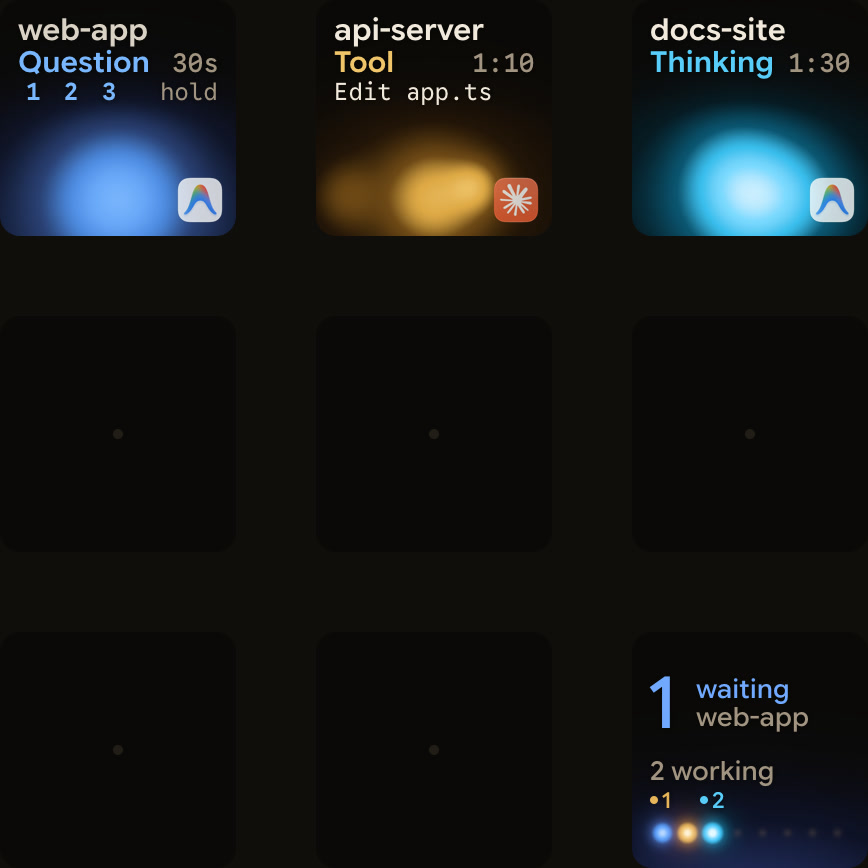
When several Antigravity conversations run skills in parallel, one may pause for input in another window. Orbtile shows each local Antigravity desktop app conversation on a key of the Logitech MX Creative Keypad, or as a tile on an iPhone (iOS 17 or later, App Store) or an Android phone (Android 8.0 or later) with Orbtile Mobile. Orbtile runs on a computer with macOS 14.0 Sonoma or later on Apple silicon, or Windows 11 (x64), and drives the keypad over USB without Logi Options+.
- Each Antigravity desktop app conversation gets a key with its title, state and, from Orbtile 0.2.10, live typewriter text.
- Working conversations use an azure blue palette, and from Orbtile 0.3.4 waiting states glow terracotta and move first.
- Tap key 9 to focus the first waiting session across pages, or tap a session key to open it.
- From Orbtile 0.2.6, pick numbered question options on keys 1, 2, 3 and 7, then hold
Sendon key 9 for 0.6 seconds. - Up to four questions with two to four choices each are supported.
- Written answers and permission prompts stay on your computer.
- Antigravity CLI and IDE sessions do not appear automatically, though custom scripts can use Orbtile's local Adapter API.
The same pad also shows Claude Code, Codex, ZCode and Kimi Code sessions. See Antigravity notifications: CLI alerts and waiting agents and Show any script or agent on a keypad with the Orbtile Adapter API.
FAQ
Where do Google Antigravity skills live on disk?
Workspace skills live in .agents/skills/ inside your project, with a SKILL.md file in each skill folder, and Antigravity also checks parent folders up to the repository root. Global skills shared across the App, CLI and IDE live in ~/.gemini/config/skills/. The Antigravity CLI additionally loads skills from ~/.gemini/antigravity-cli/skills/ and ~/.gemini/skills/, which the Antigravity App does not read.
What is the difference between a rule and a skill in Google Antigravity?
Rules are short constraints the agent keeps in mind continuously or whenever a trigger matches, stored in AGENTS.md, GEMINI.md or a rules folder. Skills are reusable procedures stored in SKILL.md folders that the agent loads on demand when relevant or when you invoke them with a slash command.
Why did my nested skill folder not load in Antigravity?
Antigravity scans each skills folder only one level deep, so a nested folder like skills/database/migrate-schema/ is skipped by default. Move the skill folder directly inside skills/ or register its relative path in a skills.json discovery manifest using include_only.
Does /migrate-workflows work in the Antigravity CLI or Antigravity IDE?
No. The /migrate-workflows command is available only in the Antigravity App 2.12.0 and later. To migrate legacy workflows when using the Antigravity CLI or Antigravity IDE, move each workflow file into a skill folder as SKILL.md and standardise its YAML frontmatter manually.