
Google Gemini CLI (gemini) is an open-source, Apache 2.0 terminal agent. Google maintains it for organisations with Gemini Code Assist on Google Cloud, plus legacy paid API or Vertex keys. Google Antigravity is a wider platform: a desktop app, the Antigravity CLI (agy), editor extensions, a standalone IDE and a Python SDK. On 18 June 2026, Antigravity CLI replaced Gemini CLI for unpaid tier and Google One users.
Google Gemini CLI and Google Antigravity side by side
The google-gemini/gemini-cli README names three command-line tools:
- Gemini CLI (
gemini) is for organisations with Gemini Code Assist Standard or Enterprise, or Code Assist for GitHub, on Google Cloud. - Antigravity CLI (
agy) is an interactive multi-agent coding terminal for Gemini 4 Argon+, free or Google AI Pro and Ultra accounts, or Google Cloud. - Gemini API CLI (
gemini-api) is a stateless API CLI, not a coding harness, for agents, scripts and CI that need direct commands for Gemini models.
| Feature | Google Gemini CLI (gemini) | Google Antigravity |
|---|---|---|
| Surfaces | Terminal agent | Antigravity App (v2.5+), Antigravity CLI (agy, v1.2+), extensions for 7 editors, standalone Antigravity IDE, Python SDK |
| Sign-in | Sign in with Google, Gemini API key or Vertex AI | oauth-personal, oauth-business, gemini-api-key or agent-platform |
| Models | Not tuned for the Gemini 4 series, such as Gemini 4 Argon | Gemini 4 Neon and Orchestrator announced; Google's README recommends agy for Gemini 4 Argon+ |
| Install | Node.js 20.0.0+ with npm, npx, Homebrew, MacPorts or Anaconda | App and IDE installers, agy install scripts, editor extensions, and pip, Poetry or uv for the SDK |
| Context | Hierarchical GEMINI.md files with @file.md imports | App onboarding imports MCP servers, skills, rules and instructions from Gemini CLI and other tools |
| Execution modes | default, auto_edit, plan and yolo | agy: auto, plan, default and accept-edits |
| Headless runs | gemini -p with --output-format json or stream-json | agy -p "prompt" |
See Google Gemini CLI: install, auth, commands and MCP setup and Google Antigravity: App, IDE, CLI, setup and agent workflows.
Installation and system requirements
Google Gemini CLI
Gemini CLI comes pre-installed on Cloud Shell and Cloud Workstations. On your own computer it needs Node.js 20.0.0 or later. Google's recommended specifications list macOS 15+, Windows 11 24H2+ and Ubuntu 20.04+.
npx @google/gemini-cli                  # run without installing
npm install -g @google/gemini-cli       # npm
brew install gemini-cli                 # Homebrew
sudo port install gemini-cli            # MacPorts
conda create -y -n gemini_env -c conda-forge nodejs
conda activate gemini_env
npm install -g @google/gemini-cli       # inside Anaconda
Gemini CLI publishes three release channels:
- Stable (
@latest) ships each week on Tuesdays at 20:00 UTC. - Preview (
@preview) ships each week on Tuesdays at 23:59 UTC. - Nightly (
@nightly) ships each day at 00:00 UTC.
Google Antigravity App, CLI, IDEs and SDK
- The Antigravity App needs macOS 13 (Ventura) or later, Windows 10 (64-bit) or Windows 11, or Linux with
glibc >= 2.28andglibcxx >= 3.4.25. - Google lists Ubuntu 20+, Debian 10+, Fedora 36+ and RHEL 8+ as meeting the Linux requirement.
- The standalone Antigravity IDE needs macOS 12 or later, Windows 10 (64-bit) or later, or the same Linux libraries.
- Googlebooks come with Antigravity pre-installed, and Google Play installs its updates.
- The
agyscript installs to~/.local/bin/agyon macOS, Linux and Googlebook. - On Windows,
agyinstalls toC:\Users\<username>\AppData\Local\agy\bin, from PowerShell or a CMD installer. - On first launch,
agyasks for a colour scheme, a rendering mode (Alt-Screen or Inline) and workspace trust. - The SDK installs
google-antigravitywithpip, Poetry oruvin a Python 3.10+ virtual environment.
# macOS, Linux or Googlebook
curl -fsSL https://antigravity.google/cli/install.sh | bash
agy --version# Windows PowerShell
irm https://antigravity.google/cli/install.ps1 | iexAntigravity extensions have these editor requirements:
| Editor or IDE | Requirement |
|---|---|
| VS Code | 1.90+ |
| JetBrains IDEs | IntelliJ-based IDEs 2026.2.1+ |
| Android Studio | A release with Bring Your Own Agent (ACP) support |
| Visual Studio | 2026 (17.8+) on Windows 10 or 11 |
| Zed | 0.140.0+ on macOS or Linux |
| Xcode | Xcode 27 beta 6+ on macOS |
| Eclipse | 2026-06+ (Public Preview) |
See Antigravity App vs Antigravity IDE: what's the difference and Google Antigravity CLI: commands, settings and permissions.
Accounts, models and quotas
Gemini CLI sign-in and daily quotas
Google says Gemini CLI is not tuned for the Gemini 4 series, such as Gemini 4 Argon. The README also asks you not to use Gemini CLI to benchmark Gemini models.
- Sign in with Google uses OAuth with your Google Account.
- Paid Code Assist users must also set
GOOGLE_CLOUD_PROJECT. - A Gemini API key suits model selection and paid tiers, and you can upgrade for higher limits.
- Vertex AI suits enterprise use, with higher rate limits through a billing account.
Gemini CLI's quota page lists 1,500 model requests per user per day for Code Assist Standard. It lists 2,000 for Code Assist Enterprise and 250 for a free tier Gemini API key.
Google Antigravity sign-in and models
Antigravity sets the account type with auth.type:
auth.type | Account | Details |
|---|---|---|
"oauth-personal" | Individual Google Accounts | Free, Pro and Ultra plans |
"oauth-business" | Gemini Enterprise (Preview) | Uses gcp.project and gcp.location |
"gemini-api-key" | Gemini API | Authenticates with a Gemini API key |
"agent-platform" | Agent Platform (Preview) | API key or Application Default Credentials |
Google's getting-started page announces Gemini 4 Neon and Orchestrator, and its model picker shows Gemini 4 Argon Medium. Gemini Enterprise is GA in the VS Code, Visual Studio, JetBrains, Zed and Xcode extensions, and in Preview for Android Studio and Eclipse. The Python SDK reads GEMINI_API_KEY. For Vertex AI or Gemini Enterprise, it uses GOOGLE_GENAI_USE_VERTEXAI, GOOGLE_CLOUD_PROJECT, GOOGLE_CLOUD_LOCATION and gcloud auth application-default login. See Google Antigravity pricing: plans, quotas, models and credits and Google Antigravity SDK: Python setup, agents and workflows.
Context files, MCP servers and admin controls
Context files and moving your Gemini CLI setup
- Gemini CLI loads
GEMINI.mdcontext files from several locations in a hierarchy and concatenates them. - A
GEMINI.mdfile can import other files with the@file.mdsyntax. - The
context.fileNamesetting can load other file names, such asAGENTS.md. - On first launch, the Antigravity App asks what kind of work you do, and skipping picks Software Engineering.
- Personal accounts need Antigravity App v2.30.0 or later for this onboarding.
- With Software Engineering, onboarding can import MCP servers, skills, rules and instructions from Claude Code, Codex, Cursor and Gemini CLI.
MCP servers
Gemini CLI reads MCP servers from ~/.gemini/settings.json, and gemini mcp add adds one from the command line. It supports Stdio, SSE and Streamable HTTP transports. The README also points to media generation with Imagen, Veo or Lyria through MCP servers. In Antigravity, the Python SDK can bring external MCP servers into SDK pipelines. See Google Antigravity MCP servers: set up and manage tools.
Gemini CLI enterprise admin controls
Admins set these controls in the Gemini CLI Management Console, and users cannot override them locally:
- Strict Mode stops users entering
yolomode. - Turning off Extensions stops users using or installing extensions.
- Turning off MCP stops users using MCP servers.
- MCP Servers (preview) sets an explicit allowlist of MCP servers.
- Required MCP Servers (preview) adds servers that the user's local configuration does not filter.
- Unmanaged Capabilities currently turns off Agent Skills.
Execution modes and policies
- In Gemini CLI,
defaultasks for approval,auto_editapproves edit tools andplanis read-only. - Gemini CLI's
yolomode approves every action and can only be turned on from the command line. - Gemini CLI policy rules are
.tomlfiles in a policy folder such as~/.gemini/policies/. - In
agy, Shift+Tab in the prompt box switches betweenauto,plan,defaultandaccept-edits. - In
automode, workspace edits and sandboxed commands run without asking. - The Antigravity SDK sets
allow,denyandask_userrules inLocalAgentConfig.
Google's SDK example denies every tool, then allows view_file:
from google.antigravity import LocalAgentConfig
from google.antigravity.hooks.policy import allow, deny

config = LocalAgentConfig(policies=[deny("*"), allow("view_file")])
Interactive sessions and headless runs
Gemini CLI sessions and scripting
Run gemini for an interactive session. Add --include-directories ../lib,../docs to bring more folders into it. Use -p for a headless run:
gemini -p "Explain the architecture of this codebase" --output-format json
gemini -p "Run tests and deploy" --output-format stream-json
json gives structured output. stream-json gives newline-delimited JSON events for watching long tasks. Gemini CLI's telemetry script can send data to Genkit (--target=genkit), a local Jaeger (--target=local) or Google Cloud (--target=gcp).
Antigravity Projects and commands
In the Antigravity App, Projects set repository boundaries, file scopes and security permissions. In Local mode, the agent works directly in your active folders. In New worktree mode, it works in an isolated Git worktree. The Knowledge Work layout runs conversations directly in project folders.
| Command | What it does |
|---|---|
/goal | Runs the task until completion without pausing for input |
/grill-me | Has the agent interview you about requirements first |
/schedule | Runs an instruction once after a delay or on a cron schedule |
/browser | Hands UI testing, screenshots and web inspection to the browser subagent |
/plugin | Manages Marketplace plugins or creates custom plugin bundles |
agy / agy -i "prompt" | Opens the interactive terminal UI, optionally with a first prompt |
agy -p "prompt" | Runs one prompt without interaction and prints the response |
Ctrl + R | Opens the Artifact Review screen for plans and diffs |
/diff | Opens the diff viewer for the changes in each turn |
/agents, /statusline, /usage, /exit | Switches subagents, sets the status line, shows credits and quotas, or exits |
Watch Antigravity and Gemini CLI sessions on a keypad or phone with Orbtile
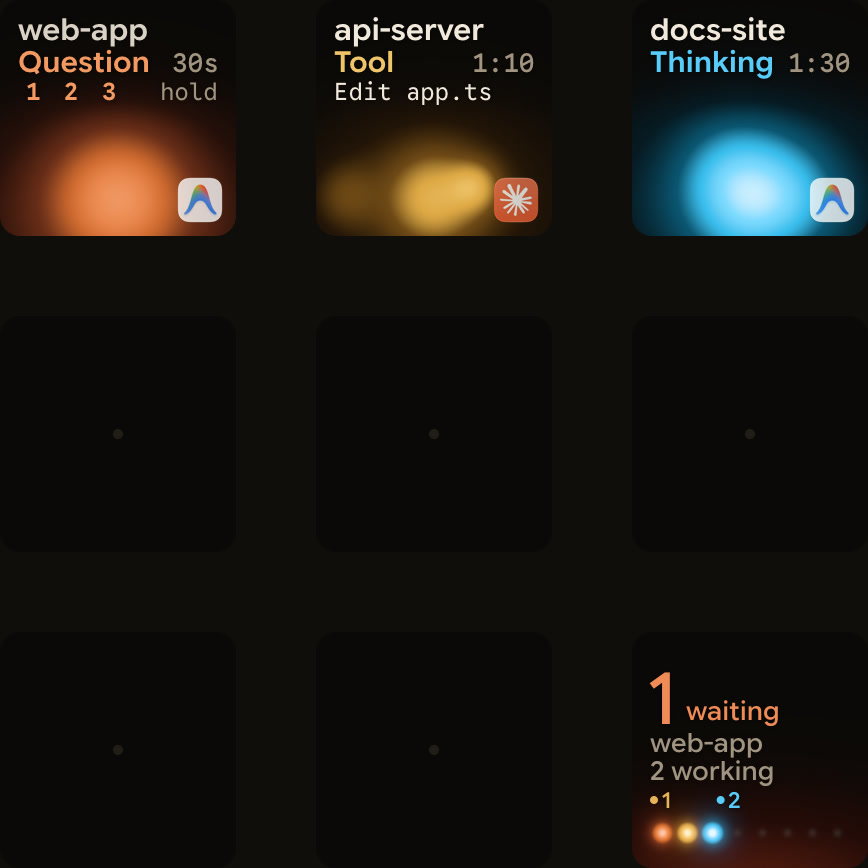
Orbtile shows coding-agent sessions on the nine LCD keys of a Logitech MX Creative Keypad, over USB without Logi Options+. It can also show them on an iPhone (iOS 17+) or an Android phone (Android 8.0+) with Orbtile Mobile. It runs on a computer with macOS 14.0 Sonoma or later on Apple silicon (M1 or later), or a Windows 11 PC (x64).
- Each Antigravity desktop app conversation gets its own key, with its title and state.
- A conversation waiting on a question moves to the front, and its key says Question.
- From Orbtile 0.3.4, Antigravity's waiting states use the shared terracotta alarm colour.
- From Orbtile 0.2.10, Antigravity replies appear as live typewriter text.
- From Orbtile 0.2.6, you can answer questions with numbered options on the keypad by picking options and holding Send.
- Up to four questions with two to four choices each work this way.
- Written answers, permissions and unsupported questions stay on the computer.
- Antigravity IDE and CLI sessions don't appear.
- Gemini CLI is not a built-in agent, but you can show its runs through Orbtile's local Adapter API.
- To turn it on, open Settings > Agents, choose Build your own, turn on Let your own tools show sessions, and allow your adapter.
- On a Mac, the reference shell adapter from the open-source
Orbtile/orbtile-adapterskit can wrap a headlessgemini -pcommand.
Orbtile also shows Claude Code, Codex, ZCode and Kimi Code sessions. See Antigravity keypad: MX Keypad shortcuts and Orbtile status pad and Show any script or agent on a keypad with the Orbtile Adapter API.
FAQ
Did Google Antigravity replace Gemini CLI?
For some users. On 18 June 2026, Antigravity CLI replaced Gemini CLI for unpaid tier and Google One users. Google still maintains Gemini CLI for organisations with Gemini Code Assist Standard or Enterprise, or Code Assist for GitHub, on Google Cloud. It also covers legacy paid API or Vertex keys.
What is the difference between the gemini, agy and gemini-api commands?
The gemini command runs Gemini CLI, a terminal agent for enterprise Gemini Code Assist workflows that is not tuned for the Gemini 4 series. The agy command runs Antigravity CLI, an interactive multi-agent coding terminal. The gemini-api command is a stateless API CLI that gives agents, scripts and CI direct commands for Gemini models.
Can I move my Gemini CLI setup to Google Antigravity?
Yes. Sign in to the Antigravity App and choose Software Engineering during onboarding. Personal accounts need version 2.30.0 or later. The onboarding can then import MCP servers, skills, rules and instructions from Gemini CLI, Claude Code, Codex and Cursor.
How does Orbtile work with Google Antigravity and Gemini CLI?
Orbtile shows each Antigravity desktop app conversation on its own key, with live reply text. It also lets you answer supported numbered-option questions from the keypad. Antigravity CLI and IDE sessions don't appear. Gemini CLI runs can show through Orbtile's local Adapter API, which you turn on in Settings > Agents.